📘 SDRD manuals • Free online PDFs
SDRD logo

SDRD Manuals & User Guides

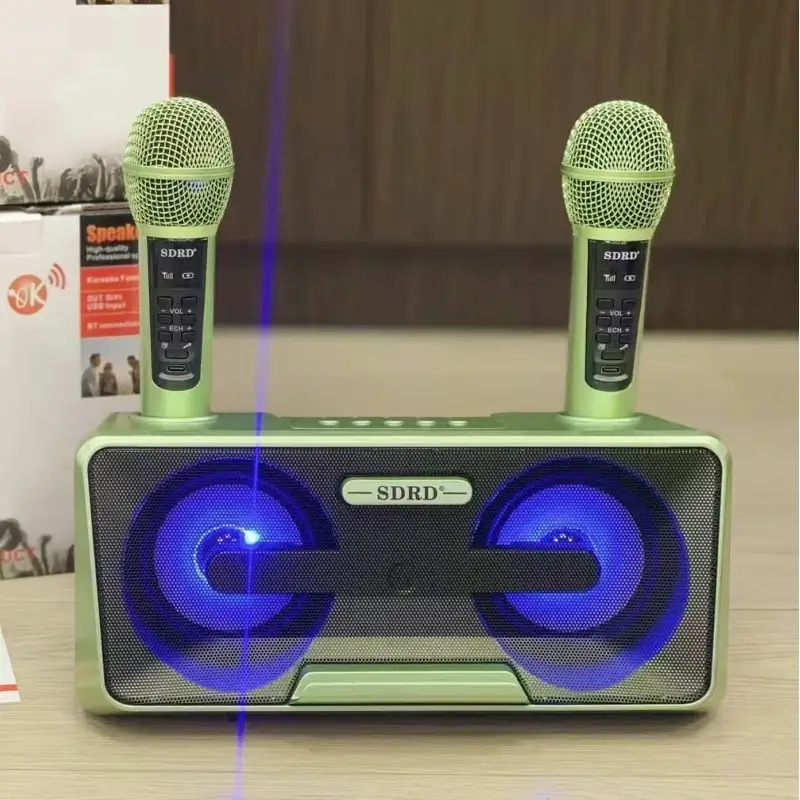
SDRD specializes in portable karaoke machines and Bluetooth speakers featuring dual wireless microphones and LED lighting.

Tip: include the full model number printed on your SDRD label for the best match.

About SDRD manuals on Manuals.plus

SDRD is a consumer electronics brand widely recognized for its range of portable karaoke systems and audio peripherals. The brand focuses on creating all-in-one entertainment solutions that combine powerful Bluetooth speakers with dual wireless microphones, making them ideal for family gatherings, parties, and home KTV sessions.

Popular SDRD models, such as the SD-306, SD-307, and SD-516, are known for their distinctive designs—often featuring unique shapes like owl eyes—and integrated functionality. These systems typically include rechargeable batteries, dynamic LED light shows, and versatile connectivity options including USB, AUX, and TF card support. SDRD products are primarily distributed through major global online marketplaces, providing accessible and fun audio equipment for karaoke enthusiasts.

SDRD manuals

Latest manuals from manuals+ curated for this brand.

SDRD SD-516 Portable Karaoke Speaker User Manual

May 31, 2025
SDRD SD-516 Portable Karaoke Speaker OPERATING INSTRUCTION All the instructions should be read carefully before operation and followed the instructions. The speaker should be situated away from heat sources such…

SDRD SD216 Karaoke Speaker Instruction Manual

May 23, 2025
SD - 216 Karaoke Speaker ManualMADE IN CHINA OPERATING INSTRUCTION All the instructions should be read carefully before operation and follow the instructions. The speaker should be situated away from…

SDRD SD-315 Karaoke Speaker User Manual

May 25, 2022
SD-315 Karaoke Speaker User Manual MADE IN CHINA OPERATING INSTRUCTION All the instructions should be read carefully before operation and follow the instructions. The speaker should be situated away from…

SDRD SD-325 Karaoke Speaker Operating Instructions

Operating Instruction
Comprehensive operating instructions for the SDRD SD-325 Karaoke Speaker, detailing setup, features, microphone usage, and product specifications. Includes packing list, safety precautions, and technical parameters.

SD-516 Portable Karaoke Speaker Manual

manual
User manual for the SD-516 Portable Karaoke Speaker, detailing operating instructions, packing list, speaker and microphone descriptions, button functions, instructions for use, charging instructions, and product parameters.

Руководство пользователя караоке системы SDRD SD-306

user manual
Подробное руководство пользователя для караоке системы SDRD SD-306, включающее инструкции по эксплуатации, описание функций, подключение микрофонов, режимы воспроизведения, а также технические характеристики.

SDRD manuals from online retailers

SDRD SD-516 Karaoke Machine User Manual

SD-516 • February 18, 2026
Comprehensive user manual for the SDRD SD-516 Bluetooth Karaoke Speaker, including setup, operation, maintenance, troubleshooting, and specifications.

SDRD 217 Bluetooth Karaoke Machine User Manual

217 • February 10, 2026
Comprehensive user manual for the SDRD 217 Bluetooth Karaoke Machine, covering setup, operation, maintenance, and troubleshooting for an immersive audio experience with wireless microphones and long playtime.

SDRD SD-216 Karaoke Machine User Manual

SD-216 • August 24, 2025
User Manual for the SDRD SD-216 Karaoke Machine, covering setup, operation, maintenance, troubleshooting, and specifications for this portable Bluetooth karaoke system with dual wireless microphones.

SDRD SD306 Plus Karaoke Speaker User Manual

SD306 Plus • April 1, 2026
Comprehensive user manual for the SDRD SD306 Plus Portable Wireless Karaoke Speaker, including setup, operation, maintenance, specifications, and troubleshooting.

SDRD SD-217 Portable Karaoke Speaker System User Manual

SD-217 • December 23, 2025
Comprehensive user manual for the SDRD SD-217 portable karaoke speaker system, featuring Bluetooth 5.0, dual wireless microphones, LED lights, and multiple playback modes. Includes setup, operation, maintenance, troubleshooting,…

SDRD SD318 Portable Bluetooth Karaoke Speaker User Manual

SD318 • December 19, 2025
Comprehensive instruction manual for the SDRD SD318 portable Bluetooth speaker with dual wireless microphones, covering setup, operation, maintenance, troubleshooting, and specifications for an optimal karaoke experience.

SDRD SD2109 Portable Karaoke Machine Instruction Manual

SD2109 • November 25, 2025
Comprehensive instruction manual for the SDRD SD2109 Home Theater Sound System, including setup, operation, specifications, and troubleshooting for the portable karaoke speaker with wireless microphones.

SDRD SD2109 Portable Karaoke Speaker System User Manual

SD2109 • November 25, 2025
Instruction manual for the SDRD SD2109 portable karaoke speaker system, featuring Bluetooth connectivity, dual wireless microphones, and multiple playback modes for home and outdoor entertainment.

SDRD video guides

Watch setup, installation, and troubleshooting videos for this brand.

SDRD support FAQ

Common questions about manuals, registration, and support for this brand.

  • How do I connect my phone to the SDRD speaker via Bluetooth?

    Turn on the speaker; the default mode is usually Bluetooth (indicated by "BLUE" on the display). Open the Bluetooth settings on your mobile device, search for the device name (often "SDRD" or the specific model like "SD-306"), and pair with it.

  • How do I charge the wireless microphones?

    Depending on your model, you can either charge the microphones by placing them into the charging slots on the speaker unit (while the speaker is powered) or by using the provided USB charging cable connected to the bottom of the microphone.

  • Why is the microphone making a howling noise?

    This feedback noise occurs when the microphone is pointed directly at the speaker or is too close to it. To stop the howling, move the microphone away from the speaker and avoid pointing the head of the microphone at the speaker grille.

  • What do the buttons on the microphone do?

    Most SDRD microphones feature buttons for Volume (V+/V-), Reverb/Echo effects, and EQ settings. Some models also have an 'A-B' button to switch frequency channels to avoid interference.

  • How do I switch input modes?

    Press the 'MODE' button on the speaker control panel to cycle between input sources such as Bluetooth, USB drive, TF/SD card, and AUX line-in.