
Introduction
Thank you for choosing the SDRD SD-216 Karaoke Machine. This portable system is designed to provide high-quality audio and an engaging karaoke experience for various occasions. It features dual wireless microphones, powerful sound output, dynamic LED lighting, and multiple connectivity options. Please read this manual carefully to ensure proper use and maintenance of your device.
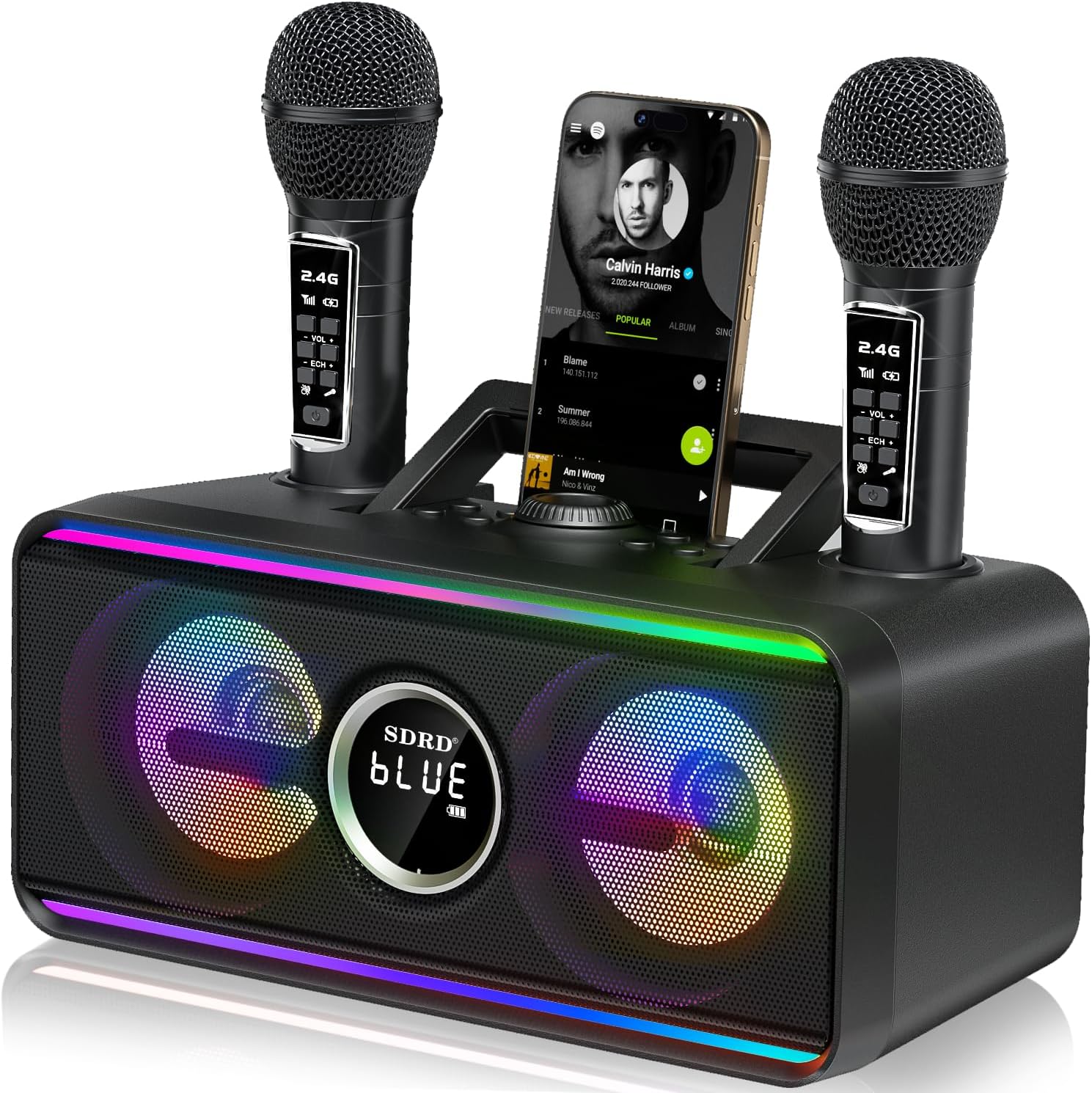
Image: The SDRD SD-216 Karaoke Machine, showcasing its compact design, dual microphone docks, and vibrant LED lights.
What's in the Box
Please verify that all items are present in the package:
- 1 x Karaoke Machine
- 2 x Wireless Microphones
- 1 x Charging Cable (USB-C)
- 1 x Mics Cable (AUX)
- 1 x User Manual

Image: A visual representation of the package contents, including the main unit, two wireless microphones, and accompanying cables.
Setup Guide
Initial Charging
Before first use, fully charge the karaoke machine and both wireless microphones. The main unit has a 4000mAh battery, providing 6-8 hours of continuous use after a 3-hour charge. Microphones can be charged by docking them in the main unit or via their individual USB-C ports.

Image: The integrated design allows for convenient storage and charging of the microphones directly within the main unit.
Microphone Pairing
The wireless microphones are pre-paired with the main unit. Simply power on both the machine and the microphones, and they should connect automatically. Ensure microphones are within 5-10 meters (16-32 feet) of the main unit for optimal performance.
Operating Instructions
Connecting to Audio Sources
- Bluetooth 5.3: Turn on the karaoke machine and enable Bluetooth on your smartphone, tablet, or TV. Select "SD-216" from the list of available devices. A stable connection can be maintained up to 100 feet (30 meters).
- USB Playback: Insert a USB drive containing MP3 audio files into the USB port. The machine will automatically detect and play the music.
- AUX Input: Use the provided AUX cable to connect external audio devices (e.g., MP3 players, computers) to the AUX port.

Image: The Bluetooth 5.3 connectivity allows for stable wireless connection to various devices over a significant range.
Control Panel Functions
The main unit features an integrated command interface for easy control:
- Power ON/OFF: Located at the rear of the unit.
- Volume Control: Rotate the central knob to adjust the master volume.
- Previous/Next: Buttons to skip tracks.
- Pause/Play: Button to control music playback.
- Mode Selection: Cycle through USB, Bluetooth, and AUX input modes.
- LED Light: Button to change LED lighting modes.
- Scene/Voice: Buttons for special sound effects or vocal adjustments.

Image: A detailed view of the control panel, highlighting the various buttons and ports for intuitive operation.
Microphone Usage
Each wireless microphone has its own controls:
- Power Button: Turn the microphone on/off.
- Volume Control: Adjust individual microphone volume.
- Echo/Reverb: Adjust the echo effect for vocals.
- Sound Effects: Buttons for applause, laughter, and cheers.
LED Lighting Effects
The SD-216 features dynamic LED lights with multiple modes to enhance your party atmosphere. Press the "LED Light" button on the main unit to cycle through different effects, including music rhythm, static colors, or turning the lights off.

Image: The karaoke machine's dual LED zones provide customizable lighting effects to match any mood or occasion.
Maintenance
- Cleaning: Use a soft, dry cloth to clean the exterior of the machine and microphones. Do not use abrasive cleaners or solvents.
- Battery Care: To prolong battery life, avoid fully discharging the unit frequently. Charge the device regularly, even if not in use for extended periods. Store in a cool, dry place.
- Storage: When not in use, store the microphones in their designated docks on the main unit to prevent loss and ensure they are charged for next use.
Troubleshooting
| Problem | Possible Cause | Solution |
|---|---|---|
| No sound from speaker. | Volume too low; incorrect input mode; device not connected. | Increase volume; select correct input mode (BT/USB/AUX); ensure device is properly paired/connected. |
| Microphone not connecting or cutting out. | Microphone battery low; out of range; interference. | Charge microphone; ensure microphone is within 5-10 meters of the unit; reduce obstacles between mic and unit. |
| Audio skipping or pausing during duets. | Temporary signal interference or processing delay. | Ensure microphones are fully charged. Maintain optimal distance from the unit. |
| LED lights not working or stuck. | Incorrect mode selected; malfunction. | Press the LED Light button to cycle through modes. If issue persists, contact support. |
| Echo effect not noticeable. | Echo level set too low. | Adjust the echo control on the microphone. |
Specifications
| Feature | Detail |
|---|---|
| Model Number | SD-216 |
| Connectivity Technology | AUX, Bluetooth 5.3, USB |
| Speaker Output Power | 20W (High-fidelity) |
| Battery Capacity (Main Unit) | 4000mAh |
| Playing Time | 6-8 hours |
| Charging Time | Approx. 3 hours |
| Microphone Type | 2.4GHz Wireless |
| Product Dimensions | 11.42 x 4.72 x 5.51 inches |
| Item Weight | 4.31 pounds (1.96 Kilograms) |
| Power Source | Battery Powered |
Warranty Information
The SDRD SD-216 Karaoke Machine comes with a standard manufacturer's warranty. Please refer to the warranty card included in your package or contact SDRD customer support for detailed information regarding warranty coverage and terms.
Support
For further assistance, technical support, or inquiries about your SDRD SD-216 Karaoke Machine, please contact SDRD customer service through the contact information provided on the product packaging or the official SDRD website. You may also visit the SDRD Store on Amazon for additional resources.
