
1. Introduction
This manual provides detailed instructions for the proper use and maintenance of your SDRD SD-306 Wireless Karaoke Bluetooth Speaker. Please read this manual thoroughly before operating the device to ensure optimal performance and longevity.
Package Contents:
- SDRD SD-306 Speaker Unit
- Wireless Microphones (x2)
- Charging Cable (USB)
- User Manual

Image 1: The SDRD SD-306 Karaoke Speaker unit with two wireless microphones inserted into their holders.
2. Setup
2.1 Charging the Speaker
- Connect the provided USB charging cable to the speaker's charging port.
- Connect the other end of the USB cable to a compatible USB power adapter (not included) or a computer's USB port.
- The charging indicator light will illuminate. Once fully charged, the light may change color or turn off.
- Allow approximately 3-4 hours for a full charge.
2.2 Powering On/Off
- To power on, press and hold the Power button (usually labeled with a power symbol) for a few seconds until the indicator light turns on and you hear a startup sound.
- To power off, press and hold the Power button again until the indicator light turns off and you hear a shutdown sound.
2.3 Bluetooth Pairing
- Ensure the speaker is powered on and in Bluetooth mode. If not, press the "MODE" button until "Bluetooth" or a similar prompt is heard.
- On your mobile device (smartphone, tablet, etc.), enable Bluetooth and search for available devices.
- Select "SD-306" from the list of found devices.
- Once paired, the speaker will emit a confirmation sound, and the Bluetooth indicator light will typically stop flashing and remain solid.
- The speaker will automatically attempt to reconnect to the last paired device when powered on.
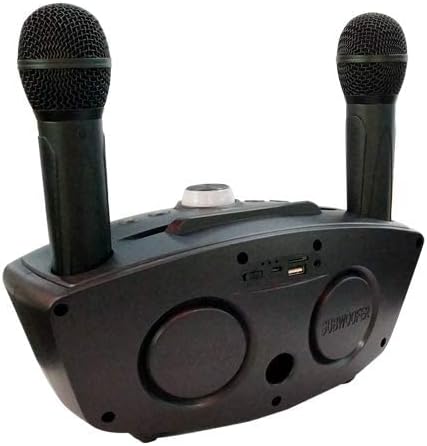
Image 2: Rear view of the SDRD SD-306 speaker, highlighting the various input ports including USB and TF card slots.
3. Operation
3.1 Control Panel Overview
The main control panel is located on the top of the speaker unit. It includes buttons for mode selection, volume control, track navigation, and microphone adjustments.
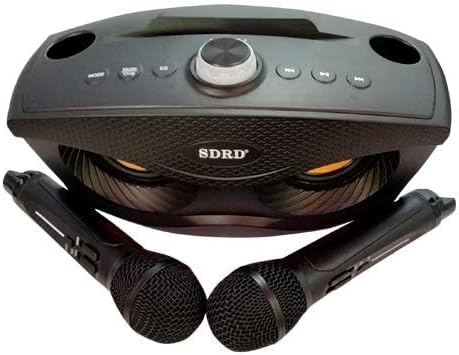
Image 3: Top view of the SDRD SD-306 speaker, showing the central control knob and surrounding buttons.
3.2 Mode Selection
Press the MODE button to cycle through available input sources:
- Bluetooth Mode: Connect wirelessly to your device.
- TF Card Mode: Insert a MicroSD (TF) card with MP3 audio files.
- USB Mode: Insert a USB flash drive with MP3 audio files.
3.3 Volume Control
- Master Volume: Use the main rotary knob on the speaker to adjust the overall sound volume.
- Microphone Volume: Each microphone has its own volume control switch. Adjust as needed.
3.4 Karaoke Function
- Ensure microphones are charged and powered on (switch located on the microphone body).
- Adjust microphone volume using the switch on the microphone.
- Sing into the microphone while music plays from the speaker.
- Some models may feature echo or reverb effects, adjustable via dedicated buttons on the speaker or microphone.

Image 4: The SDRD SD-306 speaker unit with the two wireless microphones removed from their holders, showcasing the speaker's design.
4. Maintenance
4.1 Cleaning
- Wipe the speaker and microphones with a soft, dry cloth.
- Do not use abrasive cleaners, waxes, or solvents.
- Avoid getting moisture into any openings.
4.2 Storage
- Store the device in a cool, dry place away from direct sunlight and extreme temperatures.
- If storing for an extended period, charge the battery periodically (e.g., every 3 months) to maintain battery health.
5. Troubleshooting
| Problem | Possible Cause | Solution |
|---|---|---|
| No power | Battery is depleted | Charge the speaker fully. |
| Cannot connect via Bluetooth | Speaker not in pairing mode; Device Bluetooth off; Too far from speaker | Ensure speaker is in Bluetooth mode. Turn on device Bluetooth. Move device closer to speaker (within 10 meters). |
| No sound from speaker | Volume too low; Incorrect mode selected; Device not playing audio | Increase master volume. Select correct input mode (Bluetooth, TF, USB). Ensure audio is playing on the connected device. |
| Microphone not working | Microphone off; Microphone battery low; Microphone volume too low | Turn on microphone. Charge microphone if applicable. Increase microphone volume. |
6. Specifications
| Feature | Detail |
|---|---|
| Model Number | SD-306 |
| Brand | SDRD |
| Connectivity Technology | Bluetooth, USB |
| Media Type Support | SD Card, USB Flash Drive |
| Power Source | Corded Electric (for charging) |
| Special Features | Portable, Karaoke Functionality |
| Product Dimensions | 10 x 10 x 10 cm |
| Item Weight | 1.61 kg |
| Included Components | Speaker, 2 Wireless Microphones |
7. Warranty & Support
For warranty information and customer support, please refer to the documentation provided at the time of purchase or contact your retailer. Keep your proof of purchase for any warranty claims.
For further assistance, you may visit the official SDRD website or contact their customer service department. Contact details are typically found on the product packaging or the brand's official online presence.


