📘 ThermELC manuals • Free online PDFs
ThermELC logo

ThermELC Manuals & User Guides

ThermELC is a leading manufacturer of high-accuracy temperature and humidity data loggers, indoor air quality monitors, and refrigeration HVAC monitoring tools.

Tip: include the full model number printed on your ThermELC label for the best match.

About ThermELC manuals on Manuals.plus

ThermELC specializes in advanced environmental monitoring solutions, including temperature and humidity data loggers, indoor air quality (IAQ) monitors, and HVAC refrigeration tools.

Trusted for their high accuracy and plug-and-play convenience, ThermELC devices are widely used for sensitive goods storage, transportation, and home air quality tracking. Their data loggers automatically generate secure PDF and CSV reports without requiring additional software, ensuring seamless compliance and temperature management.

ThermELC manuals

Latest manuals from manuals+ curated for this brand.

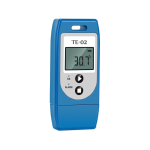
ThermElc TE-02 Temperature Data Logger User Manual

November 19, 2023
ThermElc TE-02 Temperature Data Logger Product Introductions ThermElc TE-02 is used for monitoring temperature of the sensitive goods during storage and transportation. After the recording is finished, the ThermElc TE-02…

ThermElc TE-02 Temperature Data Logger User Manual

User Manual
Comprehensive user manual for the ThermElc TE-02 temperature data logger, detailing product features, setup, operation, and specifications for monitoring sensitive goods during storage and transportation. Includes configuration options, alarm settings,…

ThermELC support FAQ

Common questions about manuals, registration, and support for this brand.

  • How do I view data from my ThermELC data logger without software?

    Once recording is complete, connect the ThermELC data logger directly to any USB PC port. It will automatically generate PDF and CSV reports without needing any special drivers.

  • What is the maximum logging capacity of the ThermELC TE-02 PRO TH?

    The ThermELC TE-02 PRO TH can securely log up to 32,000 temperature and humidity data points.

  • Where can I download the management software for ThermELC data loggers?

    Software can be downloaded by navigating to thermelc.com and clicking on 'Manuals & Software' or visiting the dedicated download page at thermelc.com/pages/download.

  • How long should I leave my new ThermELC data logger for initial calibration?

    After configuring for the first time, leave the device in an open environment for over 30 minutes to ensure it is calibrated to the accurate current temperature.