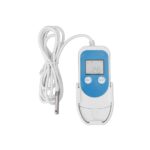
ThermElc TE-02 Temperature Data Logger

Product Introductions
ThermElc TE-02 is used for monitoring temperature of the sensitive goods during storage and transportation. After the recording is finished, the ThermElc TE-02 is connected to any USB port and automatically generates a PDF report with the temperature logging results. No additional software is required to read out the ThermElc TE-02.
Main feature
- Multiple use logger
- Auto PDF logger
- Auto generate CSV reports
- Logging of 32,000 values
- Interval of 10 seconds to 18 hours
- No special device driver required
- MKT alarm and Temperature Alarm

PLEASE NOTE:
After the device is configurated for the first time or after re-configuration, please leave the device in an open environment over 30 minutes. This will ensure the device is calibrated with the accurate current temperature
Quick start
Software Download
https://www.thermelc.com/pages/download config your parameter
Helps https://www.thermelc.com/pages/contact-us
Configuration of a ThermElc TE-02
The device can be configured using the free Data Management software.
- Time zone: UTC
- Temperature scales: ℃ /℉
- Screen display: Always on / Timed
- Log interval: 10 to 18 hours
- Start delays: 0/ timed
- Stop mode: Press button/ disabled
- Time format: DD/MM/YY or MM/DD/YY
- Start mode: Press button or Timed
- Alarm setting: Upper Limit and Lower Limit
- Description: Your reference which will appear on the report
Operation Functions
- Start Recording
Press and hold the PLAY ( ) button for approximately 3sec.The ‘OK’light is on and the ( ) or ( WAIT ) indicates the logger is started.
 - Mark
When the device is recording, press and hold the PLAY () button for more than 3sec, and the screen will switch to the ‘MARK’ interface. The number of ‘MARK’ will increase by one, indicating data was marked successfully.
(Note:One record interval can mark one time only, the logger can mark 6 times in one recording trip. Under the status of start delay, the mark operation is disabled.) - Stop Recording
Press and hold the STOP ( ) button for more than 3sec until the ‘ALARM’ light is on, and the STOP () symbol displays on the screen, indicating stopping recording successfully. (Note: If the logger is stopped during the status of start delay, a PDF report is generated when inserted into PC but without data.) During the normal recording process, press PLAY ( ) to switch to a different display interface.
 - The interfaces shown in sequence are respectively: Realtime Temperature > LOG > MARK > Temperature Upper Limit > Temperature Lower Limit.
- Get Report
Connect logger to PC via USB, and it will auto-generate PDF and CSV file
LCD Display Instructions
Battery Replacement
Technical Specifications
Youtube
https://www.thermelc.com sales@thermelc.com +44 (0)207 1939 488
Documents / Resources
 |
ThermElc TE-02 Temperature Data Logger [pdf] User Manual TE-02, TE-02 Temperature Data Logger, Temperature Data Logger, Data Logger, Logger |
 |
ThermElc TE-02 Temperature Data Logger [pdf] User Manual TE-02, TE-02 Temperature Data Logger, Temperature Data Logger, Data Logger, TE-02pro, TE-o2 pro TH, TE-03 TH |