
Introduction
This manual provides essential instructions for the assembly, operation, maintenance, and safety of your SANODESK 63" L-Shaped Standing Desk. Please read this guide thoroughly before assembly and use to ensure proper function and longevity of your product.
Safety Information
Important Safety Precautions:
- Use with caution. Follow assembly instructions carefully.
- Ensure proper anchoring and avoid overloading the desk.
- Keep children and pets away from moving parts during operation.
- Do not place hands or other objects near the lifting mechanism during height adjustment.
- Disconnect power before cleaning or maintenance.
Setup and Assembly
The SANODESK L-Shaped Standing Desk requires assembly. It is recommended that two people assemble the desk. All necessary tools are included in the package. A drill is recommended for certain steps to facilitate assembly.
Assembly Overview
The desk is designed with two assembly options to match your space and preference. Carefully review the instruction manual provided in the package for detailed step-by-step guidance.

Image: The desk can be assembled in two different L-shaped configurations to fit various room layouts.
Component Identification
Before starting assembly, identify all components using the parts list in your included manual. The desk features a sturdy frame with commercial-grade lifting column connectors.
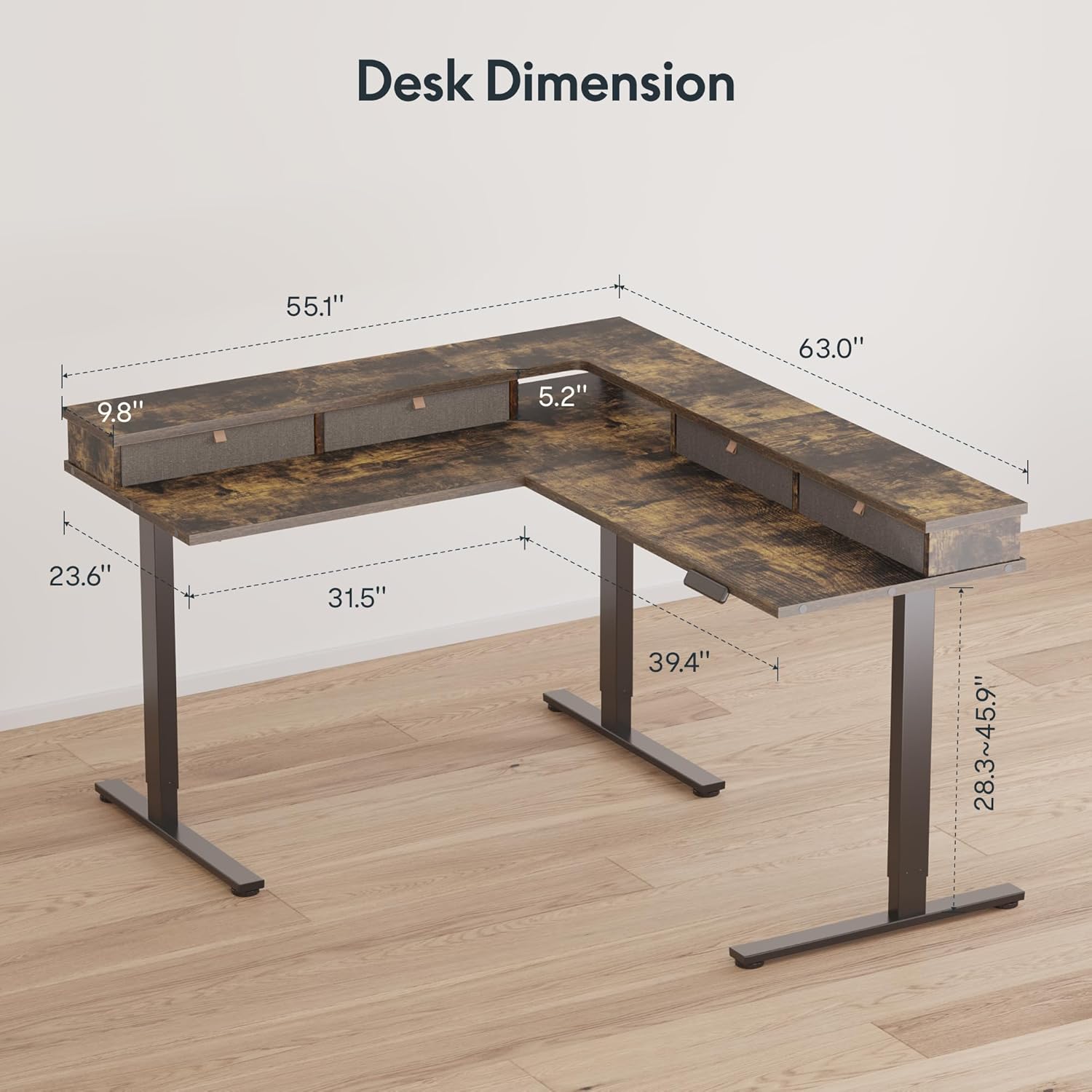
Image: Detailed dimensions of the L-shaped desk, including tabletop measurements and adjustable height range.
Assembly Video Guide
Video: A comprehensive 6-minute video guide demonstrating the assembly process of the SANODESK L-Shaped Standing Desk.
Operating Instructions
Your SANODESK standing desk features an electric lifting mechanism for smooth height adjustments and a smart control panel for personalized settings.
Smart Control Panel
The control panel allows you to raise or lower the desk, save preferred height settings, and activate safety features.
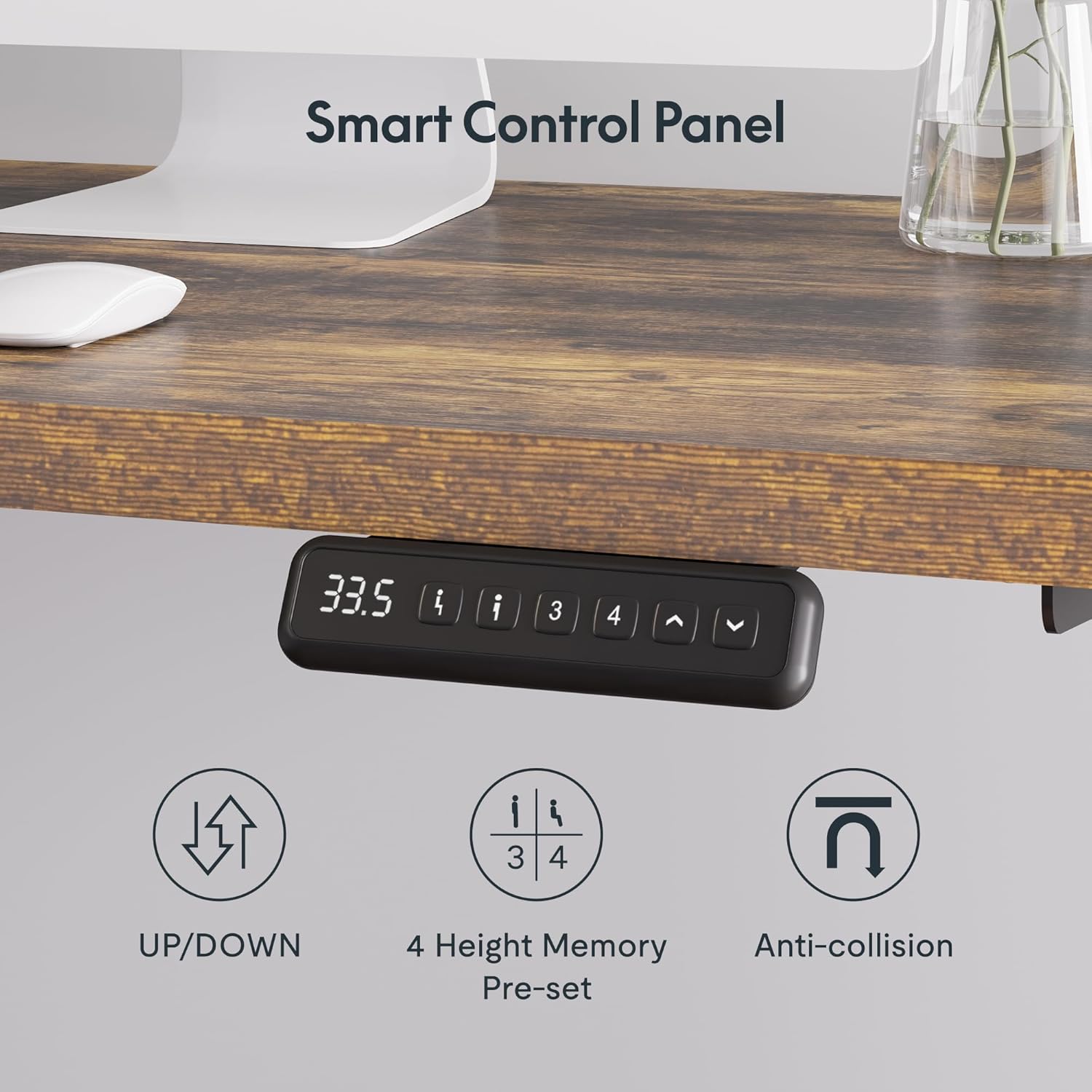
Image: Close-up of the desk's smart control panel, showing buttons for up/down adjustment, four height memory presets, and an anti-collision indicator.
Height Adjustment
- Up/Down Buttons: Press and hold the up or down arrow buttons to adjust the desk height manually.
- Height Memory Presets: The desk is equipped with 3 customizable height memory buttons. To save a height, adjust the desk to your desired position, then press a memory button (1, 2, or 3) until you hear a beep or see a confirmation on the display. To recall a saved height, simply press the corresponding memory button.
Safety Features
- Anti-Collision Function: The desk features an anti-collision system that automatically stops and slightly reverses movement if it encounters an obstacle during height adjustment.
- Child Lock: Activate the child lock function to prevent accidental adjustments. Refer to your detailed manual for specific instructions on enabling/disabling this feature.
- Sedentary Reminder: The desk includes a sedentary reminder feature to prompt you to change positions. This can be configured via the control panel.
Maintenance
Proper maintenance ensures the longevity and optimal performance of your SANODESK standing desk.
- Cleaning: Wipe the desk surfaces with a damp cloth. Avoid using harsh chemicals or abrasive cleaners that may damage the finish.
- Inspection: Periodically check all screws and connections to ensure they are tight. Retighten if necessary.
- Cable Management: Ensure all cables are properly managed to prevent interference with the lifting mechanism.
Troubleshooting
If you encounter issues with your SANODESK standing desk, refer to the following common troubleshooting steps:
- Desk Not Moving: Check if the power cord is securely plugged into both the desk and the wall outlet. Ensure no objects are obstructing the lifting columns.
- Uneven Height: Perform a reset procedure (refer to your detailed manual for specific steps, usually involving holding down certain buttons). This can re-synchronize the motors.
- Error Codes: If the control panel displays an error code, consult the full instruction manual for the meaning of the code and recommended solutions.
- Noise During Operation: A slight hum is normal. If you hear unusual or loud noises, stop operation and inspect the lifting columns for any obstructions or damage.
If these steps do not resolve the issue, please contact customer support.
Specifications
| Feature | Detail |
|---|---|
| Brand | SANODESK |
| Model | 63 x 55 with shelf |
| Desk Design | L-Shaped Standing Desk |
| Product Dimensions (D x W x H) | 55.1"D x 63"W x 28.7"H |
| Color | Rustic Brown Top, Black Frame |
| Top Material Type | Engineered Wood |
| Base Material | Carbon Steel |
| Lifting Mechanism | Electric |
| Number of Drawers | 4 |
| Special Features | Cord Rewind, Height Memory Presets, Anti-Collision, Sedentary Reminder, Built-in USB Port |
| Included Components | Desk, Keyboard Tray, Headphone Hook, Cable Management Tray, Cup Holder, Monitor Arm, Built-in USB Port |
| Required Assembly | Yes |
| Recommended People for Assembly | 2 |
| Tools Recommended For Assembly | Drill |
| Product Care Instructions | Wipe with Damp Cloth |
Warranty Information
Your SANODESK 63" L-Shaped Standing Desk comes with a Limited Lifetime Warranty. Please retain your proof of purchase for warranty claims. For specific terms and conditions, refer to the warranty card included with your product or visit the official SANODESK website.
Customer Support
For further assistance, technical support, or to inquire about replacement parts, please contact SANODESK customer service through the following channels:
- Online: Visit the official SANODESK website or the SANODESK store on Amazon.
- Email: Refer to your product packaging or the official website for customer support email addresses.
- Phone: Refer to your product packaging or the official website for customer support phone numbers.
When contacting support, please have your product model (63 x 55 with shelf) and purchase date available.


