
1. Safety Warnings
Attention: To ensure safe operation and prevent damage, please observe the following:
- Do not exceed the maximum load capacity of 90 kg (dynamic) or 120 kg (static) on the desktop. Overloading can cause instability and damage.
- Always ensure there are no obstacles in the desk's path during height adjustments. The integrated anti-collision function helps prevent damage, but user vigilance is essential.
- Keep children and pets away from the desk during operation.
- Do not sit or stand on the desk.
- Ensure all cables are properly managed and have enough slack to avoid being pulled or damaged during height changes.
- If any unusual noise, smell, or malfunction occurs, immediately unplug the desk from the power outlet and contact support.

Image 1.1: The Safe Anti-Collision System detects obstacles and stops movement to prevent damage or injury.
2. Product Overview
The SANODESK Electric Dual Motor Height Adjustable Standing Desk provides a versatile and ergonomic workspace. Designed for comfort and productivity, it allows seamless transitions between sitting and standing positions.
Key Features:
- Spacious Work Surface: A generous 200 x 80 cm tabletop accommodates multiple monitors, peripherals, and accessories.
- Dual Motor System: Powerful and quiet motors ensure smooth and stable height adjustments with a lifting speed of 25 mm/s and noise levels below 50 dB.
- Adjustable Height Range: Easily adjust the desk height from 72 cm to 121 cm to suit individual ergonomic needs.
- Memory Presets: Program up to four preferred height settings for quick and convenient adjustments.
- Anti-Collision Function: Built-in sensor detects obstacles during movement and automatically stops to prevent damage.
- Robust Construction: Features thick table legs (75x45 mm) and a carbon steel frame for enhanced stability and durability.

Image 2.1: Product details showing the desk dimensions and height range.

Image 2.2: Illustration of the robust dual motor system, highlighting its stability and durability.
3. Setup Instructions
Follow these steps to assemble your SANODESK standing desk. It is recommended to have two people for assembly.
- Unpack Components: Carefully remove all parts from the packaging. Verify that all components listed in the packing list are present and undamaged.
- Assemble Desk Frame: Attach the lifting columns to the foot supports. Secure them using the provided screws and tools.
- Install Crossbar: Connect the crossbar between the two lifting columns. Ensure all connections are tight and stable.
- Attach Control Box and Handset: Mount the control box and the intelligent control panel (handset) to the underside of the desk frame as indicated in the detailed assembly guide.
- Connect Cables: Connect the motor cables and the handset cable to the control box. Ensure all connections are secure.
- Mount Tabletop: Carefully place the tabletop onto the assembled frame. Align the pre-drilled holes (if applicable) and secure the tabletop to the frame using the provided screws. (Note: The tabletop may consist of multiple parts that need to be joined first.)
- Cable Management: Use the included cable ties or management accessories to organize and secure all cables, ensuring they do not interfere with the desk's movement.
- Initial Power-Up: Plug the desk into a grounded power outlet. The desk may perform an initial calibration cycle.
4. Operating Instructions
Your SANODESK standing desk is equipped with an intelligent control panel for easy height adjustment and memory functions.
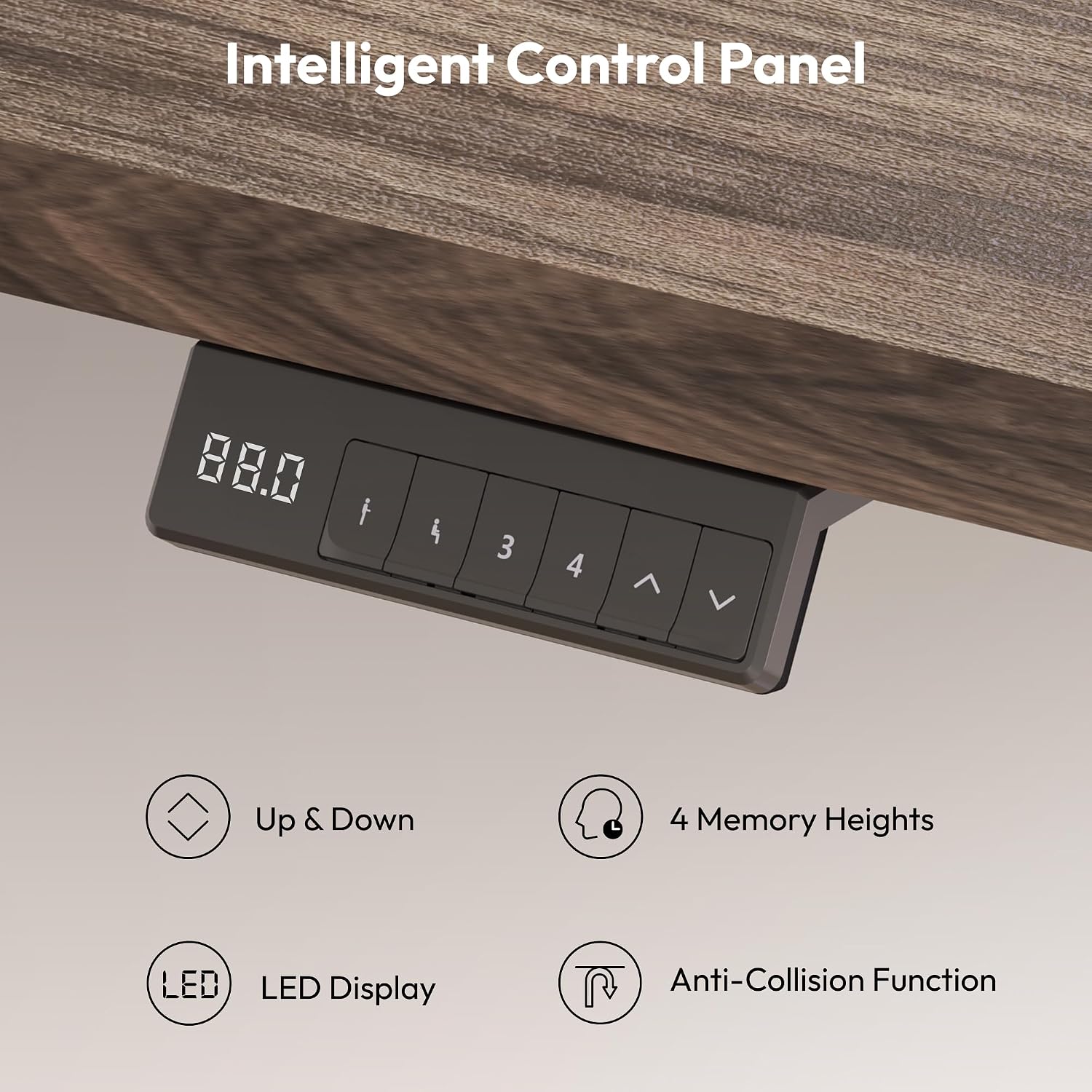
Image 4.1: The intelligent control panel for height adjustment and memory functions.
4.1. Basic Height Adjustment
- Press and hold the "Up" (^) button to raise the desk.
- Press and hold the "Down" (v) button to lower the desk.
- Release the button at your desired height. The LED display will show the current height.
4.2. Setting Memory Positions
You can save up to four preferred height settings for quick access.
- Adjust the desk to your desired height using the Up/Down buttons.
- Press the "M" or "SET" button (if available, otherwise proceed to step 3). The display may flash.
- Immediately press one of the numbered memory buttons ("1", "2", "3", or "4"). The display will show a confirmation (e.g., "S-1" for memory 1 saved).
- To recall a saved height, simply press the corresponding numbered memory button. The desk will automatically move to that position.
4.3. Anti-Collision Function
The anti-collision system is designed to prevent damage by stopping the desk's movement if it encounters an obstacle. This function is typically active by default.
- If the desk stops unexpectedly during adjustment, it may have detected an obstacle. Remove the obstacle and then resume adjustment.
- Consult the detailed assembly guide for instructions on adjusting the anti-collision sensitivity or resetting the function if needed.
5. Maintenance
Regular maintenance ensures the longevity and optimal performance of your SANODESK standing desk.
- Cleaning: Wipe the desk surface and frame with a soft, damp cloth. Avoid harsh chemicals or abrasive cleaners. Ensure the desk is unplugged before cleaning electrical components.
- Check Connections: Periodically inspect all screws and bolts to ensure they are tight. Re-tighten if necessary. Check electrical cable connections for any signs of wear or damage.
- Cable Management: Ensure cables remain neatly organized and do not snag or get pinched during desk movement.
- Lubrication: The lifting columns are generally maintenance-free. Do not attempt to lubricate internal components unless specifically instructed by the manufacturer.
6. Troubleshooting
If you encounter issues with your desk, refer to the following common problems and solutions.
| Problem | Possible Cause | Solution |
|---|---|---|
| Desk does not move. | No power, loose cable, overload, or system error. |
|
| Desk moves unevenly or makes unusual noise. | Uneven load, loose connections, or internal issue. |
|
| Anti-collision function triggers too easily or not at all. | Sensitivity setting, or sensor obstruction. |
|
| Memory presets not working. | Presets not saved correctly. |
|
If these solutions do not resolve the issue, please contact SANODESK customer support for further assistance.
7. Specifications
| Feature | Detail |
|---|---|
| Brand | SANODESK |
| Model | 200x80cm Electric Dual Motor Height Adjustable Standing Desk |
| Desktop Dimensions (L x W) | 200 cm x 80 cm |
| Height Adjustment Range | 72 cm - 121 cm |
| Load Capacity (Dynamic) | 90 kg |
| Load Capacity (Static) | 120 kg |
| Motor Type | Dual Motor |
| Lifting Speed | 25 mm/s |
| Noise Level | Below 50 dB |
| Desktop Material | Wood (as per product details) |
| Frame Material | Carbon Steel (as per product details) |
| Control Panel | LED display with 4 memory presets and anti-collision function |
| Color | Brown (desktop), Black (frame) |
8. Warranty and Support
For warranty information, technical support, or replacement parts, please refer to the warranty card included with your product or visit the official SANODESK website.
You can also contact SANODESK customer service through the retailer where you purchased the product.


