
Introduction
Thank you for choosing the SANODESK Dual Motor 3-Stage Lifting Standing Desk. This manual provides essential information for the safe and efficient assembly, operation, and maintenance of your new height-adjustable desk. Please read all instructions carefully before use and retain this manual for future reference.
Important Safety Information
- Weight Capacity: Do not exceed the maximum weight recommendation of 220 pounds (100 kg). Overloading may cause damage or injury.
- Stability: Ensure the desk is placed on a level surface. Avoid applying excessive force or leaning heavily on the desk during height adjustments.
- Children and Pets: Keep children and pets away from the desk during operation to prevent accidents.
- Power Supply: Use only the provided power adapter. Disconnect power before cleaning or maintenance.
- Obstructions: Ensure there are no obstructions (e.g., chairs, cabinets, cables) in the desk's path during height adjustments to prevent damage or injury.
- Assembly: Assembly requires two people. Follow all assembly steps precisely.
Package Contents
Please verify that all components are present before beginning assembly:
- Bamboo Desktop (60x30 inch)
- White Frame (Dual Motor, 3-Stage Lifting Columns)
- Handset with 3 Preset Buttons and Sit-Stand Reminder
- Power Adapter and Cables
- Assembly Hardware (screws, bolts, Allen wrench)
- Instruction Manual
Assembly Instructions
Follow these steps carefully for proper assembly. It is recommended to have two people for assembly.
Step 1: Prepare the Desktop
Unpack the bamboo desktop and place it upside down on a soft, clean surface to prevent scratches.

Image: Bamboo desktop ready for frame attachment.
Step 2: Attach the Frame Beams
Connect the adjustable frame beams to the lifting columns. Ensure the beams are adjusted to the appropriate length for your 60-inch desktop. Secure with the provided screws.

Image: Diagram showing the dual-motor frame assembly.
Step 3: Install Lifting Columns and Feet
Attach the 3-stage lifting columns to the frame beams. Then, secure the desk feet to the bottom of the lifting columns. Ensure all connections are tight.

Image: Detail of the three-stage leg mechanism.
Step 4: Mount the Desktop
Carefully align the assembled frame with the pre-drilled holes on the bamboo desktop. Secure the desktop to the frame using the provided screws. Note: Some larger desktops may require additional drilling for certain holes.

Image: The solid bamboo desktop surface.
Step 5: Connect the Handset and Power
Connect the handset cable to the control box, and then connect the power adapter. Route cables neatly using cable ties if included.
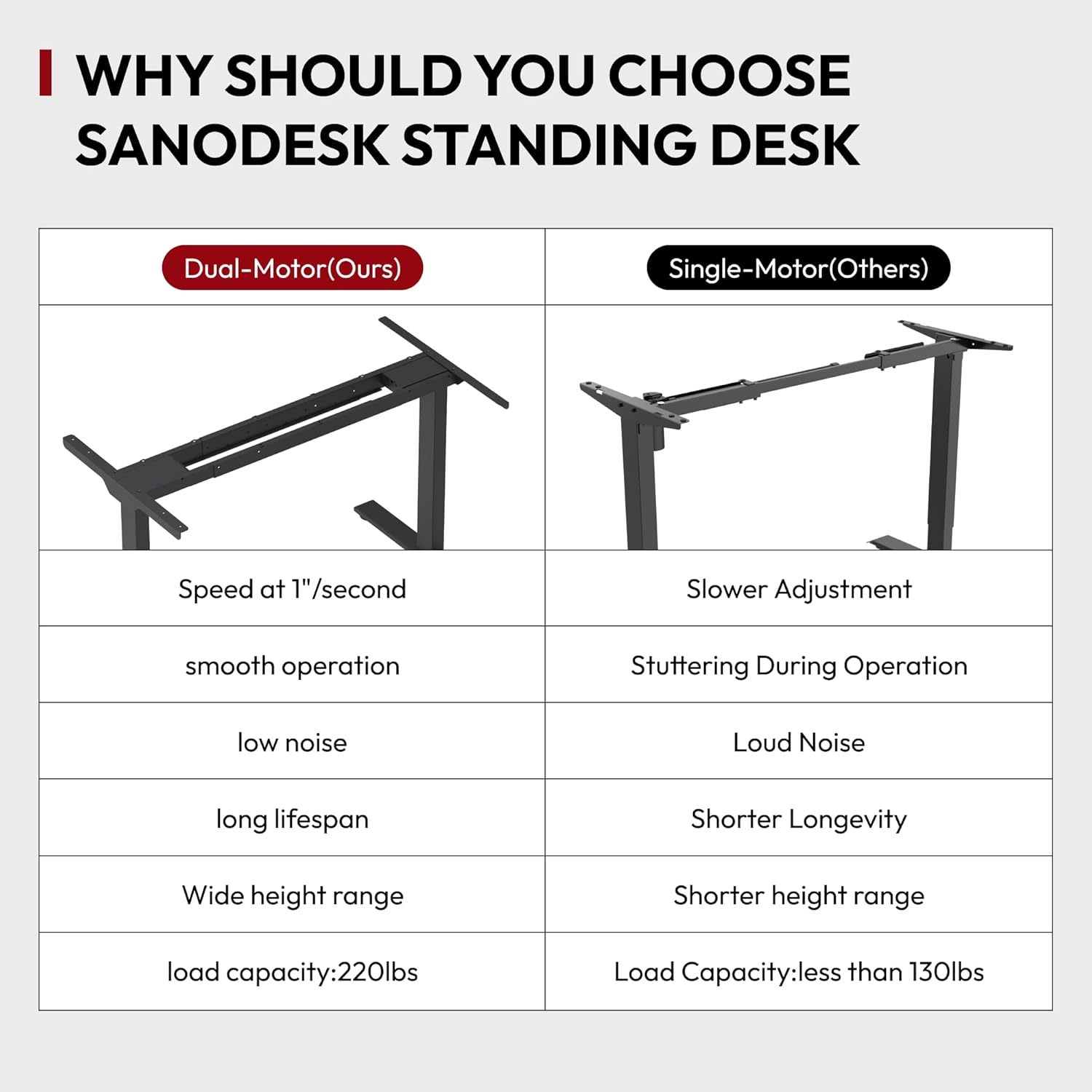
Image: The handset control panel for height adjustment and presets.
Operating Instructions
Height Adjustment
- Use the Up (▲) and Down (▼) arrows on the handset to manually adjust the desk height. The LED screen will display the current height.
- The desk features a 3-stage lifting system, allowing a height range from 23.6 inches to 49.2 inches.

Image: The desk's adjustable height range accommodating different user needs.
Memory Presets
- Your handset has 3 programmable memory presets (buttons 1, 2, 3).
- To Set a Preset: Adjust the desk to your desired height. Press the "M" button, then press the desired preset number (1, 2, or 3) within 3 seconds. The display will show "S-" followed by the number to confirm.
- To Use a Preset: Simply press the corresponding preset number (1, 2, or 3). The desk will automatically move to the saved height.
Sit-Stand Reminder
- The handset includes a sit-stand reminder function to encourage regular movement.
- To Activate/Deactivate: Refer to the specific instructions in your handset's detailed guide for setting reminder intervals.
Anti-Collision Technology
- The desk is equipped with an auto-sensing anti-collision system. If the desk encounters an obstruction during height adjustment, it will stop and reverse slightly to prevent damage.
- This feature enhances safety and protects both the desk and surrounding objects.

Image: Anti-collision technology prevents damage by stopping movement upon sensing an obstruction.
Maintenance
- Cleaning: Wipe the desktop and frame with a soft, damp cloth. Avoid harsh chemicals or abrasive cleaners.
- Inspections: Periodically check all screws and bolts to ensure they are tight.
- Cable Management: Keep cables organized and free from entanglement to prevent damage during height adjustments.
Troubleshooting
| Problem | Possible Cause | Solution |
|---|---|---|
| Desk does not move. | Power cable disconnected; control box error. | Check power connections. Reset the desk by unplugging for 10 seconds and plugging back in. |
| Uneven height adjustment. | Uneven load; loose connections. | Distribute weight evenly. Check and tighten all assembly screws. |
| Desk stops during adjustment (Anti-collision). | Obstruction detected. | Remove any objects in the desk's path. Resume adjustment. |
| Handset display shows an error code. | System error. | Refer to the detailed handset manual for specific error code meanings and solutions. Perform a reset if necessary. |
Specifications
| Brand: | SANODESK |
| Model: | Dual Motor 3-Stage Lifting Standing Desk |
| Desktop Dimensions (D x W): | 30" x 60" |
| Height Range: | 23.6" to 49.2" |
| Lifting Mechanism: | Electric Dual Motor, 3-Stage |
| Weight Capacity: | 220 lbs (100 kg) |
| Desktop Material: | Real Bamboo |
| Frame Color: | White |
| Special Features: | 3 Memory Presets, Sit-Stand Reminder, Anti-Collision Technology |
| Assembly Required: | Yes (Recommended 2 people) |
Warranty and Support
Your SANODESK Standing Desk comes with a limited warranty. For detailed warranty information, product support, or to report any issues, please contact SANODESK customer service through the retailer where the product was purchased or visit the official SANODESK website.
Please have your product model and purchase date available when contacting support.


