
1. Introduction
Thank you for choosing the SANODESK Electric Height Adjustable Standing Desk. This manual provides essential information for the safe assembly, operation, and maintenance of your new desk. This desk is designed to offer a versatile and ergonomic workspace, allowing you to easily switch between sitting and standing positions to promote a healthier work routine.
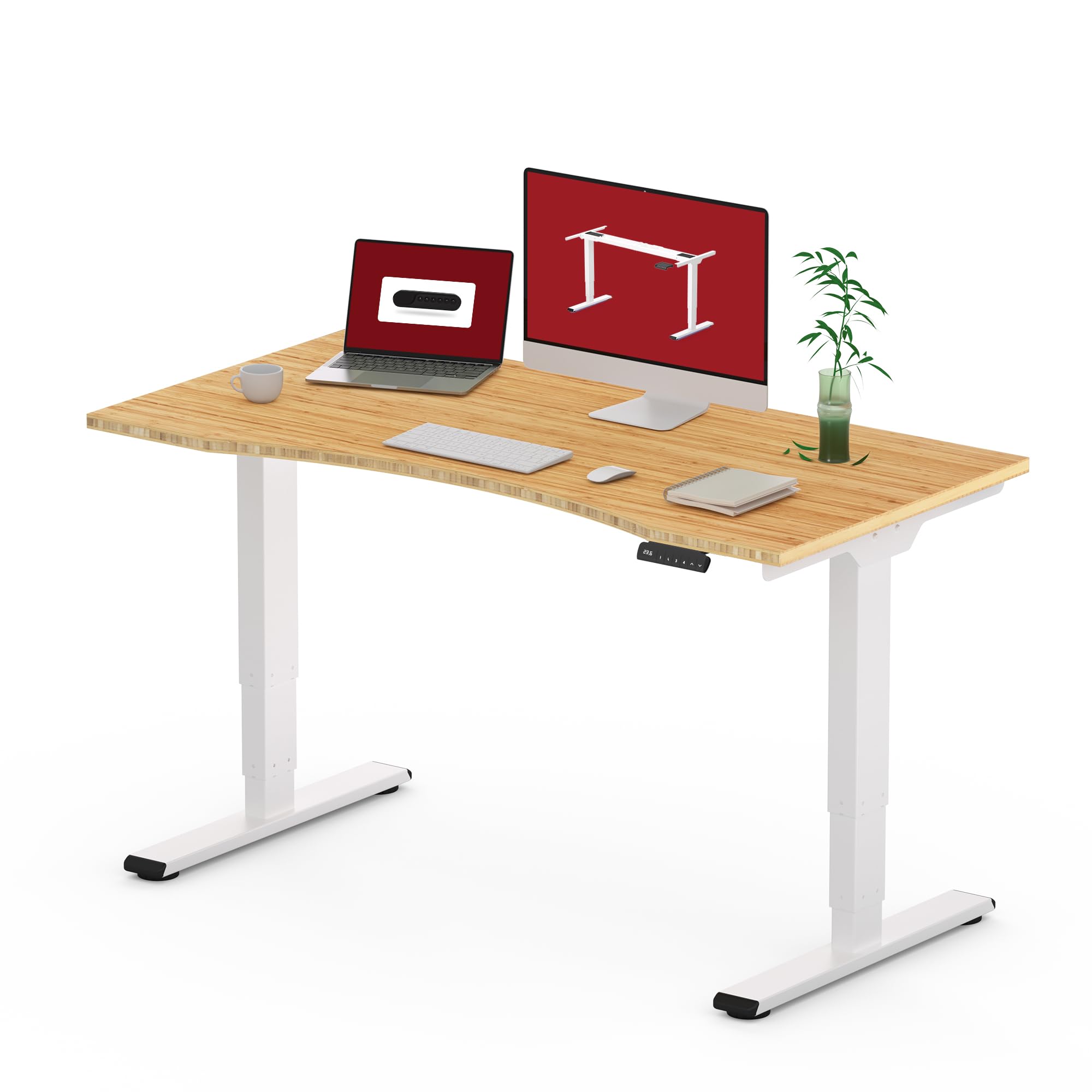
Figure 1.1: The SANODESK Electric Height Adjustable Standing Desk with a 48" x 24" curved bamboo top.
2. Safety Information
Please read all safety instructions carefully before assembly and use. Failure to follow these instructions may result in injury or damage to the product.
- Weight Capacity: Do not exceed the maximum weight capacity of 220 lbs (100 kg).
- Clearance: Ensure there are no obstructions above or below the desk during height adjustment to prevent damage or injury.
- Children and Pets: Keep children and pets away from the desk during operation.
- Power: Use only the provided power adapter. Disconnect power before cleaning or maintenance.
- Stability: Ensure all screws are tightened and the desk is stable before placing items on it.
- Anti-Collision: The desk is equipped with an anti-collision system. However, always be aware of your surroundings during movement.
3. Setup and Assembly
Assembly typically requires two adults. Please follow the detailed instructions provided in the separate assembly guide included with your packaging. Below is a general overview and visual aids.
3.1 Components Overview
Before starting, verify all components are present:
- Desktop (48" x 24" Curved Bamboo)
- Desk Frame (Legs, Crossbar, Feet)
- Dual Motors
- Control Panel/Handset
- Power Adapter and Cables
- Hardware (screws, tools)
3.2 Assembly Steps (General)
- Attach the desk feet to the lifting columns.
- Connect the lifting columns to the crossbar.
- Install the dual motors and connect them to the control box.
- Secure the assembled frame to the underside of the bamboo desktop.
- Mount the control panel to the front edge of the desktop.
- Connect all cables (motors to control box, control box to power adapter).
- Plug the power adapter into a wall outlet.

Figure 3.1: Illustration of the desk frame, highlighting the dual-motor design for smooth operation.
4. Operating Instructions
Your SANODESK standing desk is equipped with an intuitive control panel for easy height adjustments and personalized settings.
4.1 Control Panel Overview

Figure 4.1: The control panel features an LED display, up/down arrows, memory presets (1, 2, 3), and a sit-stand reminder ('M').
4.2 Height Adjustment
- Up Arrow (▲): Press and hold to raise the desk to your desired standing height.
- Down Arrow (▼): Press and hold to lower the desk to your desired sitting height.
- The LED display will show the current height in inches. The desk adjusts smoothly from 23.6" to 49.2".

Figure 4.2: The 3-stage lifting system provides a wide adjustment range for various user heights.
4.3 Memory Presets
You can save up to three preferred heights for quick adjustments.
- Adjust the desk to your desired height using the up/down arrows.
- Press the 'M' button. The LED display will show 'S-'.
- Immediately press one of the number buttons (1, 2, or 3) to save the current height to that preset. The display will show 'S-1', 'S-2', or 'S-3' to confirm.
- To recall a saved height, simply press the corresponding number button (1, 2, or 3). The desk will automatically move to the saved position.
4.4 Sit-Stand Reminder
The 'M' button can also activate a sit-stand reminder to encourage regular movement.
- Press and hold the 'M' button until the display shows a timer setting (e.g., '30' for 30 minutes).
- Use the up/down arrows to adjust the reminder interval.
- Press 'M' again to confirm and activate the reminder. The desk will beep to remind you to change positions after the set interval.
4.5 Anti-Collision Feature
The desk is equipped with an auto-sensing anti-collision system. If the desktop encounters an obstruction during movement, it will automatically stop and reverse slightly to prevent damage.

Figure 4.3: The anti-collision system detects obstacles and reverses desk movement.
5. Maintenance
Regular maintenance ensures the longevity and optimal performance of your standing desk.
- Cleaning: Wipe the desktop and frame with a soft, damp cloth. Avoid harsh chemicals or abrasive cleaners.
- Cable Management: Periodically check all cables for wear or damage. Ensure they are neatly routed to prevent snagging during movement.
- Tighten Screws: Occasionally check and tighten any loose screws on the frame or desktop connections.
- Desktop Care: The bamboo desktop is durable but can be protected with coasters for drinks and pads for hot items.
6. Troubleshooting
If you encounter issues with your desk, refer to the following common problems and solutions:
| Problem | Possible Cause | Solution |
|---|---|---|
| Desk does not move | Power cable disconnected; Overload; Motor error | Check power connections; Reduce weight on desk; Unplug for 10 seconds and plug back in. |
| Uneven movement | Unbalanced load; Loose connections | Distribute weight evenly; Check and tighten all screws. |
| Error code on display | Specific system error | Refer to the full troubleshooting guide in your assembly manual or contact customer support. |
| Anti-collision triggers frequently | Sensitivity too high; Obstruction present | Ensure clear path; Consult manual for anti-collision sensitivity adjustment (if available). |
If the problem persists, please contact SANODESK customer support.
7. Specifications
Key technical specifications for your SANODESK Electric Height Adjustable Standing Desk:
- Brand: SANODESK
- Model Number: SN-EC5W-V2+C-R4824LB-ZB
- Desktop Material: Natural Bamboo
- Frame Material: Metal
- Desktop Dimensions: 48" x 24" (Curved)
- Height Adjustment Range: 23.6" to 49.2"
- Lifting System: 3-Stage Dual Motor
- Weight Capacity: 220 lbs (100 kg)
- Special Features: Electric Height Adjustment, Ergonomic Design, 3 Memory Presets, Sit-Stand Reminder, Anti-Collision System
- UPC: 810072814364

Figure 7.1: Detailed dimensions of the desktop and the adjustable height ranges.
8. Warranty and Support
Your SANODESK Electric Height Adjustable Standing Desk comes with a limited warranty. Please refer to the warranty card included in your product packaging for specific terms and conditions.
For technical support, warranty claims, or any questions regarding your product, please contact SANODESK customer service through the retailer where you purchased the desk or visit the official SANODESK website.


