
Polk Audio Magnifi One
Polk Audio MagniFi One Sound Bar and Wireless Subwoofer System User Manual
Model: Magnifi One | Brand: Polk Audio
Introduction
The Polk MagniFi One Sound Bar with Voice Adjust Technology is a low-profile sound bar and wireless subwoofer system designed to deliver clear, immersive audio. This system enhances your listening experience for movies, music, and sports with dedicated immersion modes. Its Voice Adjust Technology ensures clear dialogue, and separate controls for Voice, Bass, and Master Volume allow for personalized audio.
The MagniFi One system is designed for quick and easy setup, providing a significant audio upgrade for your television without complex wiring or installation.
What's in the Box
- Polk Audio MagniFi One Sound Bar
- Wireless Subwoofer
- Power Cables (for Sound Bar and Subwoofer)
- Optical Cable
- Remote Control
Setup
1. Unpacking and Placement
Carefully remove all components from the packaging. Place the sound bar directly in front of your television, ensuring it does not block the TV's remote sensor. Position the wireless subwoofer anywhere in the room, preferably on the same side as the sound bar, for optimal bass performance.

Image: The MagniFi One Sound Bar positioned below a television on a media console, with the wireless subwoofer placed on the floor to the left. This illustrates a typical setup for the system in a home environment.
2. Connecting the Sound Bar and Subwoofer
The sound bar and wireless subwoofer are pre-paired at the factory. Simply connect the power cables to both units and plug them into a wall outlet. The subwoofer will automatically connect to the sound bar when both are powered on.
3. Connecting to Your TV
For the best audio quality, connect the sound bar to your TV using the supplied optical cable. Insert one end of the optical cable into the 'Optical Out' port on your TV and the other end into the 'Optical In' port on the sound bar.
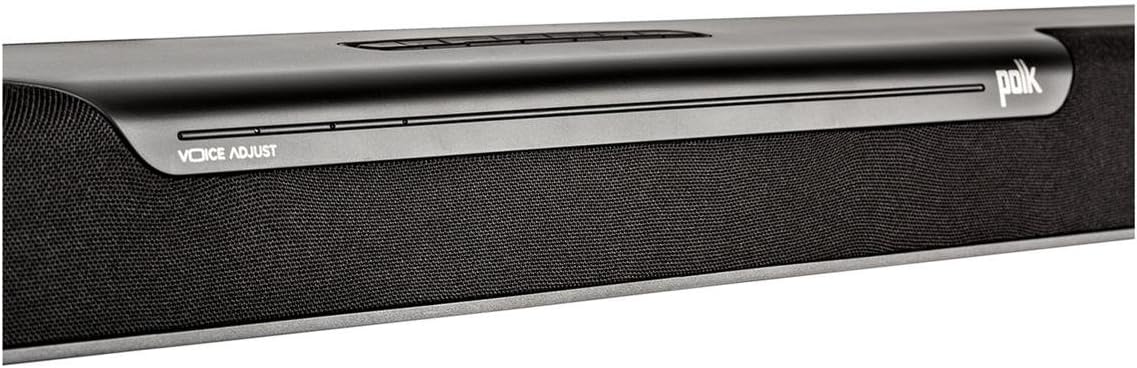
Image: A detailed view of the top surface of the MagniFi One Sound Bar, showing the integrated control buttons and the 'VOICE ADJUST' branding. This area typically houses power, volume, input selection, and sound mode controls.
Alternatively, you can use an analog audio cable (not included) if your TV does not have an optical output. Connect the analog cable from your TV's audio output to the 'AUX In' port on the sound bar.
4. Adjusting TV Audio Settings
After connecting, access your TV's audio settings menu. Disable the TV's internal speakers and set the audio output to 'External Speakers' or 'Optical/Digital Audio Out'. Ensure the digital audio output format is set to 'PCM' if available, as this is widely compatible.
Operating Instructions
Power On/Off
Press the Power button on the remote control or on the sound bar to turn the system on or off. The sound bar will indicate its status with an LED light.
Volume Control
Use the Volume Up (+) and Volume Down (-) buttons on the remote or sound bar to adjust the overall system volume.
Voice Adjust Technology
The exclusive Voice Adjust Technology allows you to increase or decrease the vocal intelligibility independent of the master volume. Press the 'Voice Adjust' button on the remote and use the volume buttons to fine-tune dialogue clarity. This feature is particularly useful for movies and TV shows where dialogue can sometimes be difficult to hear over background effects.
Bluetooth Connectivity
To stream audio wirelessly from your smartphone, tablet, or other Bluetooth-enabled device:
- Press the 'Bluetooth' button on the remote control. The sound bar's LED will indicate it is in pairing mode.
- On your device, enable Bluetooth and search for available devices.
- Select 'Polk MagniFi One' from the list to pair. Once connected, the LED on the sound bar will change to a solid color.
- You can now play audio from your device through the sound bar system.
Immersion Modes (Movie, Music, Sports)
The MagniFi One offers three preset EQ settings to optimize your listening experience:
- Movie Mode: Enhances cinematic sound with dynamic range and surround effects.
- Music Mode: Provides a balanced audio profile for music playback.
- Sports Mode: Optimizes audio for sports broadcasts, often emphasizing commentary.
Press the corresponding 'Movie', 'Music', or 'Sports' button on the remote to activate the desired mode.

Image: The Polk Audio MagniFi One Sound Bar and its accompanying wireless subwoofer are displayed side-by-side. The sound bar is sleek and black, designed to sit horizontally, while the subwoofer is a compact, upright black box. This image provides an overall view of the product components.
Maintenance
To ensure the longevity and optimal performance of your MagniFi One system, follow these simple maintenance guidelines:
- Cleaning: Use a soft, dry cloth to wipe down the sound bar and subwoofer. Avoid using liquid cleaners or abrasive materials, as they may damage the finish.
- Ventilation: Ensure that the sound bar and subwoofer have adequate ventilation. Do not block any vents or place the units in enclosed spaces that could lead to overheating.
- Environment: Keep the system away from direct sunlight, heat sources, and excessive moisture.
Troubleshooting
If you encounter issues with your Polk Audio MagniFi One system, refer to the following common problems and solutions:
- No Sound:
- Ensure the sound bar and subwoofer are powered on and connected to a working power outlet.
- Verify that the optical or analog cable is securely connected to both the TV and the sound bar.
- Check your TV's audio settings to ensure external speakers are selected and internal TV speakers are disabled.
- Confirm the sound bar's input source matches the connection type (e.g., Optical, AUX).
- Increase the volume on both the sound bar and your TV.
- Subwoofer Not Producing Bass:
- Ensure the subwoofer is powered on and its power indicator light is solid.
- Verify the wireless connection between the sound bar and subwoofer. If the connection is lost, try re-pairing them according to the user manual's instructions (typically by pressing a pairing button on both units).
- Check the bass level setting on the remote control.
- Bluetooth Pairing Issues:
- Ensure the sound bar is in Bluetooth pairing mode (indicated by a flashing LED).
- Make sure your Bluetooth device is within range (approximately 10 meters or 33 feet) and Bluetooth is enabled.
- Try unpairing and re-pairing the device.
- Clear the Bluetooth memory on your device and the sound bar (refer to the full user manual for specific steps if available).
- Remote Control Not Working:
- Check and replace the remote control batteries.
- Ensure there are no obstructions between the remote and the sound bar's sensor.
Specifications
| Feature | Detail |
|---|---|
| Model Name | Magnifi One |
| Mounting Type | Bar Mount |
| Speaker Type | Sound Bar and Subwoofer |
| Special Feature | Voice Adjust, Bass Boost |
| Connectivity Technology | Bluetooth, Optical |
| Wireless Communication Technology | Bluetooth |
| Surround Sound Channel Configuration | 5.1 |
| Item Weight | 24 Pounds (total system) |
| Product Dimensions | 34.6 x 3.3 x 2 inches (Sound Bar) |
| Speaker Maximum Output Power | 480 Watts |
| Frequency Response | 22 KHz |
| Bluetooth Range | 10 Meters |
| Woofer Diameter | 30 Centimeters |
Warranty and Support
The Polk Audio MagniFi One Sound Bar and Wireless Subwoofer System comes with a Limited Warranty. Please refer to the warranty card included with your product for specific terms and conditions, or visit the official Polk Audio website for detailed warranty information.
For further assistance, technical support, or to download the complete user manual in PDF format, please visit the Polk Audio support page or refer to the document provided at: Polk Audio MagniFi One User Manual (PDF).
Related documentsMagnifi One


Ask a question about this manual
Ask about setup, troubleshooting, compatibility, parts, safety, or missing instructions. Manuals+ will review the question and use this page’s manual context to help answer it.