
Sicce Shark ADV 800
SICCE Shark ADV 800 Internal Filter User Manual
Model: Shark ADV 800 | Brand: Sicce
Introduction
This manual provides detailed instructions for the installation, operation, and maintenance of the SICCE Shark ADV 800 Internal Filter. Designed for both freshwater and saltwater aquariums, this internal filter is intended for submerged use only. Please read these instructions carefully before use to ensure proper function and longevity of your filter.

Image: The SICCE Shark ADV 800 Internal Filter, a compact and modular unit designed for submerged aquarium filtration.
Safety Information
- Always disconnect the power supply before performing any maintenance or handling the filter.
- Ensure the filter is fully submerged during operation.
- Do not operate the filter if the power cord or plug is damaged.
- This appliance is for indoor use only and must not be used for purposes other than those specified.
- Keep out of reach of children.
Package Contents
Verify that all components are present before proceeding with installation:
- SICCE Shark ADV 800 Internal Filter unit
- Filter media (sponge)
- Venturi air intake system components
- Suction cups for mounting
- Instruction Manual (this document)

Image: The Shark ADV 800 filter shown with its packaging and various components, including filter media and air intake parts.
Setup
- Preparation: Unpack all components. Rinse the filter unit and all media thoroughly with aquarium water or dechlorinated tap water before initial use. Do not use soap or detergents.
- Assembly:
- Attach the suction cups to the filter body for secure mounting.
- Insert the provided filter media into the filter compartments. The Shark ADV features a modular design, allowing for additional filtering compartments (sold separately) to be added.
- If using the Venturi system for additional oxygenation, connect the air intake tube and adjust the air flow regulator as desired.
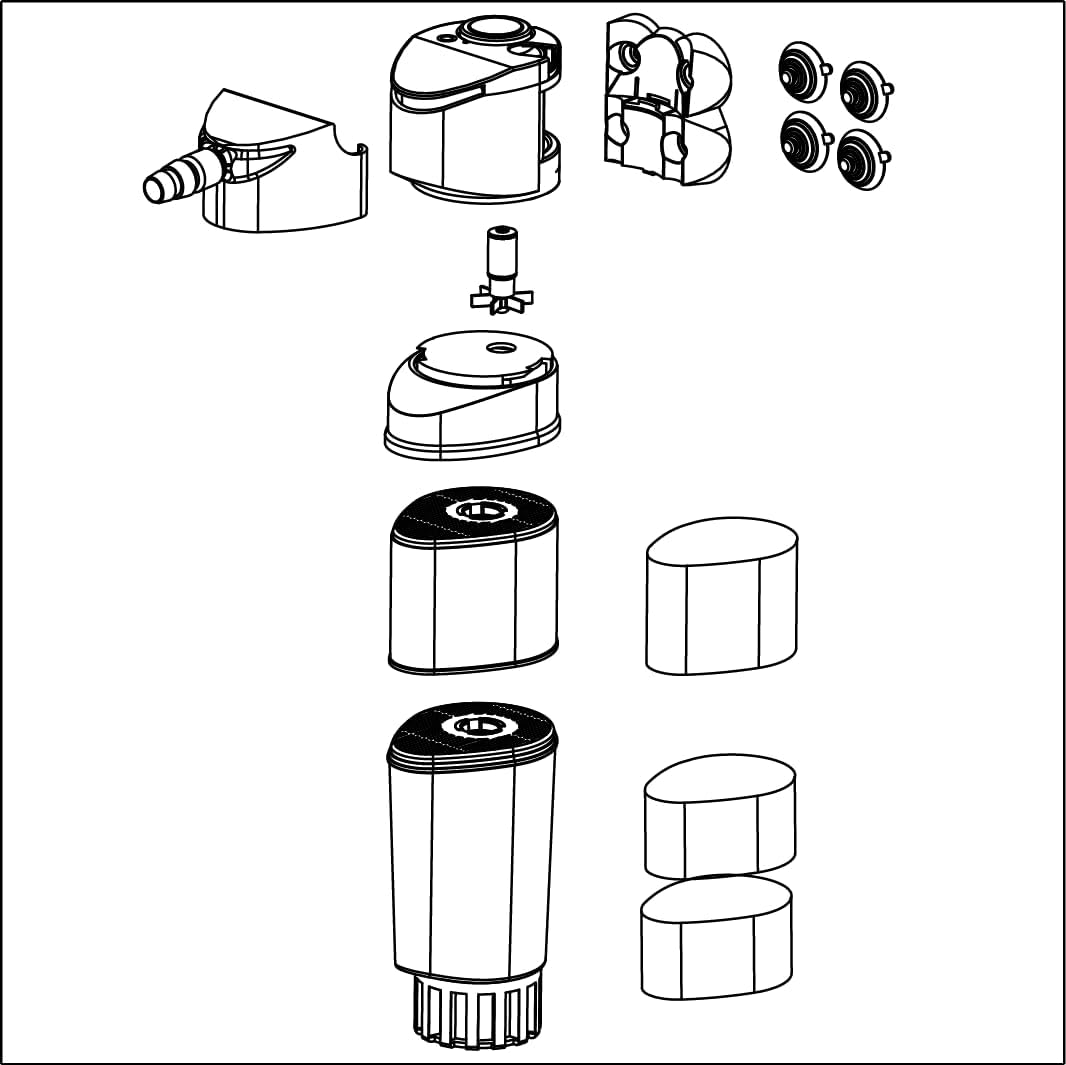
Image: An exploded diagram illustrating the individual components of the Shark ADV filter, including the motor head, impeller, filter cartridges, and suction cups.
- Placement: Position the filter inside the aquarium, ensuring it is fully submerged. Secure it to the aquarium wall using the suction cups. Ensure the water outlet is positioned to create adequate water circulation.
- Initial Startup: Once securely placed and fully submerged, connect the power plug to an electrical outlet. The filter will begin operating.
Operating Instructions
- Power On/Off: The filter operates continuously when plugged into a power source. To turn off, disconnect from the power outlet.
- Flow Adjustment: The water flow rate can be adjusted using the dial located on the top of the filter unit. Rotate the dial to increase or decrease flow as needed for your aquarium size and inhabitants.
- Venturi System: The integrated Venturi system allows for additional oxygenation of the aquarium water. Adjust the air intake regulator to control the amount of air introduced. Note that operating the Venturi system may produce some noise.
- Fish Protection: The intake diameter is adjustable to protect smaller fish from being drawn into the filter. Ensure it is set appropriately for your aquarium's inhabitants.
Maintenance
Regular maintenance is crucial for the optimal performance and longevity of your SICCE Shark ADV 800 filter.
- Disassembly for Cleaning:
- Disconnect the filter from the power supply.
- The Shark ADV features a patented Magnetic Quick Uncoupling System (MCS System). This allows you to detach the filter body and media compartments from the motor head without removing the entire unit from the aquarium. Simply pull the filter body downwards to separate it from the magnetic connection.
- The transparent mechanical filter body allows for easy visual inspection of clogging levels.

Image: A hand demonstrating the magnetic quick uncoupling system, separating the filter's lower section from its upper motor unit for easy maintenance.
- Cleaning Filter Media: Remove the filter media (sponge) from the compartments. Rinse the sponge thoroughly in old aquarium water (from a water change) to preserve beneficial bacteria. Replace the sponge if it is heavily degraded or cannot be cleaned effectively.
- Cleaning Impeller and Motor Head: Periodically clean the impeller and its housing in the motor head to prevent blockages and maintain efficient operation. Gently remove the impeller and clean any debris.
- Reassembly: Reassemble the filter components, ensuring all parts are correctly seated. Reattach the filter body to the motor head using the MCS System.
- Restart: Place the filter back into the aquarium, ensure it is fully submerged, and reconnect the power supply.
Troubleshooting
| Problem | Possible Cause | Solution |
|---|---|---|
| Filter not starting or weak flow |
|
|
| Excessive noise |
|
|
| Water not clear |
|
|
Specifications
| Feature | Detail |
|---|---|
| Model | Shark ADV 800 |
| Part Number | SIC113 |
| Flow Rate | 211 GPH (800 L/h) |
| Filtering Volume | 320 cm³ |
| Product Dimensions | 5 x 10 x 15 inches (approximate) |
| Item Weight | 13.9 ounces |
| Application | Freshwater and Saltwater |
| Usage | Indoor, Submerged |
| Special Features | Patented Magnetic Quick Uncoupling System (MCS), Venturi System, Adjustable Intake Diameter, Modular Design |

Image: A technical drawing showing the dimensions of different Shark ADV filter models, indicating height and base measurements.
Warranty and Support
The SICCE Shark ADV 800 Internal Filter comes with a Manufacturer Warranty. For specific warranty details, duration, and terms, please refer to the documentation included with your product or visit the official Sicce website.
For technical support, replacement parts, or warranty claims, please contact Sicce customer service through their official channels.
Manufacturer: Sicce
Website: www.sicce.com
Related documentsShark ADV 800


Ask a question about this manual
Ask about setup, troubleshooting, compatibility, parts, safety, or missing instructions. Manuals+ will review the question and use this page’s manual context to help answer it.