
SANODESK B0DSVSRGQR
SANODESK Electric Height Adjustable Desk User Manual
Model: B0DSVSRGQR
Brand: SANODESK
Important Safety Information
Please read these assembly instructions carefully before assembling the desk. Use the provided safety hooks to keep the desk in place during use. Do not place heavy or unstable objects on the desk to avoid accidents. Do not adjust the desk height when objects or people are in the path of the work surface.
Product Overview
The SANODESK Electric Height Adjustable Desk is designed to provide a versatile and ergonomic workspace. Featuring a robust one-piece desktop and an intelligent control panel, it allows for seamless transitions between sitting and standing positions, promoting comfort and productivity.

Figure 1: Overview of the SANODESK Electric Height Adjustable Desk in a typical office setup.
Setup and Assembly
This section provides general guidelines for setting up your SANODESK Electric Height Adjustable Desk. While specific steps may vary, the overall process involves assembling the frame, attaching the desktop, and connecting the power.
- Unpack Components: Carefully remove all parts from the packaging and verify against the packing list. Ensure all components, including the one-piece desktop, frame, and hardware, are present.
- Assemble Frame: Follow the detailed instructions provided in your physical manual to assemble the desk frame. This typically involves attaching the legs to the crossbar and feet.
- Attach Desktop: Secure the one-piece desktop to the assembled frame using the provided screws. Ensure the desktop is centered and aligned correctly. The one-piece design ensures superior stability and durability.
- Connect Power: Plug the power cable into the control box and then into a wall outlet.
- Initial Calibration: Some electric desks require an initial calibration. Refer to your physical manual for specific instructions on how to perform this, usually by holding the down button until the desk reaches its lowest point and slightly rises.

Figure 2: The desk integrated into a home office environment, demonstrating its compact and functional design.

Figure 3: Illustration of the customizable desk board dimensions, indicating compatibility with various workstation sizes.
Operating Instructions
Your SANODESK Electric Height Adjustable Desk features an intelligent control panel for easy height adjustments and memory presets.
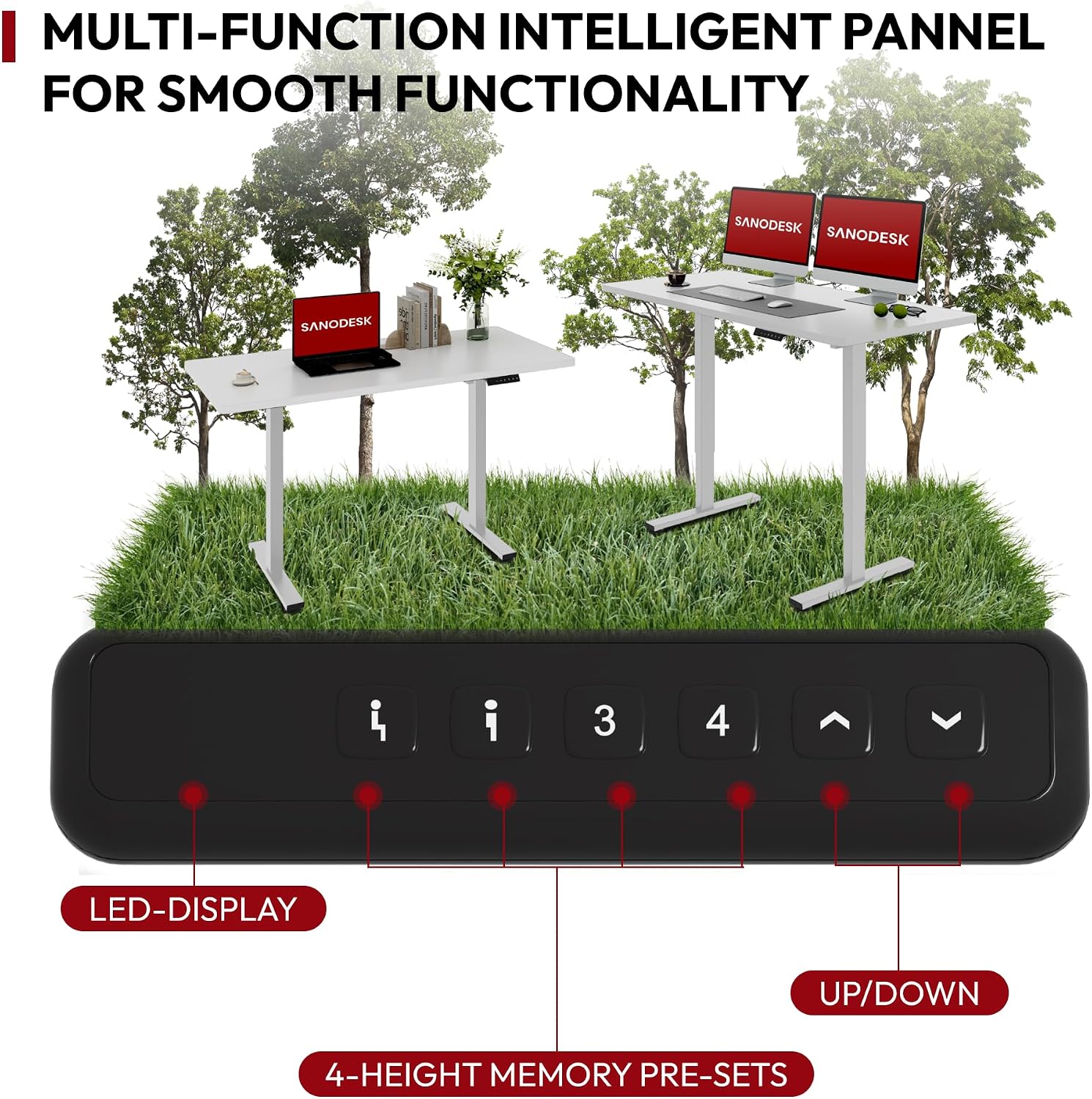
Figure 4: The intelligent control panel, highlighting the LED display, four memory preset buttons, and up/down adjustment controls.
- Adjusting Height: Use the Up (▲) and Down (▼) buttons on the control panel to raise or lower the desk to your desired height. The desk offers a flexible height adjustment range from 75 cm to 110 cm.
- Saving Memory Presets:
- Adjust the desk to your preferred sitting or standing height.
- Press the "M" or "SET" button (if available, otherwise proceed to step c).
- Press one of the numbered memory preset buttons (1, 2, 3, or 4) until you hear a beep or see a confirmation on the LED display. Your current height is now saved to that preset.
- Recalling Memory Presets: Simply press the corresponding numbered memory preset button (1, 2, 3, or 4) to automatically move the desk to your saved height.
- Anti-Collision System: The desk is equipped with an advanced anti-collision system. If the desk encounters an obstacle during height adjustment, it will automatically stop and reverse slightly to prevent damage or injury.

Figure 5: Visual representation of the desk's flexible height adjustment range, from a minimum of 75cm to a maximum of 110cm.

Figure 6: Illustration demonstrating the ultra-quiet operation of the SANODESK desk, with noise levels below 50dB.
Maintenance
Regular maintenance ensures the longevity and optimal performance of your SANODESK Electric Height Adjustable Desk.
- Cleaning: Wipe the desktop and frame with a soft, damp cloth. Avoid abrasive cleaners or harsh chemicals that could damage the finish.
- Cable Management: Periodically check and organize cables to prevent tangling or interference with the desk's movement.
- Motor and Frame Inspection: Occasionally inspect the motor and frame for any loose screws or unusual noises. Tighten any loose fasteners. If you notice persistent unusual noises, contact customer support.
- Weight Capacity: Do not exceed the recommended weight capacity of the desk to prevent strain on the motor and frame.
Troubleshooting
This section addresses common issues you might encounter with your electric height adjustable desk.
| Problem | Possible Cause | Solution |
|---|---|---|
| Desk does not move. | Power cable disconnected; Overload; Motor overheating. | Check power connections. Reduce weight on desk. Allow motor to cool down for 20 minutes. |
| Desk moves unevenly or makes unusual noise. | Loose connections; Obstruction; Uneven weight distribution. | Check all screws and connections. Remove any obstructions. Distribute weight evenly on the desktop. |
| Anti-collision system frequently triggers. | Obstruction in path; Sensitivity setting too high (if adjustable). | Ensure clear path for desk movement. Refer to physical manual for anti-collision sensitivity adjustment if available. |
| Memory presets not working. | Presets not saved correctly; Power cycle needed. | Re-save your memory presets. Unplug the desk for 30 seconds and plug it back in to reset the system. |
Specifications
Key technical specifications for the SANODESK Electric Height Adjustable Desk.
| Feature | Detail |
|---|---|
| Brand | SANODESK |
| Model | B0DSVSRGQR |
| Product Dimensions (L x W x H) | 120 x 60 x 110 cm |
| Adjustable Height Range | 75 cm to 110 cm |
| Material | Engineered Wood (Desktop), Metal (Base) |
| Color | White Frame + White Top |
| Item Weight | 21 Kilograms |
| Special Features | Ergonomic, Height Adjustable, Electric, Anti-collision System, 4 Memory Presets |
| Noise Level | Less than 50dB during operation |
Warranty and Support
SANODESK is committed to providing high-quality products and excellent customer service. For warranty information, technical support, or any inquiries regarding your desk, please contact SANODESK customer service through their official channels or the retailer where the product was purchased.
Please retain your proof of purchase for warranty claims.
Related documentsB0DSVSRGQR


Ask a question about this manual
Ask about setup, troubleshooting, compatibility, parts, safety, or missing instructions. Manuals+ will review the question and use this page’s manual context to help answer it.