
SANODESK E6Q-DO
SANODESK Electric Standing Desk User Manual
Model: E6Q-DO
Brand: SANODESK
Important Safety Information
Please read all instructions carefully before assembly and use. Failure to follow these instructions may result in injury or damage to the product.
- Always follow the assembly instructions provided.
- Use the drill with caution to avoid injury during assembly.
- When adjusting the desk height, ensure the desk is stable and unoccupied to prevent accidents.
- Keep children and pets away from the desk during operation.
- Do not overload the desk. Refer to the specifications for maximum load capacity.
- Ensure all cables are properly managed to prevent tripping hazards or damage to the motor.
Product Overview
The SANODESK Electric Standing Desk with 2 Drawers (Model E6Q-DO) is a height-adjustable computer desk designed for home and office use. It features an electric lifting mechanism, multiple storage solutions, and a spacious work surface.
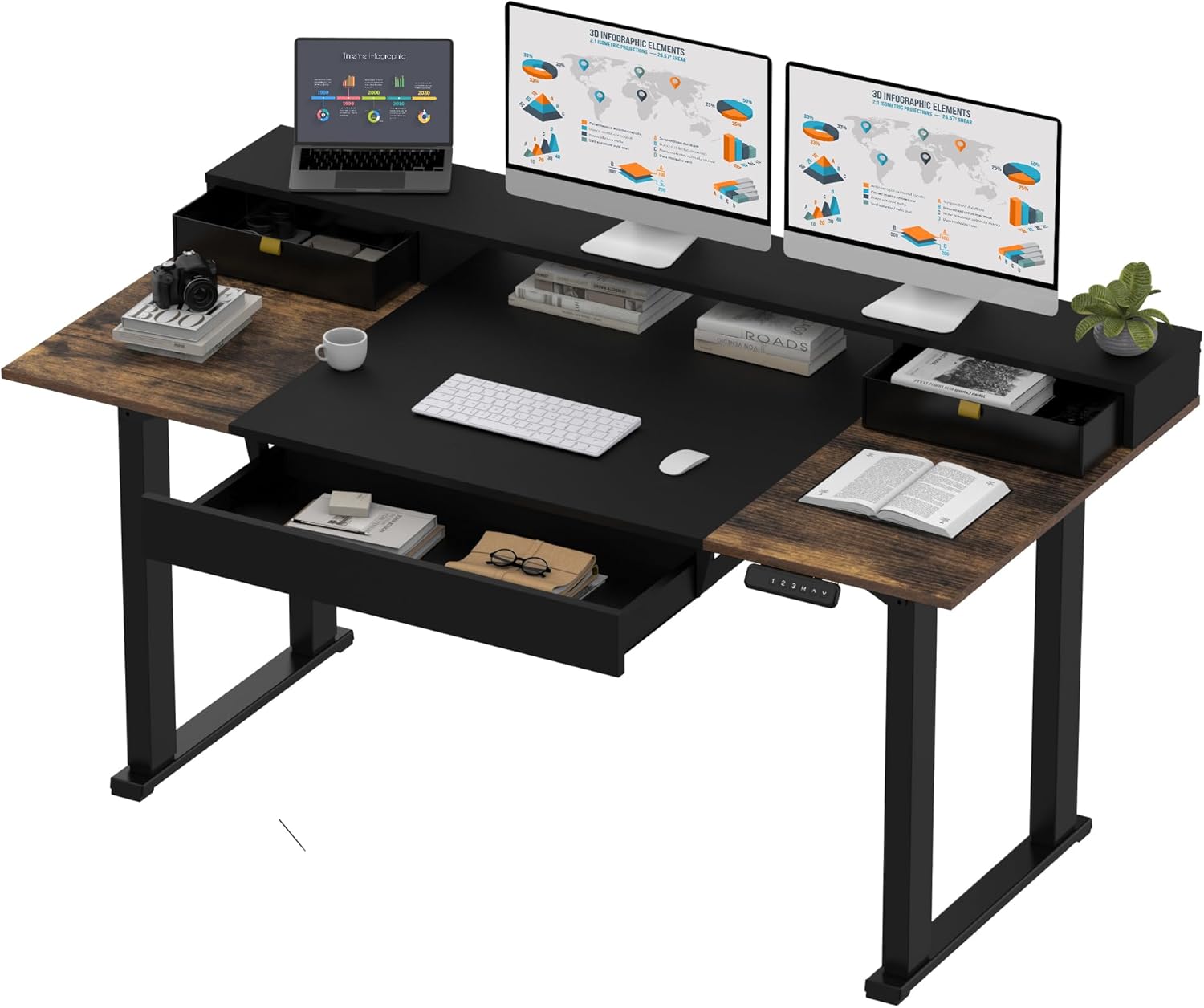
Figure 1: SANODESK Electric Standing Desk in a typical office setup. This image displays the desk with two monitors, a laptop, and various office supplies, highlighting its spacious design and integrated storage.
Key Features:
- Electric Height Adjustable: Seamlessly switch between sitting and standing positions with the touch of a button.
- Integrated Storage: Includes 2 desk drawers, a spacious under-desk drawer, and a desk shelf for efficient organization.
- Spacious Work Surface: Provides ample room for multiple monitors, peripherals, and other work essentials.
- Intelligent Keypad: Features programmable memory presets for quick height adjustments.
- Sturdy Construction: Built with durable materials for stability and longevity.
Specifications
| Attribute | Detail |
|---|---|
| Brand | SANODESK |
| Model Number | E6Q-DO |
| Product Dimensions (D x W x H) | 63"D x 71"W x 28.3"H |
| Minimum Height | 28.7 Inches |
| Maximum Height | 47.2 Inches |
| Color | Dark Walnut (tabletop), Black (frame) |
| Top Material Type | Engineered Wood |
| Base Material | Carbon Steel |
| Lifting Mechanism | Electric |
| Number of Drawers | 3 (2 desk drawers, 1 under-desk drawer) |
| Number of Shelves | 1 (desk shelf) |
| Item Weight | 86.5 Pounds |
| Required Assembly | Yes |
| Tools Recommended For Assembly | Drill |
| Includes All Assembly Tools | No |
| UPC | 840460429030 |

Figure 2: Detailed dimensions of the SANODESK Electric Standing Desk. This diagram illustrates the overall width, depth, height range, and specific measurements of the desk components.

Figure 3: Illustration of the desk's maximum load capacity. This image visually represents the desk's ability to support significant weight, indicating its robust construction.
Setup and Assembly
The SANODESK Electric Standing Desk requires assembly. Please ensure you have sufficient space and follow the included assembly manual step-by-step. A drill is recommended for assembly, and not all assembly tools are included.
Before You Begin:
- Unpack all components and verify against the parts list in your assembly manual.
- Clear a spacious area for assembly.
- Gather necessary tools, including a drill.
- Review the safety information provided at the beginning of this manual.
Assembly Steps:
Refer to the detailed assembly instructions provided in the product packaging for step-by-step guidance. The manual will guide you through attaching the legs, motor, control panel, and desktop components, including the drawers and shelf.

Figure 4: The assembled SANODESK Electric Standing Desk in a home office environment. This image provides a visual reference for the completed desk setup.
Operating Instructions
The SANODESK Electric Standing Desk features an intuitive control panel for easy height adjustment and memory presets.
Height Adjustment:
- Raise Desk: Press and hold the Up arrow (^) button to raise the desk to your desired standing height.
- Lower Desk: Press and hold the Down arrow (v) button to lower the desk to your desired sitting height.
- The digital display will show the current height in inches.
Memory Presets:
The desk allows you to save up to 3 preferred height settings for quick transitions.
- Adjust the desk to your desired height using the Up/Down arrows.
- Press the "M" button. The display will show "S-".
- Within 3 seconds, press one of the preset buttons (1, 2, or 3) to save the current height to that memory slot. The display will show "S-1", "S-2", or "S-3" to confirm.
- To recall a saved height, simply press the corresponding preset button (1, 2, or 3). The desk will automatically move to the saved position.

Figure 5: Close-up of the intelligent keypad. This image highlights the digital display, memory preset buttons (1, 2, 3), and the Up/Down controls for height adjustment.
Storage Solutions:
The desk is equipped with multiple storage options to help keep your workspace organized.
- Desk Drawers: Utilize the two integrated desk drawers for smaller office supplies, pens, and personal items.
- Under-Desk Drawer: The larger under-desk drawer is suitable for documents, notebooks, or larger accessories.
- Desk Shelf: The elevated desk shelf provides additional space for monitors, speakers, or decorative items, freeing up the main desktop area.

Figure 6: Optimized space utilization with integrated storage. This image demonstrates how the monitor stand, two desk drawers, and the under-desk drawer contribute to a tidy and efficient workspace.
Maintenance
Regular maintenance will ensure the longevity and optimal performance of your SANODESK Electric Standing Desk.
- Cleaning: Wipe the desk surface and frame with a soft, damp cloth. Avoid abrasive cleaners or harsh chemicals that could damage the finish.
- Cable Management: Periodically check and organize cables to prevent tangling and ensure smooth operation of the height adjustment mechanism.
- Motor Care: The electric motor is designed for durability. Avoid spilling liquids on the motor or control panel. If the motor sounds unusual, discontinue use and refer to the troubleshooting section or contact support.
- Fasteners: Occasionally check all screws and fasteners to ensure they are tight. Retighten if necessary.
Troubleshooting
If you encounter any issues with your SANODESK Electric Standing Desk, refer to the common problems and solutions below. If the problem persists, contact customer support.
| Problem | Possible Cause | Solution |
|---|---|---|
| Desk does not move. | Power cable disconnected; overload; motor error. | Check power connection. Reduce weight on desk. Unplug for 10 seconds, then plug back in to reset. |
| Desk moves unevenly. | Uneven load; obstruction; motor synchronization issue. | Distribute weight evenly. Check for obstructions. Perform a reset (refer to assembly manual for specific reset procedure if available). |
| Error code on display. | Specific motor or sensor issue. | Refer to the assembly manual for error code definitions and solutions. If not found, contact customer support. |
| Noise during operation. | Loose fasteners; minor friction. | Ensure all screws are tightened. A slight motor hum is normal. If noise is excessive, contact support. |
Warranty and Support
Your SANODESK Electric Standing Desk comes with a limited warranty.
- Warranty Type: Limited Warranty
- Manufacturer Warranty: 5 Year Limited Warranty (Parts, Labor)
For warranty claims, technical assistance, or any other inquiries, please contact SANODESK customer support. Keep your purchase receipt and model number (E6Q-DO) ready when contacting support.
You can find more information and contact details by visiting the official SANODESK Store on Amazon: SANODESK Store
Related documentsE6Q-DO


Ask a question about this manual
Ask about setup, troubleshooting, compatibility, parts, safety, or missing instructions. Manuals+ will review the question and use this page’s manual context to help answer it.