
1. Product Overview
Welcome to your new SANODESK Electric Standing Desk. This manual provides detailed instructions for assembly, operation, and maintenance to ensure optimal performance and longevity of your desk. The SANODESK Electric Standing Desk is designed to enhance your workspace with its height-adjustable features, integrated power solutions, and robust construction. It promotes a healthier work environment by allowing seamless transitions between sitting and standing positions.
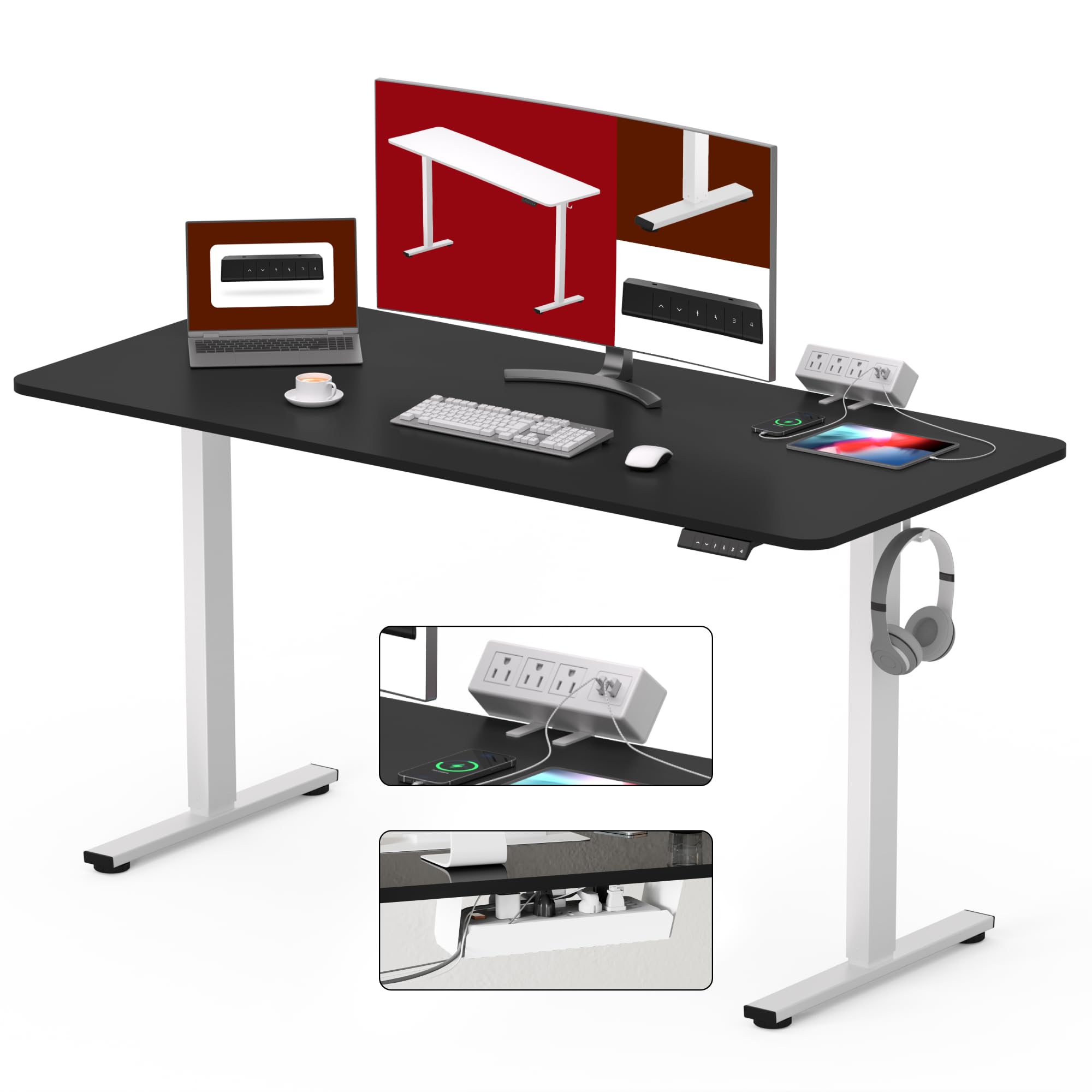
Figure 1: SANODESK Electric Standing Desk in various height settings.

Figure 2: Desktop with integrated power strip and devices.
2. Safety Information
WARNING: Failure to follow these safety instructions may result in injury or damage to the product.
- Keep children and pets away from the desk during operation.
- Do not overload the desk beyond its maximum weight capacity of 176 lbs (80 kg).
- Ensure all cables are properly managed and secured to prevent tripping hazards or entanglement with moving parts.
- Do not place liquids directly on the control panel or near electrical components.
- Only use the provided power adapter and accessories.
- Before moving the desk, lower it to its lowest position and disconnect all power cables.
3. Assembly Instructions
Follow these steps carefully for proper assembly. It is recommended to have two people for assembly due to the weight of the components. A detailed installation manual and video guide are available for further assistance.

Figure 3: Exploded view of desk components.
- Step 1: Attach Desk Legs to Desktop. Carefully place the desktop upside down on a soft, clean surface. Securely fasten the desk legs to the pre-drilled holes on the underside of the desktop using the provided screws. Ensure all connections are tight.
- Step 2: Install Control Panel. Mount the digital control panel to the underside of the desktop in the designated area using the provided hardware. Connect the control panel cable to the motor.
- Step 3: Mount Power Strip. Attach the clamp-mount power strip to the edge of the desk. Adjust the clamp for a secure fit, ensuring it is stable and accessible.

Figure 4: Close-up of the clamp-mounted power strip.
- Step 4: Organize Cables. Utilize the under-desk cable management tray to route and secure all power and data cables, reducing clutter and improving safety.

Figure 5: Before and after cable management.
4. Operating Instructions
Digital Control Panel
Your SANODESK features a 6-button digital controller with 4 programmable memory presets for easy height adjustment. The electric height adjustable system smoothly adjusts from 28.1" to 45.7" at 0.6" per second, operating quietly under 50 dB.

Figure 6: Digital Control Panel.
- Adjusting Height: Use the up (^) and down (v) arrow buttons to manually adjust the desk height. The current height is displayed on the digital screen.
- Setting Memory Presets:
- Adjust the desk to your desired sitting or standing height using the arrow buttons.
- Press the 'M' button (or the 'i' button, which often serves as a memory set function).
- Press one of the numbered preset buttons (1, 2, 3, or 4) to save the current height to that preset.
- Recalling Presets: To move the desk to a saved height, simply press the corresponding numbered preset button (1, 2, 3, or 4).
Integrated Power Strip
The desk includes a clamp-mounted power strip with 3 AC outlets (125V/1500W) and 2 USB-A ports (5V/2A) for convenient power access. This allows you to power multiple devices directly from your desk.

Figure 7: Power strip with devices charging.
5. Maintenance
To ensure the longevity and appearance of your SANODESK, follow these simple maintenance guidelines:
- Cleaning: Wipe the desktop surface with a soft, damp cloth. Avoid harsh chemicals or abrasive cleaners that could damage the engineered wood finish.
- Cable Management: Periodically check and reorganize cables in the management tray to prevent tangles, damage, and ensure smooth desk operation.
- Motor Care: The electric motor is designed for durability. Avoid overloading the desk beyond its maximum weight capacity (176 lbs) to prevent strain on the motor.
- Inspection: Regularly inspect all screws and connections to ensure they remain tight. Tighten any loose fasteners as needed.
6. Troubleshooting
If you encounter any issues with your SANODESK, refer to the following common problems and solutions:
- Desk not adjusting height:
- Check if the power cord is securely plugged into both the desk's control box and a functional wall outlet.
- Ensure no obstructions are blocking the desk's movement path.
- Perform a reset: Unplug the desk from the power outlet for at least 10 seconds, then plug it back in.
- Unusual noises during adjustment:
- Minor motor sounds are normal during operation. If the noise is loud, grinding, or unusual, check for any loose components or obstructions under the desk.
- If the issue persists, contact customer support.
- Power strip not working:
- Verify the power strip is properly connected to the desk's power supply and that the main power cable is plugged into a live wall outlet.
- Check if the power strip's circuit breaker (if present) has tripped. Reset it if necessary.
7. Specifications
| Feature | Detail |
|---|---|
| Brand | SANODESK |
| Model Number | EN2 |
| Product Dimensions | 28"D x 55"W x 45"H |
| Color | White Frame+black Top |
| Top Material Type | Engineered Wood |
| Base Material | Carbon Steel |
| Special Feature | Adjustable Height |
| Height Adjustment Range | 28.1" to 45.7" |
| Weight Capacity | Up to 176 lbs |
| Control Panel | 6-button digital controller with 4 memory presets |
| Power Strip | 3 AC outlets (125V/1500W), 2 USB-A ports (5V/2A) |
| Noise Level | Under 50 dB |
| Assembly Required | Yes |
8. Warranty and Support
For warranty information or technical assistance, please contact SANODESK customer support. Refer to your purchase documentation for specific warranty terms and conditions.
You can also visit the official SANODESK store for more products and support: SANODESK Store


