
1. Introduction
This manual provides essential instructions for the proper setup, operation, and maintenance of your HMF 4612212 Electronic Combination Lock Furniture Safe. Please read this manual thoroughly before using the safe to ensure correct functionality and security.
The HMF 4612212 safe features a robust steel construction and an electronic combination lock for secure storage of your valuables. It is designed for installation within furniture or for wall/floor mounting.
2. Safety Information
- Always keep the emergency keys in a secure location, separate from the safe and its contents. Do not store them inside the safe.
- Ensure the safe is securely mounted to a wall or floor to prevent unauthorized removal.
- Do not expose the safe to extreme temperatures or humidity.
- Replace batteries promptly when the low battery indicator appears to avoid lockouts.
- Keep the safe door closed and locked when not in use.
3. Package Contents
Verify that all items listed below are present in your package:
- HMF 4612212 Furniture Safe
- 4 x AA Batteries
- 2 x Emergency Keys
- 4 x Mounting Screws and Dowels
- User Manual (this document)
4. Setup
4.1 Battery Installation
- Locate the battery compartment on the inside of the safe door.
- Open the battery cover.
- Insert the 4 AA batteries, ensuring correct polarity (+/-).
- Close the battery cover. The safe will emit a beep, indicating successful power-up.
4.2 Initial Code Setting
The safe comes with a factory default code (usually 1-2-3-4). It is crucial to change this immediately.
- With the safe door open, press the red reset button located on the inside of the door, near the hinge. You will hear a beep.
- Within 5 seconds, enter your desired 3 to 8 digit code on the keypad.
- Press the '#' button to confirm. The safe will beep twice, indicating the new code is set.
- Test the new code with the door open before closing it.
4.3 Mounting the Safe
For optimal security, the safe should be securely mounted to a solid surface.
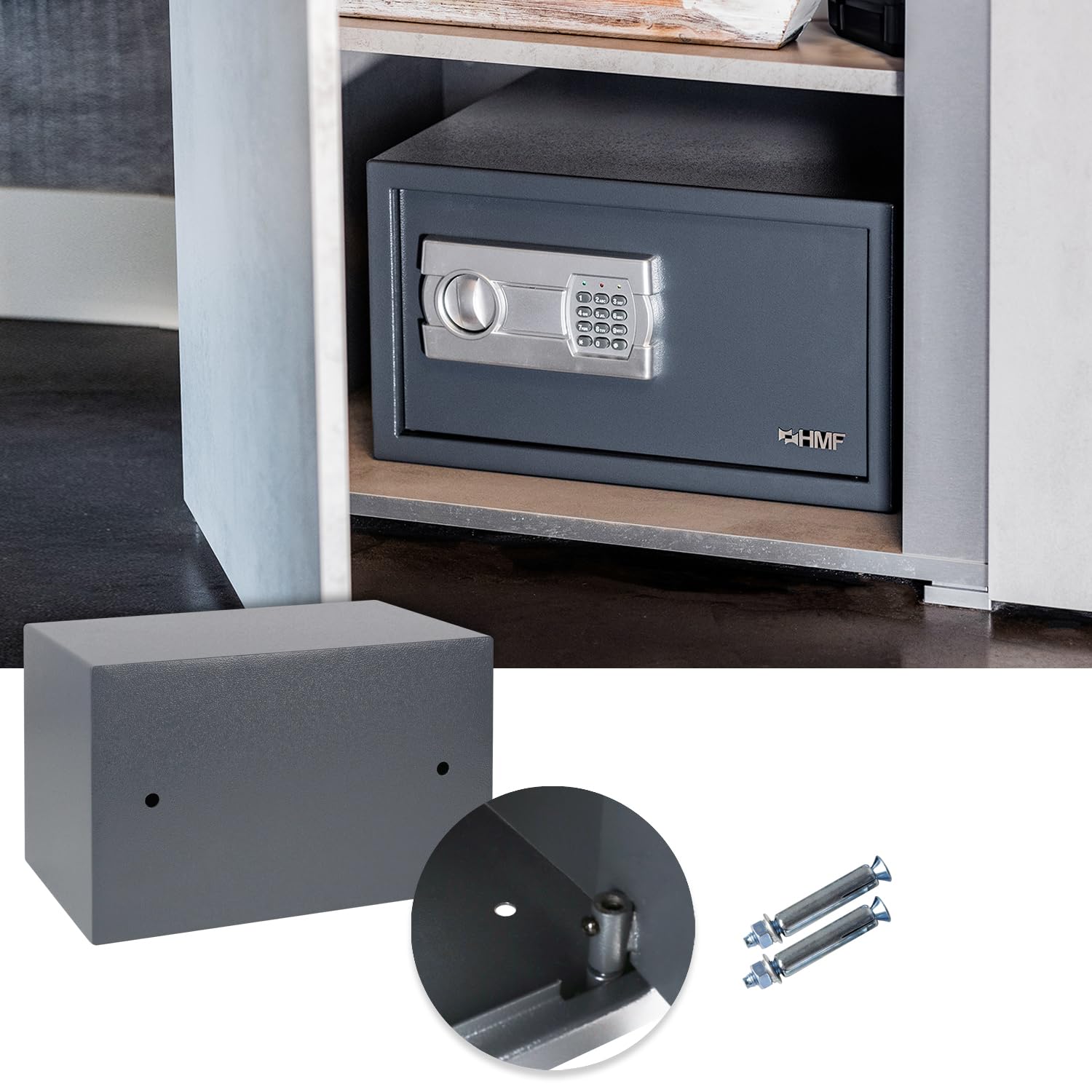
The HMF safe securely installed inside a cabinet. The image also highlights the pre-drilled holes on the safe's back and bottom, along with the provided mounting screws and dowels for installation.
- Choose a suitable location for mounting, such as inside a cabinet, on a wall, or on the floor.
- Mark the drilling points using the pre-drilled holes on the back or bottom of the safe as a template.
- Drill holes into the chosen surface using an appropriate drill bit.
- Insert the provided dowels into the drilled holes.
- Position the safe and secure it using the mounting screws. Ensure the safe is firmly attached.
5. Operation
5.1 Opening the Safe with Electronic Lock

The HMF furniture safe with its door open, revealing the electronic keypad for combination entry and the spacious interior.
- Enter your 3 to 8 digit personal combination on the keypad.
- Press the '#' button. A green light will illuminate, and you will hear a beep.
- Within 5 seconds, turn the knob clockwise to open the safe door.
5.2 Changing the Combination
You can change your personal combination at any time with the door open.
- With the safe door open, press the red reset button on the inside of the door. You will hear a beep.
- Within 5 seconds, enter your new 3 to 8 digit code on the keypad.
- Press the '#' button to confirm. The safe will beep twice, indicating the new code is set.
- Always test the new code with the door open before closing it.
5.3 Emergency Key Override

An overview of the HMF safe installed on a shelf, accompanied by detailed views of the robust door bolts, the electronic keypad for secure access, and the emergency key entry point.
In case of forgotten combination, dead batteries, or electronic malfunction, the safe can be opened using the emergency keys.
- Locate the emergency keyhole, usually concealed behind a small cover on the keypad panel.
- Remove the cover.
- Insert one of the emergency keys and turn it counter-clockwise.
- While holding the key turned, rotate the main knob clockwise to open the safe door.
- Once open, you can replace the batteries or reset the code as needed. Remember to remove the emergency key and replace the cover.
5.4 Capacity and Usage Examples

The interior of the HMF safe, demonstrating its capacity to store personal valuables such as a smartphone, wallet, and credit cards.

The HMF safe with a standard binder placed inside, illustrating that the internal dimensions are suitable for storing documents and items up to DIN A4 size.

An example of the HMF safe installed within a vehicle's storage compartment, showcasing its versatility for mobile security.

The HMF safe mounted vertically against a wall, demonstrating an alternative installation method.
6. Maintenance
6.1 Battery Replacement
When the low battery indicator (red light) flashes during operation, it is time to replace the batteries.
- Open the safe using your combination or the emergency key.
- Open the battery compartment cover on the inside of the door.
- Remove the old AA batteries and insert new ones, observing correct polarity.
- Close the battery cover.
6.2 Cleaning
Clean the exterior of the safe with a soft, damp cloth. Do not use abrasive cleaners or solvents, as these can damage the finish or electronic components.
7. Troubleshooting
| Problem | Possible Cause | Solution |
|---|---|---|
| Safe does not open with combination. | Incorrect code entered; Batteries are low or dead. | Re-enter code carefully; Replace batteries; Use emergency key. |
| Keypad does not respond. | Batteries are completely dead or incorrectly installed. | Replace batteries, ensuring correct polarity; Use emergency key. |
| Safe beeps continuously after entering code. | Incorrect code entered multiple times. | Wait for the system to reset (usually a few minutes); Re-enter correct code. |
| Cannot set new combination. | Reset button not pressed correctly; New code not entered within 5 seconds. | Ensure reset button is fully pressed; Enter new code promptly after reset. |
8. Specifications

A visual representation of the HMF safe with its external dimensions clearly marked as 35 cm (width), 25 cm (height), and 25 cm (depth). The internal dimensions are also indicated as 34.6 cm x 24.6 cm x 19 cm.
| Feature | Detail |
|---|---|
| Brand | HMF |
| Model Number | 4612212 / GF858 |
| External Dimensions (W x H x D) | 350 x 250 x 250 mm (35 x 25 x 25 cm) |
| Internal Dimensions (W x H x D) | 346 x 246 x 190 mm (34.6 x 24.6 x 19 cm) |
| Capacity | Approx. 16.17 litres (fits DIN A4 documents) |
| Weight | Approx. 5.45 kg (5 kg 450 g) |
| Material | Alloy Steel (Body: 2mm, Door: 4mm) |
| Lock Type | Electronic Combination Lock, Key Override |
| Combination Length | 3-8 digits |
| Power Source | 4 x AA Batteries |
| Mounting Type | Wall Mount, Floor Mount |
| Color | Anthracite / Charcoal |
9. Warranty and Support
Specific warranty details are not provided within the product data. For warranty information, technical support, or service inquiries, please contact HMF customer service directly or refer to the official HMF website.
Please have your model number (4612212 or GF858) and purchase information available when contacting support.


