
1. Introduction
This manual provides detailed instructions for the assembly, operation, maintenance, and troubleshooting of your SANODESK Electric Standing Desk, model 63x24. Please read this manual thoroughly before assembly and use to ensure safe and efficient operation.

Image 1.1: The SANODESK Electric Standing Desk, 63x24 Inch, in a home office setting.
The SANODESK Electric Standing Desk is designed to provide a versatile and ergonomic workspace, allowing users to easily switch between sitting and standing positions. Its robust construction and intuitive controls contribute to a comfortable and productive environment.
2. Safety Information
Important Safety Warnings:
- Do not exceed the maximum weight limit of 176 pounds (80 kg) on the desktop. Overloading can cause damage to the desk and potential injury.
- Ensure the desk is properly assembled and all fasteners are tightened before use.
- Keep children and pets away from the desk during operation to prevent accidents.
- Ensure there are no obstructions in the desk's path during height adjustment.
- Do not sit or stand on the desk.
- Disconnect power before cleaning or performing any maintenance.
- If any unusual sounds or movements occur, stop operation immediately and consult the troubleshooting section or contact support.
3. Setup and Assembly
Assembly of the SANODESK Electric Standing Desk typically takes approximately one hour for one person. Follow these general steps for installation:
- Unpack Components: Carefully remove all parts from the packaging and verify against the parts list provided in your package.
- Assemble Legs and Frame: Attach the lifting columns to the foot supports and then connect them to the crossbar frame. Ensure all screws are securely fastened.
- Attach Desktop: The desktop is typically provided in two splice board sections. Align these sections and secure them to the assembled frame using the provided screws.
- Install Control Panel: Mount the control panel to the underside of the desktop in an accessible location.
- Connect Cables: Connect the motor cables and control panel cable to the control box. Ensure all connections are firm.
- Power Connection: Plug the power cord into the control box and then into a wall outlet.

Image 3.1: Illustration of the desk frame components for simple installation.

Image 3.2: Diagram showing desktop size (63.0"x24.0") and adjustable height range (28.9"-46.5").
4. Operating Instructions
The SANODESK Electric Standing Desk features an intuitive control panel for height adjustment and memory presets.
4.1. Height Adjustment
The desk's height can be adjusted electrically from a minimum of 28.9 inches to a maximum of 46.5 inches.
- Up/Down Keys: Use the ^ (Up) and v (Down) buttons on the control panel to manually adjust the desk to your desired height. Press and hold the button until the desired height is reached.
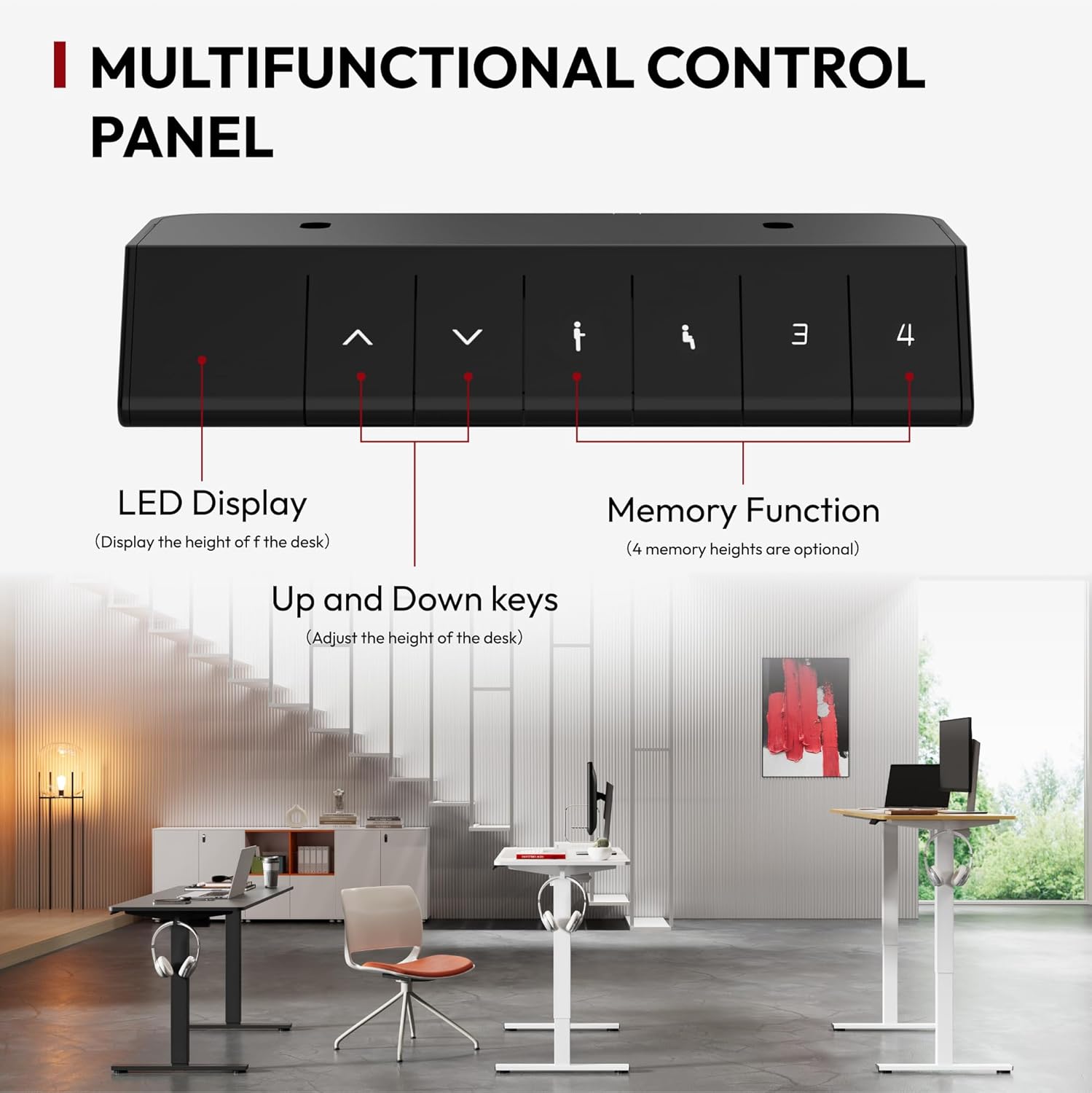
Image 4.1: Visual representation of the desk's minimum (28.9") and maximum (46.5") height settings.
4.2. Memory Presets
The control panel includes three programmable memory buttons (1, 2, 3) to save and recall your preferred sitting and standing heights.
- To Save a Height: Adjust the desk to your desired height using the Up/Down keys. Press the M button, then immediately press one of the number buttons (1, 2, or 3) to save the current height to that preset. The LED display will confirm the setting.
- To Recall a Height: Press the corresponding number button (1, 2, or 3). The desk will automatically move to the saved height.
4.3. Prolonged Sitting Reminder
The desk features a prolonged sitting reminder function to encourage movement. Refer to your specific control panel instructions for activation and customization of this feature, as it may vary.

Image 4.2: Detailed view of the multifunctional control panel, highlighting the LED display, Up/Down keys, and memory function buttons.
5. Maintenance
Regular maintenance ensures the longevity and optimal performance of your standing desk.
- Cleaning: Wipe the desktop and frame with a soft, damp cloth. Avoid abrasive cleaners or harsh chemicals that could damage the finish.
- Check Connections: Periodically inspect all electrical connections and mechanical fasteners to ensure they are secure. Tighten any loose screws.
- Lubrication: The lifting columns are generally maintenance-free. Do not apply lubricants unless specifically instructed by the manufacturer.
- Weight Distribution: Distribute weight evenly across the desktop to prevent strain on the lifting mechanism.
6. Troubleshooting
If you encounter issues with your SANODESK Electric Standing Desk, refer to the following common troubleshooting steps:
| Problem | Possible Cause | Solution |
|---|---|---|
| Desk does not move | Power cord disconnected; Motor cable loose; Overload; Safety stop activated. | Check power connection; Reconnect motor cables; Reduce weight on desk; Perform a reset (see below). |
| Uneven height adjustment | Uneven weight distribution; Obstruction; Need for reset. | Redistribute weight; Clear obstructions; Perform a reset. |
| Error code on display | Specific system error. | Refer to the specific error code in your detailed manual or contact customer support. A reset may resolve some errors. |
6.1. Reset Procedure
If the desk is not functioning correctly, a reset may resolve the issue. The exact reset procedure can vary, but a common method is:
- Disconnect the power cord from the wall outlet.
- Wait for at least 10-15 seconds.
- Reconnect the power cord.
- Press and hold the 'Down' button until the desk reaches its lowest position and slightly rebounds, then release. This typically calibrates the system.
If the problem persists after troubleshooting, please contact SANODESK customer support.
7. Specifications
| Feature | Detail |
|---|---|
| Brand | SANODESK |
| Model | 63x24 |
| Product Dimensions (D x W x H) | 24"D x 63"W x 29"H (at lowest setting) |
| Color | Black Frame + Black Top |
| Style | Modern |
| Base Material | Alloy Steel |
| Top Material Type | Wood |
| Finish Type | Wood |
| Furniture Leg Material | Alloy Steel |
| Included Components | Desk, Keyboard Tray, Monitor Arm (Note: Components may vary by package) |
| Minimum Height | 28.9 Inches |
| Maximum Height | 46.5 Inches |
| Tabletop Thickness | 1 Inch |
| Maximum Weight Recommendation | 176 Pounds (80 kg) |
| Required Assembly | Yes |
| UPC | 810072861979 |
8. Warranty Information
The SANODESK Electric Standing Desk comes with a Lifetime Warranty. This warranty covers manufacturing defects and ensures the product's quality and durability under normal use. Please retain your proof of purchase for warranty claims.
For specific terms and conditions of the warranty, please refer to the documentation included with your product or contact SANODESK customer support.
9. Customer Support
If you have any questions, require assistance with assembly, operation, or troubleshooting that is not covered in this manual, please contact SANODESK customer support.
For the most up-to-date contact information, please visit the official SANODESK website or refer to the contact details provided in your product packaging.


