
Rossmax HC700 BT
Rossmax HC700 BT Non-Contact Telephoto Thermometer User Manual
Model: HC700 BT | Brand: Rossmax
Introduction
The Rossmax HC700 BT Non-Contact Telephoto Thermometer is designed for accurate and convenient temperature measurement. Utilizing telephoto technology, it allows for non-contact temperature readings, making it ideal for various applications including body temperature and object temperature measurement. This device is Bluetooth enabled for seamless data transfer and features a quick 1-second measurement time.

Figure 1: The Rossmax HC700 BT Non-Contact Telephoto Thermometer, showing its ergonomic design and digital display.
Safety Information
Please read all instructions carefully before using this device. Improper use may result in inaccurate readings or harm.
- Do not immerse the thermometer in water or other liquids.
- Keep the device away from direct sunlight, dust, and extreme temperatures.
- Do not drop the thermometer or subject it to strong shocks.
- Ensure the measurement distance is within 10cm (3.94 inches) for accurate readings.
- This device is intended for indoor use only.
- Consult a physician if you have concerns about temperature readings.
Product Features
- Bluetooth Low Energy Technology for connectivity.
- Telephoto temperature measurement distance within 10cm (3.94 inches).
- Rapid 1-second measurement time.
- Stores up to 9 memories for tracking temperature changes.
- Capable of measuring both Temple temperature and Object temperature.
- Switchable temperature units: °C (Celsius) / °F (Fahrenheit).
- Equipped with a backlight for easy reading in low light conditions.
- Automatic shut-off feature to conserve battery life.
- Low battery indicator for timely battery replacement.
- Self-diagnosis function for malfunction detection.
Package Contents
The Rossmax HC700 BT Non-Contact Telephoto Thermometer package includes:
- 1 x Rossmax HC700 BT Non-Contact Telephoto Thermometer
Note: Batteries may or may not be included depending on the region and packaging. Please refer to the product packaging for exact contents.
Setup
Battery Installation
The Rossmax HC700 BT thermometer operates on batteries. To install or replace batteries:
- Locate the battery compartment cover, usually at the base of the handle.
- Slide or unclip the cover to open the compartment.
- Insert new batteries, ensuring correct polarity (+/-) as indicated inside the compartment.
- Close the battery compartment cover securely.
Initial Power On
After battery installation, press the power button to turn on the device. The display will show a brief self-test before entering standby mode, ready for measurement.
Bluetooth Pairing
To connect your thermometer to a compatible device via Bluetooth:
- Ensure Bluetooth is enabled on your smartphone or tablet.
- Download and install the official Rossmax health application (if available) from your device's app store.
- Follow the pairing instructions within the application to connect the thermometer. The thermometer's display may show a Bluetooth icon when successfully connected.

Figure 2: Demonstrating the use of the Rossmax HC700 BT thermometer for temple temperature measurement on an infant.
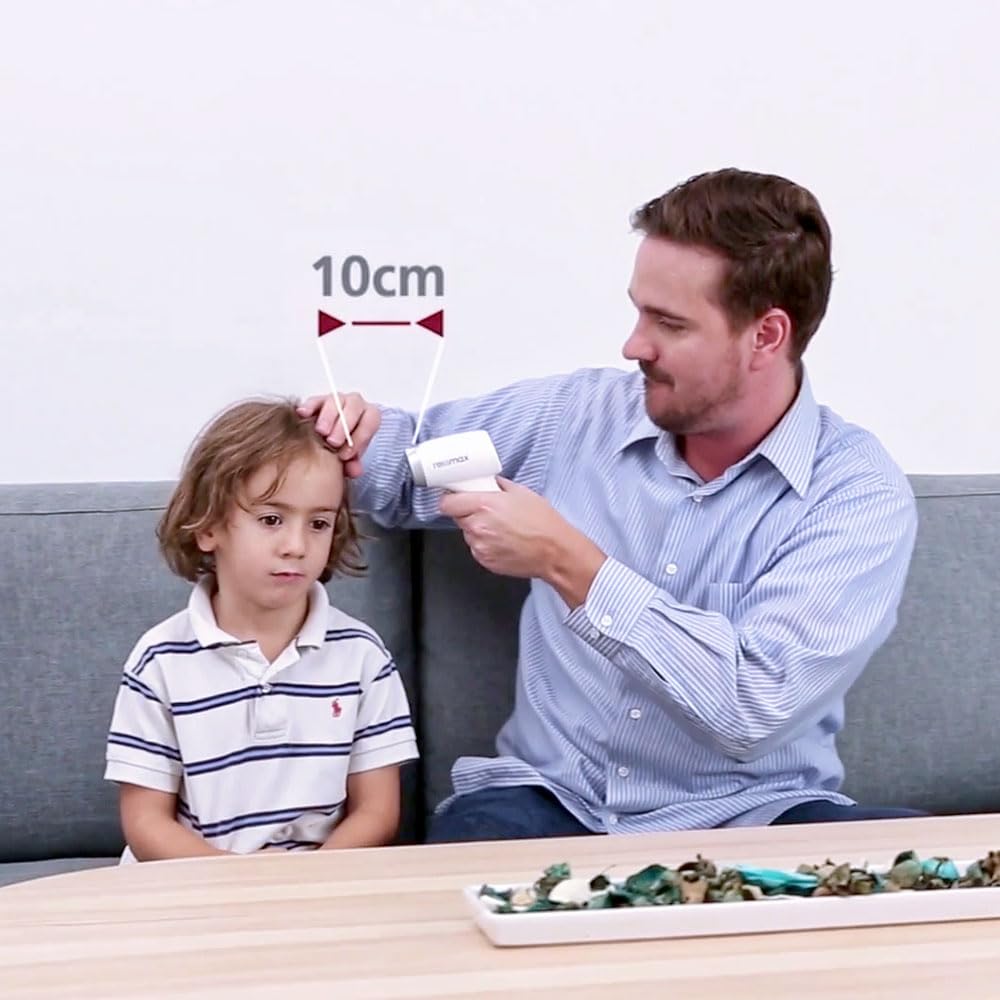
Figure 3: Illustrating the optimal 10cm measurement distance for accurate readings with the Rossmax HC700 BT thermometer.
Operating Instructions
Taking a Measurement (Temple/Object)
- Turn on the thermometer by pressing the power button.
- Select the desired measurement mode (Temple or Object) if applicable, usually by pressing a mode button. Refer to the device's specific button layout.
- Point the thermometer at the center of the temple or the object surface, ensuring the distance is within 10cm (3.94 inches).
- Press the measurement button. The reading will appear on the display within 1 second.
- A beep may sound to indicate the completion of the measurement.
Switching Temperature Units (°C / °F)
To switch between Celsius and Fahrenheit:
- With the device powered on, locate the °C/°F switch button (if present) or follow the instructions in the full user manual for button combinations to change units.
- The display will update to show the selected unit.
Recalling Memories
The thermometer stores up to 9 previous measurements. To recall them:
- While the device is on, press the memory button (often labeled 'M' or similar).
- Each subsequent press will cycle through the stored readings from most recent to oldest.
Maintenance and Care
- Cleaning: Wipe the thermometer's surface with a soft, dry cloth. For disinfection, use a cloth lightly dampened with alcohol (70% isopropyl alcohol). Do not use abrasive cleaners or immerse the device in water.
- Storage: Store the thermometer in a cool, dry place, away from direct sunlight and extreme temperatures.
- Battery Replacement: Replace batteries promptly when the low battery indicator appears to ensure accurate readings.
- Calibration: This device is factory calibrated. If you suspect a calibration issue, contact Rossmax customer support.
Troubleshooting
| Problem | Possible Cause | Solution |
|---|---|---|
| No display/Device won't turn on | Dead or incorrectly installed batteries. | Check battery polarity; replace with new batteries. |
| Inaccurate readings | Incorrect measurement distance; dirty sensor; environmental factors. | Ensure 10cm distance; clean sensor gently; avoid drafts or direct sunlight. |
| Bluetooth connection failure | Bluetooth off on device; app not running; interference. | Ensure Bluetooth is on; restart app/thermometer; move closer to paired device. |
| "LO" or "HI" displayed | Temperature out of measurement range. | Ensure measurement is within specified operating range. |
Specifications
| Model Name | HC700 BT |
| Brand | Rossmax |
| Special Feature | Non Contact, High Accuracy |
| Colour | White |
| Age Range (Description) | Adult (Suitable for all ages with proper use) |
| Included Components | 1 Thermometer unit |
| Outer Material | Glass (likely referring to the lens/sensor area) |
| Specification Met | CE |
| Display Type | Digital |
| Connectivity Technology | Bluetooth |
| Product Care Instructions | Wipe Clean |
| Power Source | Battery Operated |
| Item Length | 18 Centimetres |
| Upper Temperature Rating | 1E+2 Degrees Fahrenheit (This value is ambiguous, typically thermometers have a range, not just an upper limit. Please refer to the full product manual for precise range.) |
| Response Time | 1000 Milliseconds (1 second) |
| Reusability | Rechargeable (Refers to the device's ability to be used multiple times, not necessarily battery type) |
| Immersion Depth | 10 Centimetres (Measurement distance) |
| Indoor/Outdoor Usage | Indoor |
| Number of Memory Sticks | 1 (Refers to memory capacity for 9 readings) |
Warranty and Support
Rossmax products are manufactured to high-quality standards. For specific warranty terms and conditions, please refer to the warranty card included with your product or visit the official Rossmax website.
For technical support, service, or inquiries, please contact Rossmax customer service. Manufacturer contact information provided in the product details is: Info@rossmax.com.
Please retain your purchase receipt as proof of purchase for warranty claims.
Related documentsHC700 BT


Ask a question about this manual
Ask about setup, troubleshooting, compatibility, parts, safety, or missing instructions. Manuals+ will review the question and use this page’s manual context to help answer it.