
1. Introduction
This manual provides comprehensive instructions for the assembly, operation, and maintenance of your SANODESK Electric Height Adjustable 3 Leg Corner Desk Frame, Model E2L. Please read this manual thoroughly before installation and use to ensure proper function and safety.

Image 1.1: Overview of the SANODESK Electric Height Adjustable 3 Leg Corner Desk Frame.
Video 1.2: SANODESK L-Shaped Standing Desk - A general overview of the product's features and benefits.
2. Important Safety Instructions
To prevent injury or damage, always follow these safety guidelines:
- Ensure proper assembly for stability. Refer to the assembly section for detailed steps.
- Do not exceed the maximum weight capacity of 220 pounds (99.79 kg).
- Exercise caution when adjusting the desk height. Keep hands and objects clear of moving parts.
- Keep the desk away from water and moisture to prevent electrical hazards.
- Only use the provided power adapter and cables.
- Do not allow children to operate the desk without adult supervision.
- Regularly inspect all fasteners and connections to ensure they are secure.
3. Package Contents
Verify that all components are present before beginning assembly. Refer to the image below for a visual guide.

Image 3.1: All components included in the SANODESK E2L package.
- 3 Lifting Columns (Legs)
- 3 Desk Feet (Long and Short sides)
- 2 Crossbeams (Adjustable)
- 1 Middle Column Connecting Joining Plate
- 2 Drive Rods
- Support Plates
- Control Box
- Handset (Control Panel)
- Power Adapter and Cable
- Assembly Hardware (Screws, Allen wrenches, etc.)
- Cable Management Clips
4. Assembly Instructions
Follow these steps carefully for proper assembly. It is recommended to have two people for certain steps.
4.1. Install Middle Column Connecting Joining Plate
Attach the middle column connecting joining plate to the central leg using the provided screws and Allen wrench.
Video 4.1: E2L Installation Guide (Right Return) - Demonstrates attaching the middle column joining plate and subsequent steps.
4.2. Install Desk Feet
Secure the long and short desk feet to the bottom of each lifting column using the appropriate screws. Ensure they are firmly attached for stability.

Image 4.2: Illustration of desk feet installation on the lifting columns.
4.3. Install Crossbeams
Attach the long and short crossbeams between the lifting columns. Loosen the screws on the crossbeams to extend them as needed to fit your desktop size. Tighten securely once positioned.
4.4. Install Drive Rods
Insert the drive rods into the designated slots in the crossbeams and motors. Ensure they are properly seated and tightened to allow for smooth height adjustment.
4.5. Install Support Plates
Attach the support plates to the frame, providing additional stability and mounting points for the desktop.
4.6. Install Desktop
If your desktop comes in multiple pieces, connect them using the provided dowels and connecting plates. Place the assembled frame onto the desktop, aligning the pilot holes. Secure the frame to the desktop using the provided screws. Attach any additional support tubes to the desktop.

Image 4.6: Example of an L-shaped desktop configuration with the frame.
4.7. Install Controller and Wiring
Mount the control panel (handset) and control box to the underside of the desktop. Connect all motor cables, the control panel cable, and the power adapter to the control box. Ensure all connections are secure. Install any baffles or cable management clips to organize wiring.

Image 4.7: Close-up of the SANODESK E2L control panel.
Video 4.7.1: E2L Installation Guide (Left Return) - Provides visual guidance for the assembly process, including wiring.
5. Operating Instructions
5.1. Height Adjustment
Use the up (▲) and down (▼) buttons on the control panel to adjust the desk height. The current height is displayed on the LED screen.
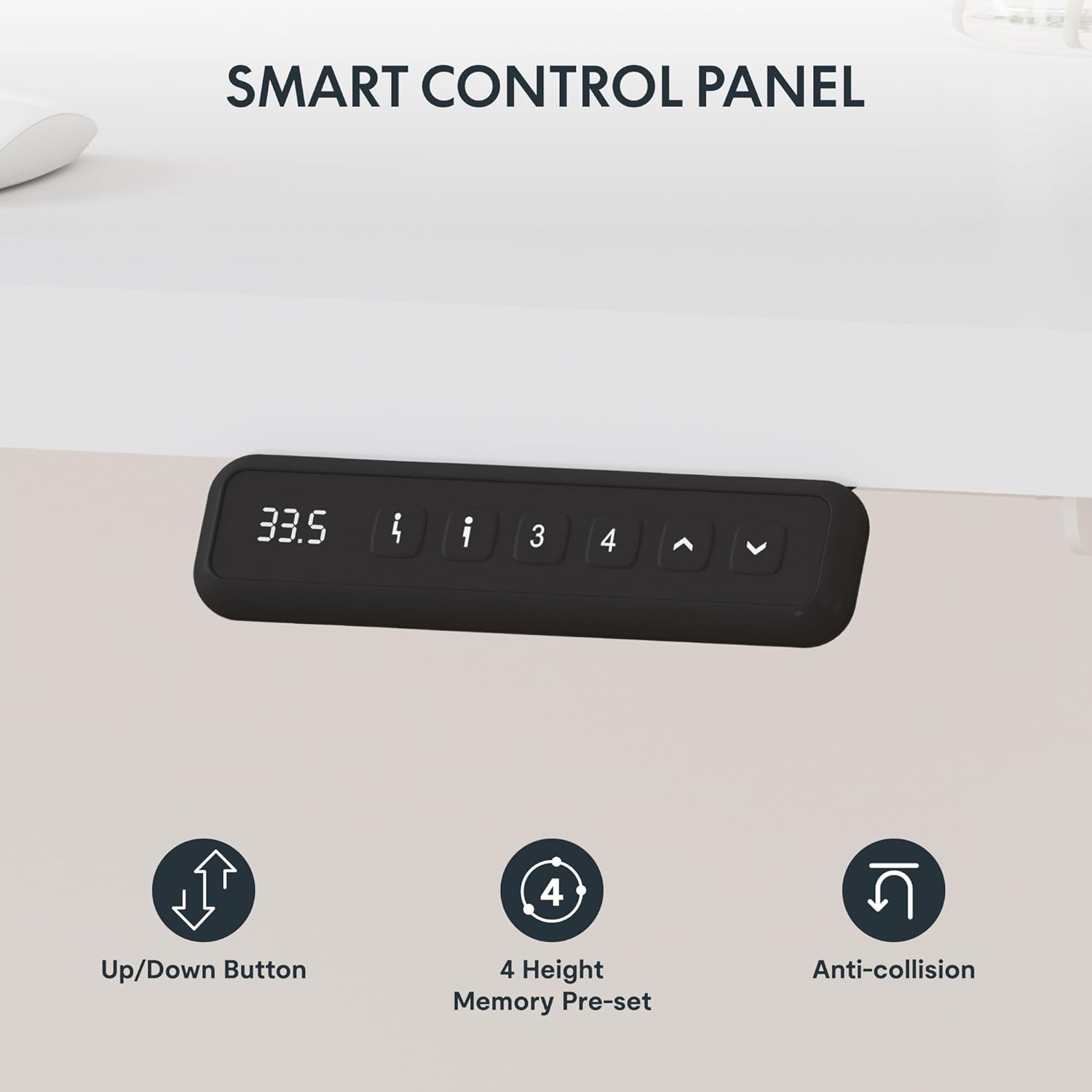
Image 5.1: Demonstrating the smooth height adjustment feature of the desk.
5.2. Memory Presets
The control panel features four memory preset buttons (1, 2, 3, 4). To save a height setting:
- Adjust the desk to your desired height.
- Press the "M" or "Set" button (if available, otherwise hold the number button).
- Press the desired number button (1-4) until the display confirms the setting is saved.
To recall a saved height, simply press the corresponding number button.
5.3. Anti-Collision Feature
The desk is equipped with an anti-collision system. If the desk encounters an obstacle during height adjustment, it will automatically stop and slightly reverse direction to prevent damage.

Image 5.3: Visual representation of the anti-collision mechanism.
6. Maintenance
- Cleaning: Wipe the desk frame and desktop with a soft, damp cloth. Avoid abrasive cleaners or solvents.
- Inspection: Periodically check all screws and connections to ensure they are tight. Re-tighten if necessary.
- Cable Management: Keep cables organized using the provided clips to prevent snagging or damage during height adjustments.
- Weight Limit: Do not overload the desk beyond its specified weight capacity to maintain optimal performance and longevity.
7. Troubleshooting
If you encounter issues with your desk, refer to the following common problems and solutions:
| Problem | Possible Cause | Solution |
|---|---|---|
| Desk does not move. | Power cable disconnected, motor cable loose, overload. | Check all power and motor connections. Reduce weight on the desk. |
| Desk moves unevenly or makes unusual noises. | Loose connections, uneven weight distribution, drive rod issue. | Ensure all screws are tight. Redistribute weight evenly. Check drive rod installation. |
| Height presets not working. | Incorrect programming, power cycle needed. | Re-program the memory presets. Unplug the desk for 30 seconds and plug back in. |
| Anti-collision feature is too sensitive or not working. | Sensor obstruction, sensitivity setting. | Ensure no objects are near the legs. Consult manufacturer for sensitivity adjustment if applicable. |
8. Product Specifications
| Feature | Detail |
|---|---|
| Brand | SANODESK |
| Model Number | E2L |
| Product Dimensions | 63"D x 62"W x 27.5"H (Frame Only) |
| Maximum Height | 47.2 inches |
| Minimum Height | 27.5 inches |
| Color | White (Frame) |
| Base Material | Metal (Alloy Steel) |
| Maximum Weight Recommendation | 220 Pounds (99.79 kg) |
| Required Assembly | Yes |
| Recommended Number of People for Assembly | 2 |
| Is Electric | Yes |
9. Warranty and Support
This SANODESK product comes with a full warranty. For specific warranty details, claims, or technical support, please refer to the manufacturer's official website or contact their customer service directly.
For additional resources, you may visit the SANODESK Store on Amazon.


