
SANODESK QS2W
SANODESK 4-Leg Standing Desk User Manual
Model: QS2W
1. Introduction
This manual provides comprehensive instructions for the assembly, operation, and maintenance of your SANODESK 4-Leg Electric Height Adjustable Standing Desk. Please read this manual thoroughly before assembly and use to ensure safe and efficient operation.
The SANODESK 4-Leg Standing Desk is designed to provide a versatile and ergonomic workspace. Key features include:
- Wide Workspace: A generous 70.9"x31.5" surface for multi-tasking.
- Solid Build: Robust four-legged structure for stability, supporting up to 220lbs.
- Thoughtful Design: Three spliced panels for easier installation and a collision avoidance feature for safety.
- Adjustable Height: Electric height adjustment from 28.7" to 47.2" for comfortable sitting or standing positions.
- Quiet Operation: Operates with less than 50db noise for a tranquil environment.

Figure 1.1: SANODESK 4-Leg Standing Desk (White, 71x32 inches) with multiple devices.
2. Safety Information
To ensure safe operation and prevent injury or damage, please adhere to the following safety guidelines:
- Weight Limit: Do not exceed the recommended maximum weight capacity of 176 pounds (80 kg). Exceeding this limit may cause damage to the desk or lead to injury.
- Assembly: Improper assembly can lead to instability or malfunction. Follow all assembly instructions carefully.
- Operation: Always use the electric lifting mechanism responsibly. Ensure the desk is stable and clear of obstructions before adjusting its height.
- Collision Avoidance: The desk is equipped with a collision avoidance feature. However, always be aware of your surroundings and ensure no objects are in the path of the desk during height adjustments.
- Children and Pets: Keep children and pets away from the desk during operation to prevent accidents.
- Power Cord: Ensure the power cord is not pinched or damaged. Do not operate the desk with a damaged cord.
- Environment: Use the desk in a dry indoor environment. Avoid exposure to moisture or extreme temperatures.
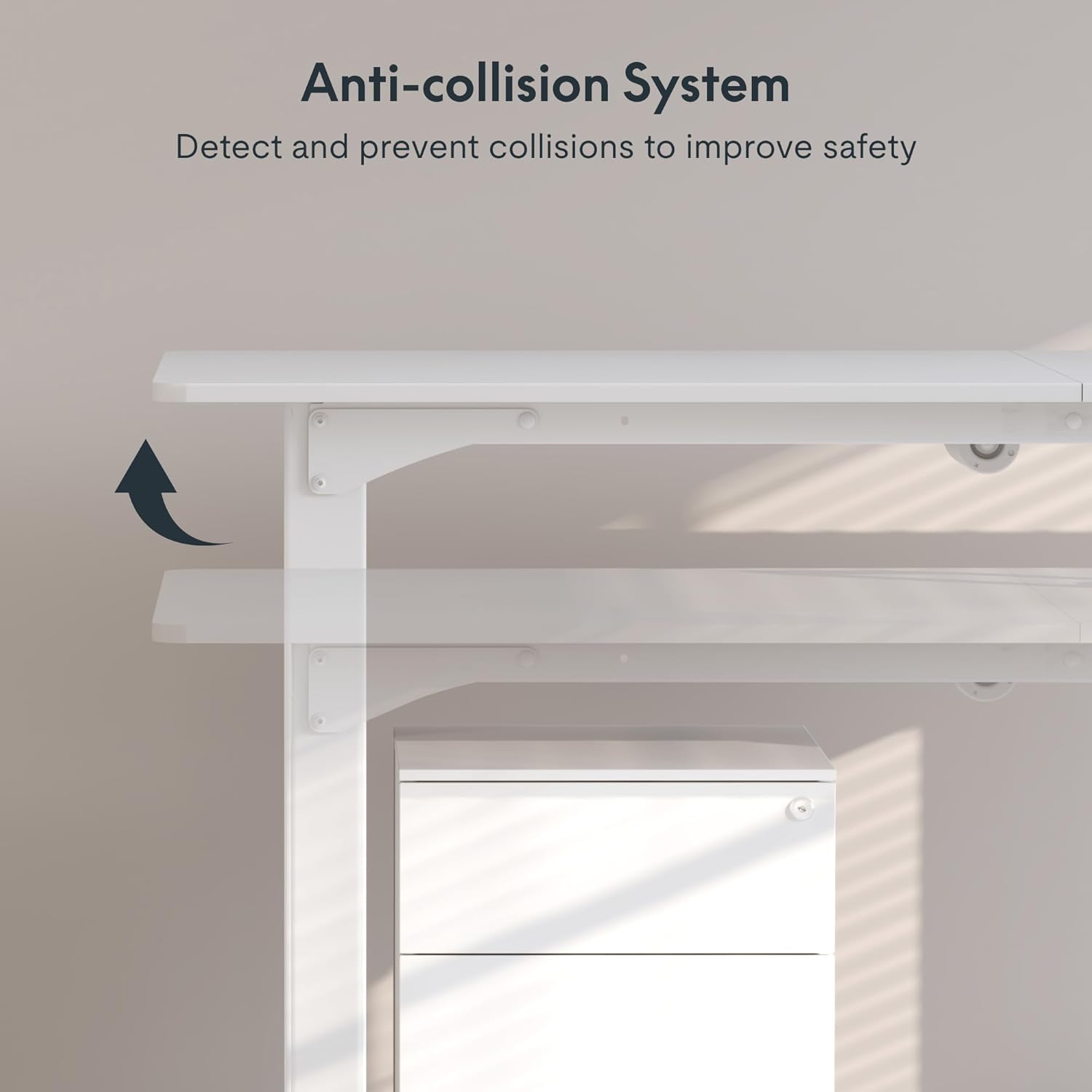
Figure 2.1: Illustration of the Anti-collision System, designed to detect and prevent collisions for improved safety.
3. Package Contents
The SANODESK 4-Leg Standing Desk package includes all necessary components for assembly. While a detailed list of every nut and bolt is not provided here, the main components typically include:
- Desktop panels (three spliced sections for easier handling)
- Four adjustable legs with integrated motors
- Control box and digital keypad
- Power adapter and cable
- Assembly hardware (screws, bolts, tools)
- User manual / Installation guide
Upon receiving your package, please inspect all components for any damage or missing parts. If any issues are found, contact customer support immediately.
4. Setup and Assembly
Assembly of the SANODESK 4-Leg Standing Desk requires careful attention to detail. An official Installation Manual (PDF) is available for detailed step-by-step instructions. It is highly recommended to refer to this document during assembly.
Key Assembly Points:
- The desktop consists of three spliced panels, designed to reduce the weight burden during installation.
- Ensure all electrical connections for the motors and control panel are securely fastened.
- Place the desk on a flat, stable surface during assembly.
- All necessary assembly tools are included with the package.
For detailed assembly instructions, please download the official Installation Manual (PDF) from the following link: SANODESK Installation Manual.

Figure 4.1: The robust steel frame structure provides enhanced stability for the desk.
5. Operating Instructions
Your SANODESK standing desk features an electric height adjustment system with memory presets for convenient operation.
5.1 Digital Keypad Functions
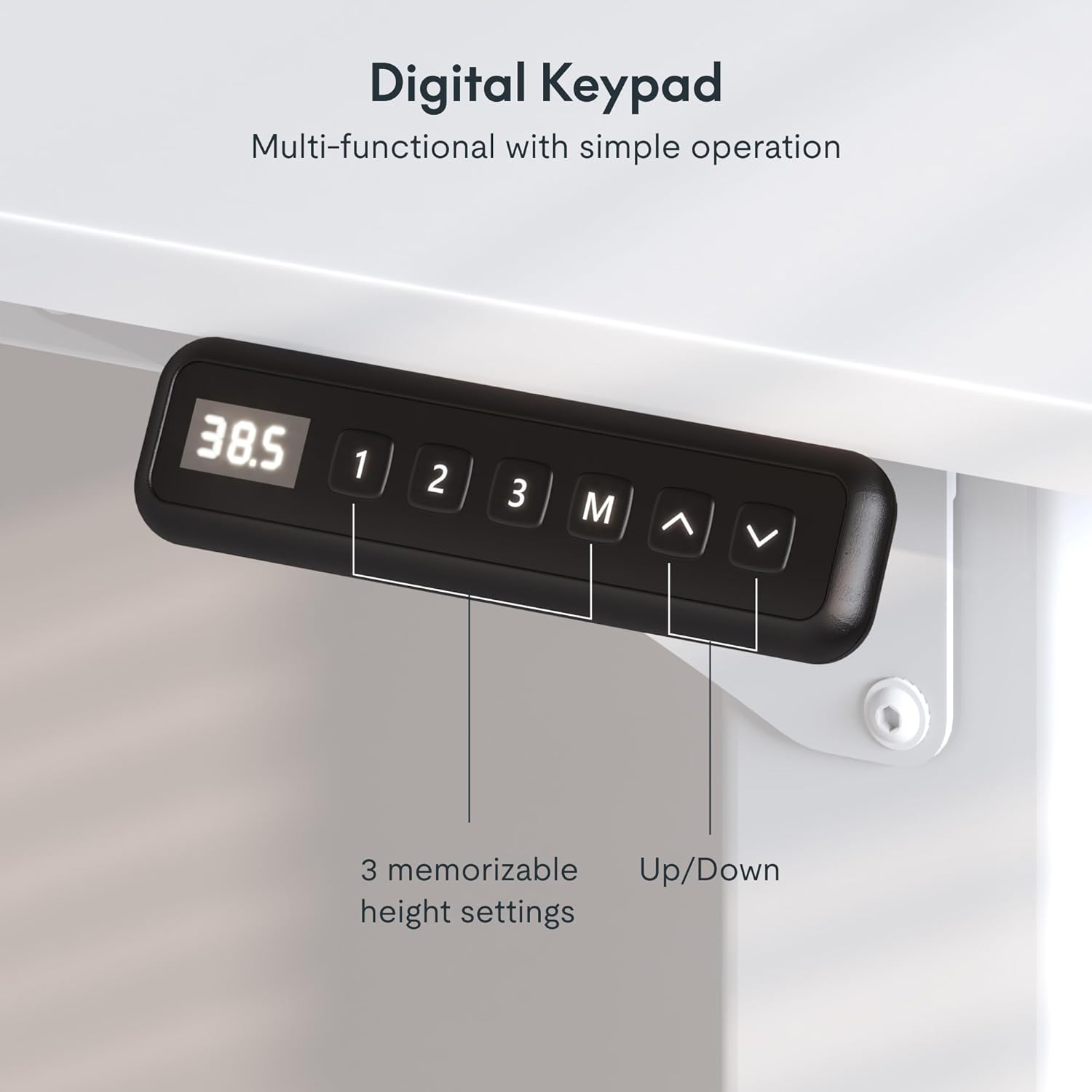
Figure 5.1: Digital Keypad for height adjustment and memory presets.
- Up/Down Arrows (^ / v): Press and hold to manually adjust the desk height. The desk will move smoothly and quietly (less than 50db) between 28.7 inches and 47.2 inches.
- Memory Presets (1, 2, 3): These buttons allow you to save and recall preferred desk heights.
- To Save a Preset: Adjust the desk to your desired height using the up/down arrows. Press the 'M' button, then press the desired number button (1, 2, or 3) within 3 seconds. The display will confirm the setting.
- To Recall a Preset: Simply press the corresponding number button (1, 2, or 3). The desk will automatically move to the saved height.
- 'M' Button: Used in conjunction with the number buttons to save memory presets.
5.2 Collision Avoidance System
The desk is equipped with an anti-collision system. If the desk encounters an obstruction during height adjustment, it will automatically stop and reverse slightly to prevent damage. While this system enhances safety, always ensure the path of the desk is clear before operation.
6. Maintenance
Proper maintenance ensures the longevity and optimal performance of your SANODESK standing desk.
- Cleaning: Wipe the desk surface and frame with a dry, soft cloth. Avoid using abrasive cleaners or harsh chemicals that could damage the finish.
- Inspections: Periodically check all screws and bolts to ensure they are tight. Re-tighten if necessary.
- Cable Management: Ensure all cables are neatly managed and not pinched by the moving parts of the desk.
- Weight Distribution: Distribute weight evenly across the desktop to prevent undue stress on the lifting mechanism.
7. Troubleshooting
If you encounter issues with your SANODESK standing desk, refer to the following common troubleshooting steps:
| Problem | Possible Cause | Solution |
|---|---|---|
| Desk does not move. | Power cable disconnected; control box issue; motor issue. | Check if the power cable is securely plugged into the wall outlet and the control box. Ensure all motor cables are connected. Try resetting the desk by unplugging it for 30 seconds and plugging it back in. |
| Desk moves unevenly or makes unusual noise. | Uneven weight distribution; loose connections; obstruction. | Ensure weight is evenly distributed. Check all assembly screws for tightness. Inspect for any obstructions under or around the desk. |
| Height presets are not working. | Presets not saved correctly. | Re-save your desired height presets by adjusting the desk to the desired height, pressing 'M', then pressing the number button (1, 2, or 3). |
| Anti-collision system triggers frequently. | Obstruction; sensitivity setting. | Ensure there are no objects in the desk's path. Refer to the full manual for potential sensitivity adjustments if available. |
If the problem persists after attempting these solutions, please contact SANODESK customer support for further assistance.
8. Specifications
| Feature | Detail |
|---|---|
| Brand | SANODESK |
| Model Number | QS2 |
| Model Name | QS2W |
| Product Dimensions (D x W x H) | 32"D x 71"W x 28.7"H |
| Color | White |
| Style | Modern |
| Base Material | Metal |
| Top Material Type | Engineered Wood |
| Finish Type | Stainless Steel |
| Special Feature | Corded, Electric Height Adjustment, Memory Presets, Anti-collision System |
| Recommended Uses | Working (Home Office, Classroom, Dormitory, Study Room) |
| Lifting Mechanism | Electric |
| Frame Joint Type | Four-legged |
| Minimum Height | 28.7 inches (Adjustable from 28.7" to 47.2") |
| Maximum Height | 47.2 inches |
| Maximum Weight Recommendation | 176 Pounds (80 kg) |
| Noise Level | Less than 50db |
| Required Assembly | Yes |
| UL Listed | Yes |
| UPC | 810072841438 |

Figure 8.1: Key dimensions of the SANODESK 4-Leg Standing Desk.

Figure 8.2: The desk supports a maximum load capacity of up to 176 lbs.
9. Warranty and Support
9.1 Return Policy
The product is eligible for a 30-day return policy, allowing for a refund or replacement within this period. Please refer to the retailer's specific return guidelines for full details.
9.2 Protection Plans
Extended protection plans are available for purchase to provide additional coverage beyond the standard return policy. Options include:
- 2-Year Protection Plan
- 3-Year Protection Plan
- Complete Protect: A monthly plan covering eligible past and future purchases.
For details on pricing and coverage, please consult the retailer's product page or contact their customer service.
9.3 Customer Support
For any questions, technical assistance, or warranty claims, please contact SANODESK customer support. Contact information can typically be found on the official SANODESK website or through your purchase platform.
You can also visit the SANODESK Store on Amazon for more information and support resources.
Related documentsQS2W


Ask a question about this manual
Ask about setup, troubleshooting, compatibility, parts, safety, or missing instructions. Manuals+ will review the question and use this page’s manual context to help answer it.