
SANODESK E5
SANODESK E5 Dual Motor 3-Stage Electric Height Adjustable Standing Desk Frame User Manual
Model: E5 / E5W
Introduction
Thank you for choosing the SANODESK E5 Dual Motor 3-Stage Electric Height Adjustable Standing Desk Frame. This manual provides essential information for the safe and efficient assembly, operation, and maintenance of your new desk frame. Please read it thoroughly before use and retain it for future reference.
The SANODESK E5 frame is designed to support a desktop (not included) and allows for seamless transitions between sitting and standing positions, promoting a healthier work environment. It features dual motors for stable and quiet operation, a 3-stage lifting system for a wide height range, and a programmable control panel with memory presets.
Safety Information
- Ensure all components are securely fastened before use.
- Keep children and pets away from the desk during operation.
- Do not place hands or other objects in the path of moving parts.
- Do not overload the desk. The maximum load capacity is 220 lbs (100 kg).
- Only use the provided power adapter.
- Disconnect power before cleaning or maintenance.
- If any unusual noise or movement occurs, immediately stop operation and unplug the power cord. Contact customer support if the issue persists.
Package Contents
Please verify that all parts are present before beginning assembly. If any parts are missing or damaged, contact SANODESK customer service.
- Desk Legs (2)
- Crossbar (1)
- Side Brackets (2)
- Control Box (1)
- Handset/Control Panel (1)
- Power Adapter (1)
- Power Cord (1)
- Hardware Kit (screws, wrenches, cable ties)

Image: All components of the SANODESK E5 electric height adjustable standing desk frame, including legs, crossbar, control box, and handset.
Setup and Assembly
Follow these steps to assemble your SANODESK E5 standing desk frame. It is recommended to have two people for assembly.
- Attach Side Brackets: Secure the side brackets to the lifting columns using the provided screws. Ensure they are oriented correctly to support your desktop.
- Assemble Crossbar: Connect the two halves of the crossbar and attach them to the lifting columns. Adjust the crossbar length to match your desired desktop width.
- Install Feet: Attach the feet to the bottom of each lifting column.
- Mount Control Box: Secure the control box to the underside of the crossbar using the provided screws.
- Connect Cables: Connect the motor cables from each leg to the control box. Connect the handset cable to the control box. Connect the power adapter to the control box and then to a power outlet.
- Attach Desktop: Carefully place your desktop onto the assembled frame. Align it as desired and secure it to the side brackets using appropriate screws (desktop screws may vary depending on desktop material).
- Cable Management: Use the included cable ties to organize and secure all cables, preventing them from interfering with the desk's movement.

Image: An exploded view diagram showing the assembly steps for the SANODESK E5 desk frame, illustrating how components like legs, crossbar, and control box connect.
Operating Instructions
Control Panel Functions
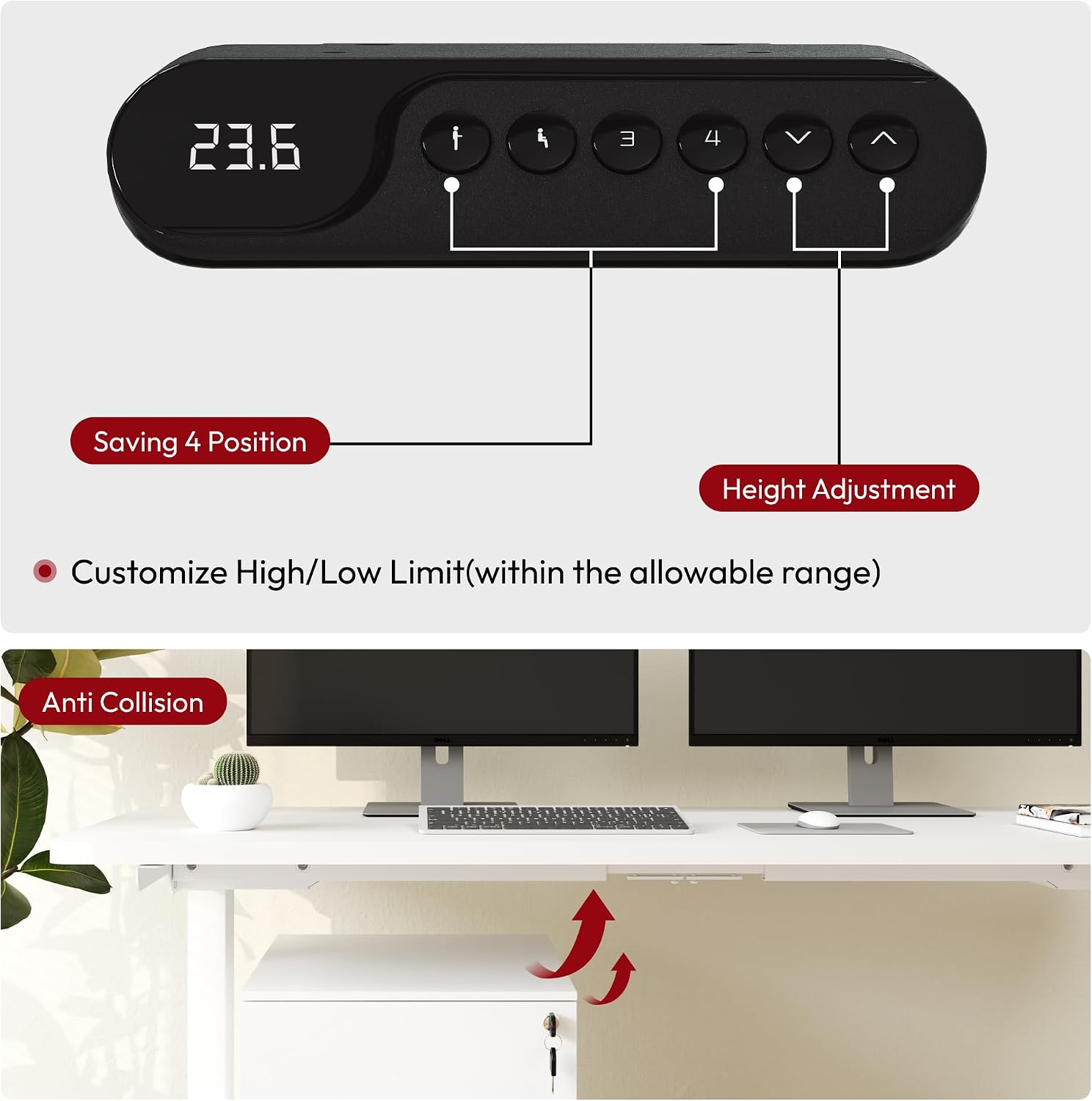
Image: Close-up of the SANODESK E5 control panel, showing the LED display, up/down arrows, and memory preset buttons (1, 2, 3, 4).
- Up/Down Arrows (▲ / ▼): Press and hold to adjust the desk height. Release to stop at the desired height.
- Memory Presets (1, 2, 3, 4): These buttons allow you to save and recall preferred sitting and standing heights.
- LED Display: Shows the current height of the desk in inches.
Setting Memory Presets
- Adjust the desk to your desired height using the up/down arrows.
- Press the "M" or "Set" button (if available, otherwise proceed to step 3). The display may flash.
- Press a number button (1, 2, 3, or 4) within 3 seconds. The current height is now saved to that preset.
Recalling Memory Presets
- Simply press the desired number button (1, 2, 3, or 4). The desk will automatically move to the saved height.
Sit-Stand Reminder
The control panel may include a sit-stand reminder function to encourage regular movement. Refer to the specific instructions for activating and customizing this feature, typically involving a timer setting.
Anti-Collision Feature
The desk is equipped with an anti-collision system. If the desk encounters an obstacle during height adjustment, it will automatically stop and reverse slightly to prevent damage. Ensure there are no obstructions in the desk's path during operation.

Image: Illustration demonstrating the anti-collision technology of the SANODESK E5, showing the desk stopping and reversing upon detecting an obstacle below.
Maintenance
- Cleaning: Wipe the desk frame with a soft, damp cloth. Avoid harsh chemicals or abrasive cleaners. Ensure the power is disconnected before cleaning.
- Cable Management: Periodically check and re-secure cables to prevent tangling or damage.
- Fasteners: Occasionally check all screws and bolts to ensure they are tight. Retighten if necessary.
- Movement Check: Operate the desk through its full height range periodically to ensure smooth and consistent movement.
Troubleshooting
| Problem | Possible Cause | Solution |
|---|---|---|
| Desk does not move. | No power, loose cable connection, overload. | Check power cord and connections. Reduce load on the desk. Perform a reset. |
| Desk moves unevenly or makes unusual noise. | Loose fasteners, obstruction, motor issue. | Check and tighten all fasteners. Remove any obstructions. Perform a reset. If problem persists, contact support. |
| Desk stops during adjustment (anti-collision activated). | Obstruction detected. | Remove the obstruction. Resume operation. |
| Control panel display shows an error code. | System error. | Perform a reset. If the error code persists, consult the specific error code guide (if provided separately) or contact customer support. |
| Desk only raises/lowers by rapidly pressing buttons, not holding. | Control box calibration issue, often after power cycle or significant weight change. | Reset Procedure: Lower the desk completely by rapidly pressing the down arrow. Disconnect all cables and power for 2 minutes. Reconnect everything and then press and hold the down arrow for 10 seconds until the desk reaches its lowest point and slightly rises, indicating a successful reset. |
Reset Procedure
If the desk is not functioning correctly, a reset may resolve the issue:
- Press and hold the down arrow button until the desk reaches its lowest position.
- Continue holding the down arrow button for approximately 5-10 seconds until the desk slightly lowers further, then rises slightly, indicating a successful reset.
- If this does not work, unplug the desk from the power outlet for at least 30 seconds, then plug it back in and repeat the reset procedure.
Specifications
| Brand: | SANODESK |
| Model Number: | E5 |
| Model Name: | E5W |
| Type: | Electric Height Adjustable Standing Desk Frame |
| Motor Type: | Dual Motor |
| Lifting System: | 3-Stage |
| Height Range: | 23.6" to 49.2" (60 cm to 125 cm) |
| Max Load Capacity: | 220 lbs (100 kg) |
| Noise Level: | < 50 dB |
| Frame Width Adjustment: | 110-170 cm (suitable for tabletops 120-200 cm wide) |
| Material: | Metal |
| Control Panel: | Programmable with 4 memory presets and sit-stand reminder |
| Safety Features: | Anti-collision technology, overload protection, overheating protection, overcurrent protection, power outage protection. UL certified. |
| UPC: | 810072837233 |

Image: Diagram illustrating the three-stage leg design and the continuous height adjustment range from 23.6 inches to 49.2 inches, with suggested ranges for different user heights.
Warranty Information
SANODESK provides the following limited warranty for this product:
- 5-Year Warranty: Covers the standing desk frames and motors.
- 2-Year Warranty: Covers the control panel and other electronic components.
This warranty covers defects in materials and workmanship under normal use. It does not cover damage caused by misuse, accidents, unauthorized modifications, or failure to follow the instructions in this manual. Please retain your proof of purchase for warranty claims.
Customer Support
If you have any questions, require assistance, or need to make a warranty claim, please contact SANODESK customer support:
- Website: Visit the official SANODESK website for FAQs and support resources.
- Email: Refer to your purchase documentation for specific support email addresses.
- Online Store: You can also visit the SANODESK Store on Amazon for product information and support options.
Related documentsE5


Ask a question about this manual
Ask about setup, troubleshooting, compatibility, parts, safety, or missing instructions. Manuals+ will review the question and use this page’s manual context to help answer it.