
SANODESK 156E
SANODESK Electric Standing Desk User Manual
Model: 156E | Size: 55x28 Inch | Color: Black Frame + Black Tabletop
1. Introduction
Thank you for choosing the SANODESK Electric Standing Desk. This manual provides essential information for the safe assembly, operation, and maintenance of your new height-adjustable desk. Please read these instructions thoroughly before use to ensure proper functionality and longevity of the product.

Image 1.1: SANODESK Electric Standing Desk in use.
2. Important Safety Information
To prevent injury or damage to your desk, always adhere to the following safety guidelines:
- Ensure all components are securely fastened before use.
- Do not exceed the maximum weight capacity of 176 lbs (80 kg).
- Keep children and pets away from the desk during height adjustments.
- Ensure there are no obstructions above or below the desk when adjusting its height.
- Do not sit or stand on the desk.
- Disconnect power before cleaning or performing maintenance.
- Use only the provided power adapter.
- If any unusual noise or movement occurs, immediately stop operation and consult the troubleshooting section or contact customer support.
Warning: Improper assembly or use can lead to product damage or personal injury.
3. Package Contents
Please verify that all parts are present and undamaged before beginning assembly. If any parts are missing or damaged, contact customer support.
| Item | Description | Quantity |
|---|---|---|
| A | Desktop (55x28 inch) | 1 |
| B | Lifting Columns (Legs) | 2 |
| C | Feet | 2 |
| D | Control Box | 1 |
| E | Handset (6-Button Controller) | 1 |
| F | Power Adapter | 1 |
| G | Cable Management Tray | 1 |
| H | Headphone Hook | 1 |
| I | Assembly Hardware (Screws, Allen Wrench, etc.) | 1 set |
4. Assembly Instructions
Assembly typically requires two people. All necessary tools are included. Follow these steps carefully:
- Attach Lifting Columns to Desktop: Place the desktop (A) upside down on a soft, clean surface to prevent scratches. Align the lifting columns (B) with the pre-drilled holes on the underside of the desktop. Secure them using the appropriate screws from the hardware kit (I).

Image 4.1: Secure the lifting columns to the desktop.
- Install Feet: Attach the feet (C) to the bottom of each lifting column (B) using the provided screws.

Image 4.2: Attach the stabilizing feet.
- Mount Control Box and Handset: Secure the control box (D) and handset (E) to the underside of the desktop in the designated areas using the provided screws. Ensure the handset is easily accessible for operation.

Image 4.3: Mount the control box and handset.
- Connect Cables: Connect the cables from the lifting columns (B) and the handset (E) to the control box (D). Then, connect the power adapter (F) to the control box. Route cables neatly using the cable management tray (G) if desired.

Image 4.4: Connect all necessary cables.
- Attach Headphone Hook: If included, attach the headphone hook (H) to the desired location on the underside of the desktop.

Image 4.5: Install the headphone hook.
- Initial Power-Up and Reset: Carefully flip the desk upright. Plug the power adapter into a wall outlet. The desk may require an initial reset. Press and hold the 'Down' button until the desk reaches its lowest point, then slightly rises and stops. This calibrates the desk.
5. Operating Instructions
Your SANODESK Electric Standing Desk features an intuitive 6-button controller for easy height adjustment and memory presets.
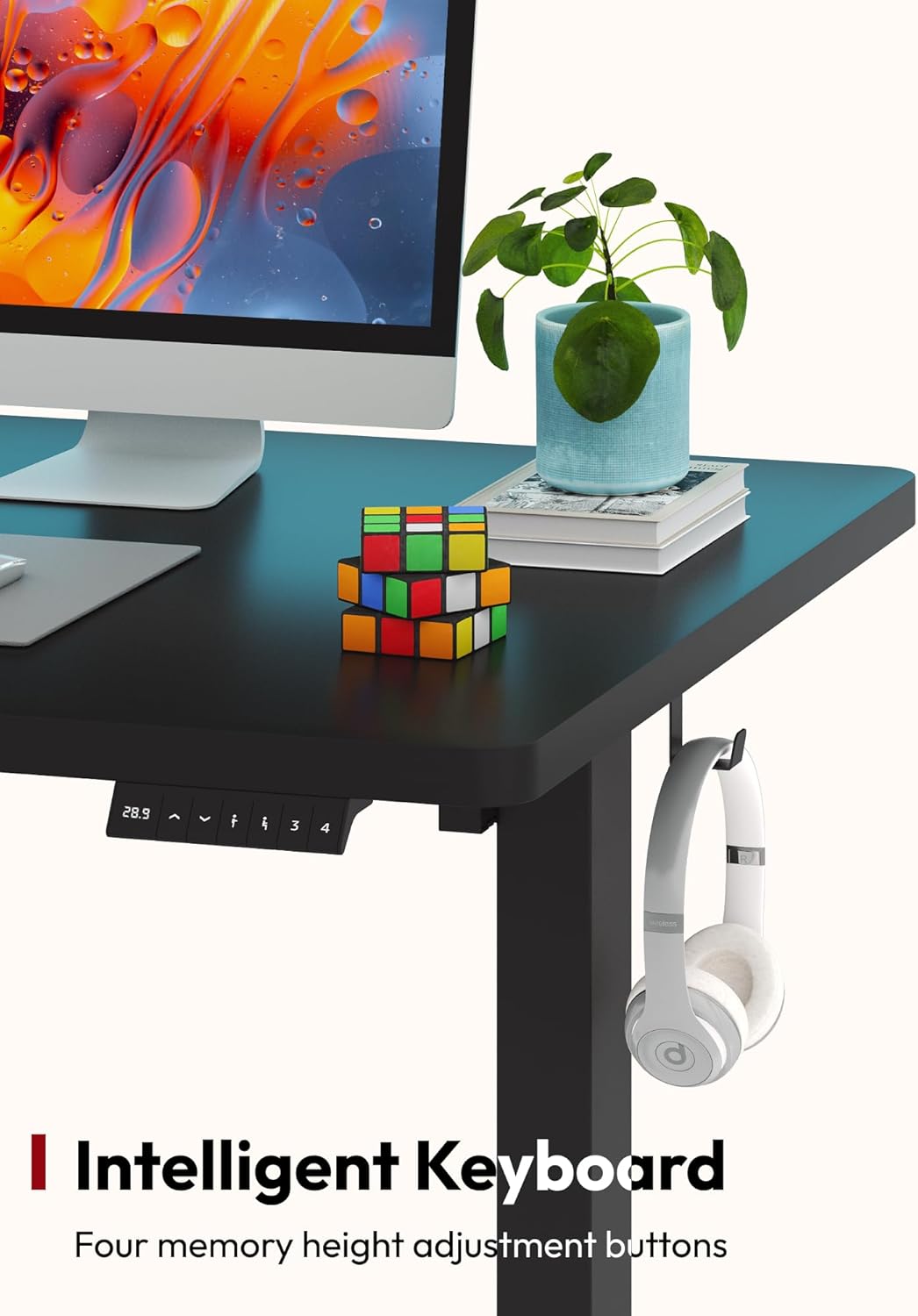
Image 5.1: The 6-Button Controller.
5.1 Basic Height Adjustment
- To Raise: Press and hold the 'Up' arrow button. The desk will move upwards. Release the button at your desired height.
- To Lower: Press and hold the 'Down' arrow button. The desk will move downwards. Release the button at your desired height.

Image 5.2: Desk height adjustment range from 28.1 to 45.7 inches.
5.2 Setting Memory Presets
The controller allows you to save up to four preferred heights for quick adjustments.
- Adjust the desk to your desired height using the 'Up' or 'Down' buttons.
- Press the 'M' button (Memory). The LED display will show 'S-'.
- Within 3 seconds, press one of the number buttons (1, 2, 3, or 4) to save the current height to that preset. The display will show 'S-1', 'S-2', etc., to confirm.
5.3 Using Memory Presets
To move the desk to a saved height, simply press the corresponding number button (1, 2, 3, or 4). The desk will automatically adjust to the saved position.
6. Maintenance
Regular maintenance ensures the optimal performance and appearance of your desk.
- Cleaning: Wipe the desktop and frame with a soft, damp cloth. Avoid abrasive cleaners or harsh chemicals that could damage the finish.
- Cable Management: Periodically check and organize cables to prevent tangles and ensure smooth operation.
- Fasteners: Occasionally check all screws and bolts to ensure they remain tight. Retighten if necessary.
- Obstruction Check: Before each adjustment, quickly check for any objects that might obstruct the desk's movement.
7. Troubleshooting
If you encounter issues with your SANODESK Electric Standing Desk, refer to the following common problems and solutions:
| Problem | Possible Cause | Solution |
|---|---|---|
| Desk does not move. | Power cable disconnected, control box cable loose, overload. | Check all cable connections. Reduce weight on the desk. Perform a reset (see Operating Instructions). |
| Desk moves unevenly or makes unusual noise. | Uneven weight distribution, loose fasteners, obstruction. | Distribute weight evenly. Check and tighten all assembly screws. Ensure no obstructions. Perform a reset. |
| Error code displayed (e.g., E01, E02). | Overload, motor overheating, sensor issue. | Remove weight from the desk. Unplug the desk for 20 minutes to allow motors to cool, then plug back in and perform a reset. If the error persists, contact customer support. |
| Memory presets not working. | Presets not saved correctly. | Re-save your desired heights following the 'Setting Memory Presets' instructions. |
If the problem persists after attempting these solutions, please contact SANODESK customer support for further assistance.
8. Specifications
| Feature | Detail |
|---|---|
| Model Number | 156E (810072824103) |
| Desktop Dimensions | 55" (W) x 28" (D) |
| Height Adjustment Range | 28.1 inches to 45.7 inches |
| Maximum Weight Capacity | 176 lbs (80 kg) |
| Material | Alloy Steel (Frame), Painted Wood (Desktop) |
| Controller Type | 6-Button with LED Display and 4 Memory Presets |
| Assembly Required | Yes (Recommended 2 people) |
| Included Components | Desktop, Lifting Columns, Feet, Control Box, Handset, Power Adapter, Cable Management Tray, Headphone Hook, Assembly Hardware |

Image 8.1: Product dimensions.
9. Warranty and Customer Support
9.1 Warranty Information
SANODESK provides a limited warranty for this product. Details regarding the specific terms and duration of the warranty are typically included with your purchase documentation or can be found on the official SANODESK website. Please retain your proof of purchase for warranty claims.
9.2 Customer Support
For any questions, concerns, or assistance with your SANODESK Electric Standing Desk, please contact our customer support team. You can typically reach us through the order page on the platform where you made your purchase, or by visiting the official SANODESK website for contact information.
We are committed to providing assistance and ensuring your satisfaction.
Related documents156E


Ask a question about this manual
Ask about setup, troubleshooting, compatibility, parts, safety, or missing instructions. Manuals+ will review the question and use this page’s manual context to help answer it.