
SANODESK E150
SANODESK E150 Electric Standing Desk User Manual
Model: E150 (120x60cm, White)
Introduction
Thank you for purchasing the SANODESK E150 Electric Standing Desk. This manual provides detailed instructions for the assembly, operation, and maintenance of your new desk. Please read this manual carefully before use to ensure proper function and safety. The SANODESK E150 is designed to offer a comfortable and ergonomic workspace with its adjustable height and smart features.

Image: The SANODESK E150 Electric Standing Desk, showcasing its clean white design and spacious tabletop.
Safety Information
Your safety is paramount. Please observe the following precautions:
- The desk automatically stops if an obstacle is detected during ascent or descent. This anti-collision feature helps prevent accidents.
- Overheat protection is a standard feature to prevent motor damage.
- To ensure maximum stability, firmly fix the desk to the floor if possible, or ensure it is placed on a stable, level surface.
- Keep children and pets away from the desk during operation.
- Do not overload the desk beyond its specified weight capacity of 60kg.
- Ensure all cables are properly managed to avoid entanglement during height adjustments.

Image: The anti-collision safety feature of the SANODESK E150, showing how the desk automatically stops when an obstacle is detected.
Setup
The SANODESK E150 is designed for straightforward assembly. Follow these general steps:
- Unpack Components: Carefully remove all parts from the packaging. Verify that all components listed in the packing list are present and undamaged.
- Assemble Legs: Attach the desk legs to the crossbar frame using the provided screws. Ensure all connections are secure.
- Attach Tabletop: Place the tabletop upside down on a soft, clean surface. Align the assembled leg frame with the pre-drilled holes on the tabletop and secure it with screws. Avoid overtightening screws, especially with MDF or composite wood tops, to prevent stripping.
- Install Control Panel: Mount the control panel to the underside of the desk in the desired position.
- Connect Cables: Connect the motor cables and control panel cable to the main control box. Ensure all connections are firm.
- Cable Management: Use the included cable ties or management accessories to organize cables neatly.
- Power On: Plug the power cord into a wall outlet.
Note: While assembly is generally simple, having an extra person can be helpful due to the weight of the components.
Operating Instructions
The SANODESK E150 offers intuitive controls for height adjustment and memory functions.
Height Adjustment
- Use the Up (▲) and Down (▼) buttons on the control panel to manually adjust the desk height.
- The desk can be adjusted smoothly from a minimum height of 71.5cm to a maximum height of 114cm.

Image: The smooth height adjustment range of the SANODESK E150, from 71.5cm to 114cm.
Memory Presets
The control panel features four memory buttons (1, 2, 3, 4) to save your preferred desk heights.
- Adjust the desk to your desired height using the Up/Down buttons.
- Press and hold one of the memory buttons (1, 2, 3, or 4) until the LED display shows 'S-' followed by the number, indicating the height has been saved.
- To recall a saved height, simply press the corresponding memory button once. The desk will automatically move to that preset height.

Image: The multi-function control panel with LED display and memory preset buttons.
Additional Features
- Under-Desk Storage Box: A convenient storage box is included for organizing cables and small items.
- Storage Hook: A hook is provided for hanging bags, headphones, or other accessories, with a maximum load capacity of 5kg.
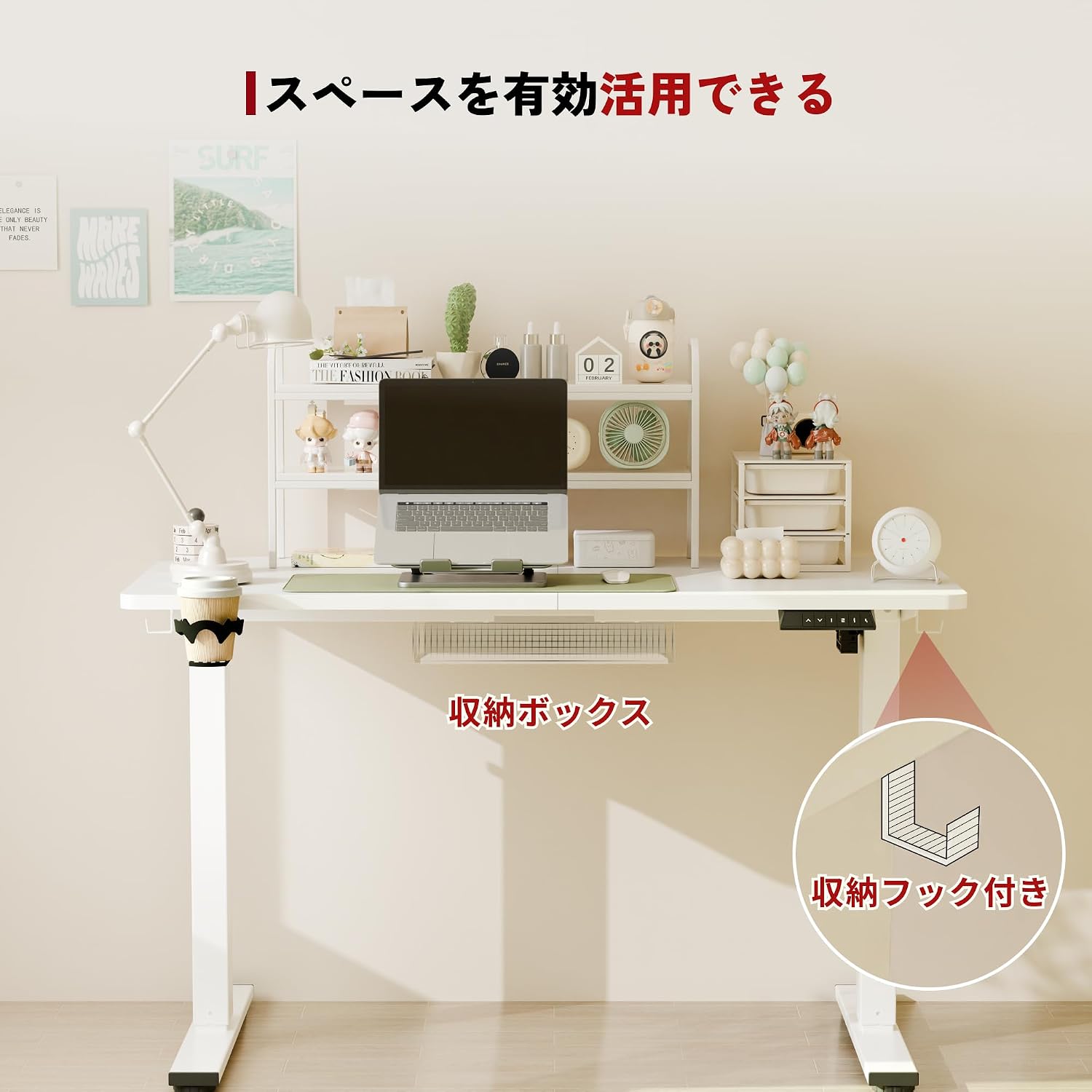
Image: The SANODESK E150 with its integrated storage box and accessory hook for efficient space utilization.
Maintenance
To ensure the longevity and optimal performance of your SANODESK E150, follow these maintenance guidelines:
- Regular Cleaning: Wipe the desk surface and frame with a soft, damp cloth. Avoid abrasive cleaners or harsh chemicals that could damage the finish.
- Check Connections: Periodically inspect all screws and connections to ensure they remain tight. Retighten if necessary.
- Cable Management: Ensure cables are not pinched or tangled, especially during height adjustments. Reorganize as needed.
- Avoid Overloading: Do not exceed the maximum load capacity of 60kg to prevent strain on the motor and frame.
- Environmental Conditions: Keep the desk in a dry environment and avoid extreme temperatures or direct sunlight.
Troubleshooting
If you encounter any issues with your SANODESK E150, refer to the following common troubleshooting steps:
- Desk Not Moving:
- Check if the power cord is securely plugged into both the desk and the wall outlet.
- Ensure there are no obstructions preventing movement.
- If the LED display shows an error code, consult the full troubleshooting guide available on the SANODESK website or contact support.
- Uneven Movement:
- Verify that the desk is placed on a level surface.
- Check that all leg frame connections are tightened evenly.
- Noise During Operation:
- A low operating noise (around 50dB) is normal. If the noise is excessive or unusual, check for loose components or obstructions.
- Charging Port Issues (if applicable):
- If the charging port on the control panel malfunctions (e.g., emits smoke or burning smell), immediately unplug the desk from the power source. Do not use the charging port again and contact customer support. This may indicate an internal electrical fault.
For more complex issues or if the problem persists, please contact SANODESK customer support.
Specifications
| Feature | Detail |
|---|---|
| Brand | SANODESK |
| Model Number | E150BB-4824-JA |
| Size | 120 x 60 cm |
| Product Dimensions | 60D x 120W x 71.5-114H cm |
| Color | White Legs / White Top |
| Style | Standing Desk |
| Height Adjustment Range | 71.5 cm to 114 cm |
| Load Capacity | 60 kg |
| Base Material | Wood (Steel frame) |
| Top Material Type | Engineered Wood |
| Finish Type | LVL Processed |
| Other Functions | Height adjustment, lightweight, electric operation |
| Product Weight | 24.9 kg |
| Package Weight | 25.7 kg |
| Battery Use | No |

Image: Key specifications of the SANODESK E150, highlighting its load capacity, speed, and quiet operation.
Warranty and Support
SANODESK provides comprehensive support for your product.
- Manufacturer's Warranty: Enjoy a 3-year free manufacturer's warranty. There is no limit to the number of support responses during the warranty period, ensuring peace of mind.
- Customer Support: SANODESK has established a call center in Japan to provide excellent after-sales service. Our support team is available to assist you in Japanese for any inquiries or issues you may have.
- Contact Information: For support, please refer to the contact details provided on the SANODESK official website or your purchase documentation.
Related documentsE150


Ask a question about this manual
Ask about setup, troubleshooting, compatibility, parts, safety, or missing instructions. Manuals+ will review the question and use this page’s manual context to help answer it.