
Introduction
This manual provides comprehensive instructions for the assembly, operation, and maintenance of your Yaheetech Farmhouse TV Stand. Please read all instructions carefully before beginning assembly and retain this manual for future reference.
Safety Information
- Always assemble the TV stand according to the provided instructions.
- Secure the TV stand to the wall using appropriate hardware to prevent tip-overs.
- Keep liquids away from the TV stand to prevent damage and potential hazards.
- Keep small children and pets away from the TV stand during and after assembly to prevent injuries.
- Do not exceed the maximum weight capacities: top: 50 kg/110 lb; big shelf: 30 kg/66 lbs; each small shelf: 10 kg/22 lb.
Package Contents
Verify all components and hardware are present before assembly. An accessory kit is included with all necessary tools and fasteners.
Components:
- Engineered Wood Panels (various sizes)
- Iron Frame Components
- Sliding Barn Doors (2)
- Adjustable Shelves (multiple)
- Cable Management Cutouts
- Adjustable Footpads
Hardware:
An accessory kit containing screws, dowels, and other fasteners is provided. Refer to the included assembly diagram for specific part identification.
Assembly Instructions
Assembly is required. A clear, step-by-step instruction manual and an accessory kit are included to ensure smooth assembly. It is recommended to have two people for assembly.
General Assembly Tips:
- Lay out all parts on a soft, clean surface to prevent scratches.
- Identify each part by its label (numbers or letters) as indicated in the assembly diagram.
- Do not fully tighten screws until all components are loosely assembled, then tighten all fasteners.
- Use the provided tools or a low-torque power drill for fasteners. Avoid over-tightening.
Assembly Overview:
- Attach fasteners to designated panels.
- Connect the main frame components using dowels and screws.
- Install the rear panels and support bars.
- Assemble the top and bottom sections.
- Attach the side metal frames.
- Install the sliding barn doors onto the metal rails.
- Insert adjustable shelves into desired positions.
Video: Official Yaheetech overview of the Farmhouse TV Stand with Sliding Barn Doors. This video demonstrates key features and the overall design of the product.
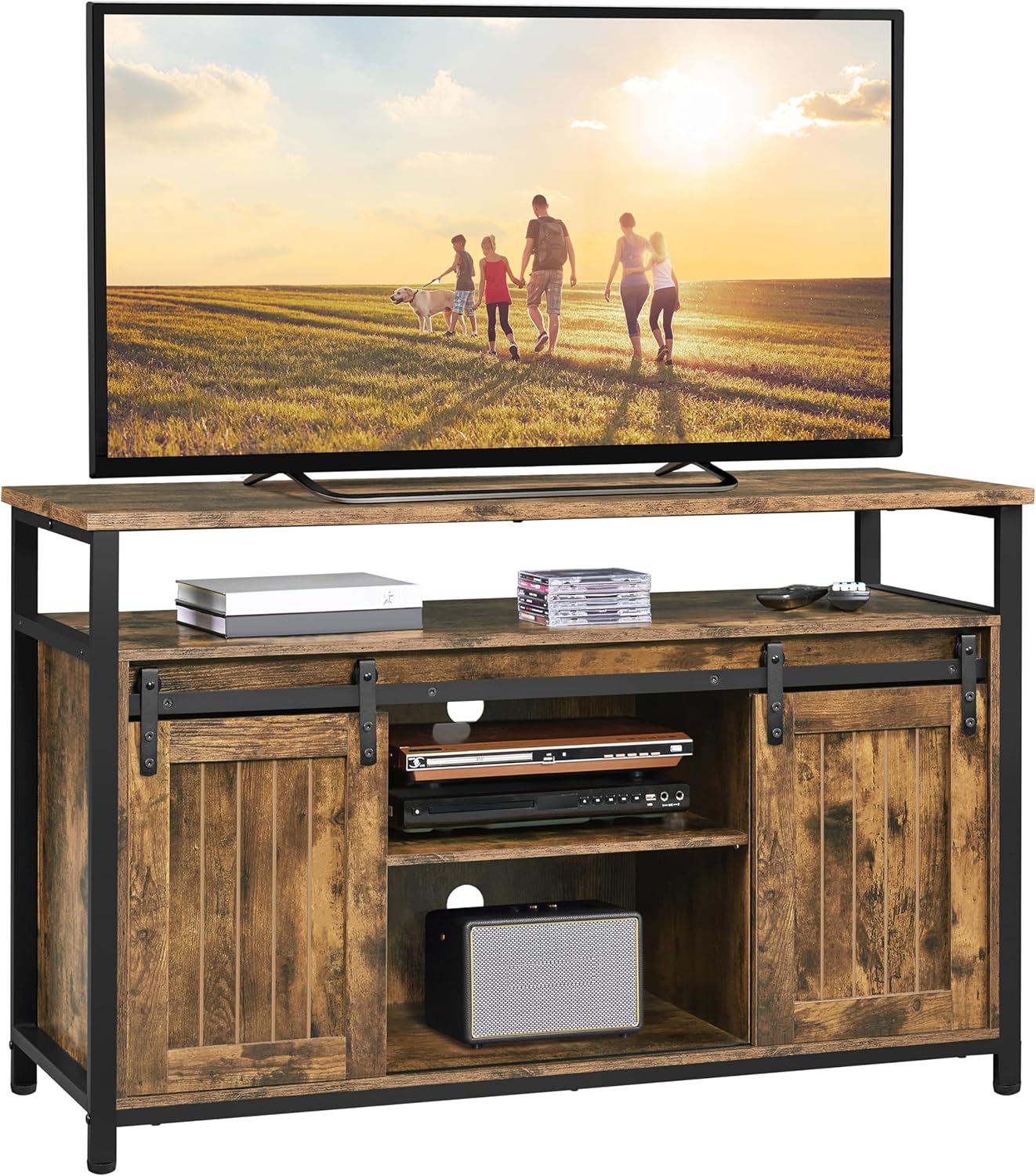
Image: Fully assembled Yaheetech Farmhouse TV Stand, showcasing its rustic brown finish and black metal accents. A television is placed on the top surface, and media components are visible in the central open shelves.
Operating Instructions
Sliding Barn Doors:
The TV stand features two sliding barn doors. Gently slide the doors along the metal rail to access or conceal the side storage compartments. Ensure the path is clear to prevent obstruction.

Image: A detailed view of the sliding barn door mechanism. A hand is shown moving one of the rustic-style doors along its black metal track, highlighting the smooth operation and design.
Adjustable Shelves:
The shelves within the storage compartments are adjustable. To change the height, carefully remove the shelf, reposition the support pins to one of the three available choices (7.2'', 9.7'', 12.2''), and reinsert the shelf. This allows for accommodating items of various sizes.

Image: An illustration demonstrating the adjustable nature of the shelves within the TV stand. Orange arrows indicate that the central and side partitions can be moved up or down to customize storage space.
Cable Management:
The TV stand includes pre-drilled cable management cutouts on the rear panels. Use these openings to route and organize your electronic device cables, maintaining a tidy appearance and preventing tangles.

Image: A close-up view of the cable management cutouts on the back panel of the TV stand. A cable is shown passing through one of the circular openings, illustrating its function for organizing wires.
Maintenance
- Cleaning: Wipe with a dry cloth. Avoid harsh chemicals or abrasive cleaners that may damage the finish.
- Inspection: Periodically check all fasteners to ensure they remain tight. Re-tighten if necessary.
- Surface Care: The veneered surface is resistant to wear and water. However, promptly wipe up any spills to prevent potential damage.
Troubleshooting
If you encounter any issues with your TV stand, please refer to the following common solutions:
- Wobbly Stand: Ensure all screws and fasteners are securely tightened. Check that the adjustable footpads are evenly adjusted on all legs to stabilize the unit on uneven floors.
- Doors Not Sliding Smoothly: Inspect the metal rails for any obstructions or debris. Ensure the door rollers are properly seated on the track.
- Missing Parts: If any parts are missing or damaged upon arrival, please contact customer support immediately for assistance.
Specifications
| Brand: | Yaheetech |
| Model Number: | YT-00114729TS |
| Dimensions (L x W x H): | 47.5 x 16 x 30.5 inches (120 x 40 x 77 cm) |
| Item Weight: | 69.4 pounds (31.5 kg) |
| Material: | Engineered Wood, Iron |
| Max TV Size Supported: | Up to 55 inches (or slightly larger if weight is within limits) |
| Max Weight Capacity (Top): | 110 lb (50 kg) |
| Max Weight Capacity (Big Shelf): | 66 lb (30 kg) |
| Max Weight Capacity (Small Shelf): | 22 lb (10 kg) |
Warranty and Support
For warranty information, replacement parts, or further assistance, please contact Yaheetech customer support through their official website or the retailer where the product was purchased. Please have your model number (YT-00114729TS) and purchase details ready.
Visit the official Yaheetech Store: Yaheetech Store


