
Introduction
This manual provides detailed instructions for the installation, use, and maintenance of your MYBAT Pro Privacy Tempered Glass Screen Protector for the Apple iPhone 13 Pro Max (6.7-inch model). This screen protector is designed to offer enhanced privacy, superior screen protection, and maintain touch sensitivity.
Product Compatibility
This screen protector is specifically designed for the Apple iPhone 13 Pro Max (6.7-inch). It is not compatible with iPhone 13 mini (5.4-inch) or iPhone 13/13 Pro (6.1-inch) models.
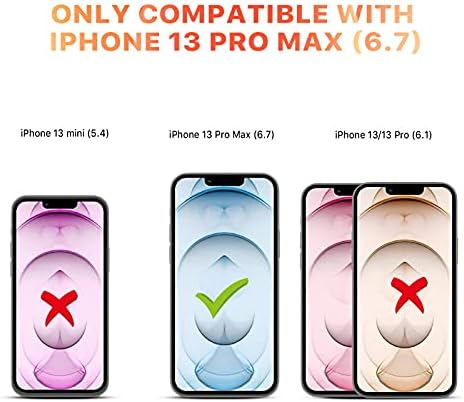
Image: Compatibility chart for iPhone 13 Pro Max (6.7) screen protector.
What's Included
The package contains the following items:
- 1x Full Coverage Tempered Glass Screen Protector
- 1x Alcohol Swab
- 1x Microfiber Cleaning Cloth
- 1x Dust Removal Sticker
- 1x Guide Stickers
- 1x Installation Guide (this document)
Installation Instructions
Follow these steps carefully for a bubble-free installation:
- Prepare Your Workspace: Ensure you are in a clean, dust-free environment with good lighting. Wash your hands thoroughly.
- Clean the Screen: Use the provided Alcohol Swab to thoroughly clean your iPhone 13 Pro Max screen. Ensure all dirt, oil, and smudges are removed.
- Dry the Screen: Use the Microfiber Cleaning Cloth to dry the screen completely. Make sure no lint or streaks remain.
- Remove Dust: Use the Dust Removal Sticker to gently dab the screen and pick up any remaining dust particles. Inspect the screen carefully for any specks of dust.
- Align the Screen Protector: Carefully peel off the protective film from the adhesive side of the tempered glass. Using the Guide Stickers (if provided, attach them to the top corners of the screen protector and use them as handles), align the screen protector precisely with your phone's screen, ensuring the cutouts for the speaker and camera are correctly positioned.
- Apply the Screen Protector: Once aligned, gently lower the screen protector onto the phone's screen. It will begin to adhere automatically.
- Remove Bubbles: If any bubbles appear, gently push them towards the edges of the screen using the microfiber cloth or a soft card. Small bubbles should disappear within 24-48 hours.

Image: Visual guide for easy, bubble-free installation.
Key Features and Operation
Your MYBAT Pro Privacy Tempered Glass Screen Protector offers several key benefits:
- Privacy Protection: The screen protector features a privacy filter that makes your screen visible only to those directly in front of it. From side angles (approximately 45 degrees or more), the screen appears dark, protecting your sensitive information from prying eyes.
- High-Definition Clarity: Despite the privacy feature, the screen protector maintains high-definition clarity when viewed directly, ensuring your content remains sharp and vibrant.
- 9H Hardness Protection: Constructed from diamond-level 9H hardness tempered glass, it provides robust protection against scratches, drops, impacts, and shattering, being 5 times stronger than standard glass.
- Oleophobic Anti-Fingerprint Coating: An oleophobic coating resists smudges, fingerprints, and dirt, keeping your screen clean and clear.
- High-Response Touch Sensitivity: The ultra-thin 0.33mm design ensures that your phone's touch screen responsiveness is not compromised.

Image: Anti-spy feature illustrating screen visibility from different angles.
Image: Ultra-clear screen display with the protector applied.
Care and Maintenance
To ensure the longevity and optimal performance of your screen protector:
- Clean the screen protector regularly with a soft, lint-free cloth (like the provided microfiber cloth).
- For stubborn smudges, lightly dampen the cloth with water or a screen cleaner specifically designed for electronics. Avoid harsh chemicals or abrasive materials.
- Avoid placing your phone with sharp objects (keys, coins) in the same pocket or bag to prevent unnecessary damage to the screen protector.
Troubleshooting
- Bubbles After Installation:
- Small bubbles often disappear naturally within 24-48 hours. For larger bubbles, gently lift the nearest edge of the screen protector and re-apply, pushing the bubble out with a microfiber cloth or soft card.
- Dust Under the Screen Protector:
- If dust particles are trapped, carefully lift the screen protector from the nearest corner using a piece of tape. Use another piece of tape to dab and remove the dust from both the screen and the adhesive side of the protector. Re-apply carefully.
- Reduced Touch Sensitivity:
- Ensure the screen protector is properly seated and there are no air gaps. If issues persist, check your phone's settings for touch sensitivity adjustments (if available) or consider re-installation.
Product Specifications
| Brand | MYBAT |
| Model Number | RIP13PMSCF111 |
| Compatible Phone Models | Apple iPhone 13 Pro Max (6.7 Inches) |
| Material | Tempered Glass |
| Item Hardness | 9H |
| Special Features | Privacy Filter, Scratch Resistant, Impact & Shatter Protection, Oleophobic Coating, High-Response Touch Sensitivity |
| Finish Type | Tempered |
| Screen Surface Description | Matte (Privacy filter may give a slightly matte appearance) |
| Unit Count | 1.0 Count |
| UPC | 885126693493 |
Warranty and Support
The MYBAT Pro Privacy Tempered Glass Screen Protector comes with a Lifetime Warranty as stated in the product description. For warranty claims, technical support, or any inquiries regarding your product, please contact MYBAT customer service through their official website or the retailer where the product was purchased.
For more information, you may visit the MYBAT Store on Amazon.