
Introduction
This manual provides instructions for the Young NS-RCRUS-17 replacement remote control. It is designed for use with specific Insignia Roku Smart TV models. Please read this manual thoroughly before use to ensure proper operation and to understand its features.
Product Overview
The NS-RCRUS-17 remote control is an infrared (IR) remote designed for ease of use with your Insignia Roku Smart TV. It features dedicated buttons for common functions and popular streaming services.
Remote Control Layout and Functions

This image illustrates the layout of the remote control, highlighting key buttons and their functions.
- TV POWER: Turns the TV on or off.
- BACK: Navigates to the previous menu or screen. From the Home screen, it moves the highlight back to the Home screen option. When watching antenna TV or a TV input, it returns to the Home screen. Stops playing streaming content and returns to the previous menu or screen. Browsing streaming content goes to the previous level in the content tree.
- HOME: Immediately returns to the Home screen.
- INSTANT REPLAY: For select models, this feature supports streaming programs that allow Live TV Pause. Jumps back a few seconds with each press and resumes playing. If Live TV Pause is disabled, it jumps to the previous channel. When using an on-screen keyboard, this button functions as a backspace.
- OPTIONS: Displays additional options when available.
- NETFLIX: Direct access to the Netflix application.
- SLING: Direct access to the Sling application.
- HULU: Direct access to the Hulu application.
- GOOGLE PLAY: Direct access to the Google Play application.
Physical Characteristics

This image displays the front, side, and back profiles of the remote control, indicating its compact and ergonomic design. The remote measures approximately 5.5 inches in length.
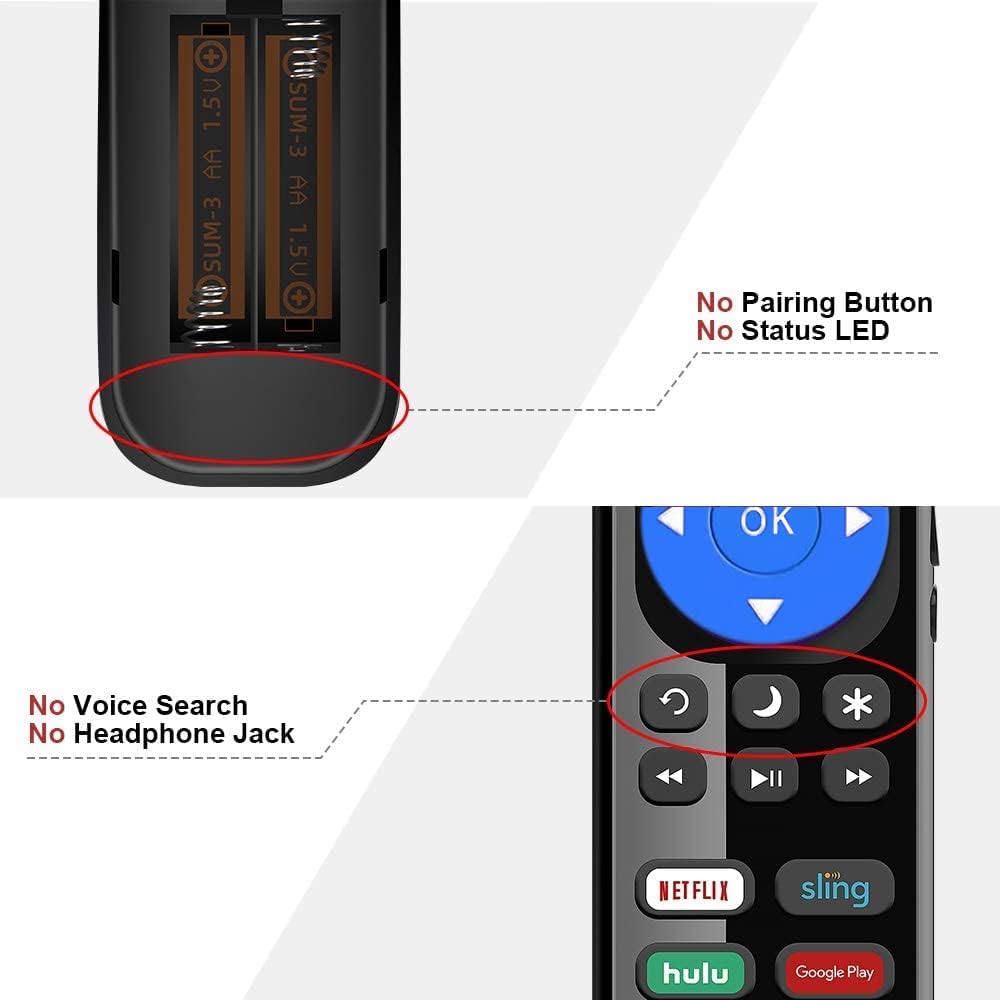
This image clarifies that the remote does not include a pairing button, status LED, voice search functionality, or a headphone jack. It operates via infrared (IR) technology.
Compatibility
This remote control is specifically designed for Insignia Roku Smart TVs. It is not compatible with Roku Box or Roku Stick devices.

This image visually confirms that the remote is compatible with Insignia Roku TVs but not with standalone Roku Box or Roku Stick devices.
Compatible Insignia Roku TV Models:
- NS-32DR420NA16, NS-32DR420NA16A, NS-32DR420NA16B
- NS-40DR420NA16, NS-40DR420NA16B
- NS-43DR710NA17, NS-43DR620CA18
- NS-48DR420NA16
- NS-50DR710NA17, NS-50DR620CA18
- NS-55DR420NA16, NS-55DR710NA17, NS-55DR620CA18
- NS-24DR220CA18
Setup
Battery Installation
The remote control requires two (2) AAA alkaline batteries (not included).
- Locate the battery compartment cover on the back of the remote control.
- Slide the cover downwards to open the compartment.
- Insert two AAA batteries, ensuring the positive (+) and negative (-) terminals match the diagrams inside the compartment.
- Slide the battery compartment cover back into place until it clicks securely.

This image shows the open battery compartment with two AAA batteries correctly inserted, illustrating the proper polarity.
Note: This remote control does not require any programming or pairing. Once batteries are installed, it is ready for use with compatible Insignia Roku Smart TVs.
Operating Instructions
Point the remote control directly at your Insignia Roku Smart TV. Ensure there are no obstructions between the remote and the TV's infrared receiver.
- Power On/Off: Press the POWER button to turn your TV on or off.
- Navigation: Use the directional pad (up, down, left, right) and the OK button to navigate menus and select options.
- Home Screen: Press the HOME button to return to the main Roku home screen.
- Back: Use the BACK button to go to the previous screen or menu.
- Instant Replay: Press the INSTANT REPLAY button to jump back in supported streaming content or switch to the previous channel.
- Options: Press the OPTIONS button to access additional settings or contextual menus.
- Quick Access Buttons: Use the dedicated NETFLIX, SLING, HULU, and GOOGLE PLAY buttons to launch these streaming applications directly.
Maintenance
- Cleaning: Wipe the remote control with a soft, dry cloth. Do not use liquid cleaners or abrasive materials.
- Battery Replacement: Replace batteries when the remote's response becomes sluggish or stops working. Always replace both batteries at the same time with new AAA alkaline batteries.
- Storage: If the remote will not be used for an extended period, remove the batteries to prevent leakage.
- Environment: Avoid exposing the remote to extreme temperatures, humidity, or direct sunlight.
Troubleshooting
Remote Not Responding
- Check Batteries: Ensure batteries are inserted correctly with the correct polarity (+/-). Replace old batteries with new AAA alkaline batteries.
- Line of Sight: Make sure there are no obstructions between the remote control and the TV's infrared sensor.
- Distance: Ensure you are within the effective operating range (up to 8 meters) of the TV.
- TV Power: Confirm that the TV is powered on.
Specific Buttons Not Working
- Clean Buttons: Ensure buttons are not stuck or obstructed by debris.
- Application Specific: Some functions (e.g., Instant Replay) may only work within specific applications or content types.
Remote Not Compatible with Roku Stick/Box
- This remote is designed exclusively for Insignia Roku Smart TVs and is not compatible with standalone Roku streaming devices like Roku Sticks or Roku Boxes. Please verify your device type.
Specifications
| Feature | Detail |
|---|---|
| Model Name | NS-RCRUS-17 |
| Brand | Young |
| Connectivity Technology | Infrared (IR) |
| Compatible Devices | Insignia Roku Smart TVs |
| Power Source | 2 x AAA Alkaline Batteries (not included) |
| Maximum Range | 8 Meters |
| Special Features | Ergonomic design, No pairing required |
| Color | Black |
| Button Quantity | 10 (excluding directional pad and OK button) |
Warranty and Support
For warranty information or technical support, please refer to the retailer or manufacturer's official website. Keep your purchase receipt for warranty claims.
This product is a replacement remote control and typically comes with a standard limited warranty against manufacturing defects. Specific warranty terms may vary by retailer.