
1. Important Safety Instructions
Please read all instructions carefully before assembly and use. Keep this manual for future reference.
- Ensure all components are present and undamaged before assembly.
- The desk is designed for indoor use only.
- Keep children and pets away from the desk during operation to prevent injury.
- Do not overload the desk. The maximum load capacity is 125 kg (excluding the tabletop).
- Ensure there are no obstacles in the desk's path during height adjustment to prevent damage or injury. The anti-collision function is designed to help prevent this, but user vigilance is still required.
- Use the parental lock feature to prevent unintended operation by children.
- Only use the power adapter supplied with the desk.
- Do not disassemble or modify the desk's electrical components. Contact customer support for service.
2. Product Overview
The SANODESK E7 is an electric height-adjustable standing desk designed for ergonomic work. It features a robust steel frame, a quiet dual-motor lifting system, and a touch-screen control panel with memory presets and safety features. This model includes a 120x60cm maple tabletop and a grey frame.

Image: A general view of the SANODESK E7 Electric Standing Desk. It features a light wood-colored tabletop and grey legs, showcasing its modern design.

Image: Diagram illustrating the ergonomic benefits of standing versus sitting. It shows a person sitting at a desk with potential back pain and distraction, and a person standing at a desk with less back pain, less distraction, and improved blood circulation. Below, it shows various people of different heights using the adjustable desk.
3. Assembly Instructions
The SANODESK E7 desk is shipped in two separate packages and requires assembly. All necessary tools are included. It is recommended that two people assemble the desk for ease and safety.
3.1 Unpacking and Preparation
- Open both packages carefully and remove all components.
- Verify that all parts listed in the packing list are present and undamaged.
- Lay out all components on a clean, soft surface (e.g., a blanket or carpet) to prevent scratches.
3.2 Frame Assembly
- Attach the feet to the lifting columns using the provided screws.
- Connect the telescopic crossbar to the lifting columns. Ensure the crossbar is expanded to the desired width for your tabletop (adjustable from 110cm to 190cm).
- Secure all connections firmly.

Image: Illustration of the telescopic crossbar, showing its adjustable range from 110cm to 190cm, accommodating desktop depths from 60cm to 80cm and widths from 120cm to 210cm.
3.3 Tabletop Attachment
- Carefully place the tabletop (120x60cm) upside down on the soft surface.
- Position the assembled frame onto the tabletop, aligning the pre-drilled holes (if any) or ensuring even placement.
- Attach the tabletop to the frame using the provided screws.
3.4 Control Panel and Cable Management
- Mount the control panel to the underside of the tabletop in a convenient location.
- Connect all motor cables and the power cable to the control box according to the diagram in the separate assembly guide.
- Use the included cable ties or management clips to organize cables neatly under the desk.
The entire assembly process typically takes approximately 45 minutes.
4. Operating Instructions
The SANODESK E7 features a user-friendly touch-screen control panel for height adjustment and memory functions.
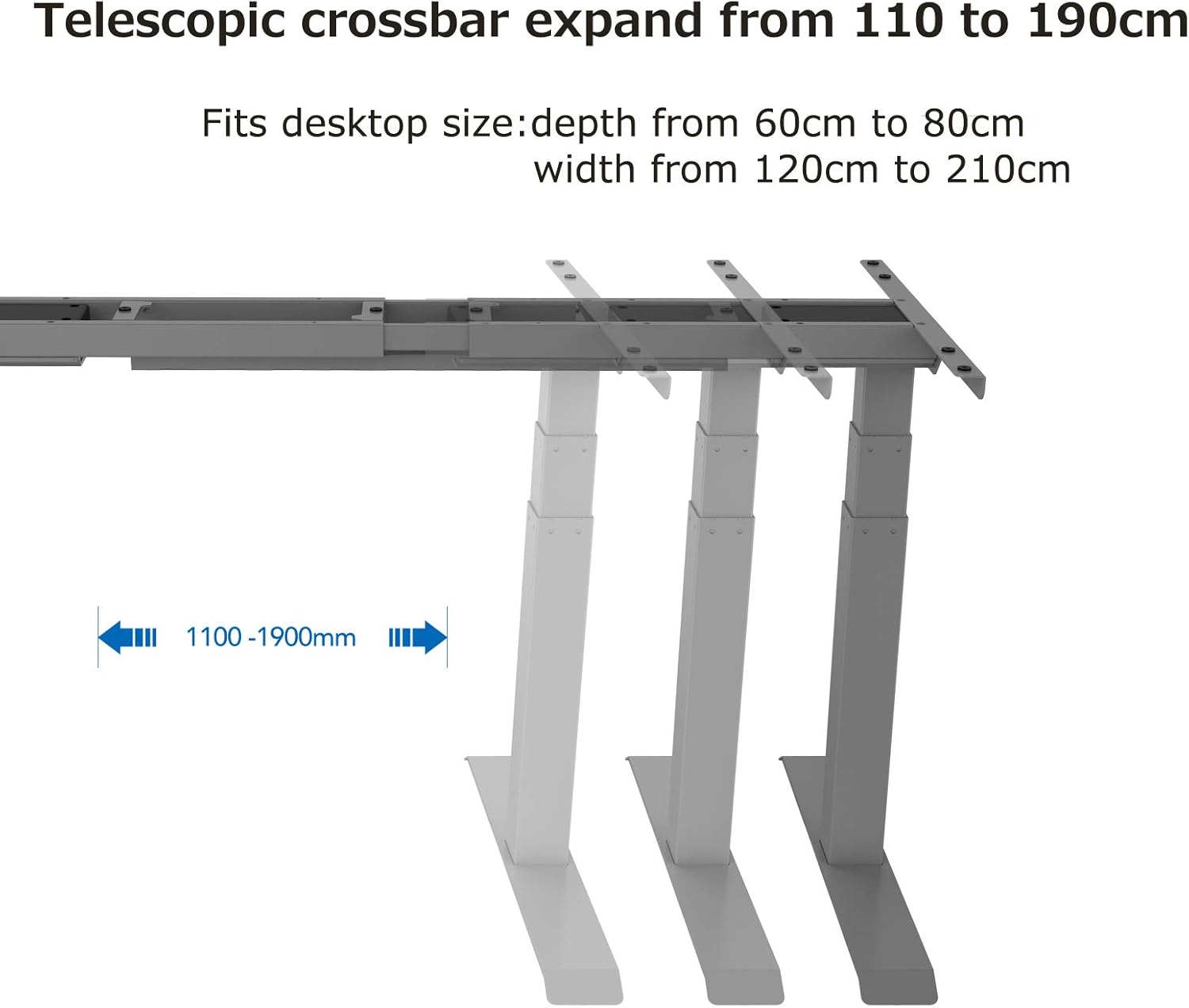
Image: Close-up of the advanced all-in-one touch-screen control panel. It features Up/Down arrows, an 'M' button for Memory & Lock, an LED display, and four preset buttons (1, 2, 3, 4) for remembered standing and sitting heights. The image highlights the 'Set Height' and 'Memory & Lock' functions.
4.1 Initial Setup and Calibration
- Plug the desk into a power outlet. The LED display on the control panel should light up.
- Press and hold the Down button until the desk reaches its lowest position and slightly rebounds. This calibrates the desk.
4.2 Adjusting Height
- Use the Up arrow to raise the desk.
- Use the Down arrow to lower the desk.
- The desk height can be adjusted smoothly between 60 cm and 125 cm at a maximum speed of 38 mm/s.

Image: Diagram showing the desk's height adjustment range. The desk can move from a minimum height of 580mm (58cm) to a maximum height of 1230mm (123cm).
4.3 Setting Memory Presets
The control panel allows you to save up to four preferred height settings.
- Adjust the desk to your desired height.
- Press the 'M' button. The display will show 'S-'.
- Within 3 seconds, press one of the preset buttons (1, 2, 3, or 4). The current height will be saved to that button.
- To recall a saved height, simply press the corresponding preset button. The desk will automatically move to that position.
4.4 Parental Lock Function
To activate the parental lock, press and hold the 'M' button for 5 seconds until 'LOC' appears on the display. To unlock, press and hold the 'M' button again for 5 seconds.
4.5 Anti-Collision Feature
The desk is equipped with an anti-collision system. If the desk encounters an obstacle during height adjustment, it will automatically stop and reverse slightly to prevent damage. This feature helps protect both the desk and surrounding objects.
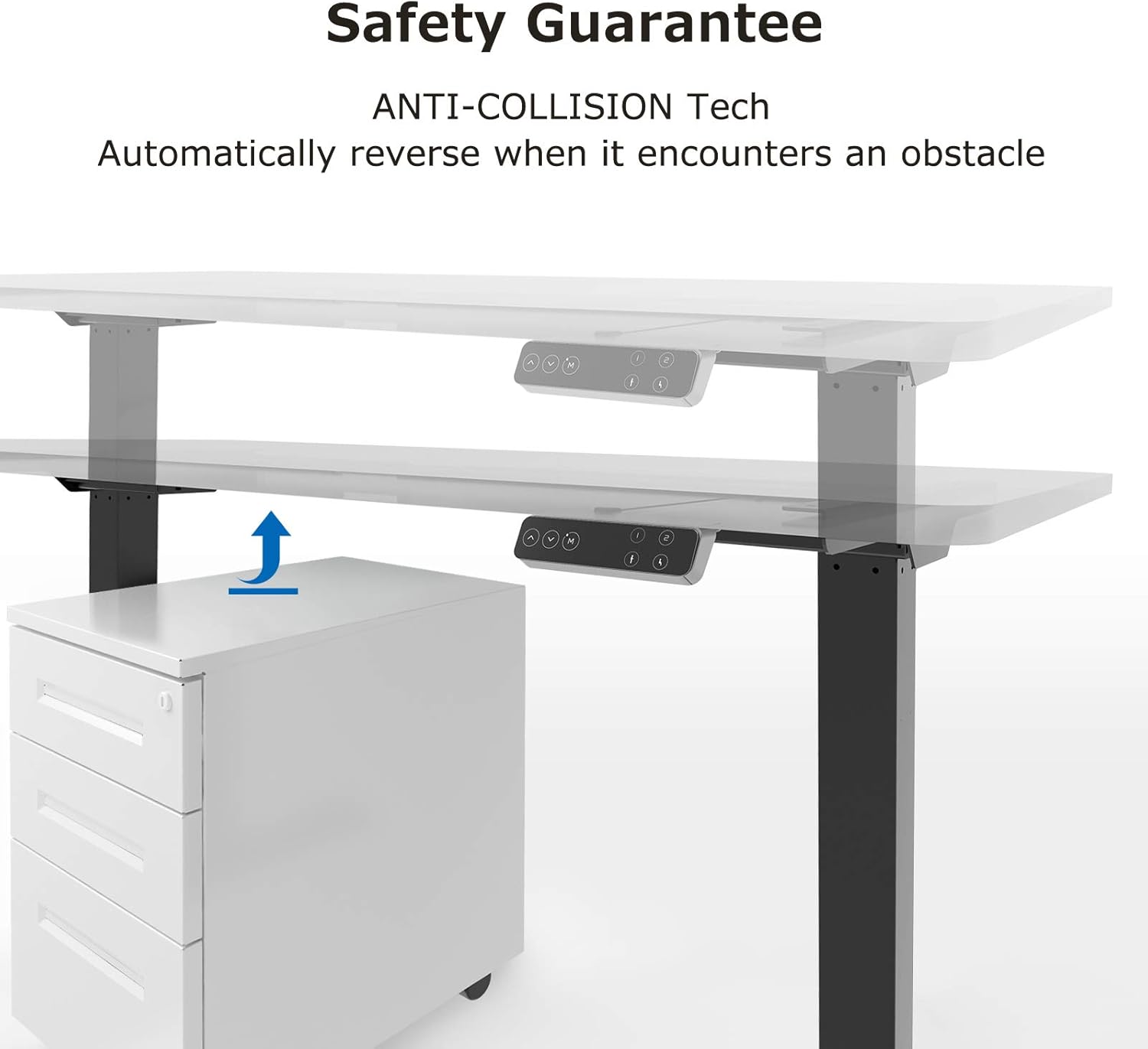
Image: Diagram illustrating the anti-collision technology. The desk is shown lowering and automatically reversing its movement when it detects an obstacle (a cabinet) underneath.
5. Maintenance
Regular maintenance ensures the longevity and optimal performance of your SANODESK E7.
- Cleaning: Wipe the desk surface and frame with a soft, damp cloth. Avoid abrasive cleaners or harsh chemicals.
- Cable Management: Periodically check that all cables are securely connected and not pinched or tangled.
- Fasteners: Occasionally check all screws and bolts to ensure they are tight. Retighten if necessary.
- Lubrication: The lifting columns are designed to be maintenance-free and do not require lubrication.
6. Troubleshooting
If you encounter any issues with your SANODESK E7, please refer to the following troubleshooting guide.
| Problem | Possible Cause | Solution |
|---|---|---|
| Desk does not move / No power | Power cable disconnected, power outlet issue, control box issue. |
|
| Desk moves unevenly or makes unusual noise | Uneven load, loose connections, obstruction. |
|
| Error code on display (e.g., E01, E02) | Overload, motor fault, sensor issue. |
|
| Parental lock activated ('LOC' on display) | Lock function engaged. |
|
6.1 Reset Procedure
If the desk is not functioning correctly, a reset may resolve the issue:
- Unplug the power cord from the wall outlet.
- Wait for at least 10 seconds.
- Plug the power cord back in.
- Press and hold the Down button until the desk reaches its lowest position, slightly rebounds, and stops. This indicates a successful reset.
7. Specifications
| Brand | SANODESK |
| Model | E7 |
| Type | Electric Height-Adjustable Standing Desk |
| Tabletop Dimensions | 120 x 60 cm |
| Height Adjustment Range | 60 cm to 125 cm |
| Lifting Mechanism | Dual Motor, 3-stage telescopic columns |
| Max. Lifting Speed | 38 mm/s |
| Max. Load Capacity | 125 kg (excluding tabletop) |
| Control Panel | Touch screen with 4 memory presets, parental lock |
| Safety Features | Anti-collision system, parental lock |
| Frame Material | Stainless Steel |
| Tabletop Material | Maple Wood |
| Color (Frame + Top) | Grey Frame + Maple Top |
| Assembly Required | Yes (2 persons recommended, tools included) |
| Item Weight | 28 Kilograms |

Image: Detailed view of the desk's three-stage lifting column design, showing inner (60x60mm), medium (65x65mm), and outer (70x70mm) tube dimensions for excellent stability. Also shown is an adjuster attached horizontally to the foot.
8. Customer Support
For any questions, technical assistance, or warranty claims, please contact SANODESK customer support. Refer to your purchase documentation for specific contact details or visit the official SANODESK website.
SANODESK is committed to providing specialized customer support to ensure your satisfaction.


