1. Product Overview
The Naifay Android 13 Car Radio is a 10.1-inch IPS touchscreen multimedia system designed for Honda Civic models manufactured between 2006 and 2011. This unit features an Android 13 operating system, a 4-core CPU, 4GB RAM, and 64GB of internal storage, providing a smooth and responsive user experience.
Key Features:
- Android 13 Operating System
- 4-Core CPU, 4GB RAM + 64GB ROM
- 10.1-inch IPS Touch Screen (1280x720P resolution)
- Wireless/Wired Apple CarPlay & Android Auto
- Wireless/Wired MirrorLink
- Built-in GPS Navigation (supports online and offline maps)
- Wi-Fi Connectivity
- Bluetooth 5.1 for hands-free calling and music streaming
- FM Radio Tuner
- Supports Rear-view Camera Input (AHD 170° wide-angle)
- Steering Wheel Control (SWC) compatibility
- Split Screen Functionality
Important Compatibility Note: This car radio does not support vehicles equipped with a premium sound system (e.g., J.B.L. or B.O.S.E.) or a factory-installed large navigation screen. Please verify your vehicle's specifications before installation.
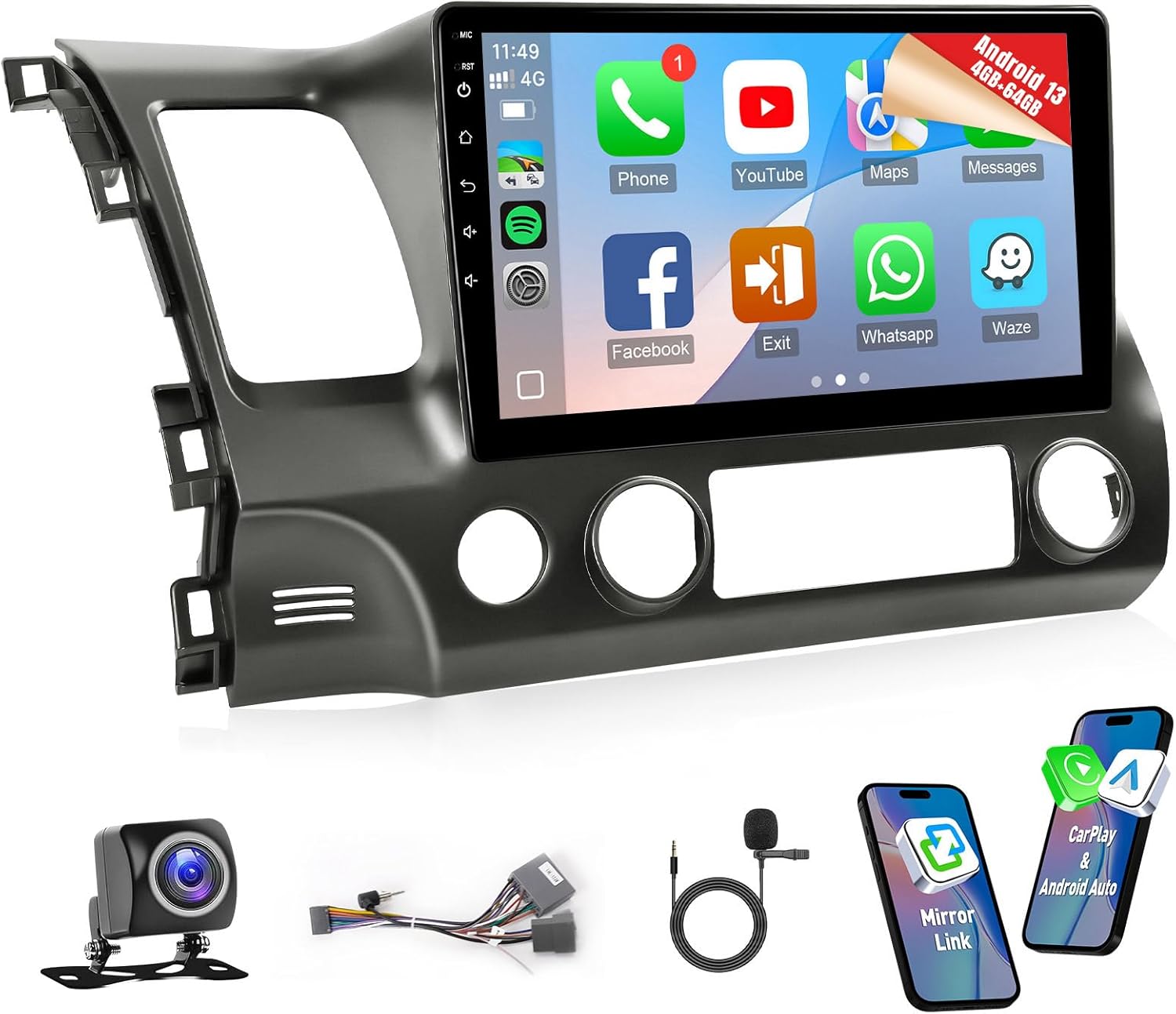
Image 1.1: The Naifay Android 13 Car Radio installed in a Honda Civic dashboard, showcasing its 10.1-inch display.
2. Setup and Installation
Installation of the Naifay car radio involves replacing the factory head unit. While the unit is designed for a plug-and-play experience with the provided wiring harness, professional installation is recommended, especially for wiring the backup camera.
2.1. Pre-Installation Check
- Confirm your Honda Civic model year (2006-2011).
- Ensure your vehicle does not have a premium sound system or a factory large navigation screen.
- Unpack all components and verify against the packing list.
2.2. Installation Steps (General)
- Disconnect Battery: Before starting, disconnect the negative terminal of your car battery to prevent electrical shorts.
- Remove Factory Radio: Carefully remove the existing car radio and trim panels. Refer to your vehicle's service manual for specific instructions on panel removal.
- Connect Wiring Harness: Connect the provided wiring harness to the car's factory harness. Ensure all connections are secure.
- Connect Antennas: Connect the GPS antenna and Wi-Fi/Bluetooth antenna to the corresponding ports on the new head unit. Position the GPS antenna in a location with a clear view of the sky.
- Install Backup Camera (Optional): If installing the backup camera, route the camera cable from the rear of the vehicle to the head unit. Connect the camera's power and ground wires to the car's reversing light circuit. Connect the video signal cable to the 'Backup Camera' input on the head unit.
- Mount New Head Unit: Secure the Naifay car radio into the dashboard opening.
- Reconnect Battery: Reconnect the car battery.
- Test Functionality: Turn on the ignition and test all functions of the new radio, including audio, touchscreen, GPS, Bluetooth, and backup camera.
- Reassemble Trim: Reinstall all removed trim panels.

Image 2.1: Visual comparison of the Honda Civic dashboard before and after the Naifay car radio installation.

Image 2.2: Detailed wiring diagram for connecting the backup camera, including power, ground, and trigger cable connections.
3. Operating Instructions
3.1. Wireless CarPlay & Android Auto
This unit supports both wireless and wired Apple CarPlay and Android Auto. Once connected, your phone will automatically link wirelessly upon starting the car.
- Connection: Enable Bluetooth and Wi-Fi on your smartphone. On the car radio, navigate to the CarPlay/Android Auto application and follow the on-screen prompts to pair your device.
- Functionality: Access phone applications, navigation maps, make calls, play music, and use voice assistants (Siri/Google Assistant) directly from the car radio screen.
3.2. GPS Navigation & Wi-Fi
The unit includes built-in GPS for navigation. It supports both online and offline maps.
- GPS: Connect the GPS antenna. Pre-installed maps are available, and you can download additional maps for offline use.
- Wi-Fi: Connect to a Wi-Fi network or a mobile hotspot to access the Play Store. This allows you to download and stream popular applications.
3.3. Bluetooth & FM Radio
- Bluetooth 5.1: Pair your smartphone for hands-free calling, music streaming, and phonebook synchronization.
- FM Radio: Access your favorite radio stations. The unit features unlimited preset stations and automatic channel search for real-time information.
3.4. Rear-view Camera Input & Steering Wheel Control
- Rear-view Camera: When a compatible backup camera is connected, the display automatically switches to the camera view when the vehicle is in reverse. The camera provides a 170° viewing angle.
- Steering Wheel Control (SWC): Utilize your vehicle's existing steering wheel buttons to control audio functions, enhancing driving safety and convenience.
3.5. Split Screen Functionality
The split-screen feature allows you to run two applications simultaneously on the 10.1-inch display, such as navigation and music playback.

Image 3.1: The car radio interface showing options for Wireless CarPlay, Android Auto, and MirrorLink connections.

Image 3.2: The car radio demonstrating GPS navigation and Wi-Fi connectivity for streaming online content.

Image 3.3: A composite image illustrating various operating features including Bluetooth, FM radio, backup camera, steering wheel controls, and split-screen mode.
4. Maintenance
Proper maintenance ensures the longevity and optimal performance of your Naifay car radio.
- Screen Cleaning: Use a soft, lint-free cloth to gently wipe the touchscreen. Avoid abrasive cleaners or harsh chemicals that could damage the display.
- Software Updates: Periodically check for system updates through the unit's settings menu to ensure you have the latest features and security patches.
- App Management: To maintain optimal performance, it is recommended to download only essential applications. Installing too many apps may cause the radio to slow down or freeze.
- Environmental Conditions: Avoid exposing the unit to extreme temperatures or direct sunlight for prolonged periods.
5. Troubleshooting
If you encounter issues with your Naifay car radio, refer to the following troubleshooting tips:
- Unit Not Powering On: Check all power connections and ensure the car battery is properly connected and charged. Verify the fuse for the car radio.
- No Sound: Check speaker connections. Ensure the volume is not muted or set to zero. Verify audio output settings.
- Touchscreen Unresponsive: Try restarting the unit. If the issue persists, a factory reset might be necessary (note: this will erase all user data).
- GPS Not Working/Inaccurate: Ensure the GPS antenna is properly connected and positioned with a clear view of the sky. Check GPS settings within the unit.
- Bluetooth Connection Issues: Ensure Bluetooth is enabled on both the car radio and your smartphone. Delete previous pairings and try reconnecting.
- Backup Camera Not Displaying: Verify that the backup camera is correctly wired, including the power, ground, and trigger wire connections to the reversing light circuit. Check the video input connection to the head unit.
- Poor Microphone Audio (during calls): Ensure the external microphone is properly connected and positioned. Adjust microphone sensitivity settings if available.
- System Freezing/Lagging: This can occur if too many applications are installed or running simultaneously. Close unnecessary apps or consider uninstalling less-used ones. A system restart may also resolve temporary issues.
If problems persist after attempting these steps, please contact customer support for further assistance.
6. Specifications
| Feature | Specification |
|---|---|
| Operating System | Android 13 |
| CPU | 4-Core Processor |
| RAM | 4GB |
| ROM | 64GB |
| Display Size | 10.1 Inches |
| Display Type | IPS Touch Screen |
| Resolution | 1280x720P |
| Connectivity | Bluetooth 5.1, USB, Wi-Fi |
| Special Features | CarPlay, Android Auto, MirrorLink, GPS, FM Radio, Backup Camera Input, Steering Wheel Control, Split Screen |
| Vehicle Compatibility | Honda Civic 2006-2011 |
| Item Weight | 3.3 pounds |
| Product Dimensions | Approximately 390mm x 245mm (15.35in x 9.64in) for the main unit, 345mm (13.58in) width at base. |
6.1. Included Components
The package typically includes:
- Naifay Android Car Radio Unit
- Dashboard Mount/Frame
- Backup Camera
- GPS Antenna
- USB Cables (x2)
- Microphone (MIC)
- RCA Cable
- Power Cable/Wiring Harness
- User Manual
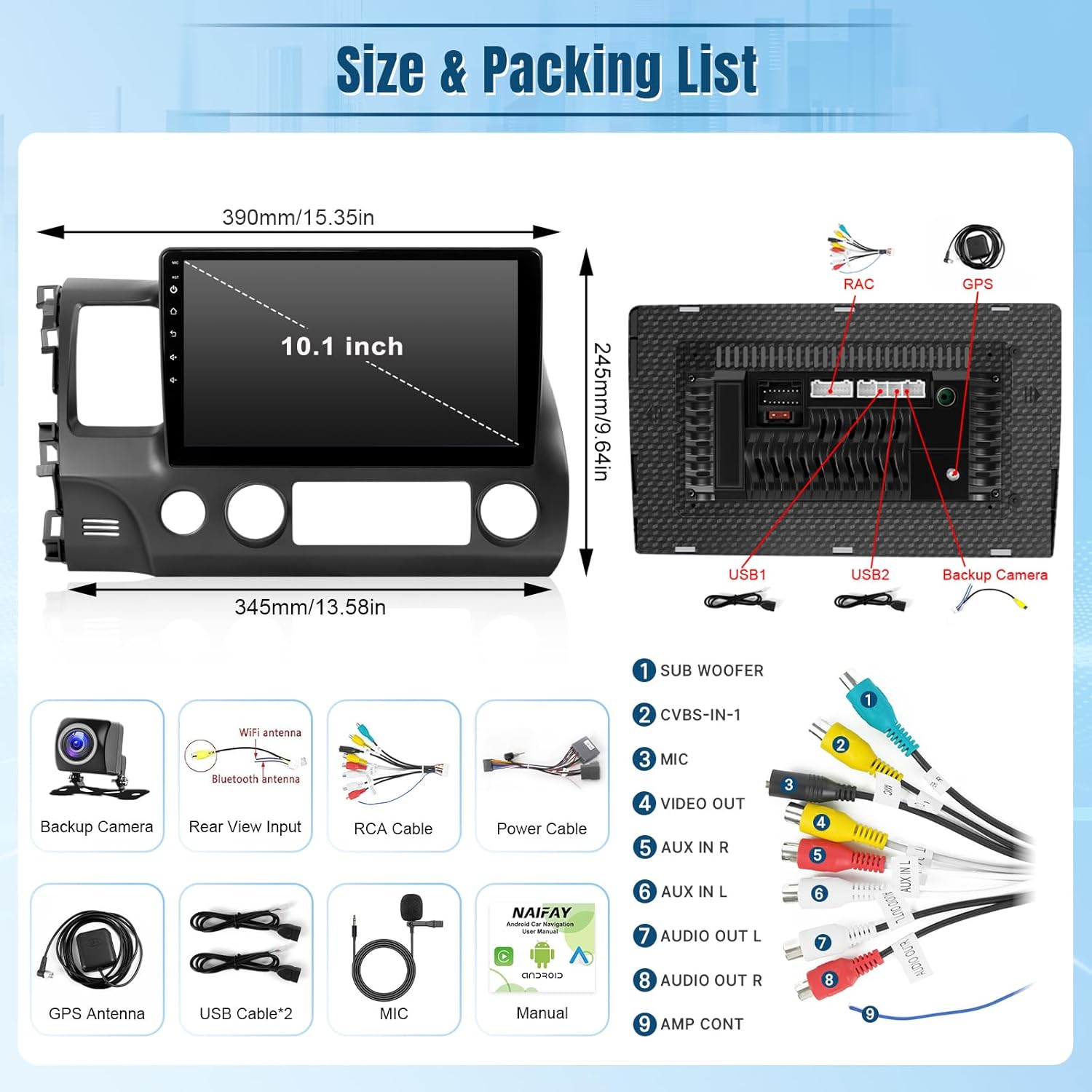
Image 6.1: Dimensions of the Naifay car radio unit and a visual representation of the included components.
Image 6.2: Radio wiring harness diagram illustrating connections for subwoofer, video out, AUX in/out, and other peripherals.
7. Support
For additional assistance, technical support, or inquiries regarding your Naifay car radio, please utilize the following resources:
- Online Help: Refer to the user manual included in your package for detailed instructions and diagrams.
- Seller Support: If you have specific questions or require further assistance, you can contact the seller directly through the platform where you purchased the product. Provide your order details and any relevant pictures or descriptions of the issue.

Image 7.1: Example of how to locate the 'Ask a question' link to contact the seller for support.


