
1. Introduction
This manual provides essential information for the Apple iPhone 17 Pro Max. This device is an unlocked, renewed US Version with 256GB storage, featuring eSIM technology and presented in Deep Blue. It is designed to offer a premium smartphone experience with advanced features and robust performance.

Image 1: Front and rear view of the Apple iPhone 17 Pro Max in Deep Blue.
2. Setup Guide
2.1 Initial Activation
- Carrier Compatibility: Verify compatibility with your chosen carrier (e.g., AT&T, T-Mobile, Sprint, Verizon, US Cellular, Cricket, Metro, Tracfone, Mint Mobile) as this phone is unlocked for GSM and CDMA networks.
- SIM Card Insertion: Insert a SIM card from your compatible carrier.
- Power On: Press and hold the Power button until the Apple logo appears.
- Connect to Wi-Fi: Follow the on-screen prompts to connect to a Wi-Fi network.
- Follow On-Screen Prompts: Complete the activation process by following the instructions displayed on the screen.
2.2 eSIM Setup
The iPhone 17 Pro Max supports eSIM technology. For eSIM activation, please consult your carrier's specific instructions. This typically involves scanning a QR code or entering activation details provided by your service provider.
3. Operating Your iPhone 17 Pro Max
3.1 User Interface and Navigation
The device operates on iOS 26, providing an intuitive and responsive user experience. Navigate through applications and settings using touch gestures on the 6.9-inch touchscreen display. Volume buttons are located on the side for easy adjustment.

Image 2: Side view of the iPhone 17 Pro Max, highlighting the volume and power buttons.
3.2 Camera Functionality
The iPhone 17 Pro Max features an advanced camera system. To access the camera, tap the Camera app icon on your home screen. You can switch between photo, video, and other modes. Utilize the various lenses for different photographic needs.
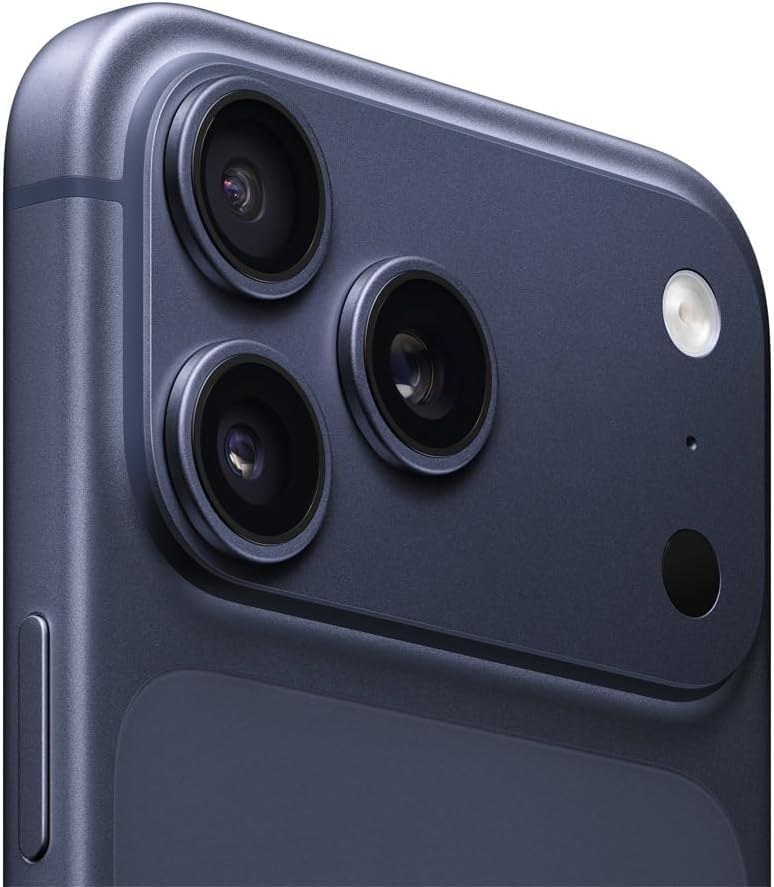
Image 3: Close-up view of the triple camera system on the rear of the iPhone 17 Pro Max.
3.3 Connectivity
The device supports 5G cellular technology, Bluetooth, USB, and Wi-Fi connectivity. Access these options through the Settings app to manage your connections.
4. Maintenance and Care
4.1 Battery Health
This renewed device is guaranteed to have a minimum battery capacity of 80%. To optimize battery life, manage background app refresh, reduce screen brightness, and enable Low Power Mode when needed. Avoid extreme temperatures.
4.2 General Care
- Keep the device clean using a soft, lint-free cloth.
- Avoid exposing the phone to excessive moisture or dust.
- Use a protective case and screen protector to prevent physical damage.
5. Troubleshooting
5.1 Network Connectivity Issues
- If experiencing cellular network issues, ensure your SIM card is correctly inserted and check with your carrier for service outages or account status.
- For Wi-Fi problems, try restarting your router and the iPhone.
5.2 Device Not Responding
If your iPhone becomes unresponsive, perform a force restart. The procedure typically involves pressing and quickly releasing the Volume Up button, then the Volume Down button, and finally pressing and holding the Side button until the Apple logo appears.
6. Product Specifications
| Feature | Detail |
|---|---|
| Brand | Apple |
| Model Name | iPhone 17 Pro Max |
| Item Model Number | A3257 |
| Operating System | iOS 26 |
| Memory Storage Capacity | 256 GB |
| RAM Memory Installed Size | 256 GB |
| Screen Size | 6.9 Inches |
| Color | Deep Blue |
| Wireless Carrier | Unlocked |
| Cellular Technology | 5G |
| Connectivity Technology | Bluetooth, USB, Wi-Fi |
| GPS | True |
| Human Interface Input | Touchscreen |
| Form Factor | Bar |
| Battery Power Rating | 4000 Milliamp Hours |
| Item Weight | 8.2 ounces |
| Package Dimensions | 6.43 x 3.07 x 0.34 inches |
| Date First Available | October 9, 2025 |
7. What's in the Box
The following items are included with your Apple iPhone 17 Pro Max:
- Apple iPhone 17 Pro Max (Renewed)
- USB Cable (generic, MFi certified)
Note: The device does not come with headphones or a SIM card.
8. Warranty and Support
8.1 Amazon Renewed Guarantee
This renewed product is backed by the Amazon Renewed Guarantee, ensuring it works and looks like new. For specific details regarding your guarantee, please refer to the Amazon Renewed program documentation or contact Amazon customer service.
8.2 Additional Support
For further assistance, technical support, or service inquiries, please visit the official Apple support website or contact your carrier. Information regarding protection plans is also available through Amazon.