1. Introduction
The APEXEL 67mm CPL (Circular Polarizer) Filter is designed to enhance your photography by minimizing reflections, increasing color saturation, and improving contrast. This filter is compatible with both smartphones (via a universal clip) and DSLR cameras (with appropriate adapter rings). It features premium multi-layer nano coatings for optimal clarity and durability.
The filter is constructed with imported Nitto Grade-A polarizing film, dual-side ultra-smooth polishing, and a 24-layer AX+AF nano coating. Its aerospace-grade aluminum alloy frame with a sandblasted oxidation finish ensures long-lasting performance. The filter is waterproof and scratch-resistant.

Image: The APEXEL 67mm CPL Filter is engineered for glaring elimination, enhanced color, and contrast improvement.
2. Package Contents
Please verify that all items are present in your package:
- 67mm CPL Filter
- Upgraded Universal Phone Clamp
- 58-67mm Adapter Ring
- Cold Shoe Mount
- Storage Bag
3. Setup Instructions
3.1 Attaching to a Smartphone
The universal phone clamp is designed for easy attachment to most smartphones up to 13mm thick, including iPhone, Samsung Galaxy, Google Pixel, and Xiaomi models. The curved-edge design helps prevent light leaks.
- Clip: Clip the filter holder onto the main camera lens of your phone. Ensure it is securely positioned over the primary lens.
- Screw: Select the 58-67mm filter adapter ring and screw it clockwise into the filter holder.
- Rotate: After the adapter ring is installed, rotate the 67mm CPL filter clockwise into the adapter ring.
- Tighten: Tighten the screw clockwise to secure the filter.

Image: Step-by-step guide for attaching the CPL filter to your smartphone.
3.2 Attaching to a DSLR Camera
The 67mm CPL filter can be used directly with DSLR camera lenses that have a 67mm filter thread. For 58mm camera lenses, use the included 58-67mm adapter ring.
- For 67mm Camera Lenses: Mount the 67mm CPL filter directly onto the lens by rotating it clockwise until secure.
- For 58mm Camera Lenses: First, select the 58-67mm filter adapter ring and screw it clockwise onto your 58mm camera lens. Then, rotate the 67mm CPL filter clockwise into the adapter ring and tighten it securely.

Image: Instructions for attaching the CPL filter to 58mm and 67mm DSLR camera lenses.
3.3 Cold Shoe Mount Usage
The universal phone clamp includes a cold shoe mount. This allows you to attach accessories such as LED fill lights or wireless microphones for enhanced video recording or low-light photography.

Image: Structure of the phone clamp and an example of using the cold shoe mount with an LED light.
4. Operating Instructions
A CPL filter works by selectively blocking polarized light, which is often responsible for reflections and haze. To achieve the desired effect, the filter needs to be rotated.
- Rotation for Effect: Once attached, gently rotate the outer ring of the CPL filter while looking through your camera's viewfinder or phone screen. You will observe changes in reflections and color saturation. Adjust until the desired effect is achieved.
- Optimal Polarization: The polarizing effect is most pronounced when the light source of the reflection is at approximately a 90-degree angle to your shooting direction.
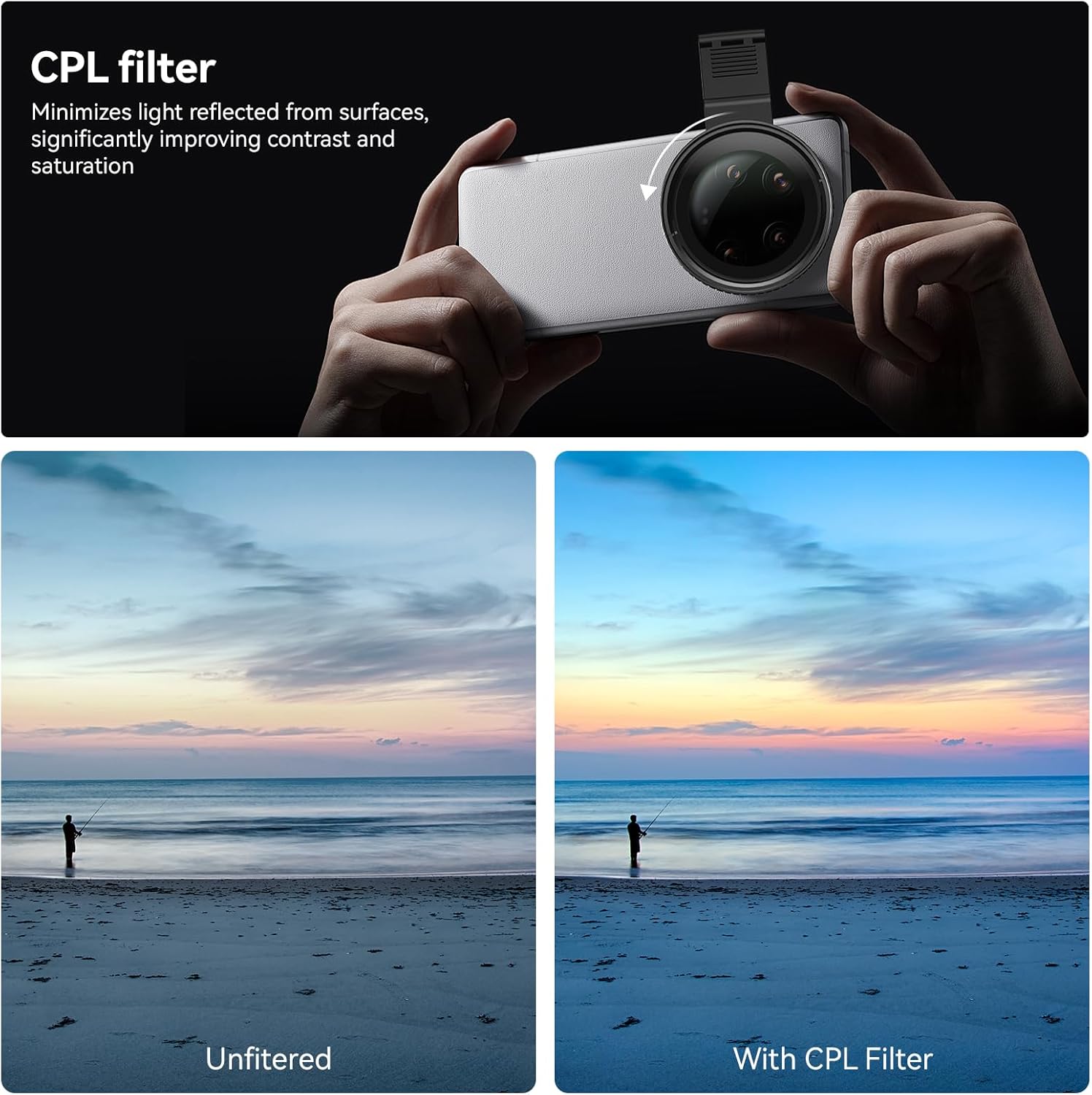
Image: Comparison of an unfiltered image versus an image taken with a CPL filter, demonstrating reduced reflections and improved saturation.

Image: Before and after using the 67mm CPL filter to reduce reflections on water and enhance clarity.
Video: Demonstration of the APEXEL CPL filter's effect on reflections, showing how rotating the filter reduces glare on surfaces like car windshields.
5. Maintenance
Proper care will ensure the longevity and performance of your APEXEL CPL filter.
- Cleaning: The filter features water and dust-proof nano coatings for easy cleaning. Use a clean, soft microfiber cloth to gently wipe away dust, fingerprints, or smudges. For stubborn marks, a small amount of lens cleaning solution can be applied to the cloth (not directly to the filter).
- Storage: Always store the filter in its provided storage bag or a protective case when not in use to prevent scratches and dust accumulation.
- Handling: Avoid touching the filter glass directly with your fingers. Handle the filter by its metal frame.

Image: The filter's water and dust-proof coatings facilitate easy cleaning.

Image: The filter features a wear-resistant, anti-scratch coating for daily durability.
6. Troubleshooting
- Vignetting or Dark Corners: If you experience dark corners in your photos, especially with wide-angle lenses, ensure the filter is correctly aligned and not obstructing the lens. For some ultra-wide phone lenses, a filter may cause slight vignetting.
- Rainbow Effect: A rainbow effect can sometimes occur due to poor alignment or specific lighting conditions. Re-align the filter carefully over your phone's lens. If using a multi-lens phone, ensure the clip is centered over the primary camera lens.
- Filter Not Covering All Lenses (Multi-Lens Phones): The universal clip is designed to align with the main camera lens. On phones with multiple lenses, it may not cover all lenses simultaneously. Focus on aligning it with the lens you intend to use.
- Difficulty Attaching/Removing: Ensure the phone clamp's tightness adjustment screw is loosened sufficiently before attaching or removing. Do not force the filter onto a lens or adapter ring; ensure threads are aligned correctly.
- Minimal Polarizing Effect: If the polarizing effect is not noticeable, rotate the outer ring of the CPL filter. The effect varies depending on the angle of the light source and the subject. Ensure you are shooting in conditions where polarized light (e.g., reflections, atmospheric haze) is present.
7. Specifications
| Feature | Detail |
|---|---|
| Product Dimensions | 0.4 x 2.64 x 2.64 inches |
| Item Weight | 5.3 ounces |
| Photo Filter Thread Size | 67 Millimeters |
| Coating Description | 24-layer AX+AF Nano Coating |
| Photo Filter Effect Type | Polarizer |
| Photo Filter Size | 67 Millimeters |
| Material | Nitto Grade-A Polarizing Film, Aerospace-grade Aluminum Alloy Frame |
| Compatibility (Phone) | Up to 13mm thick (iPhone, Samsung Galaxy, Google Pixel, Xiaomi, etc.) |
| Compatibility (DSLR) | 58mm and 67mm threaded lenses |
8. Warranty and Support
For warranty information, product support, or any inquiries not covered in this manual, please refer to the official APEXEL website or contact APEXEL customer service directly. Contact details are typically provided with your purchase documentation or on the manufacturer's official channels.


