
Apple iPhone Pro 17
Apple iPhone 17 Pro User Manual
Model: iPhone Pro 17 (256GB, eSIM, Unlocked, Deep Blue)
Introduction
Welcome to your Apple iPhone 17 Pro. This manual provides essential information to help you set up, operate, maintain, and troubleshoot your device. The iPhone 17 Pro combines advanced technology with intuitive design, offering a powerful and seamless user experience.
This specific model is a renewed US Version with 256GB storage, eSIM capability, and is unlocked for use with various carriers. It comes in a Deep Blue finish.
Setup
1. What's in the Box
Upon unboxing your iPhone 17 Pro, you should find the following items:
- Apple iPhone 17 Pro
- USB Cable
Note: As a renewed device, accessories may be generic and not original Apple products.
2. Initial Power On and Basic Setup
- Charge the Device: Connect your iPhone to a power source using the provided USB cable.
- Power On: Press and hold the Side button until the Apple logo appears.
- Follow On-Screen Instructions: The setup assistant will guide you through selecting your language, region, connecting to Wi-Fi, and setting up Face ID.
- Sign in with Apple ID: Enter your Apple ID and password. If you don't have one, you can create one during setup.
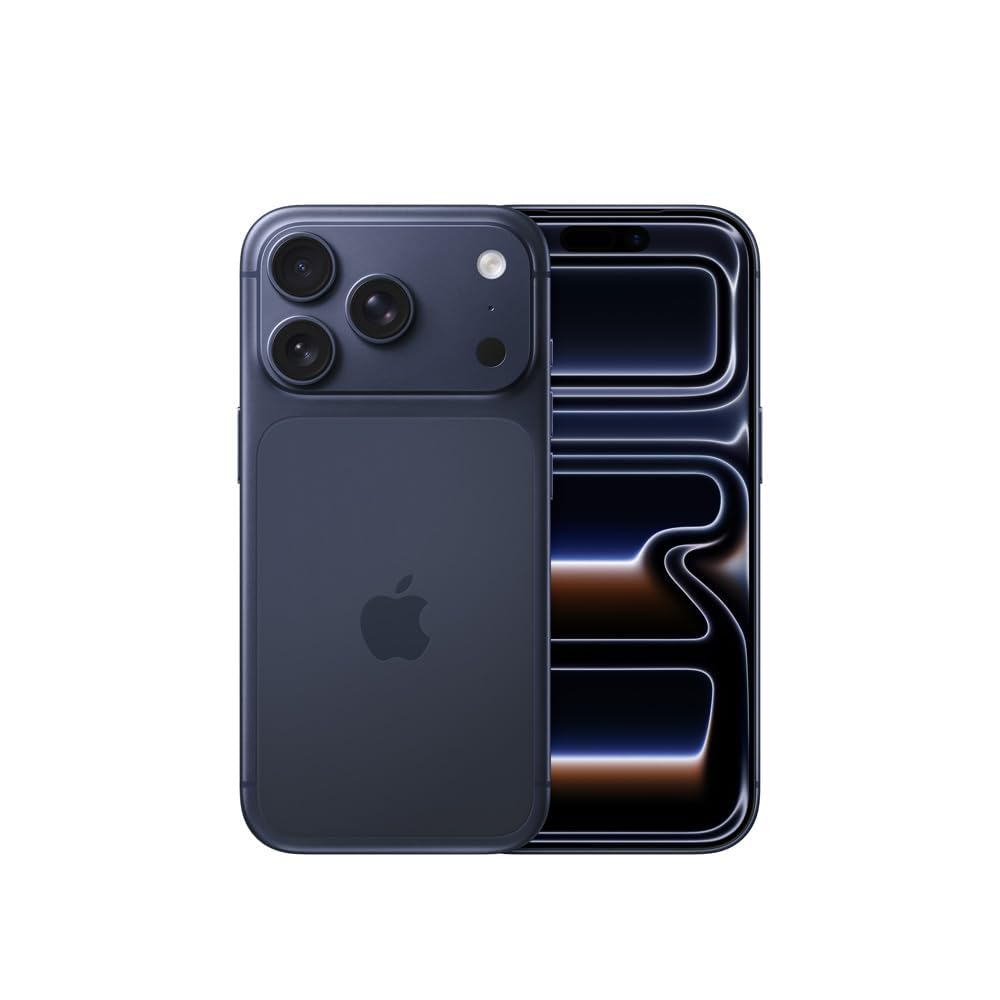
Image: Front view of the Apple iPhone 17 Pro in Deep Blue.
3. eSIM Activation
Your iPhone 17 Pro supports eSIM technology, allowing you to activate a cellular plan without a physical SIM card. Contact your carrier for specific instructions on activating your eSIM. This typically involves scanning a QR code or entering activation details provided by your carrier.

Image: Side view of the iPhone 17 Pro, highlighting the physical buttons.
Operating Your iPhone 17 Pro
1. Basic Navigation
- Touchscreen Gestures: Swipe up from the bottom to go home, swipe down from the top-right for Control Center, swipe down from the top-left for notifications.
- Side Button: Press to wake/sleep the device, press and hold for Siri, double-click for Apple Pay.
- Volume Buttons: Adjust media and call volume.
2. Making Calls and Sending Messages
Use the Phone app to make calls and the Messages app to send text messages (SMS/MMS) and iMessages.
3. Camera Features
Your iPhone 17 Pro is equipped with a powerful camera system:
- Rear Camera: 48 MP sensor for high-resolution photos and 4K video recording.
- Front Camera: 12 MP sensor for selfies and video calls.
- Shooting Modes: Includes High Dynamic Range (HDR) for improved photo quality.
- Digital Zoom: Up to 40x digital zoom.

Image: Detailed view of the iPhone 17 Pro's triple-lens rear camera system.
4. Connectivity
The device supports various connectivity options:
- Cellular: 5G, LTE, GSM (Unlocked for various carriers).
- Wireless: Wi-Fi, Bluetooth, NFC.
- Wired: Lightning, USB Type C connector.
5. Security Features
- Face Recognition: Securely unlock your device and authenticate purchases using your face.
6. Additional Features
- Always On Display: View essential information at a glance without waking your phone.
- Built-In GPS: For navigation and location services.
- Dual SIM: Supports multiple cellular plans (eSIM).
- Fast Charging Support: Quickly recharge your device.
- Stereo Speakers: Enhanced audio experience.
Maintenance
1. Battery Care
Your iPhone 17 Pro is powered by a Lithium-Ion battery with a capacity of 3650 Milliamp Hours (typical). To maximize battery lifespan:
- Avoid extreme temperatures.
- Optimize battery settings in iOS.
- Use the provided or certified charging accessories.
Note: As a renewed device, the battery is guaranteed to have a minimum capacity of 80%.
2. Water Resistance
The iPhone 17 Pro is designed to be water resistant. However, water resistance is not a permanent condition and may decrease as a result of normal wear. Do not intentionally submerge your device in water.
3. Cleaning Your Device
To clean your iPhone, use a soft, lint-free cloth. Avoid abrasive materials, sprays, or solvents.
Troubleshooting
1. Device Not Responding
If your iPhone is unresponsive, try a force restart:
- Press and quickly release the Volume Up button.
- Press and quickly release the Volume Down button.
- Press and hold the Side button until the Apple logo appears.
2. Network Connectivity Issues
- Check your cellular plan with your carrier.
- Ensure Wi-Fi and Bluetooth are enabled and connected to the correct networks/devices.
- Reset network settings (Settings > General > Transfer or Reset iPhone > Reset > Reset Network Settings).
3. Software Issues
Ensure your iOS is up to date (Settings > General > Software Update). If issues persist, consider restoring your iPhone from a backup or performing a factory reset (Note: This will erase all data on your device.)
Specifications
| Feature | Detail |
|---|---|
| Brand | Apple |
| Model Name | iPhone Pro 17 |
| Operating System | iOS 19 |
| Memory Storage Capacity | 256 GB |
| CPU Model | A-Series |
| CPU Speed | 3.7 GHz |
| Screen Size | 6.3 Inches |
| Resolution | 2622 × 1206 (460 PPI) |
| Refresh Rate | 120 Hz |
| Color | Deep Blue |
| SIM Card Type | eSIM (Dual SIM support) |
| Connector Type | Lightning, USB Type C |
| Biometric Security | Face Recognition |
| Water Resistance Level | Water Resistant |
| Rear Camera Resolution | 48 MP |
| Front Camera Resolution | 12 MP |
| Video Capture Resolution | 1080p, 4K |
| Battery Capacity | 3650 Milliamp Hours (Lithium-Ion) |
| Wireless Provider | Unlocked |
| Cellular Technology | 5G |
| Model Year | 2025 |
| Item Weight | 7.27 Ounces |
Warranty Information
This Apple iPhone 17 Pro (Renewed) is covered by a 90-Day Amazon Renewed Guarantee. This guarantee ensures that if your device does not work as expected, you can return it for a refund or replacement within 90 days of purchase. Please refer to the Amazon Renewed program terms and conditions for full details.
Support
For further assistance, please refer to the following resources:
- Apple Support: Visit the official Apple Support website for comprehensive guides, FAQs, and contact options for hardware and software issues.
- Amazon Renewed Support: For issues related to your renewed device or the 90-Day Amazon Renewed Guarantee, contact Amazon customer service.
- Your Carrier: For questions regarding your cellular plan, eSIM activation, or network services, contact your mobile service provider.
Helpful Videos
Apple iPhone 17 Pro Review
Video: A detailed review of the Apple iPhone 17 Pro, showcasing its features and user experience. (Source: Tsvety| Real Parenting)
iPhone 17 Pro Speed Test
Video: A speed test comparing the iPhone 17 Pro with another device, demonstrating its processing capabilities. (Source: Ersbit)
iPhone 17 Pro Design Overview
Video: A look at the design and build quality of the iPhone 17 Pro. (Source: Modern Goods)
iPhone 17 Pro Build Quality
Video: An overview of the iPhone 17 Pro's physical appearance and initial impressions. (Source: Bedoya Buys)
Related documentsiPhone Pro 17


Ask a question about this manual
Ask about setup, troubleshooting, compatibility, parts, safety, or missing instructions. Manuals+ will review the question and use this page’s manual context to help answer it.