1. Introduction
The APEXEL 36x Telephoto Lens is designed to enhance your smartphone photography by providing a powerful 36x optical zoom. This lens allows you to capture distant subjects with improved clarity, brightness, and color fidelity, minimizing distortion. It is an ideal tool for outdoor adventures, concerts, sports events, and wildlife observation.
Constructed from premium optical glass and a durable aircraft-grade aluminum body, this lens ensures robust performance and high-quality imaging. It offers universal compatibility with a wide range of smartphones, including various iPhone, Samsung Galaxy, and Google Pixel models.
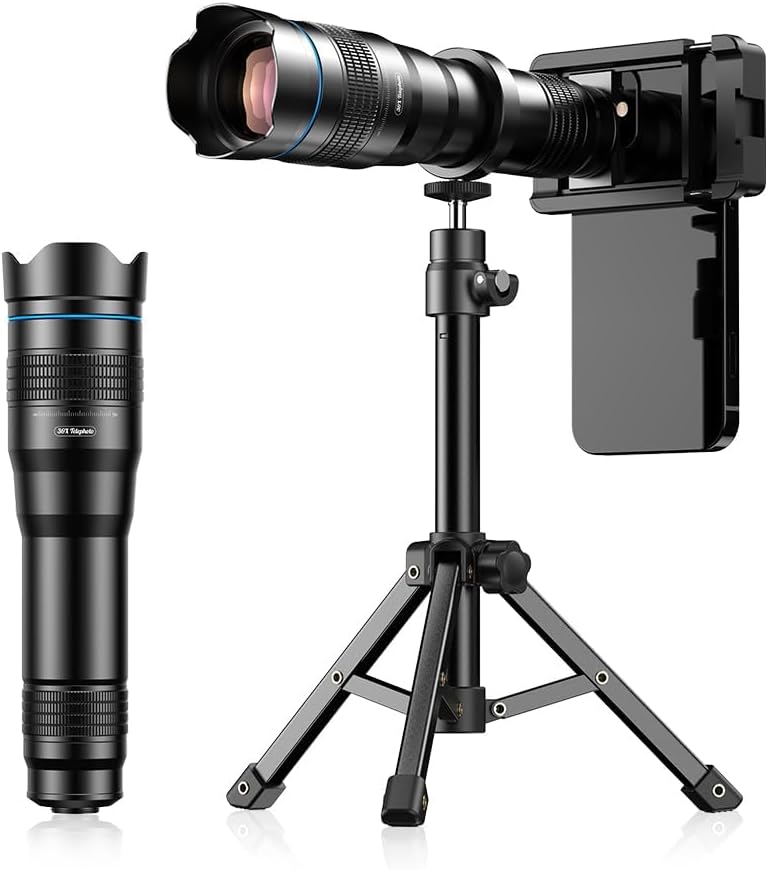
Figure 1: APEXEL 36x Telephoto Lens mounted on a smartphone with a tripod.
2. What's in the Box
Please verify that all items listed below are included in your package:
- 36X Telephoto Lens
- Smartphone Clip/Holder
- Mini Tripod
- Lens Caps (Front and Rear)
- Eyecup (for monocular use)
- Cleaning Cloth
- Instruction Manual
- Storage Bag

Figure 2: Packaging list showing all included components of the APEXEL 36x Telephoto Lens kit.
3. Setup Instructions
Follow these steps to properly set up your APEXEL 36x Telephoto Lens:
- Attach the Smartphone Clip: Securely clip the smartphone holder onto your phone, ensuring the lens mounting hole aligns with your phone's primary camera. If your phone has multiple cameras, identify the main camera for optimal results.
- Mount the Telephoto Lens: Screw the 36x telephoto lens into the threaded interface of the smartphone clip. Rotate clockwise until it is firmly secured.
- Attach the Tripod: For stable shots, especially at high magnification, screw the mini tripod's 1/4"-20 thread into the corresponding thread hole on the telephoto lens. Extend the tripod legs and adjust the height as needed.

Figure 3: Step-by-step visual guide for attaching the lens and tripod to your smartphone.
Video 1: Detailed installation guide for the APEXEL 36x Telephoto Lens and its accessories.
4. Operating Instructions
4.1 Focusing the Lens
Once the lens is attached, open your smartphone's camera app. Rotate the focus adjustment wheel on the telephoto lens until your subject appears sharp and clear in the viewfinder. Fine-tune the focus for optimal image quality.
Video 2: Functional introduction and tutorial for using the 36x Telephoto Lens, including focusing.
4.2 Eliminating Black Edges
When using the telephoto lens, especially with certain phone camera settings, you might observe black corners in your image. This is normal. To eliminate these, simply magnify the frame within your phone's camera app (e.g., zoom to 2x) until the black corners disappear.

Figure 4: Adjusting phone's digital zoom to remove black edges from the telephoto lens view.
4.3 Monocular Use
The telephoto lens can also be used as a standalone monocular telescope. Simply attach the included eyecup to the eyepiece end of the lens for a comfortable viewing experience without your smartphone.

Figure 5: Using the telephoto lens as a monocular for direct observation.
4.4 Macro Control Settings (iOS/Android)
For optimal performance, especially with newer iPhone models (iPhone 13 and newer), it is recommended to disable macro controls on the camera screen and use the main camera. For Samsung Galaxy S22/S23 Ultra, disable focus enhancement.

Figure 6: Adjusting smartphone camera settings for macro control on iOS and Samsung Galaxy devices.
5. Universal Smartphone Compatibility
The APEXEL 36x Telephoto Lens is designed for broad compatibility with most popular smartphone models. The universal clamp accommodates phones with widths between 66mm and 95mm (2.6-3.7 inches).
Compatible models include, but are not limited to: iPhone 16, 15, 14, 13, and 12 Pro series, Samsung Galaxy series, and Google Pixel phones.
5.1 Non-Planar Lenses & Phone Cases
If your mobile phone camera is convex or if you are using a phone case, we recommend using the included EVA spacers. These pads are available in 2mm, 3mm, and 4mm thicknesses and can be used to fill any gap on your phone back to ensure the telephoto lens sits flush with the camera, or to accommodate a phone case.

Figure 7: Using EVA spacers for proper lens alignment with various phone designs and cases.
5.2 Identifying the Primary Lens
For optimal image quality, ensure the telephoto lens is aligned with your smartphone's primary camera lens. Refer to your phone's manual or the visual guide below to identify the primary lens.

Figure 8: Guide to identifying the primary camera lens on different smartphone models.
6. Maintenance
- Cleaning the Lens: Use the provided microfiber cleaning cloth to gently wipe the lens surfaces. For stubborn smudges, use a specialized lens cleaning solution applied to the cloth, not directly to the lens.
- Storage: Always store the lens in its protective storage bag when not in use to prevent dust and scratches. Keep lens caps on both ends.
- Handling: Avoid dropping the lens or subjecting it to harsh impacts, as this can damage the optical elements.
7. Troubleshooting
- Blurry Images: Ensure the lens is properly focused by rotating the adjustment wheel. Also, confirm the lens is clean and free of smudges. For best results, use the included tripod to minimize camera shake.
- Dark Corners/Vignetting: As mentioned in Operating Instructions, zoom in slightly on your smartphone's camera app until the dark corners disappear.
- Lens Not Aligning: Verify that the smartphone clip is centered over your phone's primary camera. Use the included EVA spacers if your phone has a non-planar camera or if you are using a phone case.
- Difficulty Attaching Lens: Ensure the lens is screwed in straight and not cross-threaded into the smartphone clip.
8. Specifications
| Feature | Detail |
|---|---|
| Magnification | 36x Optical Zoom |
| Lens Type | Telephoto |
| Focal Length Description | 14 |
| Compatible Mountings | Universal Smartphone Clip (66-95mm width) |
| Product Dimensions | 7.84 x 2.03 x 2.03 inches |
| Item Weight | 1.63 pounds |
| Manufacturer | APEXEL |
9. Warranty and Support
For information regarding product warranty, returns, or technical support, please refer to the documentation included with your purchase or visit the official APEXEL website. Protection plans may also be available for extended coverage.


