
Donner MAMP2
Donner MAMP2 Stereo Audio Amplifier User Manual
Model: MAMP2
Introduction
This user manual provides detailed instructions for the operation, setup, and maintenance of your Donner MAMP2 Stereo Audio Amplifier. Please read this manual thoroughly before using the product to ensure proper functionality and safety.
The Donner MAMP2 is a versatile 600W peak 2-channel stereo audio amplifier receiver designed for a superior audio experience. It features a wide range of input options and customizable sound controls, making it suitable for various home audio, karaoke, and theater speaker setups.
Product Overview

The Donner MAMP2 amplifier, shown here with its multi-functional remote control, is a compact and powerful unit. The front panel features various controls and input ports, while the rear panel provides speaker terminals and additional input/output options. The included remote allows for convenient control of all amplifier functions from a distance.
Key Features:
- 600W Peak Power (60W x 2 RMS): Delivers robust audio output for an enhanced listening experience.
- 2-Channel Independent Control: Supports up to 2 groups of speakers (4 speakers, 4-8Ω) and one subwoofer.
- Multi-Input Modes: Includes Bluetooth 5.3, USB (up to 64G), RCA, 2 microphone inputs, AUX IN, FM radio, digital fiber, coaxial, and Phono input for turntables.
- Customizable EQ Control: Independent treble, midrange, and bass adjustments via both amplifier and remote. Settings are automatically saved.
- Dual Microphone Interface: Ideal for karaoke and public speaking with a talk-over function to lower background music.
- Upgraded FM Function: Allows quick selection of favorite FM frequencies by direct number input.
Setup
Package Contents:
- Donner MAMP2 Stereo Audio Amplifier
- Multi-functional Remote Control
- Power Cable
- User Manual (this document)
Connecting Speakers:
The MAMP2 supports up to 4 passive speakers (4-8Ω) and one active subwoofer. Ensure correct polarity (+ to + and - to -) when connecting speaker wires to the amplifier's speaker terminals.
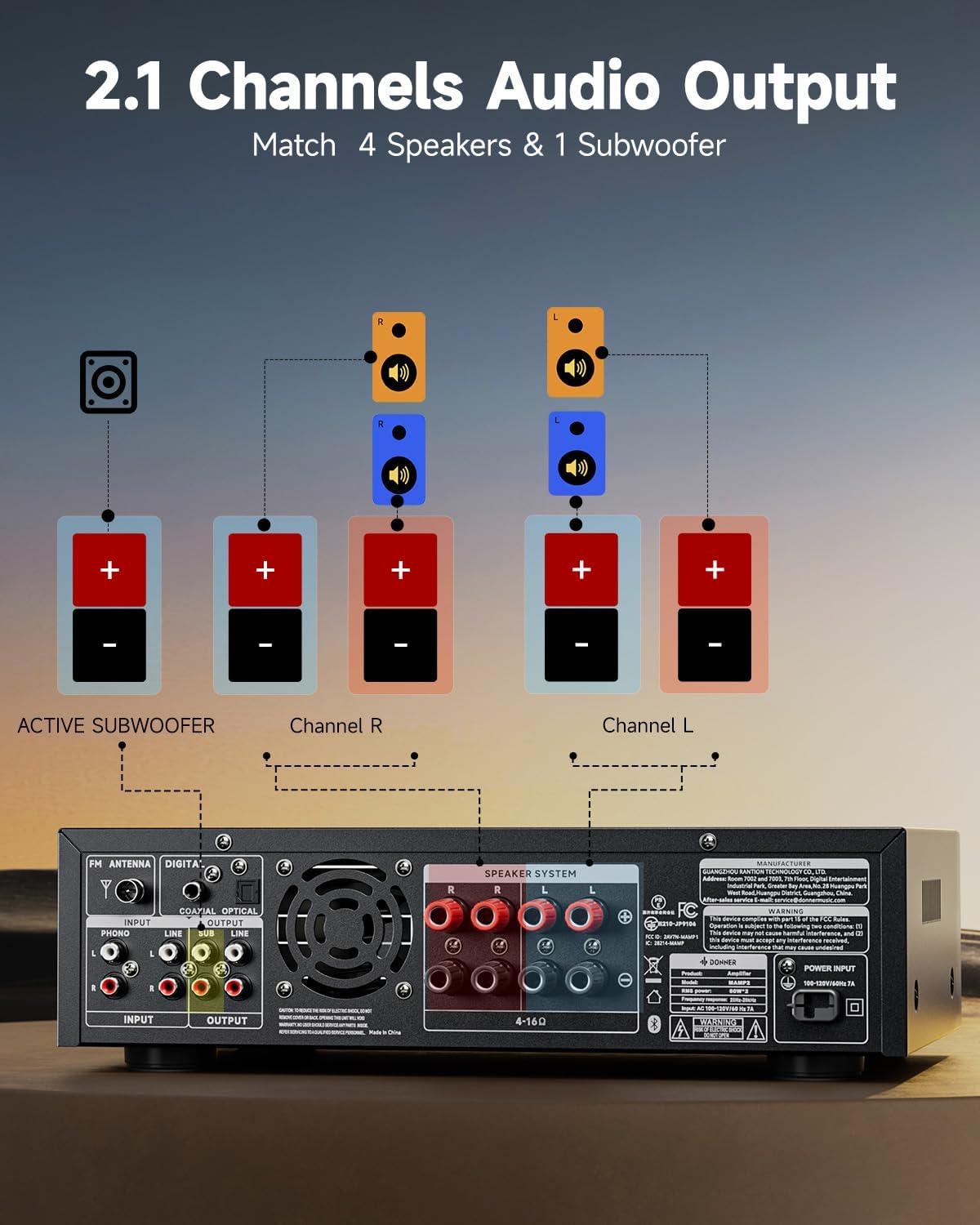
This diagram illustrates the connection of speakers and an active subwoofer to the Donner MAMP2 amplifier. Connect your main left and right speakers to the "Channel L" and "Channel R" terminals respectively. An active subwoofer can be connected to the dedicated "ACTIVE SUBWOOFER" output for enhanced bass.
Connecting Audio Sources:
The MAMP2 offers a variety of input options. Choose the appropriate cable and port for your device.

The amplifier supports multiple input sources. For digital audio, use the Optical or Coaxial inputs, suitable for smart TVs. For analog devices, use the RCA or AUX IN ports. A dedicated Phono input is available for turntables. USB input supports media playback up to 64GB. Two 1/4'' microphone inputs are provided for vocal use. FM antenna connection is also available for radio reception.
- Bluetooth 5.3: For wireless connection from smartphones, tablets, or computers.
- USB: Insert a USB drive (up to 64GB) for direct audio playback.
- RCA/AUX IN: Connect traditional audio devices like CD players, DVD players, or other media players.
- Microphone Inputs (1/4''): Connect up to two microphones for karaoke or public address.
- FM Radio: Connect the included FM antenna for radio reception.
- Digital Optical/Coaxial: Connect smart TVs or other digital audio sources for high-quality sound.
- Phono Input: Connect a turntable directly to this input.
Operating Instructions
Power On/Off:
Press the Power button on the front panel or the remote control to turn the amplifier on or off.
Input Selection:
Use the MODE button on the front panel or the remote to cycle through available input sources (Bluetooth, USB, RCA, AUX, FM, Optical, Coaxial, Phono).
Volume Control:
Adjust the Master Volume knob on the front panel or use the VOL+ / VOL- buttons on the remote control to set the overall sound level.
EQ Adjustment:
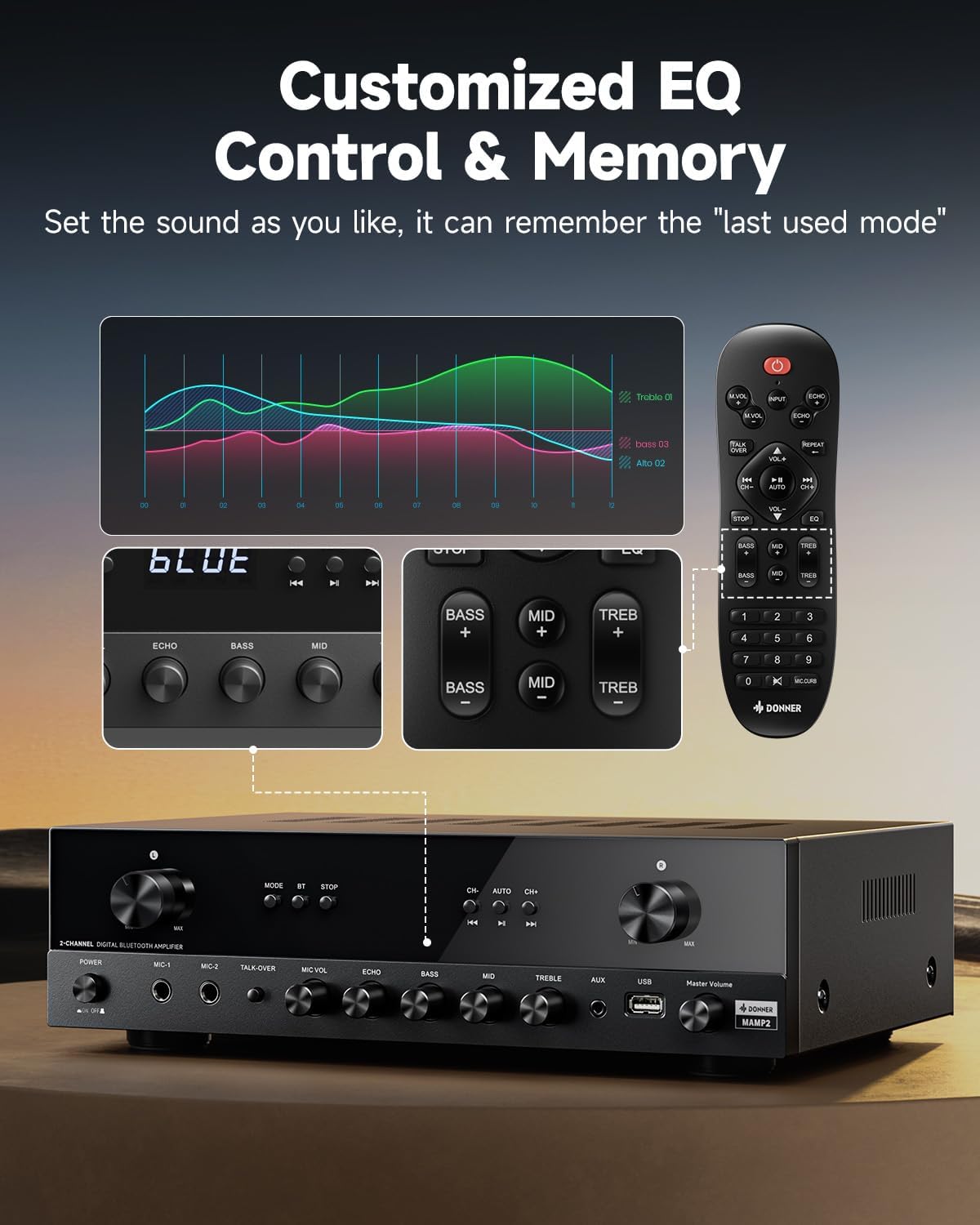
The Donner MAMP2 allows for precise sound customization. Use the dedicated knobs on the front panel or the EQ buttons on the remote control to adjust Bass, Midrange, and Treble levels. The amplifier automatically saves your preferred EQ settings for the next use.
Bluetooth Operation:
- Select Bluetooth mode using the MODE button. The display will show "BLUE".
- On your device (smartphone, tablet), enable Bluetooth and search for "Donner MAMP2".
- Select "Donner MAMP2" to pair. Once connected, the display will indicate a successful connection.
FM Radio Operation:
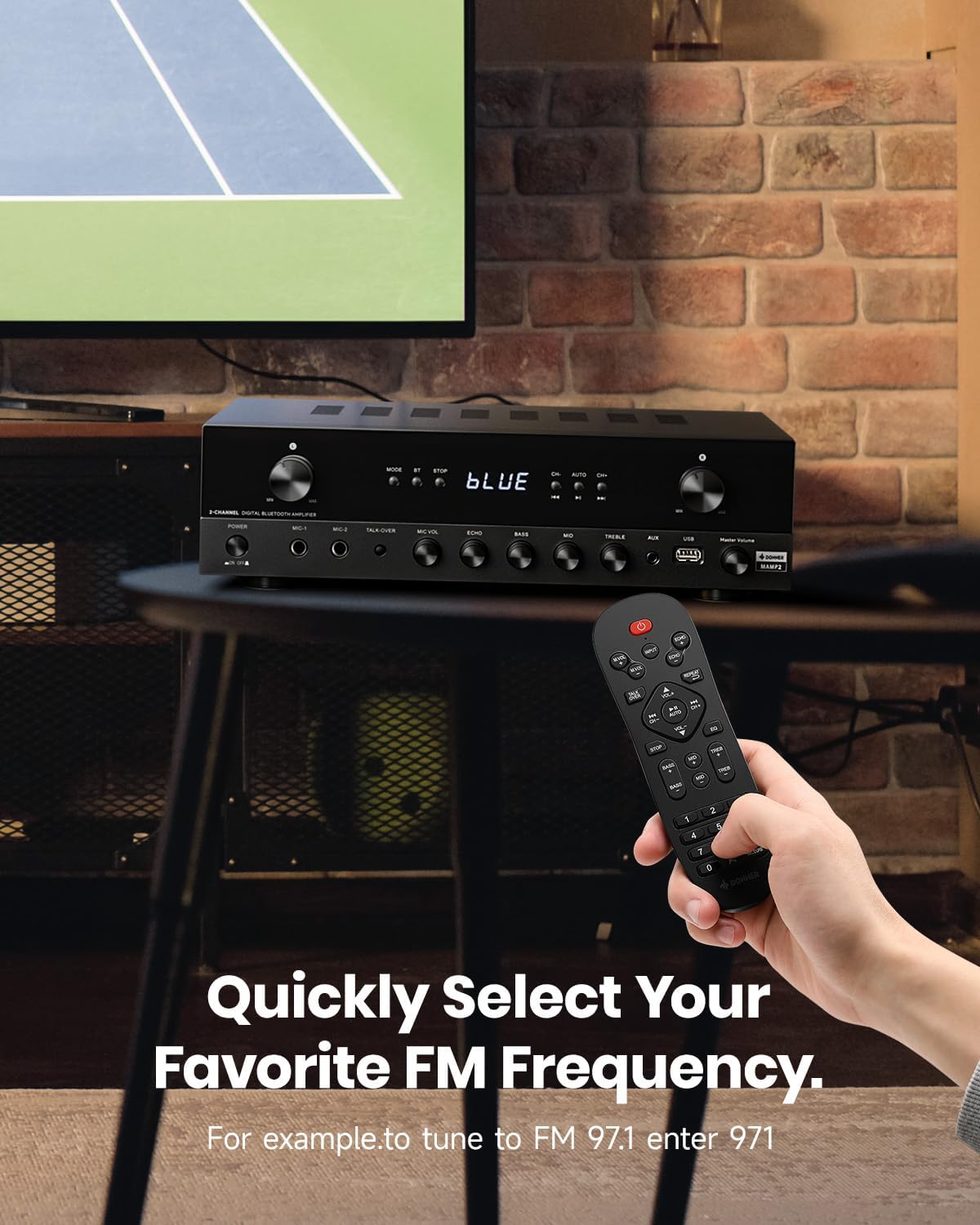
To tune into FM radio, select the FM mode. You can use the CH+ / CH- buttons to scan through stations or directly enter your desired frequency using the number pad on the remote control (e.g., for FM 97.1, enter 971).
Microphone and Karaoke Functions:
- Connect microphones to the 1/4'' MIC inputs on the front panel.
- Adjust MIC VOL and ECHO levels using the respective knobs.
- Activate the TALK-OVER function to automatically lower background music when speaking into the microphone.
Maintenance
To ensure the longevity and optimal performance of your Donner MAMP2 amplifier, follow these maintenance guidelines:
- Cleaning: Use a soft, dry cloth to wipe the exterior of the amplifier. Do not use liquid cleaners or abrasive materials, as they may damage the finish or internal components.
- Ventilation: Ensure the amplifier has adequate ventilation. Do not block the ventilation openings on the top or sides of the unit. Avoid placing it in enclosed spaces without airflow.
- Storage: When not in use for extended periods, store the amplifier in a cool, dry place away from direct sunlight and extreme temperatures.
- Power: Always disconnect the power cord from the wall outlet before cleaning or if the unit will be unused for a long time.
Troubleshooting
If you encounter issues with your Donner MAMP2 amplifier, refer to the following common problems and solutions:
| Problem | Possible Cause | Solution |
|---|---|---|
| No power | Power cord not connected; Power outlet faulty | Ensure power cord is securely plugged in; Try a different power outlet. |
| No sound output | Incorrect input selected; Volume too low; Speaker wires loose or incorrectly connected; Muted | Select the correct input source; Increase volume; Check speaker wire connections and polarity; Ensure unit is not muted. |
| Bluetooth not connecting | Amplifier not in Bluetooth mode; Device too far; Interference | Switch amplifier to Bluetooth mode; Move device closer to amplifier; Reduce interference from other wireless devices. |
| Microphone not working | Microphone not plugged in correctly; MIC VOL too low; Microphone faulty | Ensure microphone is fully inserted into the MIC input; Increase MIC VOL; Test with another microphone if available. |
| Remote control not working | Batteries drained; Obstruction between remote and amplifier; Remote sensor blocked | Replace batteries; Remove any obstructions; Ensure remote sensor on amplifier is clear. |
If the problem persists after trying these solutions, please contact Donner customer support for further assistance.
Specifications
| Feature | Detail |
|---|---|
| Brand | Donner |
| Model Number | MAMP2 |
| Output Power | 600W Peak (60W x 2 RMS) |
| Number of Channels | 2 |
| Connectivity Technology | Bluetooth 5.3, USB, RCA, AUX, FM, Optical, Coaxial, Phono |
| Compatible Devices | Speakers |
| Microphone Inputs | Dual 1/4'' |
| USB Support | Up to 64GB |
| Product Dimensions | 35 x 24.8 x 9.8 cm |
| Item Weight | 4.7 kg |
| Special Feature | Compact Design, Customizable EQ, Talk-Over Function |
Warranty and Support
Donner products come with a standard manufacturer's warranty. For specific warranty terms and conditions, please refer to the warranty card included with your product or visit the official Donner website.
For technical support, troubleshooting assistance beyond this manual, or warranty claims, please contact Donner customer service:
- Website: www.donnerdeal.com
- Email: support@donnerdeal.com
- Phone: Please check the Donner website for regional contact numbers.
When contacting support, please have your product model number (MAMP2) and purchase information ready.
Related documentsMAMP2


Ask a question about this manual
Ask about setup, troubleshooting, compatibility, parts, safety, or missing instructions. Manuals+ will review the question and use this page’s manual context to help answer it.