
CARPURIDE Portable Wireless Carplay and Android Auto Display
Carpuride Portable Wireless Carplay and Android Auto Display User Manual
Model: Portable Wireless Carplay and Android Auto Display
1. Introduction
Thank you for choosing the Carpuride Portable Wireless Carplay and Android Auto Display. This device is designed to enhance your driving experience by bringing smart connectivity and entertainment directly to your vehicle. Featuring a 7-inch 1080p HD touchscreen, it offers seamless integration with Apple CarPlay and Android Auto, along with versatile audio output options and easy installation.
2. Key Features
- Wireless CarPlay & Android Auto: Access all phone features via wireless Bluetooth and Wi-Fi connection, including calls, music, online navigation, and voice control.
- 7-inch 1080p HD IPS Touchscreen: A high-definition display that captures the full driving view without obstructing your line of sight, ensuring a safer and more comfortable experience.
- Bluetooth 5.0 & Built-in Microphone: For smooth hands-free calls and voice control. Includes a micro port for external microphone.
- Multiple Audio Output Options: Connect to your car's audio system via AUX, FM wireless transmission, or use the device's built-in local speaker.
- Multimedia Playback: Supports TF card and USB for playing audio and video files.
- Mirror Link Function: Super link feature allows online video streaming, downloading video/images, or mirroring your Android phone's screen.
- Automatic Brightness Adjustment: Light-sensing design automatically adjusts screen brightness based on ambient light for eye protection and safer driving.
- Wide Compatibility: Suitable for almost all types of vehicles, including cars, trucks, vans, buses, and pickups. Powered by DC 12V 2.5A cigarette lighter.
3. Package Contents
Please check the box for the following items:
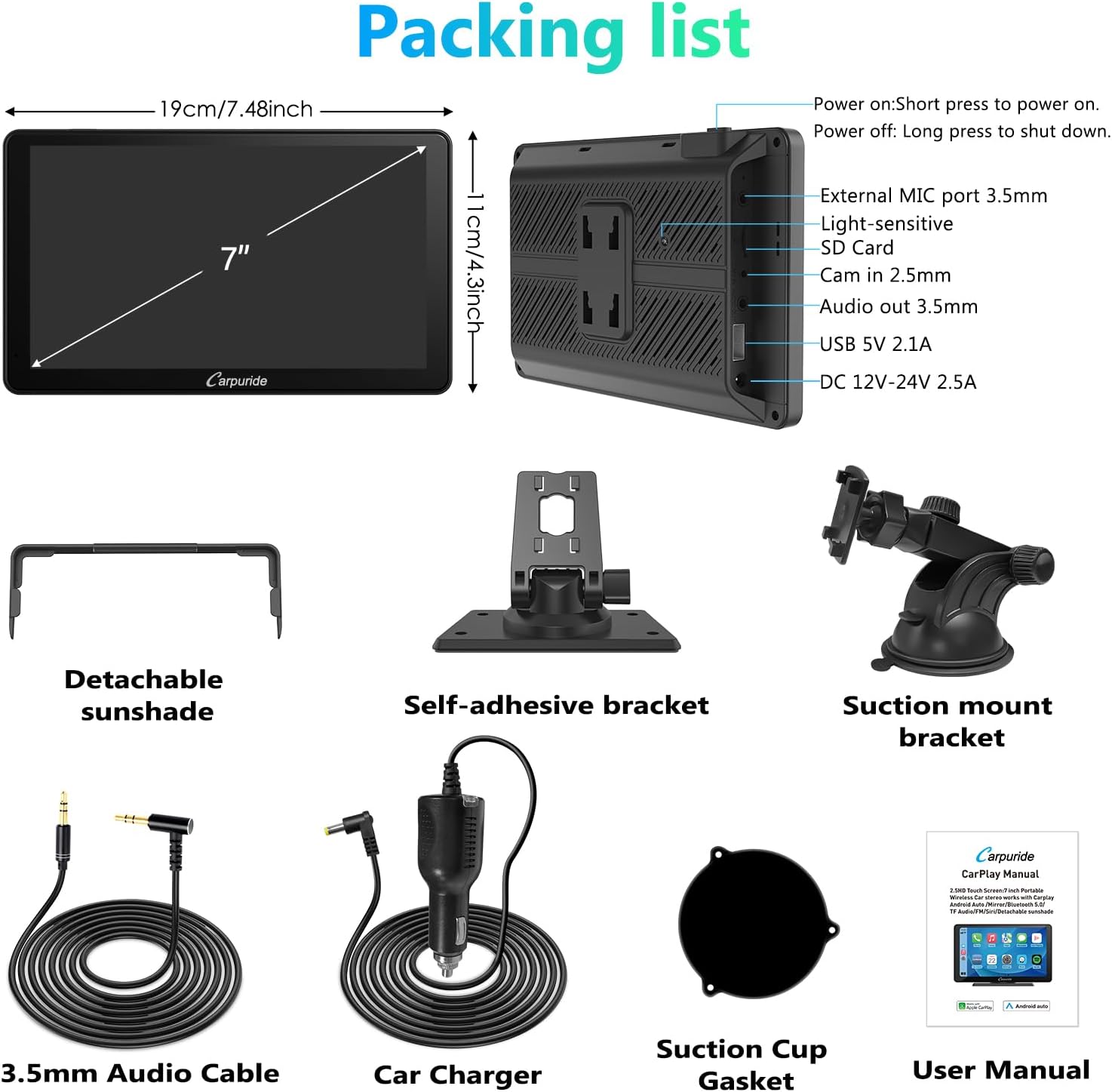
Description: An overview of the Carpuride device dimensions and the complete packing list, including the main unit, detachable sunshade, self-adhesive bracket, suction mount bracket, 3.5mm audio cable, car charger, suction cup gasket, and user manual.
- Carpuride Display Unit
- Detachable Sunshade
- Self-adhesive Bracket
- Suction Mount Bracket
- 3.5mm Audio Cable
- Car Charger (DC 12V-24V 2.5A)
- Suction Cup Gasket
- User Manual
4. Setup and Installation
The Carpuride display is designed for simple, non-destructive installation without needing to disassemble car parts.
4.1 Mounting the Device
Choose between the adhesive bracket or the suction cup mount based on your preference and vehicle's dashboard or windshield.
- Adhesive Bracket: Clean the desired dashboard surface thoroughly. Peel off the protective film from the adhesive base and firmly press the bracket onto the surface. Hold for a few seconds to ensure strong adhesion.
- Suction Mount Bracket: Clean the desired windshield or dashboard surface. Attach the suction cup gasket to the suction mount. Press the suction cup firmly against the surface and engage the lever to create a vacuum seal.
- Attach the Carpuride display unit to the chosen mount. Ensure it is securely fastened and positioned to not obstruct your view of the road.

Description: The Carpuride portable display unit, featuring a 7-inch screen, shown with both the suction cup mount and the adhesive dashboard mount, ready for installation.
4.2 Power Connection
Connect the provided car charger to the DC 12V-24V 2.5A input port on the Carpuride display and plug the other end into your vehicle's cigarette lighter socket.
4.3 Audio Connection
The Carpuride display offers four ways to output audio:

Description: Diagram illustrating the four versatile audio output options for the Carpuride device: Bluetooth audio, FM transmission to car radio, AUX connection, and its built-in local speaker.
- Bluetooth Audio: Pair the Carpuride display with your car's Bluetooth system for wireless audio streaming.
- FM Transmission: Select an unused FM frequency on the Carpuride display and tune your car's radio to the same frequency to transmit audio wirelessly.
- AUX Connection: Use the provided 3.5mm audio cable to connect the Carpuride display's audio out port to your car's AUX input.
- Local Horn: The device has a built-in speaker for direct audio output.
5. Operating Instructions
5.1 Power On/Off
- Power On: Short press the power button.
- Power Off: Long press the power button.
5.2 Wireless CarPlay & Android Auto
Once powered on, the device will automatically search for nearby compatible phones. Enable Bluetooth and Wi-Fi on your smartphone and follow the on-screen prompts to connect to CarPlay or Android Auto wirelessly.

Description: The Carpuride display demonstrating its compatibility with both Apple CarPlay and Android Auto, allowing access to phone features, navigation, and music directly from the screen.
5.3 GPS Navigation & Voice Control
Utilize your phone's navigation apps (e.g., Apple Maps, Google Maps, Waze) directly on the Carpuride display. The integrated microphone allows for voice commands through Siri or Google Assistant for hands-free operation.

Description: Illustration of the Carpuride display's integrated GPS navigation and voice control capabilities, enabling hands-free operation for calls, music, and directions using voice assistants.
5.4 Multimedia Playback & Mirror Link
Insert a TF card or USB drive into the designated slots to play audio and video files. For mirror link, connect your smartphone (wired or wirelessly) to display its screen content on the Carpuride unit. Note that when using the mirror function, the machine may not be displayed in full screen.
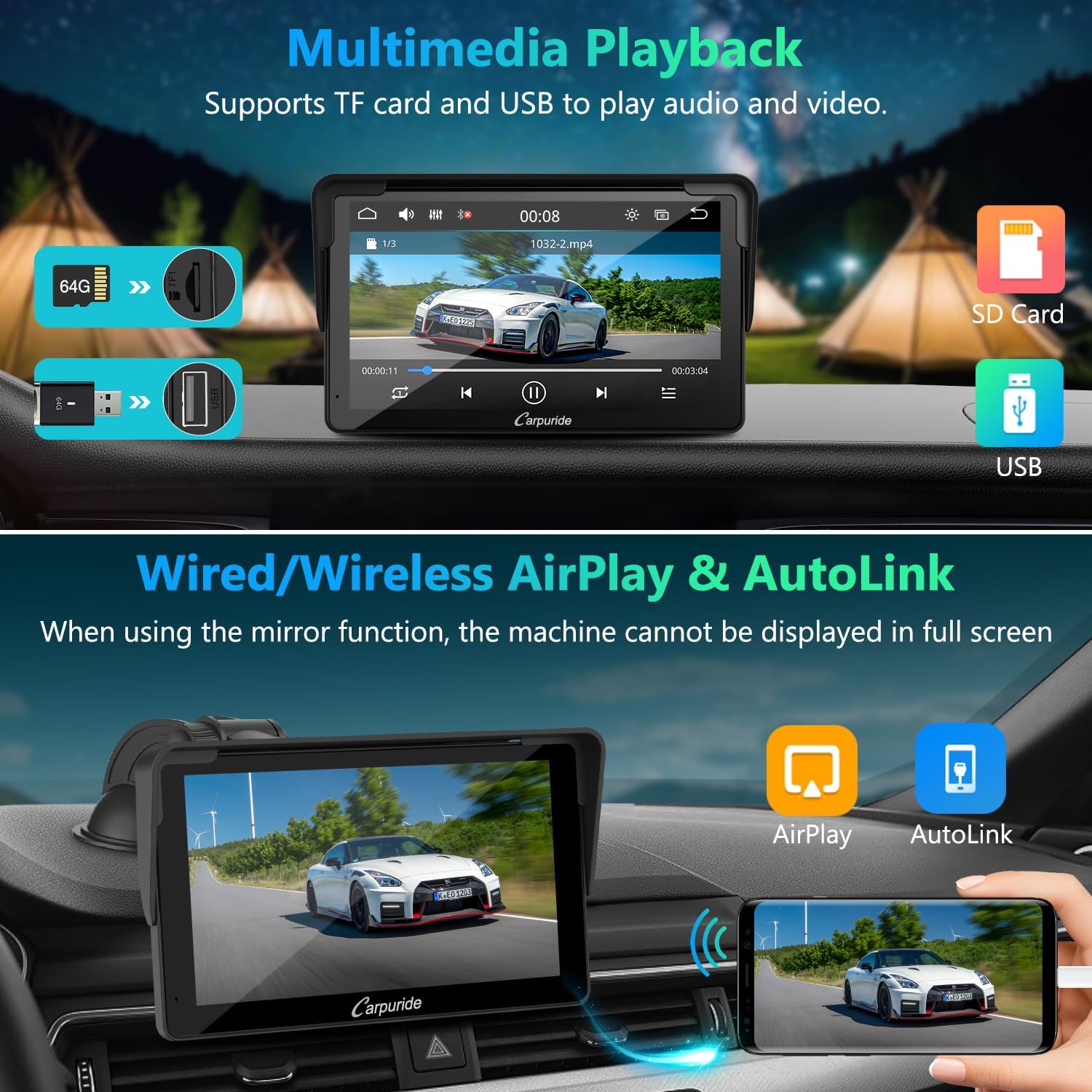
Description: The Carpuride display supports multimedia playback from TF cards and USB drives. It also features wired and wireless mirror link functionality (AirPlay for iOS, AutoLink for Android) to display phone content.
5.5 Brightness Adjustment
The device features a light-sensitive design that automatically adjusts the screen brightness according to the ambient light conditions. This protects your eyes and contributes to safer driving.

Description: The Carpuride display features a light-sensing design that automatically adjusts screen brightness according to ambient light conditions, enhancing visibility and driving safety.
6. Maintenance
To ensure the longevity and optimal performance of your Carpuride display, follow these maintenance guidelines:
- Cleaning: Use a soft, lint-free cloth to gently wipe the screen and exterior. For stubborn smudges, slightly dampen the cloth with water or a screen-safe cleaner. Avoid abrasive materials or harsh chemicals.
- Temperature: Avoid exposing the device to extreme temperatures, both hot and cold. Do not leave it in direct sunlight for extended periods, especially in a parked car.
- Storage: If storing the device for a long period, disconnect it from power and store it in a cool, dry place.
- Handling: Handle the device with care. Avoid dropping it or subjecting it to strong impacts.
7. Troubleshooting
If you encounter issues with your Carpuride display, please refer to the following common problems and solutions:
- No Power:
- Ensure the car charger is securely plugged into both the device and the vehicle's cigarette lighter socket.
- Check if the vehicle's cigarette lighter socket is receiving power (e.g., by testing with another device).
- Verify the vehicle's fuse for the cigarette lighter socket is not blown.
- No Audio Output:
- If using FM transmission, ensure the Carpuride display and your car radio are tuned to the exact same unused frequency.
- If using AUX, ensure the 3.5mm cable is fully inserted into both the device and your car's AUX input, and your car's audio source is set to AUX.
- If using Bluetooth, ensure the device is successfully paired with your car's audio system and your car's audio source is set to Bluetooth.
- Check the volume levels on both the Carpuride display and your car's audio system.
- CarPlay/Android Auto Not Connecting:
- Ensure Bluetooth and Wi-Fi are enabled on your smartphone.
- Forget the device from your phone's Bluetooth settings and try pairing again.
- Restart both the Carpuride display and your smartphone.
- Ensure your phone's operating system is up to date.
- Touchscreen Unresponsive:
- Restart the device.
- Ensure the screen is clean and free of debris or moisture.
If the problem persists after trying these solutions, please contact Carpuride customer support for further assistance.
8. Specifications
| Feature | Specification |
|---|---|
| Brand | CARPURIDE |
| Connectivity Technology | Auxiliary, Bluetooth |
| Controller Type | Google Assistant (Voice Control) |
| Special Feature | Touchscreen |
| Compatible Devices | Smartphone |
| Connector Type | HDMI, RCA, 3.5 mm jack, USB Type-A |
| Audio Output Mode | Stereo |
| Surround Sound Channel Configuration | 5.1 |
| Video Encoding | RM |
| Product Dimensions (L x W x H) | 2.5P x 18.2l x 10.7H centimeters (approx. 0.98 x 7.17 x 4.21 inches) |

Description: Details of the Carpuride's 7-inch 1080P HD IPS touchscreen, emphasizing its high sensitivity, 1024x600 HD resolution, 2.5D curved design, and anti-scratch properties.
9. Warranty and Support
Carpuride products are designed for reliability and performance. For warranty information and technical support, please refer to the warranty card included in your package or visit the official Carpuride website. Our customer service team is available to assist you with any questions or issues you may encounter.
Related documentsPortable Wireless Carplay and Android Auto Display


Ask a question about this manual
Ask about setup, troubleshooting, compatibility, parts, safety, or missing instructions. Manuals+ will review the question and use this page’s manual context to help answer it.