
1. Introduction and Overview
This manual provides instructions for the Energizer Smart 2K Wired Indoor Camera, Model EIX1-1006. This device is designed for indoor monitoring, offering 2K HD video resolution, night vision, and two-way audio communication. Its foldable design allows for privacy when the camera is not in active use. The camera connects to your home Wi-Fi network (2.4GHz & 5GHz) and is managed via the Energizer Connect App.
Key features include:
- 2K HD Resolution: Provides clear and detailed video footage.
- 130° Wide-Angle View: Offers broad coverage of indoor spaces.
- Night Vision: Integrated LED lights enable clear viewing in low-light conditions.
- Two-Way Audio: Allows for real-time communication through the camera.
- Instant Motion Alerts: Notifies you of detected activity via the Energizer Connect App.
- Foldable Design: Serves as a privacy cover when the camera is not in use.
- Flexible Storage: Supports local microSD card storage (up to 128GB, not included) and optional cloud storage.
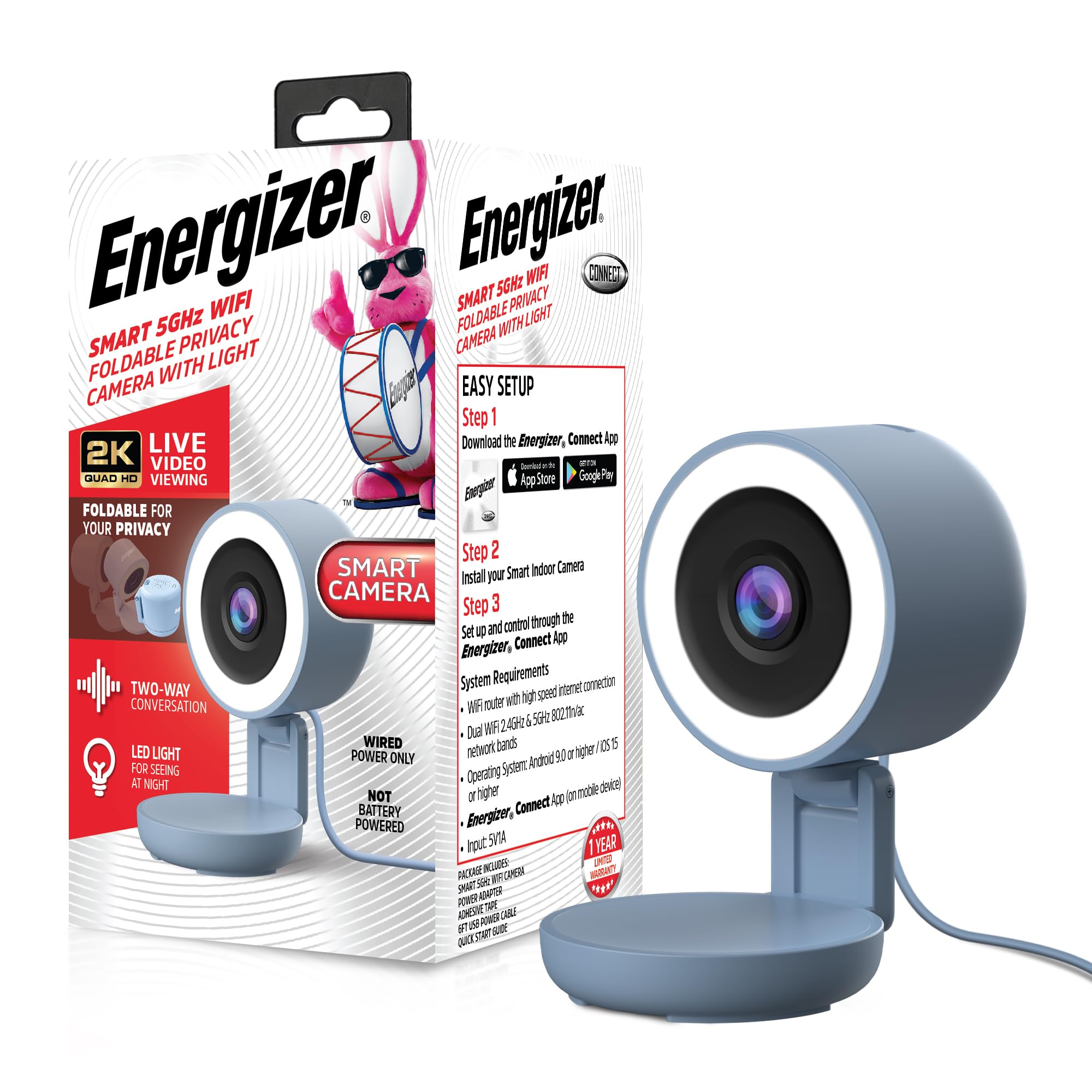
Image 1.1: Energizer Smart 2K Wired Indoor Camera with its foldable privacy feature.
2. Package Contents
Verify that all items are present in the package:
- Energizer Smart 2K Wired Indoor Camera
- USB Power Adapter
- USB Power Cable
- Quick Start Guide

Image 2.1: Product packaging illustrating included components and initial setup steps.
3. Setup Instructions
Follow these steps to set up your Energizer Smart 2K Wired Indoor Camera:
- Download the Energizer Connect App: Search for "Energizer Connect" on the Google Play Store (for Android devices) or the Apple App Store (for iOS devices) and install the application.
- Create an Account: Open the Energizer Connect App and follow the on-screen prompts to create a new user account or log in if you already have one.
- Power On the Camera: Connect the provided USB power cable to the camera and the USB power adapter. Plug the adapter into a standard wall outlet. The camera's indicator light will begin to flash, indicating it is ready for pairing.
- Add Device in App: In the Energizer Connect App, tap the "+" icon to add a new device. Select "Camera" or the specific camera model if prompted.
- Connect to Wi-Fi: Follow the app's instructions to connect the camera to your home Wi-Fi network. Ensure your Wi-Fi network is 2.4GHz or 5GHz. You may need to scan a QR code displayed on your phone with the camera lens.
- Position the Camera: Place the camera on a flat, stable surface. The foldable design allows for angle adjustment.
System Requirements:
- Wi-Fi router with high-speed internet connection
- Dual Wi-Fi 2.4GHz & 5GHz 802.11n/ac network bands
- Operating System: Android 9.0 or higher / iOS 15 or higher
- Energizer Connect App (on mobile device)

Image 3.1: The Energizer Connect App interface for managing the camera and receiving alerts.
4. Operating Instructions
4.1 Live View
Open the Energizer Connect App and select your camera from the device list to view the live video feed. You can monitor your space in real-time from anywhere with an internet connection.
4.2 Two-Way Audio
To use the two-way audio feature, tap the microphone icon within the live view interface of the app. You can then speak through your phone, and your voice will be projected through the camera's speaker. Release the icon to listen. This allows for communication with individuals or pets in the camera's vicinity.

Image 4.1: Demonstrating the two-way audio feature via the Energizer Connect App.
4.3 Motion Detection and Alerts
The camera is equipped with motion detection capabilities. When motion is detected, the camera can send instant notifications to your smartphone via the Energizer Connect App. You can customize alert sensitivity and schedules within the app settings.
4.4 Video Recording and Storage
The camera supports two storage options for recorded video footage:
- MicroSD Card (Local Storage): Insert a microSD card (up to 128GB, not included) into the designated slot on the camera. The camera will automatically record events or continuous footage based on your app settings.
- Cloud Storage: An optional cloud storage service is available, often with a free trial period. This allows for remote access to recorded footage without the need for a local storage device. Details and subscription options are available within the Energizer Connect App.

Image 4.2: The camera supports microSD card for local video recording.
4.5 Night Vision
The camera automatically switches to night vision mode in low-light conditions, utilizing its built-in LED lights to provide clear black and white video footage.
4.6 Privacy Mode (Foldable Design)
The camera features a foldable design. When you wish to ensure privacy, you can fold the camera head down, physically blocking the lens. This acts as a visual indicator and physical barrier for privacy.

Image 4.3: The camera's foldable design provides a privacy option.
5. Maintenance
To ensure optimal performance and longevity of your camera:
- Cleaning: Gently wipe the camera lens and body with a soft, dry cloth. Avoid using harsh chemicals or abrasive materials.
- Software Updates: Regularly check the Energizer Connect App for firmware updates. Keeping the camera's software up-to-date ensures access to the latest features and security enhancements.
- Placement: Ensure the camera is placed in a location where it is not exposed to extreme temperatures, direct sunlight, or moisture.
6. Troubleshooting
If you encounter issues with your Energizer Smart 2K Wired Indoor Camera, refer to the following common solutions:
- Camera Not Connecting to Wi-Fi:
- Ensure your Wi-Fi network is 2.4GHz or 5GHz.
- Verify that your Wi-Fi password is entered correctly in the app.
- Move the camera closer to your Wi-Fi router to improve signal strength.
- Restart your Wi-Fi router and the camera.
- Ensure your mobile device meets the minimum operating system requirements (Android 9.0+ / iOS 15+).
- No Live Video Feed:
- Check your internet connection.
- Confirm the camera is powered on and connected to Wi-Fi.
- Close and reopen the Energizer Connect App.
- Two-Way Audio Not Working:
- Ensure your phone's microphone is enabled for the Energizer Connect App in your device settings.
- Check the volume settings on your phone and within the app.
- Verify there are no obstructions blocking the camera's speaker or microphone.
- Motion Alerts Not Received:
- Check the notification settings for the Energizer Connect App on your smartphone.
- Verify that motion detection is enabled and configured correctly within the app.
- Adjust motion detection sensitivity if necessary.
7. Specifications
| Feature | Specification |
|---|---|
| Model Number | EIX1-1006 |
| Indoor/Outdoor Usage | Indoor |
| Video Capture Resolution | 2K |
| Connectivity Protocol | Wi-Fi (2.4GHz & 5GHz) |
| Power Source | Corded Electric |
| Controller Type | App (Energizer Connect) |
| Mounting Type | Tabletop Mount |
| Special Features | 2-Way Audio, Built-In Light, Local Recording, Motion Sensor, Night Vision, Foldable for Privacy |
| Storage Options | MicroSD (up to 128GB), Cloud Storage (optional) |
| Product Dimensions (L x W x H) | 2.5 x 2.8 x 4.7 inches |
| Item Weight | 8 ounces |
| UPC | 805106873219 |
8. Warranty and Support
The Energizer Smart 2K Wired Indoor Camera comes with a 1-Year Limited Warranty. For warranty claims or technical assistance, please refer to the Energizer Connect App for support resources or visit the official Energizer Connect website. Keep your purchase receipt as proof of purchase for warranty purposes.


