
Richmat PS3-A29020-1
Richmat PS3A Power Supply User Manual
Model: PS3-A29020-1
1. Introduction
This manual provides essential information for the safe and efficient operation of your Richmat PS3A Power Supply. Designed specifically for adjustable and family-style bed bases, this 29V 2A adapter ensures consistent performance and includes a battery backup feature for emergency use.
Please read this manual thoroughly before installation and use, and retain it for future reference.
2. Safety Information
To prevent injury or damage to the product, observe the following safety precautions:
- Ensure the power supply is disconnected from the main power outlet before performing any maintenance or installation.
- Do not expose the power supply to water, excessive moisture, or extreme temperatures.
- Do not attempt to open or repair the power supply. Refer all servicing to qualified personnel.
- Use only with compatible adjustable bed bases that support the Richmat PS3A model.
- Keep out of reach of children and pets.
- Ensure proper ventilation around the power supply during operation.
3. Product Overview
The Richmat PS3A Power Supply is a compact and durable unit designed to power your adjustable bed. It features a sleek black housing and an integrated battery backup system.
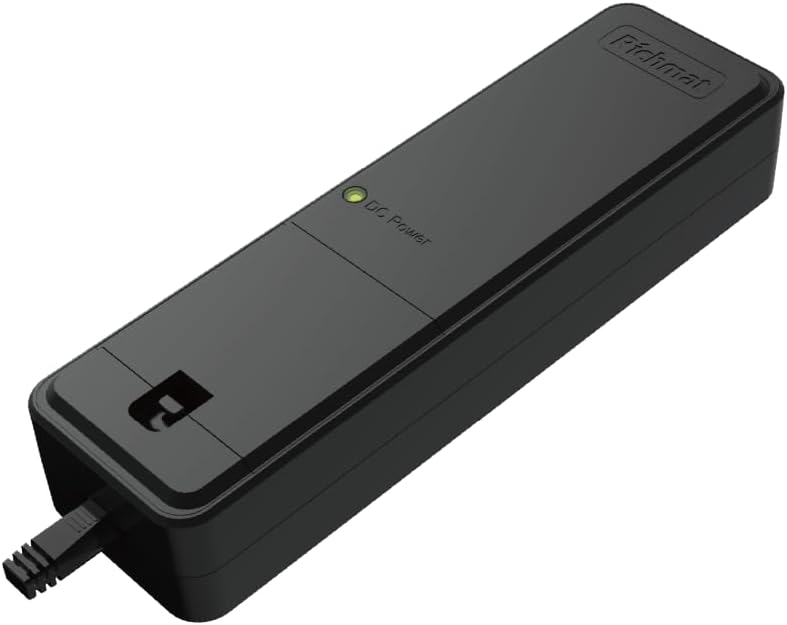
Figure 3.1: Angled view of the Richmat PS3A Power Supply, showing the DC Power indicator light and the Richmat logo.

Figure 3.2: Top view of the Richmat PS3A Power Supply, highlighting the DC Power indicator and the cable exit point.

Figure 3.3: End view of the Richmat PS3A Power Supply, showing the AC power input port.

Figure 3.4: Side view of the Richmat PS3A Power Supply, showing its compact profile.
Key Features:
- Dependable Power: Provides stable 29V 2A output for smooth operation of bed motors.
- Battery Backup: Internal dual 9V battery system allows for returning the bed to a flat position during power outages.
- Durable Design: Sleek black housing designed to blend discreetly with most bed frames.
4. Setup
Follow these steps to set up your Richmat PS3A Power Supply:
- Unpack: Carefully remove the power supply from its packaging.
- Connect to Bed Base: Locate the power input port on your adjustable bed base. Connect the DC output cable from the PS3A Power Supply to this port. Ensure a secure connection.
- Connect AC Power Cord: Note: The AC power cord is not included with this power supply. Connect a compatible AC power cord (IEC C7 type, commonly known as a figure-8 cable) to the AC input port on the PS3A Power Supply (refer to Figure 3.3).
- Plug into Wall Outlet: Plug the other end of the AC power cord into a standard, grounded wall outlet.
- Verify Power: The "DC Power" indicator light on the power supply (refer to Figure 3.1 and 3.2) should illuminate, indicating that the unit is receiving power.
Important: Ensure all connections are firm before plugging into a power outlet.
5. Operating Instructions
Once properly set up, the Richmat PS3A Power Supply will continuously provide power to your adjustable bed base. The primary function is automatic and requires no user intervention during normal operation.
Battery Backup Function:
The PS3A Power Supply includes an internal dual 9V battery system designed to provide temporary power during a power outage. This feature allows you to return your adjustable bed to a flat position in an emergency.
- When main AC power is lost, the power supply will automatically switch to battery backup mode.
- The battery backup is intended for emergency lowering only and is not designed for continuous operation or full bed adjustments.
- The batteries are typically trickle-charged when the unit is connected to AC power.
- It is recommended to periodically check the battery charge by briefly unplugging the AC power cord and attempting to operate the bed (only for emergency lowering). If the bed does not respond, the internal batteries may need replacement or recharging.
6. Maintenance
The Richmat PS3A Power Supply requires minimal maintenance to ensure long-term performance.
- Cleaning: Disconnect the power supply from the wall outlet before cleaning. Use a soft, dry cloth to wipe the exterior. Do not use liquid cleaners or abrasive materials.
- Inspection: Periodically inspect the power supply and all connected cables for any signs of damage, fraying, or loose connections. If any damage is observed, discontinue use and contact customer support.
- Battery Check: As mentioned in the operating instructions, periodically test the battery backup function to ensure it is operational.
7. Troubleshooting
If you encounter issues with your Richmat PS3A Power Supply, refer to the following table for common problems and solutions.
| Problem | Possible Cause | Solution |
|---|---|---|
| No power to bed / DC Power indicator off. |
|
|
| Bed does not move during power outage. |
|
|
| Unusual noises or smells from power supply. | Internal malfunction. | Immediately unplug the power supply from the wall outlet. Do not attempt to use it. Contact Richmat customer support. |
If the problem persists after attempting these solutions, please contact Richmat customer support for further assistance.
8. Specifications
| Attribute | Value |
|---|---|
| Model Number | PS3-A29020-1 (also referred to as PS3) |
| Output Voltage | 29V |
| Output Current | 2A |
| Input Voltage | AC 100-240V (typical, depends on AC cord) |
| Battery Backup | Internal dual 9V battery system |
| Color | Black |
| Country of Origin | China |
| ASIN | B0F7CSWCB2 |
9. Warranty and Support
For information regarding warranty coverage, technical support, or replacement parts, please contact Richmat customer service directly. Refer to the contact information provided with your product packaging or visit the official Richmat website.
Please have your product model number (PS3-A29020-1) and ASIN (B0F7CSWCB2) ready when contacting support.
Related documentsPS3-A29020-1


Ask a question about this manual
Ask about setup, troubleshooting, compatibility, parts, safety, or missing instructions. Manuals+ will review the question and use this page’s manual context to help answer it.