
Introduction
Thank you for choosing the Onforu I25BL LED Flood Light. This manual provides essential information for the safe and efficient use of your new lighting product. Please read these instructions carefully before installation and operation, and retain them for future reference.

Image: Onforu LED Flood Lights providing vibrant illumination in an outdoor setting, showcasing their color-changing capabilities.
Safety Information
- Ensure the power supply is disconnected before installation or maintenance.
- The product is rated IP66 for water and dust resistance, suitable for outdoor use. However, the power plug is not waterproof and must be protected from moisture or plugged into a waterproof outlet.
- For permanent outdoor installations requiring wiring, it is recommended to consult a qualified electrician to ensure proper and safe setup.
- Do not disassemble or modify the product. This may void the warranty and pose safety risks.
- Avoid direct eye exposure to the light source when illuminated.
Package Contents
Your Onforu I25BL LED Flood Light package includes:
- Onforu I25BL LED Flood Light(s) (Quantity as purchased, e.g., 4-pack)
- User Manual
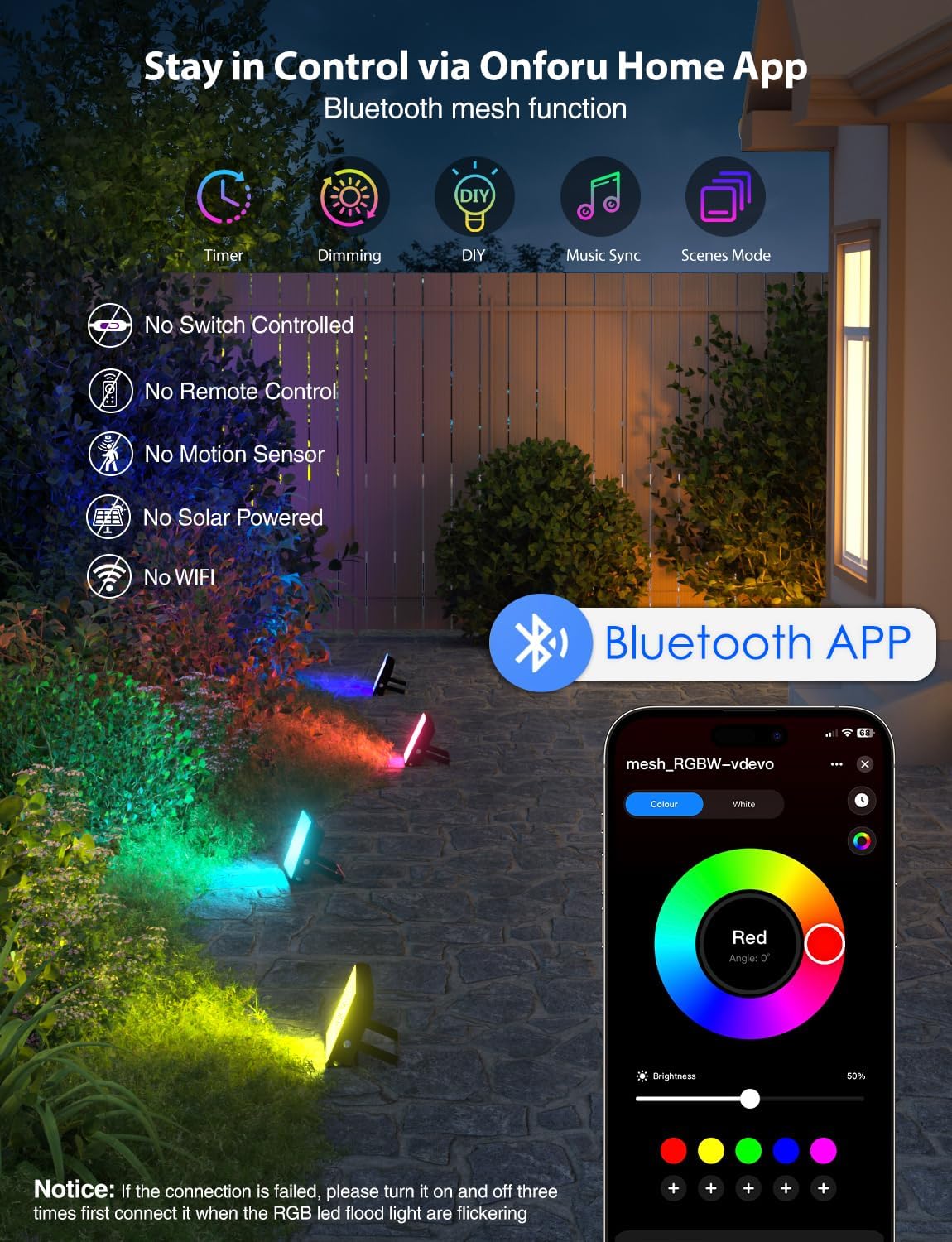
Image: A set of four Onforu LED Flood Lights, demonstrating the typical package contents.
Product Overview
The Onforu I25BL LED Flood Light is a versatile 25W, 2000LM RGBW light designed for both indoor and outdoor applications. It features Bluetooth APP control, 16 million color options, 2700K warm white light, 22 dynamic modes, music sync, and smart timer functions. Its IP66 rating ensures durability against dust and water.
Key Features:
- Power: 25W
- Brightness: 2000 Lumens
- Color Options: 16 Million RGB colors + 2700K Warm White
- Control: Bluetooth APP Control (Onforu Home APP)
- Dynamic Modes: 22 preset modes (strobe, jump, fade, etc.)
- Special Features: Real-Time Music Sync, Smart Timer, Memory Function
- Durability: IP66 Weatherproof Design (dust and water resistant)
- Dimensions: 5.7"L x 3.8"W x 1.1"H

Image: Detailed view of the LED array within the flood light, highlighting the warm white and RGB components.

Image: Technical diagram illustrating the length, width, and height of the flood light in inches.
Setup
1. Physical Installation
- The flood light comes with an adjustable bracket. This bracket allows you to rest the light on a flat surface or mount it to a wall or wooden structure.
- To mount, use appropriate screws (not included) through the holes in the bracket. Ensure the mounting surface is stable and can support the light's weight.
- The power cord is approximately 3 feet long. Plan your installation location accordingly to reach a power outlet.
- Important: While the light itself is IP66 weatherproof, the power plug is not. It must be plugged into a protected indoor outlet or a certified outdoor waterproof outlet/enclosure. For permanent outdoor wiring, professional installation by a qualified electrician is recommended.

Image: The flood light with its adjustable bracket, demonstrating how it can be positioned for various lighting angles.

Image: The standard power plug of the flood light, emphasizing the need for proper protection in outdoor environments.
2. Bluetooth Connection Guidance
- Download the "Onforu Home" APP from your smartphone's app store.
- Plug in the flood light.
- If initial pairing fails, power cycle the light 3 times (On-Off-On-Off-On). When the light enters a rapid flickering mode, this indicates it is in Bluetooth pairing mode. This is not a malfunction.
- Open the Onforu Home APP. The app should automatically detect the device.
- Proceed to connect via the Onforu Home APP during this flickering state.
- Once successfully paired, you can control your RGB floodlights through the app.

Image: A visual guide demonstrating the steps to pair the flood light with the Onforu Home App, including power cycling and app detection.
Operating Instructions
Once connected to the Onforu Home APP, you can access a wide range of control features:
- 16 Million Colors & 2700K Warm White: Select from a vast spectrum of colors or choose a comfortable 2700K warm white light to suit any mood or occasion.
- 22 Dynamic Modes: Utilize pre-programmed lighting effects such as strobe, jump, and fade to create engaging visual displays.
- Real-Time Music Sync: The lights can automatically synchronize with music played through your phone's microphone or downloaded tracks, enhancing party or event atmospheres.
- Brightness Control: Adjust the intensity of the light to your preference.
- Smart Timer: Schedule specific on/off times for your lights, allowing for automated landscape lighting or event timing.
- Memory Function: The lights will retain your last selected settings (color, mode, brightness, speed) even after a power loss, eliminating the need for reprogramming.
- Bluetooth Mesh Control: Control up to 300 lights simultaneously with stable synchronization, ideal for large-scale lighting projects.

Image: A collage of smartphone screens showing the diverse functionalities of the Onforu Home App, including color selection, music sync, and timer settings.

Image: Outdoor landscape illuminated with Onforu LED Flood Lights, showcasing the wide range of available colors.

Image: An outdoor gathering enhanced by Onforu LED Flood Lights, demonstrating the music sync feature creating a dynamic party atmosphere.
Maintenance
- Cleaning: Gently wipe the light's surface with a soft, damp cloth. Do not use harsh chemicals or abrasive cleaners.
- Weather Resistance: The IP66 rating means the light is protected against dust ingress and powerful water jets. It is designed to withstand rain, snow, and dust.
- Storage: If storing the lights for an extended period, ensure they are clean and dry, and store them in a cool, dry place.

Image: An Onforu LED Flood Light operating outdoors in the rain, visually confirming its IP66 dust and waterproof capabilities.
Troubleshooting
Bluetooth Connection Issues:
- If the initial pairing fails, ensure the light is powered off. Then, power cycle the light 3 times (On-Off-On-Off-On).
- The light will enter a rapid flickering mode, signaling it is ready for Bluetooth pairing. This is the correct state for connection, not a malfunction.
- Open the "Onforu Home" APP and attempt to connect again while the light is flickering.
- Ensure your smartphone's Bluetooth is enabled and within range of the flood light.
- If controlling multiple lights, ensure they are all in pairing mode if you intend to group them.
Specifications
| Attribute | Value |
|---|---|
| Brand | Onforu |
| Model Number | I25BL |
| Wattage | 25 watts |
| Brightness | 2000 Lumens |
| Color Temperature | 2700 Kelvin (Warm White) |
| Light Color | RGB, Warm White (16 Million Colors) |
| Control Method | App (Bluetooth) |
| Indoor/Outdoor Usage | Indoor, Outdoor |
| Water Resistance Level | IP66 (Waterproof) |
| Material | Aluminum |
| Product Dimensions | 1.18"L x 3.85"W x 5.7"H |
| Power Source | Corded Electric |
| Voltage | 120 Volts |
| Number of Items | 4 (as per product title) |
Warranty and Support
For warranty information and customer support, please refer to the official Onforu website or contact their customer service directly. Keep your purchase receipt for any warranty claims.
Protection plans are available for purchase separately, offering extended coverage for 3 or 4 years. Please check Amazon for details on these plans.


