Introduction
This manual provides detailed instructions for the safe and effective operation, setup, and maintenance of your Dasqua 8400-0020 Digital Levelling Box. Please read this manual thoroughly before using the device to ensure proper handling and to prevent damage or injury.
Safety Instructions
General Safety Precautions:
- Always handle the device with care to avoid dropping or impact, which can affect its accuracy.
- Keep the device away from strong magnetic fields, except for its integrated magnet, to prevent interference with internal components.
- Do not expose the device to extreme temperatures, humidity, or direct sunlight.
- Clean the device with a soft, dry cloth. Do not use abrasive cleaners or solvents.
- This device is not waterproof. Avoid contact with liquids.
- Keep out of reach of children.
Product Overview
The Dasqua 8400-0020 is a compact digital levelling box designed for precise angle measurements. It features a clear digital display, intuitive controls, and a magnetic base for secure attachment to ferrous surfaces.
Components and Controls
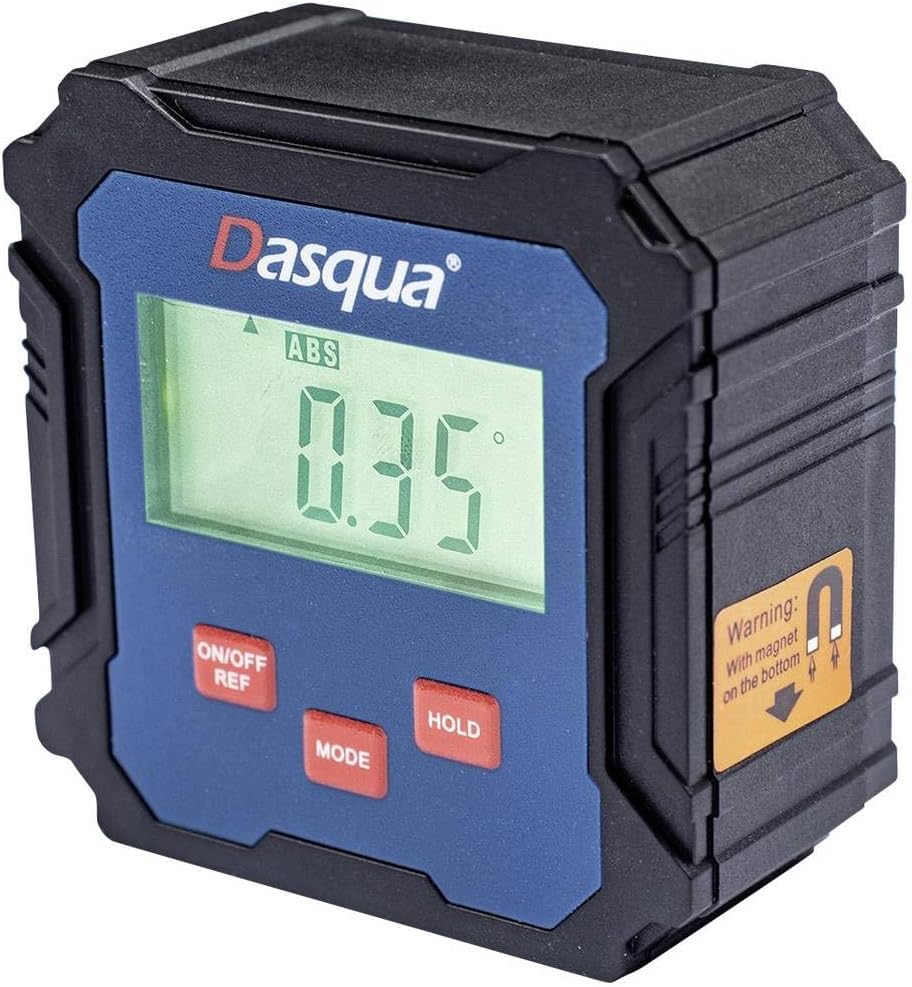
Figure 1: Dasqua 8400-0020 Digital Levelling Box. This image shows the front face of the device, highlighting the digital display, control buttons, and a warning label for the magnetic base.
- 1. Digital Display: Shows angle readings in degrees, absolute (ABS) or relative (REF) mode, and battery indicator.
- 2. ON/OFF REF Button: Powers the unit on or off. Also used to set a relative zero point (REF).
- 3. MODE Button: Switches between absolute (ABS) and relative (REF) measurement modes.
- 4. HOLD Button: Freezes the current reading on the display.
- 5. Magnetic Base: Located on the bottom of the unit, allows for secure attachment to metal surfaces for hands-free operation.
Setup
Before first use, ensure the device has sufficient power. The Dasqua 8400-0020 typically uses standard AAA batteries. Open the battery compartment, insert batteries with correct polarity, and close the compartment securely.
Battery Installation:
- Locate the battery compartment cover on the back or side of the unit.
- Open the cover.
- Insert [Number] AAA batteries (not included) observing the correct polarity (+/-).
- Close the battery compartment cover firmly.
Note: The exact battery type and quantity should be confirmed from the product packaging or device itself.
Operating Instructions
1. Power On/Off:
Press the ON/OFF REF button to turn the device on. Press and hold the ON/OFF REF button for a few seconds to turn it off.
2. Absolute Measurement (ABS Mode):
When the device is powered on, it typically defaults to Absolute (ABS) mode. In this mode, the display shows the angle relative to a true horizontal (0°) or vertical (90°) plane. The "ABS" indicator will be visible on the display.
3. Relative Measurement (REF Mode):
To measure an angle relative to a specific surface (e.g., to find the difference between two angles), use the Relative (REF) mode:
- Place the device on the first surface you wish to set as your reference.
- Press the ON/OFF REF button briefly. The display will show "0.00°" and the "REF" indicator will appear, indicating that this position is now your zero reference.
- Move the device to the second surface. The display will now show the angle difference between the first and second surfaces.
- To exit REF mode and return to ABS mode, press the MODE button.
4. Hold Function:
Press the HOLD button to freeze the current reading on the display. This is useful when taking measurements in hard-to-see areas. Press the HOLD button again to release the reading and resume live measurement.
5. Calibration (Self-Calibration):
For optimal accuracy, it is recommended to perform a self-calibration periodically or if you suspect the readings are inaccurate. Refer to the device's specific instructions for calibration, which usually involves placing the unit on a flat, level surface and following a sequence of button presses.
Note: Consult the manufacturer's full instructions for detailed calibration procedures if available.
Maintenance
Cleaning:
Wipe the device with a soft, dry, lint-free cloth. Do not use liquid cleaners, aerosols, or solvents. Ensure no dust or debris accumulates around the display or buttons.
Storage:
When not in use, store the digital levelling box in a dry, cool place, away from direct sunlight and extreme temperatures. If storing for an extended period, remove the batteries to prevent leakage and potential damage to the device.
Troubleshooting
| Problem | Possible Cause | Solution |
|---|---|---|
| Device does not power on. | Low or dead batteries. Incorrect battery polarity. | Replace batteries with new ones. Ensure batteries are inserted with correct polarity. |
| Inaccurate readings. | Device not calibrated. Device exposed to strong magnetic fields (other than its base magnet). Physical damage. | Perform self-calibration. Move device away from other magnetic sources. Inspect for damage; if damaged, contact support. |
| Display is dim or flickering. | Low battery power. | Replace batteries. |
| Buttons are unresponsive. | Device frozen. Low battery. | Remove and reinsert batteries to reset. Replace batteries. |
Specifications
| Feature | Detail |
|---|---|
| Model Number | 8400-0020 |
| Brand | Dasqua |
| Measurement Range | 90° x 4 (360°) |
| Resolution | 0.1° |
| Product Dimensions | 13.3 x 12.5 x 5.5 cm |
| Weight | 140 g |
| Features | Digital display, Magnetic base, ABS/REF mode, Hold function |
Warranty and Support
For warranty information and technical support, please contact Dasqua customer service or refer to the official Dasqua website. Keep your purchase receipt as proof of purchase for any warranty claims.
Manufacturer: Dasqua


