
Donner MAMP6
Donner MAMP6 Stereo Receiver User Manual
Premium 1000W Peak Power 6 Channel Audio Amplifier
1. Product Overview
The Donner MAMP6 is a versatile 6-channel stereo receiver designed to elevate your audio experience. With a peak power output of 1000W (25W × 6 RMS power), it supports up to 6 groups of 12 speakers with impedance ranging from 4 to 16 ohms. This amplifier integrates multiple input modes including Bluetooth 5.3, USB, FM radio, RCA, and digital optical/coaxial interfaces, making it suitable for various home audio setups, karaoke, and theater systems.
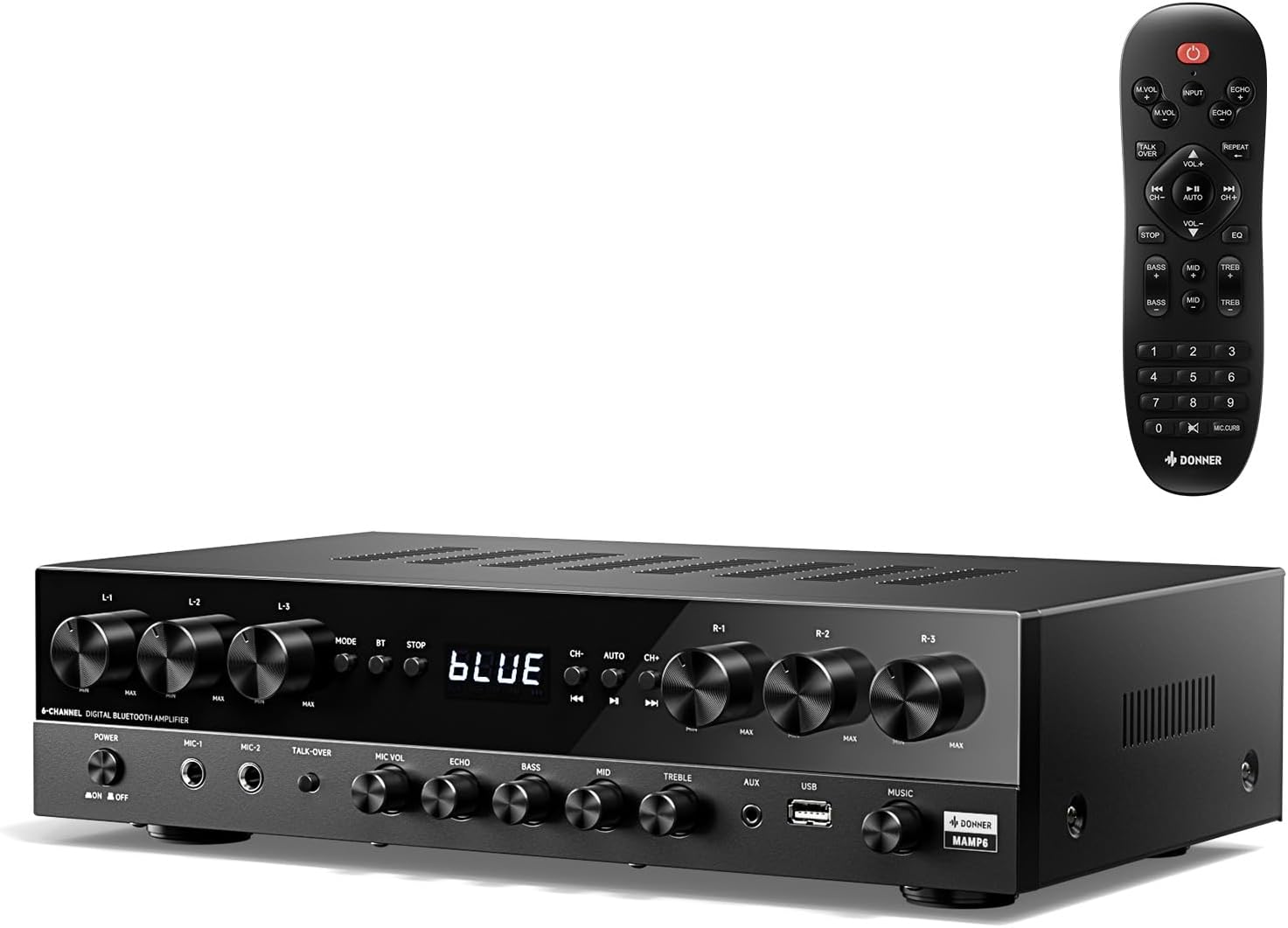
Image: The Donner MAMP6 Stereo Receiver shown with its included remote control. The receiver features a black finish with multiple control knobs and a digital display.
2. Key Features
- 1000W Peak Power: Delivers robust audio performance with 25W × 6 RMS power, supporting up to 6 groups of 12 speakers (4-16 ohms).
- Multifunction Remote Control: An upgraded remote allows control over treble, midrange, bass, echo, and Talkover functions across all input modes.
- Multiple Input Modes: Supports Bluetooth 5.3, USB (up to 64 GB), 2 pairs of RCA, 2 mic inputs, AUX IN, FM radio, and digital Optical/Coaxial inputs for broad compatibility.
- Upgraded FM Function: Convenient direct frequency input for quick FM station selection.
- Customized EQ Control: Independent treble, midrange, and bass adjustments available on both the amplifier and remote. Settings are automatically saved for convenience.
- Dual Mic Interfaces: Features two 1/4'' microphone jacks for karaoke and public address, including a Talk Over function to lower background music during speech.

Image: A comparison showing the new multifunction remote control for the Donner MAMP6 versus an older style remote, highlighting enhanced functionality.

Image: The Donner MAMP6 receiver on a wooden surface, illustrating its various connectivity options including FM, USB, AUX, Microphone, CD/DVD, Speakers, Coaxial, and Optical inputs.
3. Setup Guide
3.1 Unpacking
Carefully remove all components from the packaging. Ensure all items listed below are present:
- Donner MAMP6 Stereo Receiver
- Remote Control
3.2 Connecting Speakers
The MAMP6 features 6 independent channels, allowing you to connect up to 12 speakers (6 pairs). Connect your speakers to the corresponding terminals on the rear panel. Ensure correct polarity (+ to + and - to -) for optimal sound quality.

Image: A diagram illustrating the 6-channel audio output of the Donner MAMP6, showing how up to 12 speakers can be connected and controlled by individual volume knobs.
3.3 Connecting Audio Sources
Connect your desired audio sources to the appropriate input jacks on the receiver's front or rear panel.
- Bluetooth: For wireless connection from smartphones, tablets, or computers.
- USB: Insert a USB drive (up to 64 GB) for direct audio playback.
- RCA (L/R): Use for traditional audio devices like CD/DVD players or older amplifiers.
- Optical/Coaxial: For digital audio connection from smart TVs or other digital sources.
- AUX IN: A 3.5mm jack on the front panel for quick connection of portable devices.
- Mic Inputs: Two 1/4" jacks for microphones.

Image: A detailed diagram of the Donner MAMP6 front panel, labeling the power switch, microphone inputs, Talk-over, Mic Vol, Echo, Bass, Mid, Treble, AUX, USB, and Music Volume knobs.

Image: A detailed diagram of the Donner MAMP6 back panel, showing connections for FM antenna, digital optical/coaxial, RCA inputs, line out, and the 6-channel speaker outputs.
4. Operating Instructions
4.1 Power On/Off
Press the POWER button on the front panel or the remote control to turn the unit on or off.
4.2 Input Selection
Use the MODE button on the front panel or the INPUT button on the remote to cycle through available input sources (Bluetooth, USB, FM, RCA, Optical, Coaxial, AUX).
4.3 Volume Control
Adjust the overall volume using the large MUSIC VOLUME knob on the front panel or the VOL+/- buttons on the remote. Individual channel volumes (L1-L3, R1-R3) can be adjusted using their respective knobs on the front panel.
4.4 EQ Adjustment
Fine-tune your sound using the BASS, MID, and TREBLE knobs on the front panel or the corresponding buttons on the remote control. The system automatically saves your EQ settings.

Image: The Donner MAMP6 receiver and its remote, highlighting the independent Bass, Mid, and Treble controls for customized sound adjustment and memory function.
4.5 Bluetooth Pairing
Select the Bluetooth input mode. The display will show "BLUE". On your device, search for "Donner MAMP6" and pair. Once connected, you can stream audio wirelessly.
4.6 USB Playback
Insert a USB flash drive into the USB port on the front panel. The unit will automatically switch to USB mode and begin playing compatible audio files.
4.7 FM Radio Operation
Select the FM input mode. Use the CH+/- buttons to scan for stations or directly enter the frequency using the numeric keypad on the remote control.

Image: A hand holding the remote control for the Donner MAMP6, demonstrating the ability to quickly select FM frequencies by directly entering numbers.
4.8 Microphone Usage (Karaoke/Talkover)
Connect microphones to the MIC 1 or MIC 2 inputs. Adjust microphone volume with the MIC VOL knob and add echo effect with the ECHO knob. Activate TALK OVER to automatically lower background music when speaking into the microphone.

Image: Two individuals singing into microphones, illustrating the karaoke and Talk Over features of the Donner MAMP6 receiver.
5. Maintenance and Care
- Cleaning: Use a soft, dry cloth to clean the exterior of the unit. Do not use liquid cleaners or aerosols.
- Ventilation: Ensure adequate ventilation around the receiver. Do not block ventilation openings.
- Placement: Place the unit on a stable, flat surface away from direct sunlight, heat sources, and excessive moisture.
- Power Cord: Regularly check the power cord for any damage.
6. Troubleshooting
| Problem | Possible Cause | Solution |
|---|---|---|
| No power | Power cord not connected; Power outlet faulty; Unit is off. | Ensure power cord is securely plugged in; Try a different outlet; Press the POWER button. |
| No sound output | Incorrect input selected; Volume too low; Speakers not connected properly; Mute is on. | Select correct input source; Increase volume; Check speaker connections and polarity; Disable mute. |
| Bluetooth not connecting | Receiver not in Bluetooth mode; Device not discoverable; Interference. | Switch receiver to Bluetooth mode; Ensure device's Bluetooth is on and discoverable; Move closer to receiver; Restart both devices. |
| Poor FM reception | Antenna not connected or positioned poorly; Weak signal. | Connect FM antenna securely; Adjust antenna position for better reception; Try manual tuning. |
| Microphone not working | Microphone not plugged in; MIC VOL too low; Microphone faulty. | Ensure microphone is fully plugged into MIC 1/2; Increase MIC VOL knob; Test with another microphone. |
7. Technical Specifications
| Feature | Specification |
|---|---|
| Model Number | MAMP6 |
| Peak Power Output | 1000W |
| RMS Power Output | 25W × 6 Channels |
| Speaker Impedance | 4 - 16 ohms |
| Connectivity Technology | Bluetooth 5.3, USB, RCA, Optical, Coaxial |
| USB Support | Up to 64 GB |
| Microphone Inputs | 2 x 1/4'' Jacks |
| Product Dimensions | 14.96 x 3.86 x 9.76 inches (38 x 9.8 x 24.8 cm) |
| Item Weight | 11.97 pounds (5.44 kg) |
| Color | Black |
| Manufacturer | Donner |
| Country of Origin | China |
8. Warranty and Support
Donner products are designed for reliability and performance. For specific warranty information, please refer to the warranty card included with your product or visit the official Donner website. For technical support, troubleshooting assistance, or service inquiries, please contact Donner customer support through their official channels. Keep your purchase receipt as proof of purchase for warranty claims.
Official Donner Website: www.donnerdeal.com
Related documentsMAMP6


Ask a question about this manual
Ask about setup, troubleshooting, compatibility, parts, safety, or missing instructions. Manuals+ will review the question and use this page’s manual context to help answer it.