
1. Introduction
This manual provides comprehensive instructions for the safe and efficient operation, installation, and maintenance of your DELLA 8,000 BTU Portable Air Conditioner with Heat Pump. Please read this manual thoroughly before use and retain it for future reference.

Figure 1.1: DELLA 8,000 BTU Portable Air Conditioner with included remote control and smartphone app interface.
2. Safety Information
Always follow basic safety precautions when using electrical appliances to reduce the risk of fire, electric shock, or injury.
- Read all instructions before operating the appliance.
- Ensure the unit is connected to a properly grounded 120 Volt outlet. Do not use extension cords or surge protectors.
- Do not block air inlets or outlets. Maintain adequate clearance around the unit for proper airflow.
- Do not insert fingers or foreign objects into the air vents.
- Unplug the unit before cleaning or performing any maintenance.
- Keep the unit away from water and other liquids.
- This appliance is not intended for use by persons (including children) with reduced physical, sensory or mental capabilities, or lack of experience and knowledge, unless they have been given supervision or instruction concerning use of the appliance by a person responsible for their safety.
3. Product Features
The DELLA Portable Air Conditioner is designed with multiple functionalities to enhance your comfort:
- 4-in-1 Functionality: Offers Cooling, Heating, Fan, and Dehumidifier modes for year-round comfort.
- Smart Connectivity: WiFi enabled and compatible with Alexa for convenient control from anywhere within range using the Della app.
- Efficient Cooling & Heating: 8,000 BTU ASHRAE (5,000 BTU SACC) cooling capacity and 6,500 BTU heating capacity, suitable for rooms up to 150 sq. ft.
- Quiet Operation: Features a 49dB Whisper-Quiet Mode, designed to be 18% quieter than comparable units.
- Advanced Airflow: MightyAir X Tech provides 30% more speed and long-range wind blowing up to 15ft.
- Dehumidification: Built-in dehumidifier removes up to 48 pints/day, offering 20% higher dehumidifier capacity than traditional models.
- User-Friendly Controls: Includes a 24-hour timer, auto-restart, sleep mode, child lock function, and water-full indicator.
- Easy Mobility: Equipped with casters on the bottom and side handles for effortless movement between rooms.
- Adjustable Vents: Manually adjustable vents allow for smooth and quick redirection of airflow.

Figure 3.1: The 4-in-1 functionality of the DELLA Portable AC, including cooling, fan, heating, and dehumidifying modes.

Figure 3.2: Illustrates the quiet operation and high efficiency of the unit, highlighting its 49dB whisper-quiet mode and 8K BTU capacity covering 150 sq ft.

Figure 3.3: Demonstrates the MightyAir X Tech for faster cooling/warming and smart device app control, including Alexa compatibility.
4. Setup
Setting up your DELLA Portable Air Conditioner is designed to be quick and toolless. Follow these steps for proper installation:
- Attach Exhaust Hose: Connect the exhaust hose to the back of the AC unit by sliding it into the designated port.
- Prepare Window Kit: Attach the exhaust hose to the sealing board port of the window kit.
- Install Window Kit: Place the adjustable 3-section sealing board into your window frame. The kit adapts to both horizontal and vertical windows (25.5"-64.1" width/height). Ensure a snug fit for maximum efficiency.
- Position Unit: Roll the unit into position using its caster wheels. Ensure there is at least 19 inches of clearance around the unit for proper airflow and to accommodate the exhaust tube.

Figure 4.1: Step-by-step guide for damage-free installation of the exhaust hose and window kit.
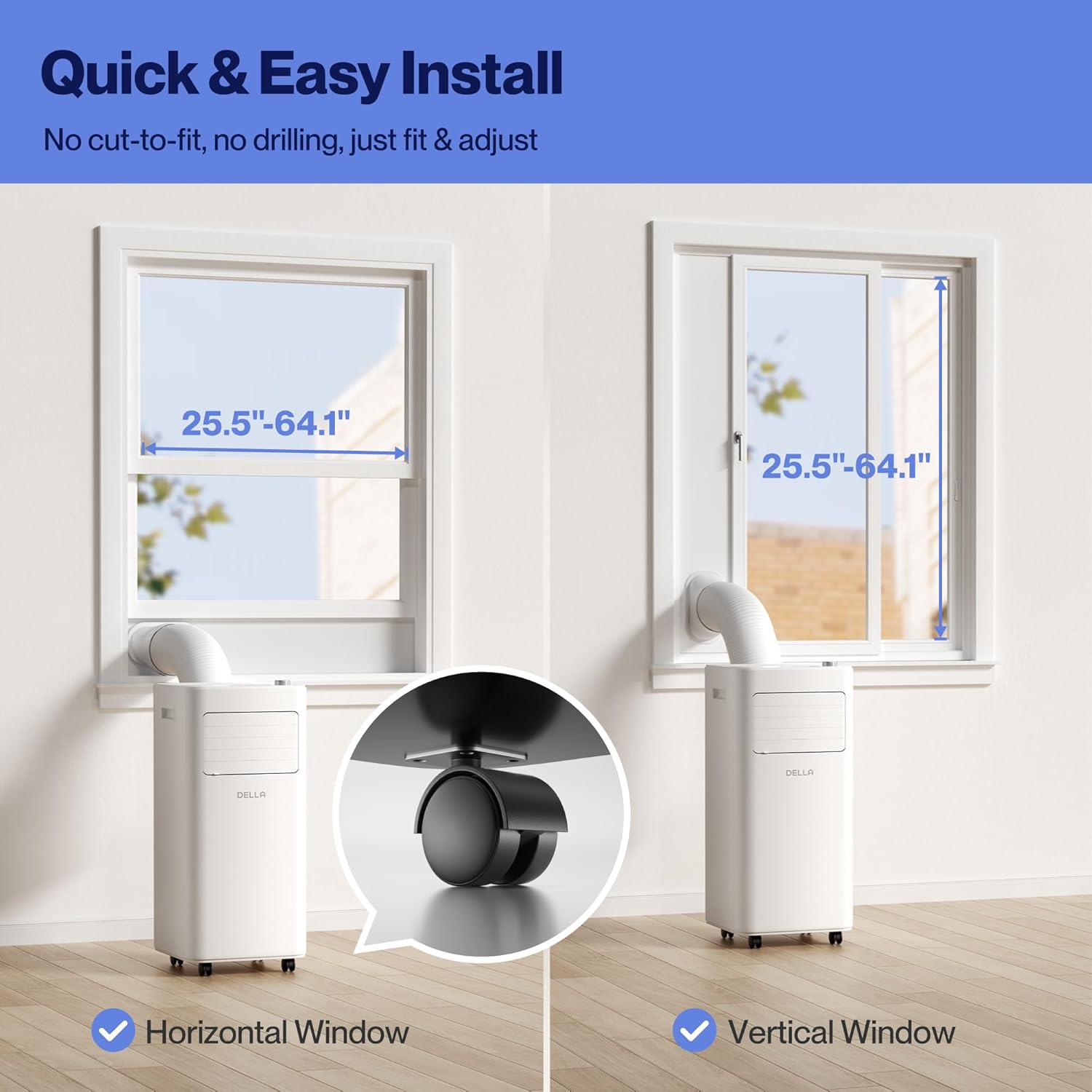
Figure 4.2: Visual guide for quick and easy installation, demonstrating compatibility with both horizontal and vertical window types.
Setup Video Guide
Video 4.1: Official Della Portable AC setup and feature overview. This video demonstrates the unit's mobility, control panel, adjustable vents, quick setup process, and maintenance features like filter removal and water drainage.
5. Operation
Your DELLA Portable Air Conditioner can be operated using the intuitive soft-touch control panel on the unit, the included remote control, or via the Della app on your smartphone.
Control Panel & Remote
The top panel features a digital display and touch controls for various functions. The remote control provides convenient access to all settings from a distance.

Figure 5.1: Detailed view of the intuitive soft-touch control panel on the unit.
Operating Modes
- Cool Mode: Adjust temperature from 61°F (16°C) to 90°F (32°C) to cool your room.
- Heat Mode: Utilizes a built-in heat pump function with 6,500 BTU capacity to warm your space efficiently.
- Fan Mode: Adjustable with 2 fan speeds for optimal air circulation, including auto-swing up-down.
- Dry Mode (Dehumidifier): Removes up to 48 pints of moisture per day, providing dry comfort on humid days.
Smart Features
- 24-Hour Timer: Program the unit to turn on or off automatically.
- Sleep Mode: Reduces noise and adjusts temperature for comfortable sleep.
- Child Lock: Prevents accidental changes to settings.
- WiFi & App Control: Connect to the Della app to control the unit remotely, set schedules, and utilize Geo Fencing for automatic operation based on your location.

Figure 5.2: Overview of the four primary operating modes: Cool, Dry, Fan, and Heating.
6. Maintenance
Regular maintenance ensures optimal performance and longevity of your portable air conditioner.
Filter Cleaning
The unit features a removable and washable double-layer filter designed to protect against dust and pet dander. Clean the filters regularly to maintain air quality and unit efficiency.
- Turn off and unplug the unit.
- Remove the filter covers from the back of the unit.
- Gently pull out the filters.
- Wash the filters with warm, soapy water. Rinse thoroughly.
- Allow filters to air dry completely before reinserting.
Water Disposal
The unit has a self-evaporate system, but manual drainage may be required, especially in high humidity or when the water-full indicator (FL) illuminates.
- Turn off and unplug the unit.
- Locate the drain port at the bottom rear of the unit.
- Place a shallow pan or connect a drain hose (included) to the drain port.
- Remove the drain plug to allow water to flow out.
- Once drained, replace the drain plug securely.

Figure 6.1: Overview of water disposal options, including the self-evaporate system, water-full indicator, and manual drainage.
7. Troubleshooting
If you encounter issues with your DELLA Portable Air Conditioner, please refer to the following common problems and solutions. If the problem persists, contact customer support.
- Unit does not turn on: Check if the power cord is securely plugged into a grounded outlet. Ensure the unit is not on an extension cord or surge protector. Verify the power button has been pressed.
- Unit is not cooling effectively: Check if the air filters are clean. Ensure the exhaust hose is properly installed and not kinked. Verify windows and doors are closed in the room. The room size should be within the recommended 150 sq. ft.
- Water-full indicator (FL) is on: The internal water tank is full. Perform manual drainage as described in the Maintenance section.
- Unit is noisy: Ensure the unit is on a flat, stable surface. Check for any obstructions in the air inlets or outlets.
- Remote control not working: Check and replace batteries if necessary. Ensure there are no obstructions between the remote and the unit's sensor.
- WiFi connection issues: Ensure your router is within range and the unit is in pairing mode. Refer to the Della app instructions for detailed troubleshooting steps.
8. Specifications
| Feature | Specification |
|---|---|
| Product Dimensions | 12.2 x 12.2 x 27.6 inches |
| Item Weight | 44.9 pounds |
| Cooling Capacity | 8,000 BTU ASHRAE (5,000 BTU SACC) |
| Heating Capacity | 6,500 BTU |
| Coverage Area | Up to 150 Sq. Ft. |
| Temperature Range | 61°F (16°C) - 90°F (32°C) |
| Voltage | 120 Volts |
| Refrigerant | R-32 |
| Model Name | 048-OPAC-5H |
| UPC | 192928066258 |
| Included Components | Portable air conditioner, remote control, window kit, manual |
9. Warranty and Support
Your DELLA Portable Air Conditioner comes with a 1-Year Warranty. For any product support or technical assistance, Della offers 24/7 customer support.
Please refer to your purchase documentation for specific warranty terms and conditions. For direct assistance, contact Della customer support through the information provided on the official Della website or your product packaging.


Figure 9.1: Della's commitment to 24/7 customer support and a 1-year warranty.


