
Important Safety Information
Please read this manual thoroughly before assembly and use. Keep this manual for future reference.
- Weight Capacity: Do not exceed the maximum load capacity of 220 lbs (100 kg). Overloading may cause instability and damage.
- Electrical Safety: Ensure the power cord is properly connected to a grounded outlet. Do not operate the desk with a damaged cord or plug. Keep liquids away from electrical components.
- Pinch Points: Keep hands and objects clear of moving parts (legs, desktop edges) during height adjustment to prevent injury or damage.
- Children and Pets: Keep children and pets away from the desk during operation. The anti-collision system helps prevent accidents, but supervision is recommended.
- Level Surface: Always operate the desk on a flat, stable surface to ensure proper function and prevent tipping.
- Assembly: Two people are recommended for assembly due to the size and weight of the components.
Product Overview
The SANODESK 4-Leg Electric Height Adjustable Standing Desk offers a spacious and stable workspace designed for comfort and productivity. Its robust construction and intelligent features make it ideal for various work environments.
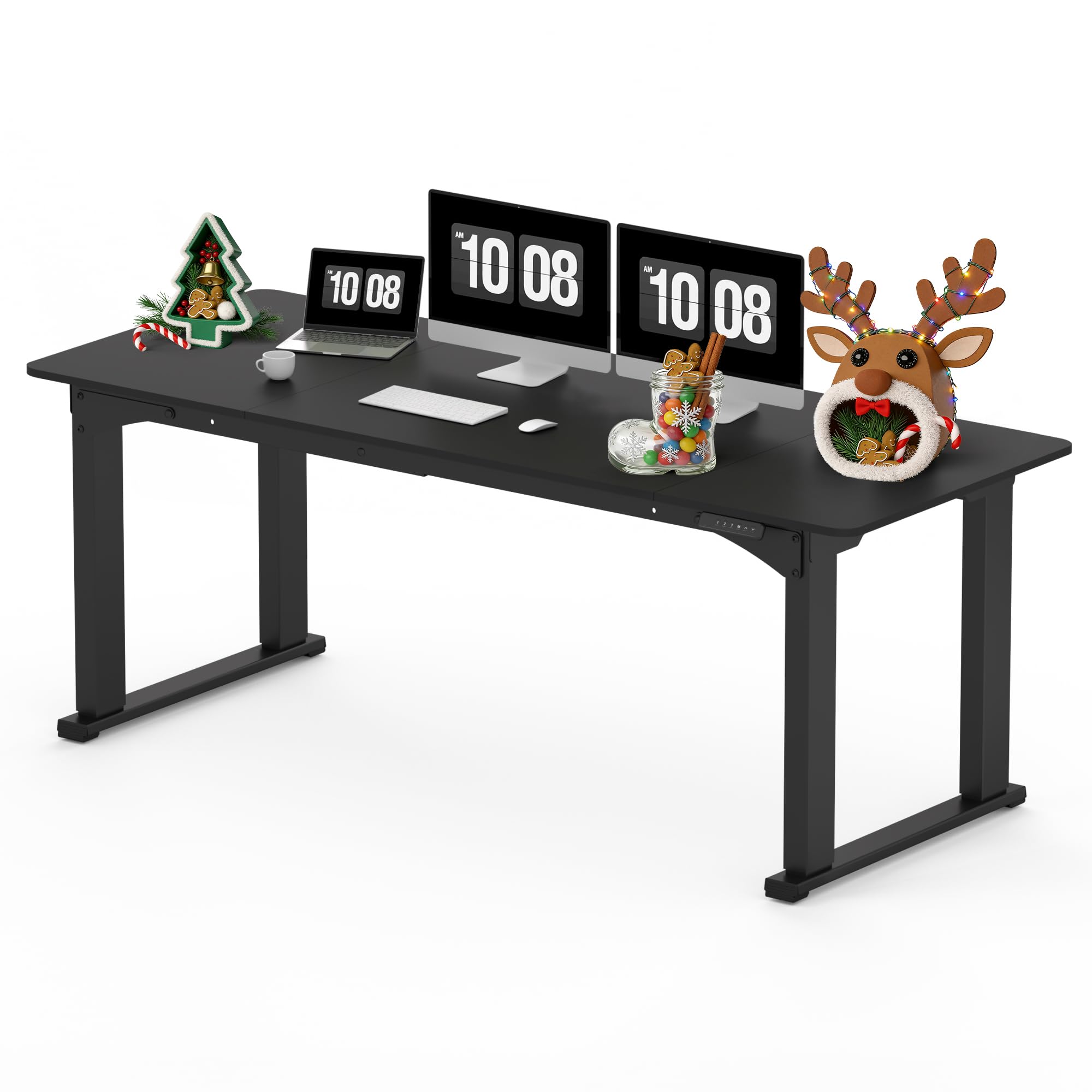
Image: The SANODESK 4-Leg Electric Height Adjustable Standing Desk in black, featuring a wide desktop suitable for multiple monitors and office accessories. The desk is shown in a home office environment with a modern aesthetic.

Image: A diagram illustrating the key dimensions of the SANODESK 4-Leg Electric Height Adjustable Standing Desk, including desktop width (78.7 inches), depth (31.5 inches), and adjustable height range (28.7 to 47.2 inches).
Package Contents
Verify that all components are present before beginning assembly. If any parts are missing or damaged, please contact customer support.
- Desktop Panels (3 sections)
- 4-Leg Frame Components
- Control Box
- Digital Keypad
- Power Adapter and Cable
- Hardware Kit (screws, tools)
- Instruction Manual
Assembly Instructions
Follow these steps carefully for proper assembly. It is recommended to have two people for this process.
- Unpack Components: Carefully remove all parts from the packaging and lay them out on a clean, soft surface to prevent scratches.
- Assemble Leg Frames: Attach the crossbars to the leg columns using the provided hardware. Ensure all connections are secure.
- Attach Legs to Desktop: Position the desktop panels (three spliced panels for easier handling) upside down. Secure the assembled leg frames to the pre-drilled holes on the desktop using the appropriate screws.
- Install Control Box and Keypad: Mount the control box and digital keypad to the underside of the desktop in the designated locations.
- Connect Cables: Connect the motor cables from the legs to the control box, and then connect the keypad cable to the control box. Finally, connect the power adapter to the control box and plug it into a power outlet.
- Cable Management: Use the included cable ties or clips to organize and secure all cables, preventing them from dangling or getting caught.
- Flip the Desk: With assistance, carefully flip the desk upright and place it in its desired location.

Image: A close-up view of the strong steel frame structure, highlighting the robust four-legged design that ensures stability and durability for the standing desk.
Operating Instructions
The digital keypad provides intuitive control over your desk's height settings.
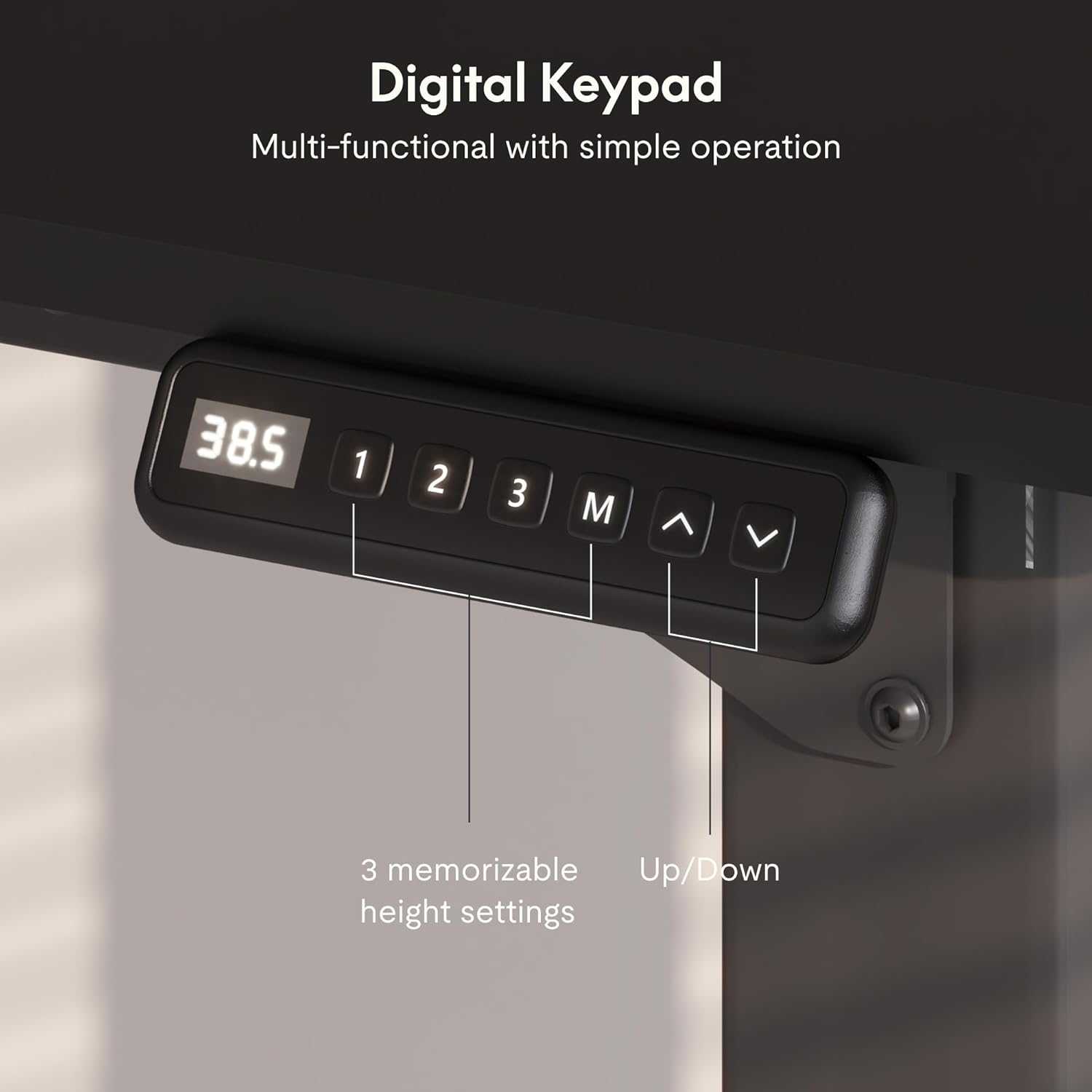
Image: The digital control panel with a display showing the current height, and buttons for up/down adjustment, memory presets (1, 2, 3), and a memory set button (M).
Height Adjustment
- Up/Down Buttons: Press and hold the Up (▲) or Down (▼) arrow buttons to adjust the desk to your desired height. The digital display will show the current height.
Memory Presets
You can save up to three preferred height settings for quick adjustments.
- Set a Memory Position: Adjust the desk to your desired height using the Up/Down buttons.
- Press the M button, then immediately press one of the number buttons (1, 2, or 3) to save the current height to that preset. The display will show 'S-' followed by the number to confirm.
- Recall a Memory Position: Simply press the corresponding number button (1, 2, or 3) to automatically move the desk to the saved height.
Anti-Collision System
The desk is equipped with an anti-collision system to prevent damage or injury. If the desk encounters an obstacle during height adjustment, it will automatically stop and reverse slightly.
- Operation: The system is active during both upward and downward movement.
- Response: If an obstruction is detected, the desk will halt and move in the opposite direction for a short distance.
- Reset: If the anti-collision system is triggered frequently, check for obstructions. You may need to briefly unplug and replug the desk to reset the system if it becomes unresponsive.

Image: An illustration demonstrating the anti-collision system, showing the desk automatically reversing its movement when an obstacle is detected beneath the desktop.
Maintenance
Regular maintenance ensures the longevity and optimal performance of your standing desk.
- Cleaning: Wipe the desktop and frame with a soft, damp cloth. For stubborn stains, use a mild, non-abrasive cleaner. Avoid harsh chemicals.
- Cable Management: Periodically check all cables for wear or damage. Ensure they are neatly organized and not pinched.
- Fastener Check: Occasionally inspect all screws and bolts to ensure they are tight. Retighten if necessary.
- Motor Care: The electric motors are maintenance-free. Avoid disassembling the motor units.
Troubleshooting
If you encounter any issues, refer to the following common problems and solutions.
| Problem | Possible Cause | Solution |
|---|---|---|
| Desk does not move | Power cable disconnected; Control box error | Check power connections. Unplug and replug the power cable to reset. |
| Uneven height adjustment | Obstruction; Motor synchronization issue | Check for obstructions. Perform a full reset by lowering the desk to its lowest point and holding the down button for 5-10 seconds. |
| Anti-collision system triggers frequently | Obstruction; Sensor sensitivity | Remove any objects that might be triggering the sensor. If the issue persists, contact support. |
| Error code on display | Specific system fault | Note the error code and refer to the manufacturer's website or contact customer support for specific guidance. |
If these solutions do not resolve the issue, please contact SANODESK customer support.
Specifications
Detailed technical specifications for your SANODESK standing desk.
| Feature | Detail |
|---|---|
| Brand | SANODESK |
| Model | 78x32 |
| Desk Design | Standing Desk |
| Product Dimensions (D x W x H) | 32"D x 78"W x 28.7"H |
| Adjustable Height Range | 28.7" to 47.2" (implied from feature bullets, not directly in specs table but good to include) |
| Color | Black |
| Top Material Type | Engineered Wood (FSC-Certified) |
| Base Material | Standing Desk Frame (Stainless Steel finish) |
| Maximum Load Capacity | Up to 220 lbs (100 kg) |
| Noise Level | Less than 50db |
| Special Feature | Corded, Electric Height Adjustment, Memory Presets, Anti-collision System |
| Assembly Required | Yes |

Image: An illustration highlighting the maximum load capacity of the desk, indicating it can support up to 176 lbs with stability. Note: Product feature bullets state 220 lbs, using the higher value for consistency.
Warranty and Support
SANODESK products come with a limited warranty. For specific warranty details, claims, or technical support, please refer to the warranty card included with your product or visit the official SANODESK website.
Customer Support: For assistance, please contact SANODESK customer service through their official channels. Have your model number and purchase date ready.


