
1. Product Overview
The Devo G5 Smart Lock is a keyless entry deadbolt designed for front doors, offering multiple access methods and smart home integration. It features built-in WiFi for remote control and monitoring via a smartphone application.
Key Features:
- 5-in-1 Unlocking Options: App, 6-digit code, IC card, mechanical key, and voice control (Alexa/Google Assistant).
- Built-in WiFi: Enables real-time monitoring, access management, notifications, and event history via the Tuya Smart app without a separate bridge.
- Enhanced Security: Features anti-peep passwords, automatic lockdown after incorrect attempts, and an auto-lock function.
- Durable Design: IP54 waterproof rating and operational in temperatures from -15°C to 50°C (5°F to 122°F).
- Emergency Power: Equipped with a Type-C port for emergency charging.
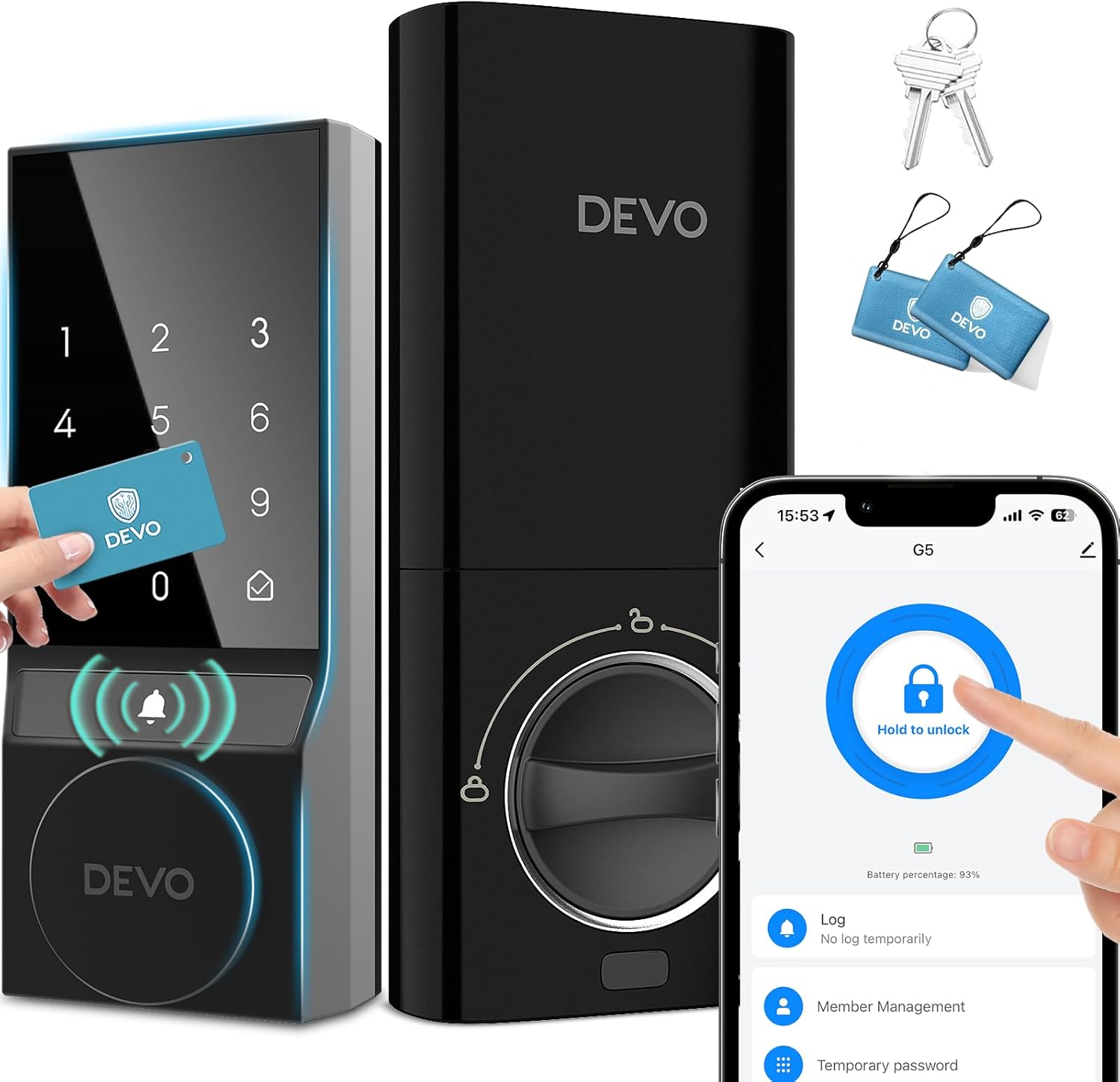
Image 1.1: The Devo G5 Smart Lock, showcasing its exterior and interior units, along with included IC cards, mechanical keys, and a smartphone displaying the control app interface.
2. Package Contents
Verify that all components are present before beginning installation.
- Smart Lock (Exterior and Interior Units) x 1
- IC Card x 2
- Mechanical Key x 2
- Measuring Cardboard x 1
- Instruction Manual x 1
- Installation Hardware (Screws, bolts, etc.)
Note: 8 AA batteries are required for operation and are not included in the package.
3. Installation Guide
The Devo G5 Smart Lock is designed for easy installation on standard American latches, typically within 15 minutes, without requiring additional drilling. Ensure your door meets the compatibility requirements before proceeding.
3.1 Door Compatibility Check
Before installation, confirm your door's dimensions and lock type are compatible:
- Door Thickness: 1-3/8" to 2-1/8" (35mm - 55mm)
- Hole Diameter: 1-1/2" or 2-1/8" (38mm or 54mm)
- Backset: 2-3/8" or 2-3/4" (60mm or 70mm)
- Minimum Distance (from door edge to lock center): 4" (10cm)
- Latch Hole: Compatible with both chiseled and non-chiseled latch holes.
- Door Lock Type: Compatible with single cylinder deadbolts. Not compatible with mortise or integrated/rim cylinder locks.

Image 3.1: Detailed diagram illustrating the required door dimensions and compatibility for installing the Devo G5 Smart Lock, including hole diameter, backset, door thickness, and latch hole types.
3.2 Step-by-Step Installation
- Prepare the Door: Ensure the door is clean and the existing deadbolt hardware is removed. Use the provided measuring cardboard to confirm hole alignment if necessary.
- Install the Latch: Insert the latch into the door edge and secure it with screws. Ensure the latch bolt faces the correct direction (beveled edge towards the door frame).
- Install the Exterior Assembly: Route the cable from the exterior keypad through the door hole. Align the exterior unit with the latch and secure it.
- Install the Interior Mounting Plate: Attach the mounting plate to the interior side of the door, securing it to the exterior assembly with screws. Ensure the cable passes through the plate.
- Connect the Cable: Connect the cable from the exterior unit to the interior unit's circuit board.
- Install the Interior Assembly: Attach the interior unit to the mounting plate, ensuring the thumb turn spindle engages correctly with the latch mechanism. Secure with screws.
- Insert Batteries: Open the battery cover on the interior unit and insert 8 AA batteries (not included), observing correct polarity.
- Test the Lock: Manually operate the thumb turn and use a mechanical key to ensure smooth operation.
4. Operation Instructions
The Devo G5 Smart Lock offers multiple convenient ways to secure and access your home.

Image 4.1: Visual representation of the four primary access methods for the Devo G5 Smart Lock: using the mobile app, entering a code on the keypad, scanning an IC card, and using a traditional mechanical key.
4.1 Initial Setup and App Connection
- Download the App: Search for 'Tuya Smart' in your smartphone's app store (iOS or Android) and download it.
- Create an Account: Register for a new account or log in if you already have one.
- Add Device: Follow the in-app instructions to add your Devo G5 Smart Lock. This typically involves putting the lock into pairing mode (refer to the lock's internal button or specific keypad sequence) and connecting it to your 2.4GHz Wi-Fi network.
- Set Master PIN: Establish a master PIN code through the app or directly on the keypad. This code is required for programming other user codes and settings.

Image 4.2: The Tuya Smart app interface, demonstrating features such as user management, smart notifications, temporary passcode generation, and access to unlock records for the Devo G5 Smart Lock.
4.2 Unlocking and Locking Methods
- Via App: Open the Tuya Smart app, select your lock, and tap the unlock icon.
- Via Keypad: Enter your 6-digit user code on the touchscreen keypad, then press the unlock symbol. The anti-peep function allows you to enter random digits before or after your code to obscure it from onlookers.
- Via IC Card: Present a registered IC card to the card reader area on the exterior unit.
- Via Mechanical Key: Insert the mechanical key into the keyhole on the exterior unit and turn to unlock.
- Via Voice Control: Integrate with Amazon Alexa or Google Assistant. Use commands like "Hey Alexa, unlock the front door" (voice PIN may be required for security).

Image 4.3: A user interacting with a voice assistant (Alexa) to unlock the Devo G5 Smart Lock, demonstrating hands-free operation.
4.3 Auto-Lock Function
The lock features an adjustable auto-lock function that automatically secures the door after a set period once it closes. This feature can be configured or disabled via the Tuya Smart app.

Image 4.4: A user approaching a door equipped with the Devo G5 Smart Lock, highlighting the automatic locking mechanism for added convenience and security.
4.4 User Management and Passcodes
Through the Tuya Smart app, you can manage various types of passcodes:
- Permanent Passcodes: For family members and regular users.
- Timed Passcodes: Valid for specific durations, ideal for guests or service providers.
- One-time Passcodes: For single use, expiring after the first entry.
- Recurring Passcodes: Active on specific days or times, suitable for recurring services.
5. Maintenance
Proper maintenance ensures the longevity and optimal performance of your Devo G5 Smart Lock.
5.1 Battery Management
The Devo G5 Smart Lock requires 8 AA batteries. Battery life can last up to 180 days, depending on usage and environmental factors.

Image 5.1: An illustration of the Devo G5 Smart Lock's interior unit, highlighting the battery compartment designed to hold eight AA batteries for extended operation.
- Low Battery Warning: The lock will provide a low battery warning through the app and potentially an audible alert on the lock itself when batteries are running low. Replace all 8 batteries promptly when this warning appears.
- Emergency Charging: If batteries completely drain, you can use a Type-C cable to connect a power bank to the emergency charging port on the exterior unit to temporarily power the lock and gain access.
5.2 Cleaning and Environmental Care
- Clean the touchscreen keypad with a soft, dry cloth. Avoid abrasive cleaners or solvents.
- The lock is IP54 waterproof, offering protection against dust and splashing water. However, avoid direct exposure to heavy rain or prolonged submersion.
- Ensure the lock operates within its specified temperature range of -15°C to 50°C (5°F to 122°F).
6. Troubleshooting
This section addresses common issues you might encounter with your Devo G5 Smart Lock.
6.1 Access Issues
- Keypad not responding: Check battery level. If batteries are dead, use the mechanical key or emergency Type-C charging.
- Code not working: Ensure the correct 6-digit code is entered. Verify the code's validity period if it's a temporary or timed passcode.
- IC card not working: Ensure the IC card is properly registered and presented to the correct area.
- App remote unlock failing: Check your phone's internet connection and the lock's Wi-Fi connectivity. Ensure the lock is online in the Tuya Smart app.
6.2 Security Features and Alarms
- Incorrect Attempts: After multiple incorrect code entries, the lock will enter a protective lockdown state and trigger an alarm. Wait for the lockdown period to expire before attempting to unlock again.
- Low Battery Alarm: Replace batteries immediately upon receiving a low battery warning to avoid being locked out.
6.3 General Performance
- Lock not engaging/disengaging smoothly: Check for any obstructions in the door frame or strike plate. Ensure the lock is properly aligned and installed.
- Wi-Fi connectivity issues: Ensure your router is broadcasting a 2.4GHz network. Move the router closer to the door or consider a Wi-Fi extender if signal strength is weak.
7. Specifications
| Brand | Devo |
| Model Name | G5 |
| Lock Type | Combination Lock, Deadbolt, Keypad, WiFi Smart Lock |
| Material | Aluminum |
| Item Dimensions (L x W x H) | 2.5 x 1.24 x 5.8 inches |
| Item Weight | 2.44 Pounds |
| Special Features | Anti-Peeping Password, Auto-Lock, Fob Unlock, Passcode Unlock, Touchscreen |
| Connectivity Protocol | Wi-Fi |
| Control Method | App, Remote, Touch, Voice (Android, iOS) |
| Power Source | 8 x AA Batteries (not included) |
| Operating Temperature | -15°C to 50°C (5°F to 122°F) |
| Waterproof Rating | IP54 |
8. Warranty and Support
The Devo G5 Smart Lock comes with a 12-month warranty from the date of purchase.
For technical assistance, troubleshooting, or warranty claims, please contact Devo customer support. Support is available 24/7.
Refer to the contact information provided in your product packaging or visit the official Devo website for the most up-to-date support details.


