
1. Introduction
Thank you for choosing the ACEZUK Portable Jump Starter and Tire Inflator M06-FR. This versatile device is designed to provide reliable emergency jump-starting for vehicles, inflate tires, and serve as a portable power bank and LED light source. Please read this manual carefully before use to ensure safe and optimal performance.

Image 1: ACEZUK Portable Jump Starter and Tire Inflator M06-FR and included accessories.
2. Safety Information
- Always wear safety glasses when working with batteries.
- Do not touch the red and black clamps together to prevent short circuits.
- Ensure the device is fully charged before use for optimal performance.
- Do not expose the device to extreme temperatures or direct sunlight.
- Keep out of reach of children.
- Remove the jump starter clamps from the car battery immediately after the vehicle starts.
3. Package Contents

Image 2: All items included in the product package.
- ACEZUK Portable Jump Starter and Tire Inflator M06-FR
- Smart Jump Cables (Red and Black clamps)
- USB Charging Cable
- Air Hose with Valve Connector
- Various Nozzles for Inflation
- Storage Case
- User Manual
4. Product Features
- Powerful Jump Starter: 7000A peak current, capable of starting up to 12.0L gasoline and diesel engines.
- High-Capacity Power Bank: 21800mAh battery with USB-A and USB-C outputs for charging mobile devices.
- Integrated Tire Inflator: 150PSI air compressor with multiple nozzles for various inflatables.
- Multi-mode LED Light: Features 3 lighting modes for emergencies, night work, and general illumination.
- Smart Protection System: Built-in safeguards against overheating, overcharging, over-discharging, over-current, over-voltage, short circuits, and reverse polarity.
- Digital Display: 2.5-inch screen shows real-time battery level and tire pressure.
5. Setup
5.1 Charging the Device
Before first use, fully charge the jump starter. Connect the provided USB charging cable to the device's input port and a suitable USB power adapter. The digital display will indicate the charging progress.
5.2 Initial Checks
Ensure the device has at least 50% charge before attempting to jump-start a vehicle. Check all cables and connectors for any damage.
6. Operating Instructions
6.1 Jump Starting a Vehicle
- Ensure the jump starter is adequately charged.
- Open the vehicle's hood and locate the car battery.
- Connect the smart jump cables to the jump starter device.
- Attach the red (+) clamp to the positive terminal of the car battery.
- Attach the black (-) clamp to the negative terminal of the car battery.
- Once connected, the smart cable indicator light will turn green, indicating a safe connection.
- Start your vehicle's engine.
- Immediately remove the jump cables from the car battery once the engine starts. First, remove the black clamp, then the red clamp, and finally disconnect the cables from the jump starter.
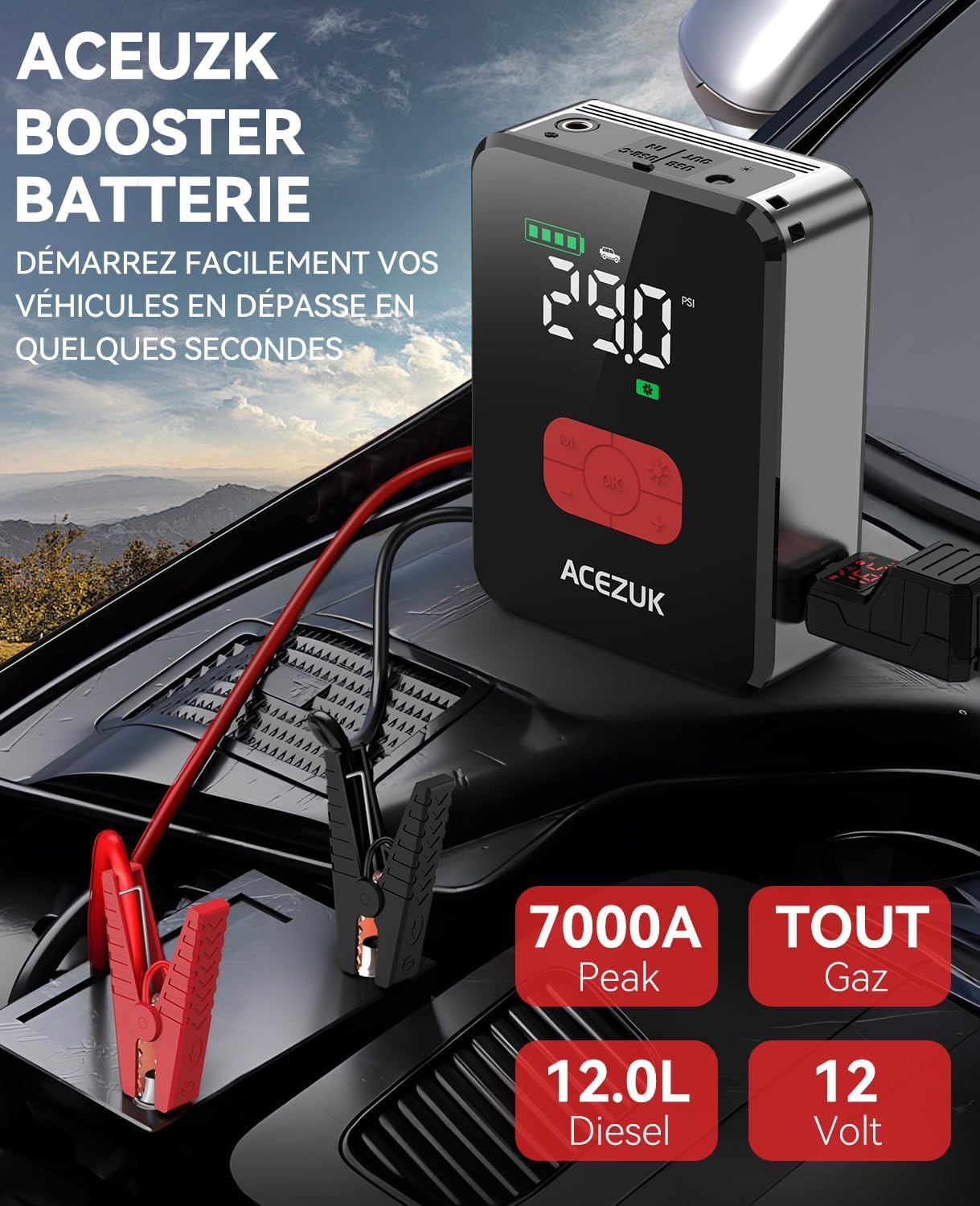
Image 3: Proper connection of the jump starter to a vehicle battery.
Video 1: Demonstration of jump-starting a car battery using the device.
Video 2: How to jump-start a car with the integrated air compressor feature.
6.2 Using the Tire Inflator
- Connect the air hose to the device's inflation port.
- Attach the other end of the air hose to the tire valve.
- The digital display will show the current tire pressure.
- Use the '+' and '-' buttons to set the desired pressure.
- Press the 'OK' button to start inflation. The device will automatically stop when the set pressure is reached.
- Disconnect the air hose from the tire valve and the device.

Image 4: Using the device to inflate a car tire.

Image 5: The device's display showing real-time battery level and tire pressure.
6.3 Using as a Power Bank
Connect your mobile devices (smartphones, tablets, etc.) to the USB-A or USB-C output ports on the jump starter using appropriate charging cables. The device will automatically begin charging your connected devices.

Image 6: The device functioning as a power bank, charging smartphones.
6.4 Using the LED Light
Press the light button to cycle through the available LED light modes: Night Repair, Outdoor Emergency, and Night Reading/Camping. Press again to turn off the light.

Image 7: Different applications of the integrated LED light.
6.5 Using 12V DC Constant Output Mode
To activate the 12V DC constant output mode (160W), first turn on the device. Then, quickly press the power button 5 times. The 'DC' icon will flash on the screen, indicating that the 12V output is active for compatible devices. To turn off this mode, press the power button 5 times continuously again to prevent energy consumption.
Video 3: Instructions on how to use the 12V DC constant output mode.
7. Maintenance
- Charging: Recharge the device every 3-6 months, even if not in use, to maintain battery health.
- Storage: Store the device in a cool, dry place, away from direct sunlight and extreme temperatures. Use the provided storage case for protection.
- Cleaning: Wipe the device with a soft, dry cloth. Do not use harsh chemicals or abrasive materials.
8. Troubleshooting
| Problem | Possible Cause | Solution |
|---|---|---|
| Vehicle does not start | Low charge on jump starter; incorrect connection; severely discharged battery. | Ensure jump starter is fully charged. Check clamp connections (red to positive, black to negative). If battery is severely discharged, use the 'BOOST' function if available (refer to device instructions). |
| Tire inflator not working | Air hose not properly connected; device not powered on; desired pressure not set. | Ensure air hose is securely connected to both the device and tire valve. Power on the device. Set the desired pressure before starting inflation. |
| Device not charging mobile devices | Low device battery; incorrect USB cable; device not powered on. | Charge the jump starter. Use a compatible USB cable. Ensure the device is powered on. |
9. Specifications
| Feature | Detail |
|---|---|
| Brand | ACEZUK |
| Model | M06-FR |
| Peak Amperage | 7000 Amperes |
| Battery Capacity | 21800 mAh |
| Voltage | 12 Volts (DC) |
| Max Tire Pressure | 150 PSI |
| Product Weight | 1.55 kg |
| Product Dimensions | 16.9 x 14.2 x 20.7 cm |
| Battery Cell Composition | Lithium Ion |
10. Warranty and Support
The ACEZUK Portable Jump Starter and Tire Inflator M06-FR comes with a standard manufacturer's warranty. For specific warranty details, please refer to the warranty card included in your package or contact ACEZUK customer support.
For technical assistance, troubleshooting, or any product-related inquiries, please contact ACEZUK customer service through the contact information provided on the product packaging or the official ACEZUK website. Please have your model number (M06-FR) and purchase details ready when contacting support.


