
LUTEC B0DJP7DTKL
LUTEC Security Lights User Manual
Models: 2-Head & 4-Head Motion Sensor Outdoor Flood Lights (B0DJP7DTKL)
1. Introduction
Thank you for choosing LUTEC Security Lights. This manual provides essential information for the safe installation, operation, and maintenance of your new 2-head and 4-head motion sensor outdoor flood lights. Please read this manual thoroughly before installation and keep it for future reference.
2. Safety Information
Always follow basic safety precautions when installing and operating electrical products to reduce the risk of fire, electric shock, and personal injury.
- Ensure power is turned OFF at the circuit breaker or fuse box before installation or servicing.
- Installation should be performed by a qualified electrician or in accordance with local electrical codes.
- Do not connect to a dimmer switch.
- Do not install near flammable materials or in explosive atmospheres.
- Wear safety glasses and gloves during installation.
- Ensure the fixture is securely mounted to a sturdy surface.
- Do not look directly into the LED light source when the fixture is illuminated.
3. Package Contents
Verify that all components are present before beginning installation:
- LUTEC Security Light Fixture (2-Head or 4-Head)
- Mounting Hardware (screws, wire nuts, gasket)
- Instruction Manual
4. Product Overview & Features
The LUTEC Security Lights are designed for outdoor use, providing bright, motion-activated illumination for enhanced security and convenience. They feature adjustable light heads and a sensitive motion sensor.
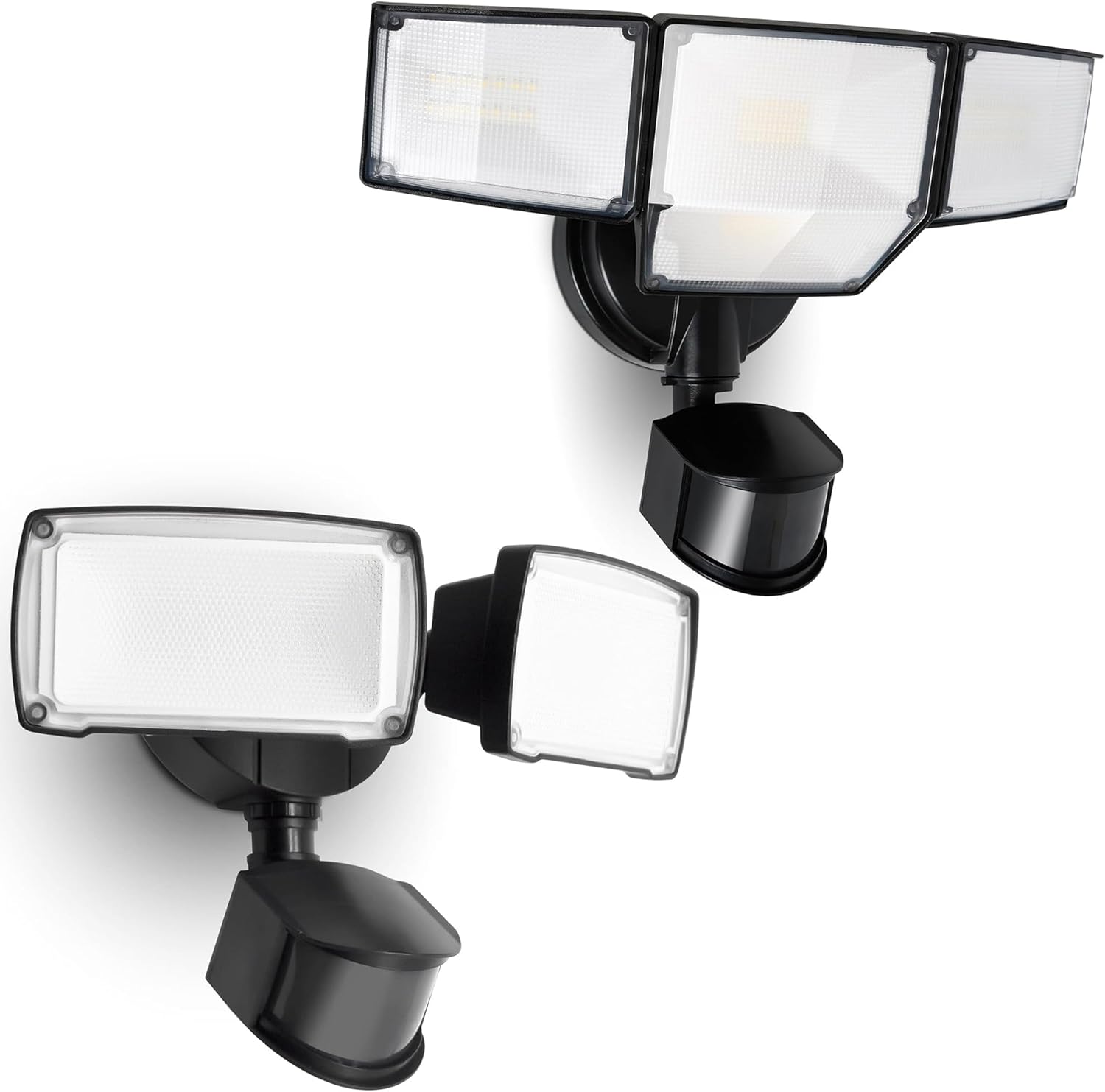
Image: Overview of the LUTEC 2-Head and 4-Head motion sensor security lights, showcasing their design and adjustable heads.

Image: A visual comparison highlighting the differences between the 4-head and 2-head flood lights, including lumen output, detection angle, illuminated surfaces, number of heads, and light range.
- Super Bright Illumination: The 4-head model delivers 9000 lumens (80W) and the 2-head model delivers 3500 lumens (38W) of 5000K daylight, providing extensive coverage.
- Adjustable Light Heads: Allows for precise aiming of light to desired areas.
- High-Sensitive Motion Sensor: Detects motion up to 69 feet (4-head) or 59 feet (2-head) with a 180° detection angle.
- Multiple Lighting Modes: Offers versatile operation for various scenarios.
- Durable & Weatherproof: IP65 rated aluminum housing ensures long-lasting performance in outdoor conditions.
5. Setup & Installation
Follow these steps for proper installation of your security light:
- Turn Off Power: Before starting, ensure the power to the junction box is turned off at the circuit breaker.
- Prepare Mounting Surface: The ideal installation height for the motion sensor is approximately 8.2 feet (2.5 meters) above the ground to ensure optimal detection range.
- Mount the Fixture: Attach the mounting bracket to the junction box. Connect the fixture wires (black to black, white to white, ground to ground) using wire nuts. Secure the fixture to the mounting bracket.
- Seal the Fixture: Apply silicone sealant around the mounting plate to prevent water intrusion, especially on rough or uneven surfaces.
- Adjust Light Heads: Loosen the screws on the light heads to adjust their angle and direction. Tighten the screws once positioned. The 2-head model allows 360° rotation and 180° tilt for each head.
- Restore Power: Once installation is complete, turn the power back on at the circuit breaker.

Image: Diagram illustrating the recommended installation height of 8.2 ft for the motion sensor, showing a 180° detection angle and a range of up to 69 ft.

Image: Illustration of the 2-head LED security light showing its adjustable heads with 360° rotation and 180° tilt capabilities, along with power (38W), color temperature (5000K), and lumen output (3500 Lumen).
6. Operating Instructions
Your LUTEC security light features a motion sensor with adjustable settings and multiple lighting modes.
Motion Sensor Adjustment Dials
The motion sensor has two adjustable dials, typically located on the underside of the sensor:

Image: Close-up of the motion sensor with dials labeled 'DISTANCE' (Sensitivity) and 'TIME'. Sensitivity settings are L (0-20 ft), M (20-39 ft), H (39-59 ft). Time settings are 1 MIN, 3 MIN, 10 MIN.
- DISTANCE (Sensitivity): Adjusts the detection range of the motion sensor.
- L (Low): 0-20 ft (0-6 m)
- M (Medium): 20-39 ft (6-12 m)
- H (High): 39-59 ft (12-18 m) - Note: 4-head model can detect up to 69 ft.
- TIME: Sets how long the light stays on after motion is detected and stops.
- 1 MIN: Light stays on for 1 minute.
- 3 MIN: Light stays on for 3 minutes.
- 10 MIN: Light stays on for 10 minutes.
Lighting Modes
The outdoor floodlight features four versatile lighting modes, selectable via a switch or by specific power cycles:

Image: Visual representation of the three primary lighting modes: Motion Sensor Mode (100% brightness on motion), Dusk to Dawn Mode (20% brightness at dusk, 100% on motion), and Manual Override Mode (100% brightness for 6 hours).
- ① Motion Sensor Mode: The light activates at 100% brightness when motion is detected during nighttime. It turns OFF after motion ceases and the set time duration expires.
- ② Dusk to Dawn Mode (Low Brightness + Motion): The light turns on at 20% brightness at dusk and stays on until dawn. If motion is detected during the night, it will switch to 100% brightness, then return to 20% after motion ceases and the set time duration expires.
- ③ Manual Override Mode: The light stays on at 100% brightness for 6 hours, regardless of day or night. This mode is useful for continuous illumination when needed.
- ④ Test Mode: Used for testing the motion sensor's functionality and coverage area during installation. In this mode, the light will turn on for a short period (e.g., 5-10 seconds) each time motion is detected, regardless of ambient light.

Image: Illustration of the Dusk to Dawn mode, showing the light automatically turning on at low brightness at dusk and turning off at dawn, with the ability to switch to full brightness upon motion detection.
7. Maintenance
Regular maintenance ensures optimal performance and longevity of your security light.
- Cleaning: Periodically clean the light fixture and motion sensor lens with a soft, damp cloth. Do not use abrasive cleaners or solvents.
- Inspection: Regularly check for any loose wiring, damaged components, or signs of wear. Address any issues promptly.
- No User-Serviceable Parts: The LED light source is integrated and not replaceable. Do not attempt to open the light heads.
8. Troubleshooting
If you encounter issues with your LUTEC security light, refer to the table below for common problems and solutions.
| Problem | Possible Cause | Solution |
|---|---|---|
| Light does not turn on at night. | 1. Power is off. 2. Sensor is dirty or obstructed. 3. Incorrect mode selected. 4. Ambient light is too high. | 1. Check circuit breaker. 2. Clean sensor lens; remove obstructions. 3. Ensure correct lighting mode is selected. 4. Relocate light or adjust sensor sensitivity. |
| Light stays on constantly. | 1. Manual Override Mode is active. 2. Continuous motion detected. 3. Sensor sensitivity too high. | 1. Cycle power to reset mode. 2. Check for constant movement in detection zone. 3. Reduce sensor sensitivity (DISTANCE dial). |
| Light flickers or cycles on/off rapidly. | 1. Loose wiring. 2. Power fluctuations. 3. Sensor interference. | 1. Check all wire connections (power off first). 2. Consult an electrician. 3. Ensure no heat sources or reflective surfaces are interfering with the sensor. |
| Motion sensor range is too short/long. | 1. Incorrect sensitivity setting. 2. Obstructions. 3. Installation height. | 1. Adjust DISTANCE dial. 2. Clear obstructions. 3. Ensure optimal installation height (approx. 8.2 ft). |
9. Specifications
Technical details for the LUTEC 2-Head and 4-Head Security Lights:
| Feature | 4-Head Model | 2-Head Model |
|---|---|---|
| Power Consumption | 80W | 38W |
| Lumen Output | 9000 LM | 3500 LM |
| Color Temperature | 5000K Daylight | 5000K Daylight |
| Detection Angle | 180° | 180° |
| Detection Distance | Up to 69 ft (21 m) | Up to 59 ft (18 m) |
| Light Range Coverage | Up to 2,370 sq. ft. | Up to 1,150 sq. ft. |
| IP Rating | IP65 (Waterproof) | IP65 (Waterproof) |
| Housing Material | Durable Aluminum | Durable Aluminum |

10. Warranty & Support
LUTEC provides a comprehensive warranty for its products. For specific warranty terms and conditions, please refer to the warranty card included with your product or visit the official LUTEC website.
If you require assistance, have questions, or encounter any issues with your LUTEC Security Light, please contact our customer service team. We offer 24/7 after-sales support to ensure your satisfaction.
Contact Information:
Please refer to the contact details provided on your product packaging or the official LUTEC website for the most current support information.
Related documentsB0DJP7DTKL


Ask a question about this manual
Ask about setup, troubleshooting, compatibility, parts, safety, or missing instructions. Manuals+ will review the question and use this page’s manual context to help answer it.