1. Important Safety Information
Read all safety warnings and instructions before using this product. Failure to follow the warnings and instructions may result in electric shock, fire, and/or serious injury.
- Battery Safety: This device contains a lithium-polymer battery. Do not disassemble, puncture, or expose to extreme temperatures (above 60℃ or below -20℃).
- Jump Starting: Ensure proper polarity connection (red clamp to positive, black clamp to negative) to avoid sparks or damage. Do not jump start a frozen or visibly damaged battery.
- Ventilation: Ensure adequate ventilation when operating, especially during jump starting, as batteries can produce explosive gases.
- Air Compressor: Do not over-inflate items. The air compressor is designed for low-pressure inflatables and is not suitable for high-pressure items like vehicle tires, balloons, or sports balls.
- Children: Keep out of reach of children. This is not a toy.
- Water Exposure: Do not expose the device to rain or wet conditions.
2. Package Contents
Verify that all items listed below are included in your package:
- 1 x ACEZUK M04-US Jump Starter with Integrated Air Pump
- 1 x Smart Jump Cable (with clamps)
- 1 x USB-C Charging Cable
- 1 x Storage Case
- 5 x Pump Nozzle Set
- 1 x User Manual

Image: The ACEZUK M04-US Jump Starter unit, its smart jump cables, USB-C charging cable, storage case, and the five different air nozzles. The main unit is black and orange with a digital display.

Image: A visual representation of the complete package contents, including the M04 Car Jump Starter, Type-C Cable, Storage Box, Smart Clamps, User Manual, and Gas Nozzles, all neatly organized.
3. Product Overview and Features
The ACEZUK M04-US is an 8-in-1 multi-function portable device designed for automotive emergencies and outdoor activities. Its primary functions include:
- Car Battery Jump Starter: Delivers up to 4000A peak current to start vehicles with up to 7.0L gasoline or 5.5L diesel engines.
- Air Inflator & Deflator: Integrated electric pump for inflating and deflating large inflatable equipment like mattresses, boats, and swimming rings.
- Emergency Power Bank: 15800 mAh capacity with USB-A and USB-C ports for charging mobile devices.
- LED Flashlight: Features Bright, Fast Flashing, and SOS modes for illumination and signaling.
- Smart Clamp Protections: Includes 8 types of protection: Over Temperature, Over Charge, Over Discharge, Over Current, Over Voltage, Short Circuit, Reverse Polarity, and Anti-interference.

Image: A close-up of the jump starter's digital display, illustrating indicators for real-time power, fast charging, charging (IN), power supply (OUT), blower started, and high temperature protection.
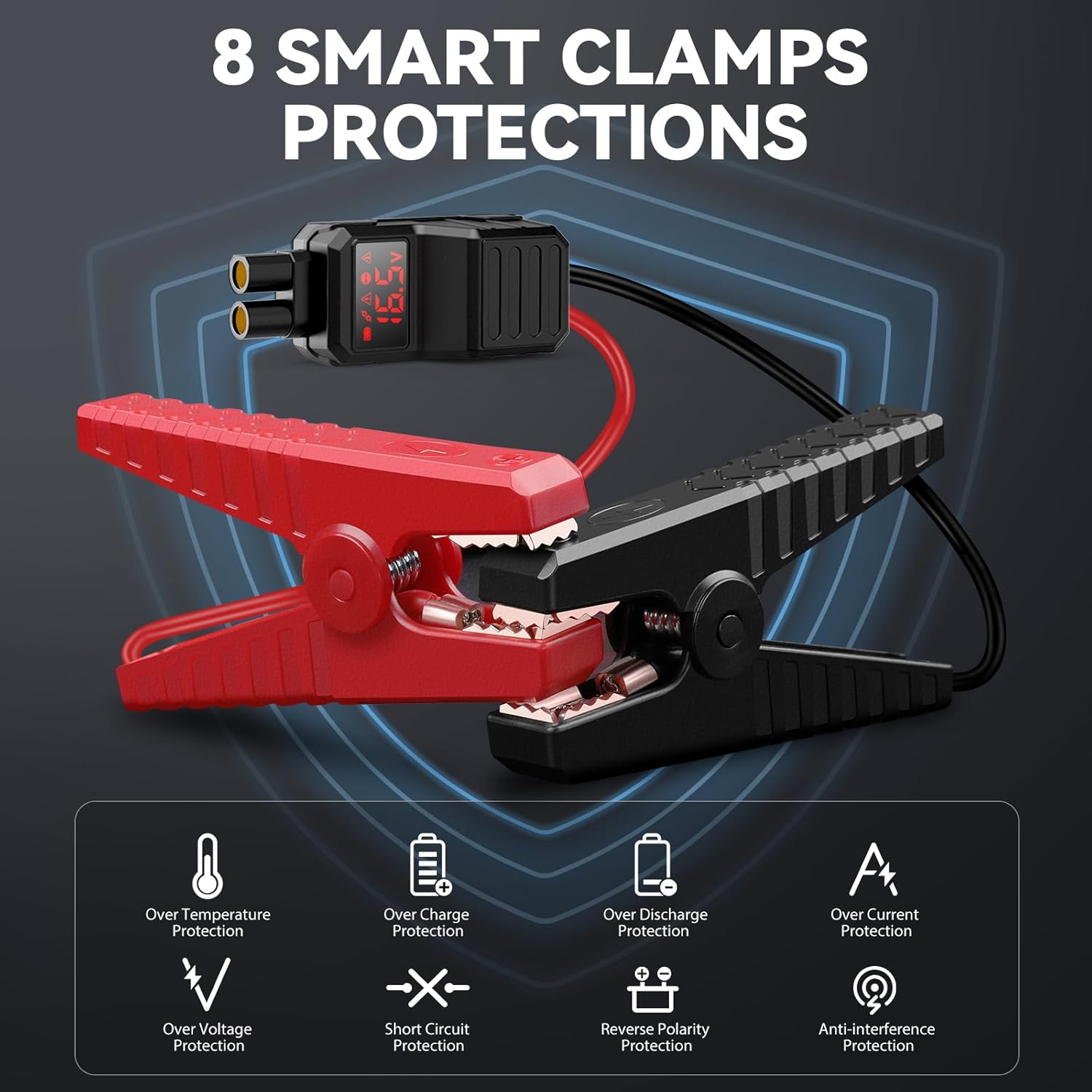
Image: A visual representation of the smart clamps and a list detailing the 8 built-in protections: Over Temperature, Over Charge, Over Discharge, Over Current, Over Voltage, Short Circuit, Reverse Polarity, and Anti-interference Protection.
4. Setup and Initial Charging
Before first use, fully charge the ACEZUK M04-US unit.
- Connect the provided USB-C charging cable to the Type-C IN/OUT port on the jump starter.
- Connect the other end of the USB-C cable to a suitable USB wall adapter (not included) or a powered USB port.
- The digital display will indicate charging status. Charge until the battery indicator shows full.
It is recommended to fully charge the device every 3-6 months to maintain battery health, even when not in use.
5. Operating Instructions
5.1. Jump Starting a Vehicle
Ensure your vehicle's ignition is off and the jump starter is sufficiently charged.
- Insert the smart jump cable into the jump starter's dedicated port. Ensure a firm connection.
- Connect the red (+) clamp to the positive terminal of your vehicle's battery.
- Connect the black (-) clamp to the negative terminal of your vehicle's battery.
- Once connected, the smart cable's indicator light will show readiness.
- Start your vehicle's engine. If it doesn't start immediately, wait 30 seconds before attempting again. Do not crank for more than 3 seconds per attempt.
- Once the vehicle starts, immediately remove the black (-) clamp, then the red (+) clamp from the vehicle battery.
- Disconnect the smart jump cable from the jump starter.

Image: The ACEZUK M04-US Jump Starter with its smart clamps connected to a car battery, demonstrating the jump-starting process. The unit's display shows it is ready to operate.

Image: A step-by-step visual guide showing how to use the jump starter: 1) Insert jump cable into the jump starter, 2) Connect clamps to car battery, 3) Start car engine, 4) Remove clamps.
5.2. Using the Air Inflator/Deflator
The integrated air pump is designed for low-pressure, high-volume inflatables.
- Select Nozzle: Choose the appropriate nozzle from the 5-piece set for your inflatable item.
- Inflate: Insert the selected nozzle into the 'IN' (input) port on the jump starter. Connect the nozzle to the inflatable item's valve. Long press the air pump button to start inflation. One click to stop.
- Deflate: Insert the selected nozzle into the 'OUT' (output) port on the jump starter. Connect the nozzle to the inflatable item's valve. Long press the air pump button to start deflation. One click to stop.
Note: This air pump is NOT suitable for inflating vehicle tires, balloons, or sports balls.
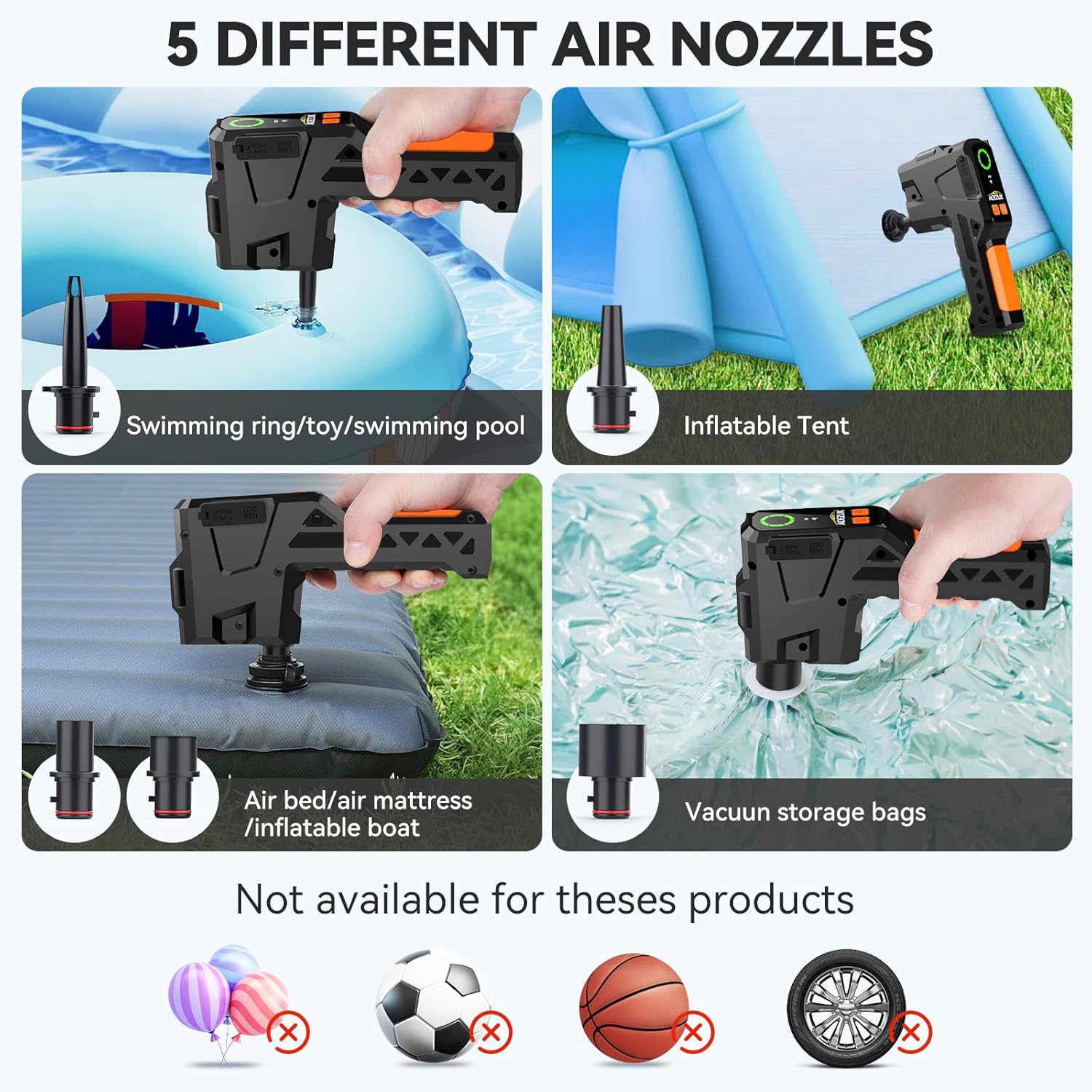
Image: Displays the five different air nozzles provided and examples of compatible inflatables such as swimming rings, inflatable tents, air beds/mattresses, and vacuum storage bags. It also explicitly shows items like balloons, soccer balls, basketballs, and car tires as 'not available for these products'.

Image: A three-step visual guide demonstrating the inflation process: 1) Select the correct nozzle, 2) Install the nozzle on the 'IN' air port, 3) Long press to turn on the air pump, one click to close.

Image: A three-step visual guide demonstrating the deflation process: 1) Select the correct nozzle, 2) Install the nozzle on the 'OUT' air port, 3) Long press to turn on the air pump, one click to close.
5.3. Using as a Power Bank
The device can charge various USB-powered electronics.
- Connect your device's charging cable to either the USB-A OUT port or the Type-C IN/OUT port on the jump starter.
- The jump starter will automatically begin charging your device.

Image: The ACEZUK M04-US Jump Starter connected via USB-C to a smartphone and a tablet, demonstrating its function as a backup power bank for charging multiple devices.

Image: The ACEZUK M04-US Jump Starter positioned next to headphones, a tablet, and a smartphone, illustrating its capability to charge multiple portable devices simultaneously.
5.4. Using the LED Flashlight
The built-in LED light offers multiple modes for various situations.
- Press the flashlight button once to turn on the Bright mode.
- Press again for Fast Flashing (strobe) mode.
- Press a third time for SOS signal mode.
- Press a fourth time to turn off the light.
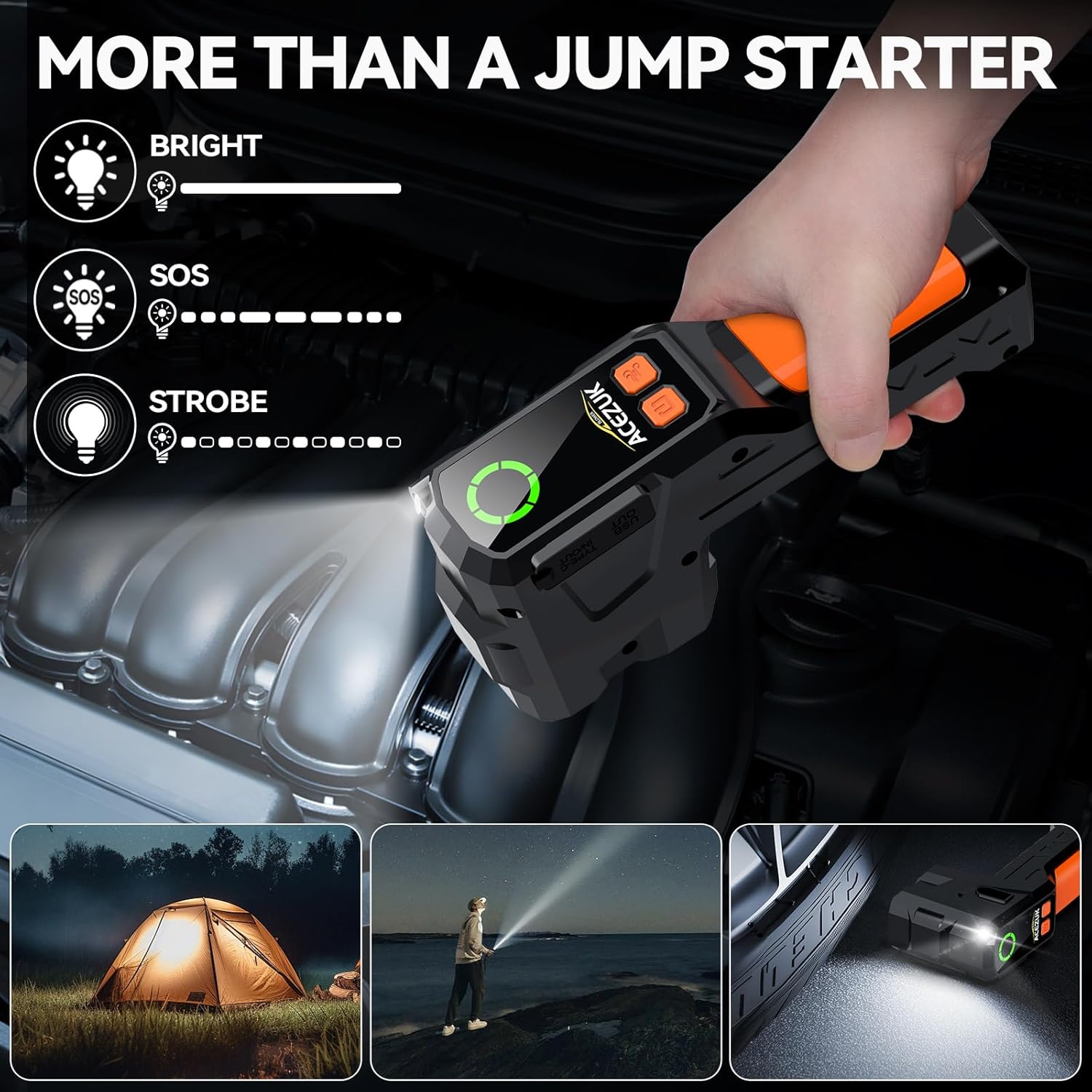
Image: The ACEZUK M04-US Jump Starter's LED light illuminating an engine bay, with icons indicating its three modes: Bright, SOS, and Strobe. Smaller images show its use for camping and general illumination.

Image: The ACEZUK M04-US Jump Starter positioned on the ground, with its super bright LED light illuminating a car wheel, highlighting its utility in low-light conditions. Icons for Bright, Strobe, and SOS modes are also shown.
6. Maintenance
- Charging: Recharge the unit after each use, especially after jump starting a vehicle. For optimal battery life, recharge every 3-6 months if not used regularly.
- Storage: Store the device in its storage case in a cool, dry place, away from direct sunlight and extreme temperatures.
- Cleaning: Use a soft, dry cloth to clean the exterior of the unit. Do not use harsh chemicals or abrasive cleaners.
7. Troubleshooting
If you encounter issues with your ACEZUK M04-US, refer to the following common problems and solutions:
| Problem | Possible Cause | Solution |
|---|---|---|
| Vehicle does not start | Low charge on jump starter; incorrect clamp connection; vehicle battery completely dead or damaged. | Ensure jump starter is fully charged. Check clamp polarity (+ to +, - to -). Ensure clamps have good contact. If battery is severely damaged, professional assistance may be required. |
| Air pump not working | Low charge; incorrect port used (IN/OUT); nozzle not properly attached. | Recharge the unit. Ensure nozzle is firmly inserted into the correct IN or OUT port. Check for blockages in the nozzle or port. |
| Device not charging | Faulty USB-C cable or adapter; charging port issue. | Try a different USB-C cable and wall adapter. Ensure the cable is fully inserted into the Type-C port. |
| LED light not working | Low charge; button malfunction. | Recharge the unit. Press the flashlight button multiple times to cycle through modes. |
8. Specifications
Detailed technical specifications for the ACEZUK M04-US Jump Starter:
- Model: M04-US
- Peak Current: 4000 Amps
- Battery Capacity: 15800 mAh
- Type-C Input/Output: 5V/3A, 9V/2A, 12V/1.5A
- USB Output: 5V/3A, 9V/2A, 12V/1.5A
- Item Weight: 2.51 pounds (approx. 1.14 kg)
- Product Dimensions: 1.53 x 3.64 x 7.09 inches (approx. 3.89 x 9.25 x 18.01 cm)
- Manufacturer: ACEZUK

Image: A graphic displaying key specifications of the ACEZUK Jump Starter, including Peak current (4000A), Battery capacity (15800mAh), Type-C Input/Output (5V/3A, 9V/2A, 12V/1.5A), and USB Output (5V/3A, 9V/2A, 12V/1.5A).
9. Warranty and Support
For information regarding warranty coverage, technical support, or service inquiries, please refer to the official ACEZUK website or contact their customer support directly. Contact details are typically provided on the product packaging or within the included user manual.


