
1. Introduction
This user manual provides detailed instructions for the installation, operation, and maintenance of your TMEZON 4-wire IP Video Door Intercom System. Please read this manual thoroughly before using the product to ensure proper functionality and safety. Keep this manual for future reference.
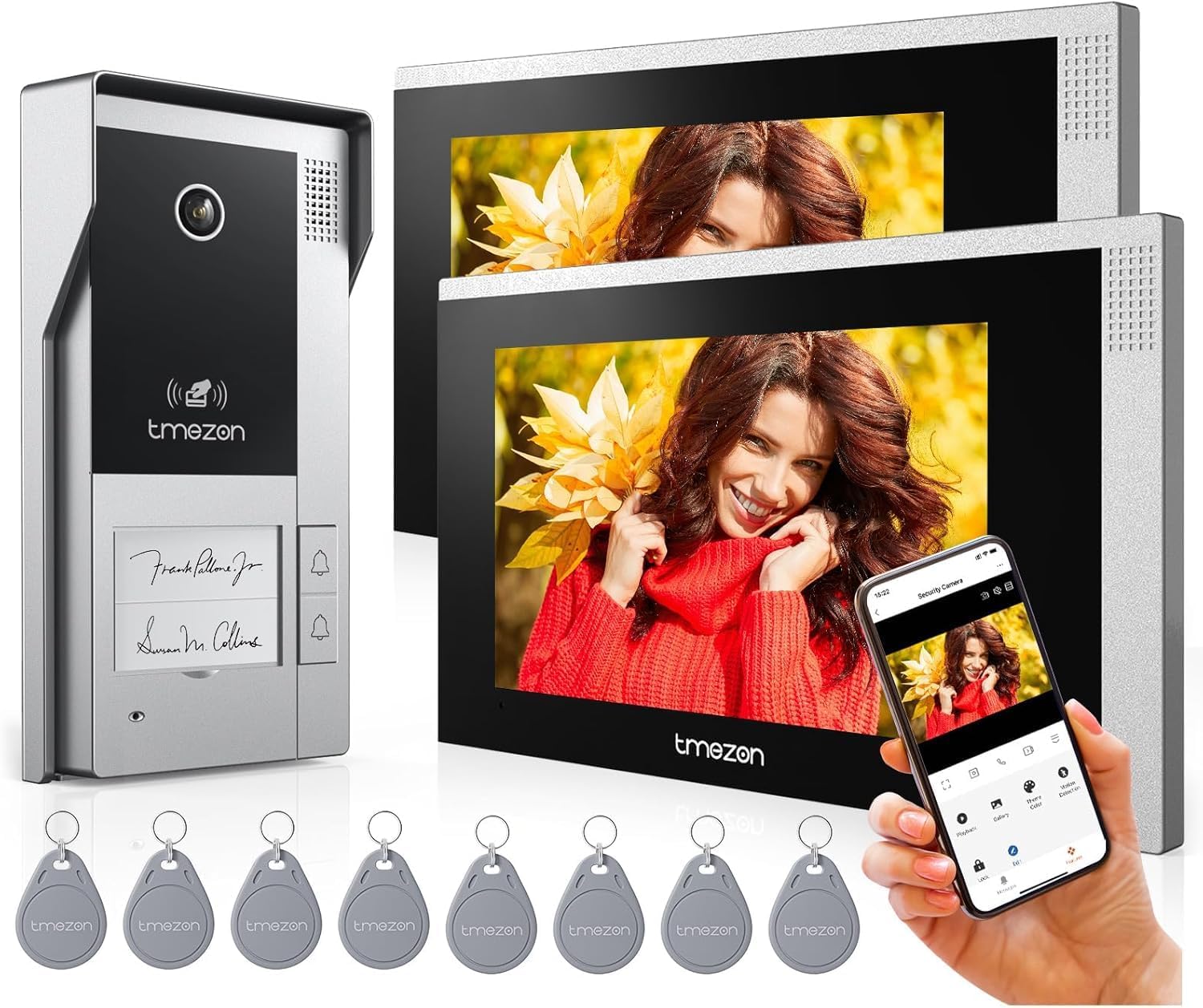
This image displays the complete TMEZON 4-wire IP video door intercom system. It includes the sleek outdoor doorbell unit, two 7-inch indoor touchscreen monitors, and a set of RFID key cards for convenient access.
2. Safety Information
- Ensure all wiring is performed by a qualified electrician and complies with local electrical codes.
- Do not expose the indoor monitor to water or excessive humidity.
- Avoid placing the monitor near heat sources or in direct sunlight.
- Use only the power adapter supplied with the system.
- Do not attempt to disassemble or repair the unit yourself. Contact customer support for assistance.
- Keep RFID cards away from strong magnetic fields.
3. Package Contents
Verify that all items are present in your package:
- Outdoor Doorbell Unit (MZ-VDP-NE170)
- Indoor Touchscreen Monitor (MZ-IP-V728TW) x 2
- Power Adapters
- Mounting Brackets and Screws
- RFID Key Cards (8 pieces)
- Wiring Cables (for connection between doorbell and monitor)
- User Manual
4. Product Overview
4.1 Outdoor Doorbell Unit
The outdoor unit features a 1080P camera with infrared night vision, a microphone, speaker, and a call button. It is designed for outdoor use and is weather-resistant.

The outdoor doorbell unit is designed to withstand various weather conditions, ensuring reliable operation even in rain.
4.2 Indoor Touchscreen Monitor
The 7-inch IP touchscreen monitor serves as the central control unit. It allows for two-way communication, video viewing, recording playback, and remote unlocking. It also features a TF card slot for local storage.

The TMEZON system supports up to a 128GB TF (microSD) card for local storage of recordings. This image highlights the easily accessible TF card slot on the side of the indoor monitor, allowing for ample storage of video and image data.
5. Setup and Installation
5.1 Wiring Diagram
The system uses a 4-wire connection between the outdoor doorbell unit and the indoor monitor. Ensure correct polarity and secure connections for optimal performance. Refer to the detailed wiring diagram in the included quick start guide for specific connections.
5.2 Mounting the Outdoor Unit
- Choose a suitable location near your door, at a height of approximately 1.5 meters (5 feet) from the ground.
- Use the mounting bracket as a template to mark drilling holes.
- Drill holes and insert wall plugs if necessary.
- Secure the mounting bracket to the wall.
- Connect the 4-wire cable and any lock control wires to the outdoor unit.
- Attach the outdoor unit to the mounting bracket.
5.3 Mounting the Indoor Monitor
- Select a convenient indoor location, typically near a power outlet.
- Secure the monitor's mounting plate to the wall.
- Connect the 4-wire cable from the outdoor unit and the power adapter to the monitor.
- Mount the monitor onto the wall plate.
5.4 App Setup (TuyaSmart)
- Download the 'TuyaSmart' app from your device's app store.
- Register or log in to your account.
- Ensure your Wi-Fi network is set to 2.4GHz.
- Follow the in-app instructions to add your TMEZON intercom system. This typically involves putting the monitor into pairing mode and connecting it to your Wi-Fi network.
6. Operating Instructions
6.1 Answering Calls and Two-Way Audio
When a visitor presses the doorbell, the indoor monitor will ring and display the live video feed. You can answer the call by tapping the 'Answer' icon on the screen. Engage in two-way audio communication with the visitor.

The 7-inch IP touchscreen monitor enables clear two-way audio communication between the indoor unit and the outdoor doorbell. This allows you to speak with visitors and confirm their identity before opening the door.
6.2 Voice Message Function
If you are unavailable to answer a call, the system can automatically switch to message mode, allowing visitors to leave a voice message. These messages can be reviewed later from the monitor or the app.

When a visitor rings the doorbell and no one answers, the system automatically enters message mode. This feature allows visitors to leave a voice message, ensuring you don't miss important interactions.
6.3 Unlocking Methods
The TMEZON system offers multiple ways to unlock your door or gate:
- Monitor Unlock: Tap the 'Unlock' icon on the indoor monitor screen during a call or live view.
- App Remote Unlock: Use the 'TuyaSmart' app on your smartphone to unlock the door remotely from anywhere with an internet connection.
- RFID Card Unlock: Present a pre-programmed RFID key card to the outdoor doorbell unit's sensor for quick and convenient access.

The TMEZON intercom system offers versatile unlocking options, including remote unlocking via the mobile app, convenient access using RFID key cards, and direct control from the indoor monitor.
6.4 Recording and Playback
The system supports automatic snapshot capture and video recording when the doorbell is pressed or motion is detected. Recordings can be stored locally on a TF card (up to 128GB, not included) or via cloud service.

The system supports both local storage via an SD card (not included) and cloud service for recording video 24/7. This image illustrates the playback interface, allowing users to review recorded footage by date and time, capture snapshots, and share videos.

The indoor monitor supports image preview during playback, making it easier to navigate and find specific recordings. This feature enhances the user experience by providing visual thumbnails of stored events.
6.5 Motion Detection
Configure motion detection settings via the indoor monitor or the 'TuyaSmart' app. When motion is detected within the camera's field of view, you will receive instant notifications on your smartphone, and the system will automatically record the event.

The system features advanced motion detection, alerting you to activity at your door. This image shows a delivery person triggering the motion sensor, resulting in an instant notification on your connected smartphone, enhancing security.
6.6 Day and Night Vision
The 1080P camera provides clear video quality during the day. At night, the integrated infrared lights enable clear black-and-white night vision, ensuring continuous monitoring in low-light conditions.

Equipped with a 1080P camera and infrared light, the video doorbell provides clear and sharp video footage both during the day and at night, ensuring continuous monitoring.
6.7 Controlling Multiple Locks
The TMEZON system can be configured to control up to two electronic locks, providing flexible access management for different entry points like a main door and a gate.

The TMEZON intercom system offers advanced control, allowing you to connect and manage up to two electronic locks, providing flexible access solutions for gates and doors.
7. Maintenance
- Regularly clean the camera lens and monitor screen with a soft, dry cloth to ensure clear visibility.
- Do not use abrasive cleaners or solvents.
- Check wiring connections periodically to ensure they are secure.
- Ensure the outdoor unit is free from obstructions that might block the camera's view or microphone.
8. Troubleshooting
| Problem | Possible Cause | Solution |
|---|---|---|
| No image on monitor | Loose wiring connection; Power issue; Faulty camera/monitor | Check all 4-wire connections; Ensure power adapter is plugged in; Contact support if problem persists. |
| No audio | Microphone/speaker blocked; Volume too low; Wiring issue | Check for obstructions; Adjust volume settings on monitor; Verify wiring. |
| Motion detection not working | Sensitivity too low; Incorrect settings; Obstruction | Adjust motion detection sensitivity in settings; Ensure camera view is clear. |
| Cannot connect to Wi-Fi/App | Incorrect Wi-Fi password; 5GHz network; Distance from router | Ensure correct 2.4GHz Wi-Fi network and password; Move monitor closer to router or use a Wi-Fi extender. |
| Door/gate not unlocking | Incorrect wiring to lock; Lock power issue; Faulty lock | Verify lock wiring (NO/NC); Check power supply to lock; Test lock independently. |
9. Specifications
| Feature | Detail |
|---|---|
| Model Name | MZ-IP-V728TW*2+MZ-VDP-NE170 |
| Power Source | Corded Electric |
| Connectivity Technology | Wireless (Wi-Fi), Wired (4-wire) |
| Wi-Fi Frequency | 2.4GHz |
| Video Capture Resolution | 1080p |
| Indoor Monitor Size | 7 Inch IP Touchscreen |
| Storage Support | Up to 128GB TF Card (not included) |
| Unlocking Methods | App, RFID Card, Monitor |
| Motion Detection | Yes |
| Two-Way Audio | Yes |
| Voice Message | Yes |
| Material | Plastic (Monitor), Metal (Doorbell) |
| Item Weight | 2.24 kg (total package) |
| Dimensions (L x W x H) | 20 x 12 x 27 cm (package) |
10. Warranty and Support
TMEZON products are designed for reliability and performance. For warranty information, technical support, or service inquiries, please refer to the contact details provided on the TMEZON official website or your purchase documentation. Please have your model number (MZ-IP-V728TW*2+MZ-VDP-NE170) ready when contacting support.


