1. Introduction
Thank you for purchasing the NUX DM-310 Electronic Drum Kit. This manual provides essential information for setting up, operating, and maintaining your new instrument. Please read it thoroughly before use to ensure proper functionality and to maximize your drumming experience.
The DM-310 offers an affordable yet high-quality digital drumming solution, featuring dedicated mesh heads for a natural feel, an independent kick drum for realistic playability, a simple sound module, multi-channel USB audio interface functionality, and Bluetooth audio/MIDI capabilities via the included NBT-1 Bluetooth module.
2. Package Contents
Please check that all the following components are included in your package:
- NUX DM-310 Main Unit (Drum Module)
- NBT-1 Bluetooth Module
- Hi-Hat Controller Pedal
- Kick Pad
- Kick Pedal
- Power Adapter
- Drum Sticks
- Assembly Hardware and Cables
3. Product Overview

The complete NUX DM-310 Electronic Drum Kit, showcasing the drum pads, cymbals, module, and pedals assembled on the rack.
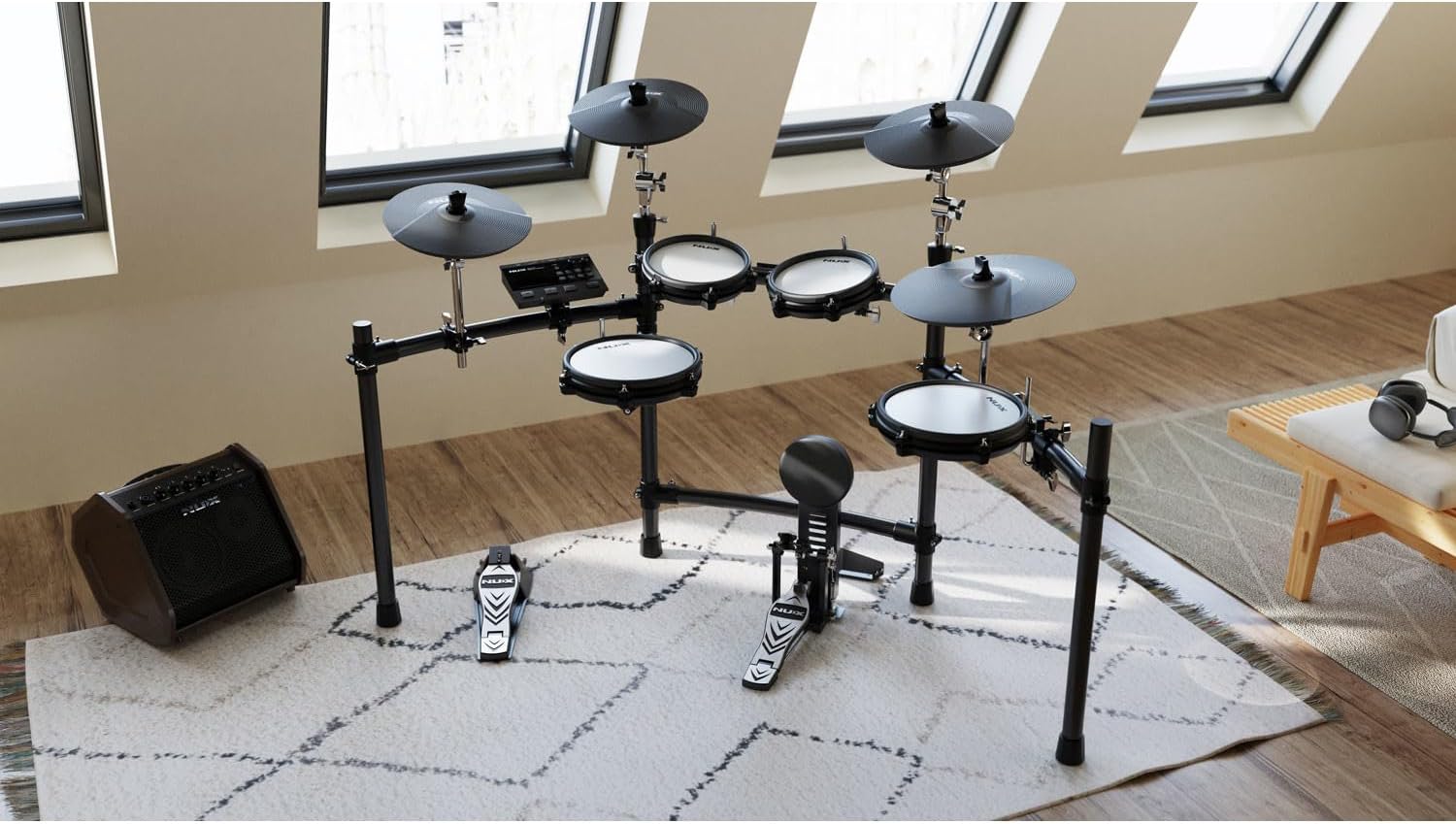
The NUX DM-310 kit set up in a typical room environment, demonstrating its compact footprint.

Front view of the DM-310 Digital Module, showing the display, control knobs, and buttons for various functions.

Rear view of the DM-310 Digital Module, highlighting the various input/output ports including USB, Trigger inputs, Bluetooth Module slot, Aux In, and L/Mono & R Outputs.

A close-up view of a NUX mesh drum pad, designed to provide a natural and responsive playing feel.

The independent kick pedal and kick pad, offering a realistic drumming experience for bass drum articulation.

Illustration of inserting the NBT-1 Bluetooth module into its dedicated slot on the DM-310 module, enabling wireless connectivity.
4. Setup Instructions
4.1 Assembling the Drum Rack
- Unpack all components and identify the main rack pipes and clamps.
- Assemble the main horizontal and vertical support pipes according to the included diagram. Ensure all clamps are securely tightened.
- Attach the cymbal arms and drum pad mounts to the rack using the provided clamps. Adjust their positions for comfortable playing.
4.2 Mounting Pads and Cymbals
- Mount the snare, tom pads, and cymbals onto their respective arms and mounts.
- Place the kick pad in front of the rack and attach the kick pedal to it.
- Position the hi-hat controller pedal on the floor near the hi-hat cymbal.
4.3 Connecting the Module and Cables
- Mount the DM-310 module onto the designated arm on the drum rack.
- Connect each drum pad and cymbal to the corresponding trigger input on the DM-310 module using the included multi-pin cable or individual trigger cables. Refer to the port labels on the module (e.g., Snare, Tom1, Crash1, etc.).
- Connect the hi-hat controller pedal and kick pad to their respective inputs on the module.
- Insert the NBT-1 Bluetooth module into the 'Bluetooth Module' slot on the rear of the DM-310 module.
- Connect the DC-9V power adapter to the module's power input and then to a power outlet.
- For audio output, connect the L/MONO and R OUTPUTs to an amplifier, mixer, or headphones.
5. Operating Instructions
5.1 Powering On and Basic Operation
- Press the POWER button to turn on the module. The display will light up.
- Use the KIT knob to select different drum kits. Rotate to browse, press to confirm.
- Adjust the overall volume using the MASTER knob.
- Use the TONE button to access tone settings for individual pads.
5.2 Practice Functions
- CLICK: Activates the metronome. Use the knob to adjust tempo.
- COACH: Access various coaching modes to improve your timing and technique.
- REC: Press to start recording your performance. Press again to stop.
- PLAY/STOP: Plays back recorded performances or built-in demo songs.
5.3 Bluetooth Connectivity
- Ensure the NBT-1 Bluetooth module is inserted into the DM-310 module.
- On your smart device (phone, tablet), enable Bluetooth and search for available devices.
- Select "NUX DM-310" from the list to pair. You can now stream audio from your device to the drum module or use it for MIDI applications.
5.4 USB Audio Interface Function
The DM-310 module features a multi-channel USB audio interface. Connect the module to your computer using a USB cable (not included). Your computer should recognize the DM-310 as an audio device, allowing you to record your drumming directly into a Digital Audio Workstation (DAW) or use it as a MIDI controller.
6. Maintenance
- Cleaning: Use a soft, dry cloth to wipe down the module, pads, and cymbals. Do not use abrasive cleaners or solvents.
- Mesh Head Care: The mesh heads are durable but can be damaged by excessive force or sharp objects. Avoid striking them with anything other than drum sticks.
- Storage: When not in use for extended periods, disconnect the power adapter. Store the kit in a dry, temperature-controlled environment away from direct sunlight.
- Cable Management: Ensure cables are not tangled or pinched to prevent damage.
7. Troubleshooting
7.1 No Sound from Pads
- Check all trigger cables are securely connected to both the pads/cymbals and the module.
- Ensure the MASTER volume knob on the module is turned up.
- Verify that your amplifier or headphones are properly connected and powered on, and their volume is adjusted.
- Check the individual pad sensitivity settings in the module's menu.
7.2 Bluetooth Connection Issues
- Ensure the NBT-1 Bluetooth module is fully inserted into its slot.
- Make sure Bluetooth is enabled on your smart device.
- Try unpairing and re-pairing the device.
- Restart both the DM-310 module and your smart device.
7.3 Module Not Powering On
- Check that the power adapter is securely connected to both the module and a working power outlet.
- Ensure the power outlet is active (test with another device).
- Verify that you are using the correct power adapter supplied with the unit.
8. Specifications
| Brand | NUX |
| Product Model Number | DM-310 |
| Color | Black |
| Product Dimensions (LxWxH) | 94.5 x 44 x 38.5 cm |
| Item Weight | 20.9 Kilograms |
| Included Components | NBT-1 Module, Hi-Hat Controller, Kick Pad, Main Unit (Module), Kick Pedal, Power Adapter, Drum Sticks |
| First Available Date on Amazon.co.jp | 2024/8/6 |
9. Warranty and Support
Warranty information for your NUX DM-310 Electronic Drum Kit is typically provided with your purchase documentation. Please refer to the warranty card or contact your retailer for specific details regarding coverage and duration.
For technical support, service, or any questions not covered in this manual, please contact NUX customer support or visit the official NUX website. Keep your purchase receipt as proof of purchase for warranty claims.
Note: Product specifications and features are subject to change without notice.


