
1. Introduction
Thank you for choosing the SANODESK Electric Standing Desk. This desk is designed to provide a versatile and ergonomic workspace, allowing seamless transitions between sitting and standing positions. Featuring a durable whole-piece desktop, integrated power strip with USB ports, and efficient cable management, it is an ideal solution for any home or office environment. Please read this manual thoroughly before assembly and operation to ensure safe and proper use.
2. Safety Information
To ensure your safety and prolong the life of your SANODESK Electric Standing Desk, please adhere to the following guidelines:
- Always follow the assembly instructions carefully.
- Keep the desk away from heat sources and direct sunlight.
- Do not place heavy objects on the desktop that could cause it to tip over or exceed the weight capacity of 176 lbs.
- Do not use the desk if any parts are damaged or missing. Contact customer support for replacement parts.
- Always use the desk with caution when adjusting the height. Ensure no obstructions are in the path of the desktop or legs.
- Keep children and pets away from the desk during operation.
- Ensure all cables are properly managed to prevent tripping hazards or damage to the electrical components.
3. Package Contents
Before beginning assembly, please verify that all components are present and undamaged. Refer to the detailed installation manual included in your package for a complete list of parts.
- Whole-Piece Desktop (40" x 24", Mahogany Top)
- Electric Height Adjustable Frame (Black)
- Desk Clamp Power Strip with 2 USB-A Ports (5V/2A) and 3 AC Power Outlets (125V/1500W)
- Under Desk Cable Management Tray
- 6-Button Digital Control Panel
- Assembly Hardware and Tools (excluding drill)
- Detailed Installation Manual

Figure 3.1: Exploded view of the SANODESK Electric Standing Desk components, showing the desktop, frame, power strip, and cable management tray.
4. Setup and Assembly
The SANODESK Electric Standing Desk is designed for easy assembly. Follow the detailed installation manual and video guide provided with your product. While most screw holes are pre-embedded, a drill may be required for certain steps (not included).
- Unpack Components: Carefully remove all parts from the packaging and lay them out on a clean, flat surface.
- Assemble Frame: Follow the instructions to assemble the industrial-grade steel frame. Ensure all connections are secure.
- Attach Desktop: Secure the whole-piece desktop to the assembled frame.
- Install Control Panel: Mount the 6-button digital control panel to the underside of the desktop in an easily accessible location.
- Attach Power Strip: The versatile power dock and USB charger mount to the desk surface with an edge mount bracket. Clamp it onto the back or side of your desk for a secure hold.
- Install Cable Management Tray: Attach the cable management tray under the desk to help organize wires and reduce clutter.
- Connect Power: Plug the desk into a standard electrical outlet.

Figure 4.1: Illustration of effective cable management using the included tray, transforming a messy desk into a tidy workspace.
5. Operating Instructions
Your SANODESK Electric Standing Desk features an intuitive 6-button digital control panel for effortless height adjustment.
- Height Adjustment: Use the Up (^) and Down (v) arrow buttons to smoothly adjust the desk height. The desk adjusts from 28.1" to 45.7" at 0.6" per second, operating quietly under 50 dB.
- Memory Presets: The control panel includes 4 programmable memory presets.
- Adjust the desk to your desired sitting or standing height.
- Press the "M" button (or similar memory set button, typically indicated by a person icon or 'i' for individual preset).
- Press one of the numbered preset buttons (1, 2, 3, or 4) to save the current height to that preset.
- To recall a saved height, simply press the corresponding numbered preset button. The desk will automatically move to the saved position.
- Power Strip Usage: The integrated desk clamp power strip provides 2 USB-A ports and 3 AC power outlets for convenient charging and powering of your devices.

Figure 5.1: The SANODESK Electric Standing Desk featuring its spacious whole-piece desktop and integrated power outlet for multiple devices.
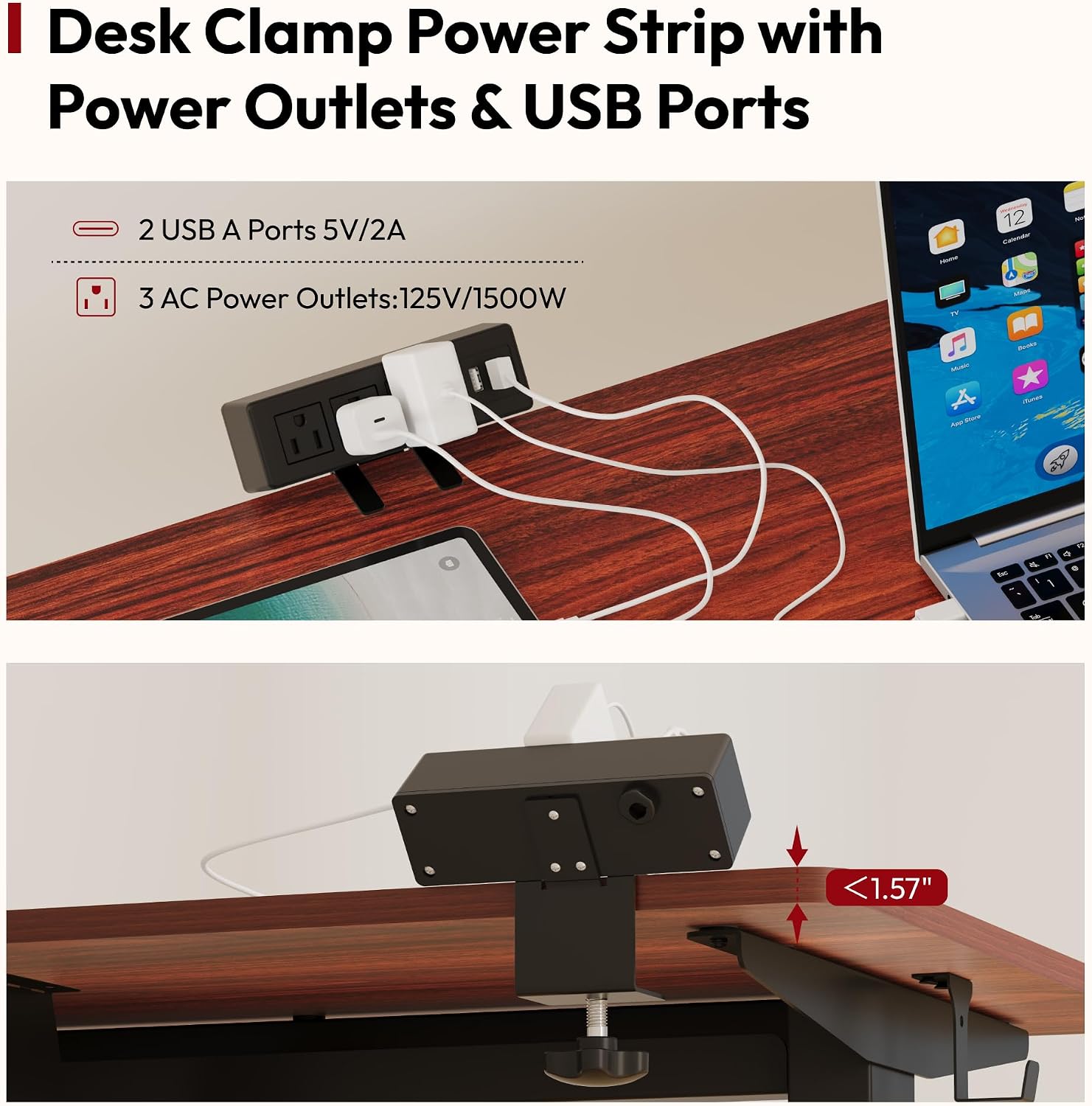
Figure 5.2: Detail of the desk clamp power strip, illustrating its USB and AC outlets and how it securely attaches to the desk edge.
6. Maintenance
Regular maintenance will help keep your SANODESK Electric Standing Desk in optimal condition:
- Cleaning: Wipe the desktop and frame with a soft, damp cloth. Avoid harsh chemicals or abrasive cleaners.
- Cable Management: Periodically check and reorganize cables in the management tray to prevent tangles and ensure smooth operation.
- Fasteners: Occasionally check all screws and bolts to ensure they are tight. Retighten if necessary.
- Motor Care: The electric motor is designed for durability, tested for 20,000 lift cycles. No special maintenance is required for the motor itself, but avoid overloading the desk.
7. Troubleshooting
If you encounter any issues with your SANODESK Electric Standing Desk, please refer to the following common troubleshooting steps:
| Problem | Possible Cause | Solution |
|---|---|---|
| Desk does not move. | Power cable disconnected; Overload; Motor overheating. | Check power connection. Reduce weight on desk. Allow motor to cool down for 20 minutes. |
| Uneven height adjustment. | Obstruction; Uneven weight distribution. | Remove any obstructions. Redistribute weight evenly on the desktop. |
| Error code on display. | Specific system error. | Refer to the detailed installation manual for specific error code meanings and solutions. If the issue persists, contact customer support. |
| Noise during operation. | Loose fasteners; Minor motor sound. | Tighten any loose fasteners. A quiet hum (<50 dB) is normal during operation. |
For issues not covered here, or if troubleshooting steps do not resolve the problem, please contact SANODESK customer support.
8. Specifications
| Feature | Detail |
|---|---|
| Brand | SANODESK |
| Model Number | EN2 |
| Product Dimensions (D x W x H) | 24"D x 40"W x 45"H |
| Desktop Size | 40" x 24" (Whole-Piece) |
| Color | Black Frame + Mahogany Top |
| Height Adjustment Range | 28.1" to 45.7" |
| Adjustment Speed | 0.6" per second |
| Noise Level | Under 50 dB |
| Weight Capacity | Up to 176 lbs |
| Base Material | Alloy Steel |
| Top Material Type | Wood |
| Control Panel | 6-Button Digital with 4 Memory Presets |
| Power Strip | 2 USB-A Ports (5V/2A), 3 AC Outlets (125V/1500W) |
| Included Components | Desk, Power Strip, Cable Management Tray |

Figure 8.1: Visual representation of the desk's dimensions and height adjustment capabilities.

Figure 8.2: The whole-piece desktop design, emphasizing its smooth surface and enhanced stability.
9. Warranty and Support
The SANODESK Electric Standing Desk comes with a Limited Warranty. Please refer to the warranty card included in your package for specific terms and conditions. For technical support, warranty claims, or any other inquiries, please contact SANODESK customer service through the retailer where you purchased the product or visit the official SANODESK website.
Manufacturer: SANODESK
UPC: 810072876553


