
Introduction
Thank you for choosing the Blackview AirBuds 4 Wireless Earbuds. This manual provides essential information for setting up, operating, and maintaining your earbuds. Please read it carefully to ensure optimal performance and longevity of your device.
Package Contents
Verify that all items are present in your package:
- Blackview AirBuds 4 Earbuds (Left and Right)
- Charging Case
- User Guide
- Type-C Charging Cable
- Two additional pairs of silicone ear tips (total of 3 sizes: S, M, L)

Product Overview
The Blackview AirBuds 4 feature an ergonomic in-ear design for comfortable wear and stable fit. The charging case provides convenient storage and extends battery life.

Setup
1. Charging the Earbuds and Case
Before first use, fully charge the earbuds and charging case. Connect the provided Type-C charging cable to the charging port on the case and a USB power source.
- The charging case can provide up to 5 full charges for the earbuds.
- A full charge for the case takes approximately 1.5 hours.

2. Bluetooth Pairing
- Open the charging case. The earbuds will automatically enter pairing mode.
- On your device (smartphone, tablet, PC), enable Bluetooth.
- Search for available Bluetooth devices and select "AirBuds 4" from the list.
- Once connected, you will hear a confirmation tone, and the earbuds are ready for use.
The earbuds feature automatic re-connection to the last paired device when removed from the case.

Operating Instructions
Wearing the Earbuds
Choose the silicone ear tips that provide the most comfortable and secure fit for your ears. Insert the earbuds gently into your ear canal and rotate slightly to ensure a snug seal for optimal sound quality and stability.

Touch Controls
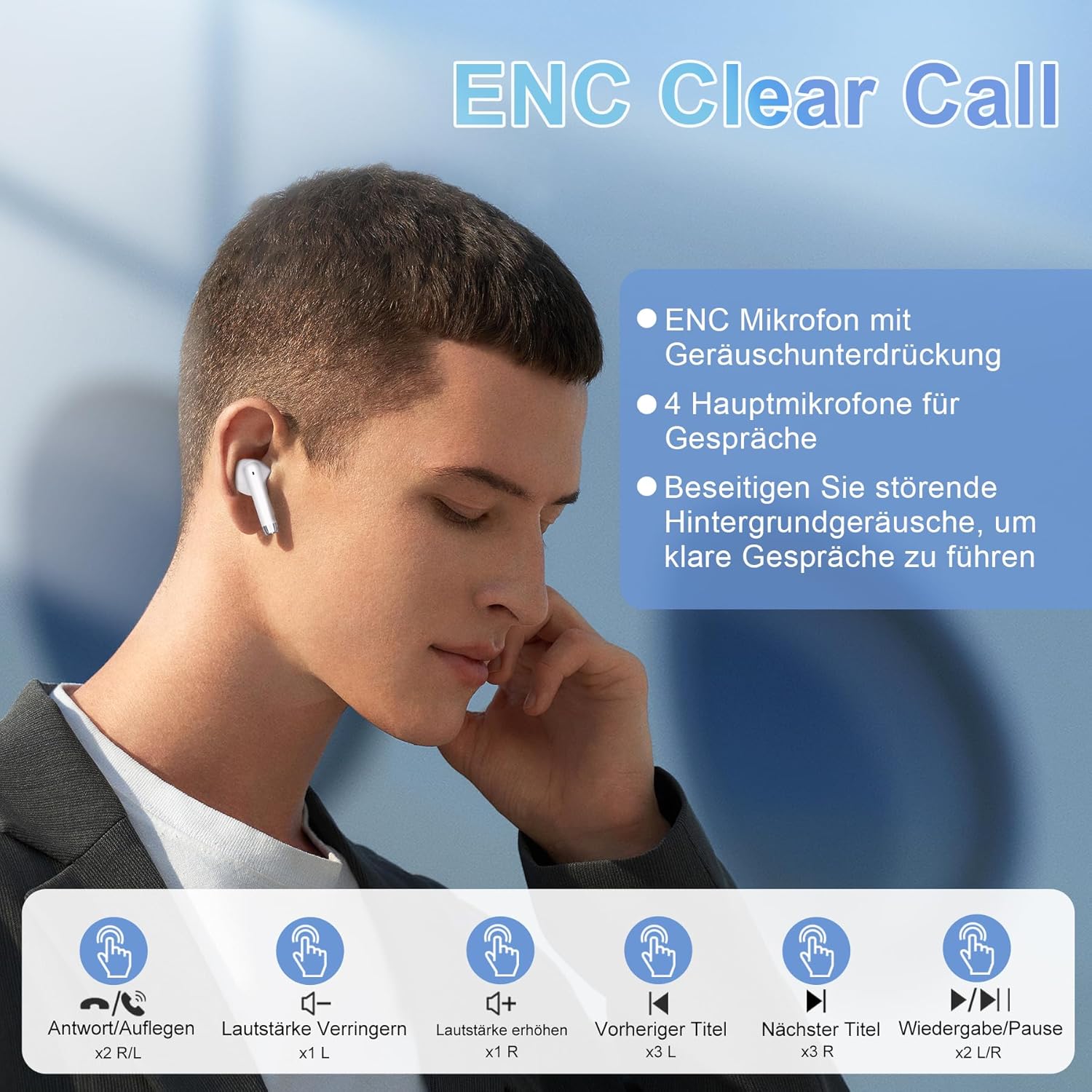
The Blackview AirBuds 4 feature intuitive touch controls on each earbud. The functions are as follows:
| Action | Control | Function |
|---|---|---|
| Double Tap (L/R) | Earbud Touch Sensor | Play/Pause Music, Answer/End Call |
| Triple Tap (L) | Left Earbud Touch Sensor | Previous Track |
| Triple Tap (R) | Right Earbud Touch Sensor | Next Track |
| Single Tap (L) | Left Earbud Touch Sensor | Volume Down |
| Single Tap (R) | Right Earbud Touch Sensor | Volume Up |
| Long Press (L/R) | Earbud Touch Sensor | Activate Voice Assistant |
Features
Advanced Bluetooth 5.3 Technology
The AirBuds 4 utilize Bluetooth 5.3, offering a faster and more stable wireless connection. This technology ensures lower power consumption and reduced latency for a seamless audio experience.

Hi-Fi Stereo Sound & ENC Noise Reduction
Equipped with 13mm dynamic drivers and a three-layer composite diaphragm, the AirBuds 4 deliver high-resolution audio with strong bass and clear highs. Each earbud includes an Environmental Noise Cancellation (ENC) microphone to enhance voice clarity and reduce background noise during calls.

IPX7 Waterproof Rating
The earbuds are IPX7 waterproof, making them resistant to sweat, rain, and splashes. This protection allows for use during workouts or in light rain conditions.
Extended Battery Life
Enjoy up to 8 hours of music playback on a single charge. With the included charging case, the total listening time extends to approximately 36 hours.
Troubleshooting
No Sound from Earbuds
- Ensure earbuds are charged.
- Check Bluetooth connection on your device. Re-pair if necessary.
- Adjust volume on both your device and via earbud touch controls.
Earbuds Not Pairing
- Make sure both earbuds are in the charging case and have sufficient charge.
- Remove "AirBuds 4" from your device's Bluetooth list and attempt to pair again.
- Ensure no other Bluetooth devices are interfering with the connection.
Charging Issues
- Verify the Type-C cable is securely connected to both the case and the power source.
- Try a different charging cable or power adapter.
- Clean the charging contacts on the earbuds and inside the case.
Specifications
| Feature | Detail |
|---|---|
| Model Name | AirBuds 4 |
| Connectivity Technology | Wireless (Bluetooth 5.3) |
| Ear Placement | In-Ear |
| Form Factor | In-Ear |
| Noise Control | Environmental Noise Cancellation (ENC) |
| Water Resistance | IPX7 |
| Battery Life (Earbuds) | Up to 8 hours |
| Total Playtime (with Case) | Up to 36 hours |
| Charging Port | Type-C |
| Weight | 100 grams (packaging dimensions) |
Maintenance
- Cleaning: Regularly clean the earbuds and charging case with a soft, dry cloth. Avoid using harsh chemicals or abrasive materials.
- Storage: When not in use, store the earbuds in their charging case to protect them from dust and damage.
- Battery Care: To prolong battery life, avoid fully discharging the earbuds or case frequently. Charge them regularly, even if not in constant use.
Warranty and Support
Your Blackview AirBuds 4 are covered by a manufacturer's warranty. For detailed warranty information, please refer to the warranty card included in your package or visit the official Blackview website. For technical support or service inquiries, please contact Blackview customer service through their official channels.
Please retain your proof of purchase for warranty claims.


