1. Product Overview
The hornbill A5 Smart Front Door Lock Set offers advanced security and convenient access for your home or apartment. This keyless entry system integrates multiple unlocking methods, including fingerprint, passcode, mobile application, and traditional mechanical keys. It is designed for durability and ease of use, providing a modern solution for door security.

Image: The hornbill A5 Smart Lock, showcasing its sleek design and integration with the mobile app for smart control.
Key Features:
- Smart Unlocking: Access via Fingerprints, APP, Passcode, and Mechanical Keys.
- Wi-Fi & Alexa Control: Supports remote control and Alexa voice control (requires Tuya Gateway, sold separately).
- Multiple Passcodes: Up to 50 fingerprints and 100 passcodes can be set for family, guests, and employees.
- Durable Construction: Made of reliable aluminum alloy, anti-impact, suitable for harsh environments.
- Fast Fingerprint Identification: Recognizes fingerprints in 0.1 seconds and unlocks within 1 second.
- Auto Lock: Automatically locks when the door closes. One-touch locking available by holding '#' for 2 seconds or via app.
- Easy Installation: Installs in minutes with a screwdriver, no drilling required for compatible doors.
2. Installation Guide
The hornbill A5 Smart Lock is designed for straightforward installation, typically requiring only a screwdriver. No additional drilling is needed for most standard US doors. Ensure your door thickness is between 1.49 inches and 1.88 inches for proper fit.
2.1 Pre-Installation Check
- Verify door thickness and backset dimensions using the provided template.
- Confirm the lock is compatible with both left-handed and right-handed doors. The direction can be set in the app after installation.

Image: Detailed dimensions for the hornbill A5 Smart Lock, crucial for ensuring compatibility and proper installation on your door.
2.2 Step-by-Step Installation
- Install the latch and strike plate into the door frame.
- Mount the exterior assembly (keypad and fingerprint reader) onto the door.
- Install the interior mounting plate.
- Connect the cable from the exterior assembly to the interior assembly.
- Secure the interior assembly to the mounting plate.
- Install the battery pack and cover.
- Test the lock's functionality with mechanical keys and initial setup.

Image: The hornbill A5 Smart Lock is designed to fit both left-handed and right-handed doors, with direction adjustable via the app.
3. Operating Instructions
The hornbill A5 Smart Lock offers multiple convenient ways to secure and access your property.
3.1 Unlocking Methods
- Fingerprint: Place your registered finger on the sensor for quick unlocking (0.1s identification, 1s unlock). The lock supports up to 50 unique fingerprints.
- Passcode: Enter your 6-digit passcode on the keypad. The lock supports up to 100 passcodes. For enhanced security, use the anti-peeping passcode feature by entering random digits before and after your actual code.
- Mobile App: Use the dedicated mobile application (available for iOS and Android) to lock/unlock the door remotely (requires Tuya Gateway for Wi-Fi control).
- Mechanical Key: Use the provided physical keys as a backup.

Image: Experience rapid and secure access with the lock's advanced fingerprint identification technology.

Image: The anti-peeping passcode feature enhances security by allowing you to enter random digits before and after your actual code.
3.2 Locking Methods
- Auto Lock: The deadbolt will automatically lock after a set period (5-1800 seconds) once the door is closed.
- One-Touch Locking: Press and hold the '#' key on the keypad for 2 seconds to manually lock the door.
- App Locking: Lock the door remotely using the mobile application.

Image: The auto-lock feature ensures your door is always secured, while one-touch locking provides immediate peace of mind.
3.3 Advanced Features via App
The mobile application provides comprehensive control and management capabilities for your smart lock.
- User Management: Add, modify, or delete user fingerprints and passcodes. Authorize and manage family members, allowing them to use the app or set their own codes.
- eKey Sharing: Share electronic keys with temporary or permanent access.
- Temporary Codes: Generate one-time or time-limited passcodes for visitors or service personnel.
- Scheduled Codes: Create passcodes that are active only during specific days and times.
- Operation Records: View real-time logs of lock activity, including who unlocked the door and when.
- Double Locking: Activate a double lock mode from the inside by pressing and holding the double lock button for 5 seconds. In this mode, only mechanical keys, the admin code, or the app can unlock the door from the outside.

Image: The Smart Life App provides comprehensive control over your lock, including user management and activity tracking.

Image: Easily add and manage users as family members, granting them convenient keyless access.

Image: Activate Double Locking for enhanced security, restricting external access to only mechanical keys, admin code, or the app.
3.4 Voice Control (Alexa/Google Assistant)
Integrate your hornbill A5 Smart Lock with Amazon Alexa or Google Assistant for convenient voice control. A Tuya Gateway (sold separately) is required for this functionality.

Image: Control your hornbill A5 Smart Lock hands-free using voice commands with Amazon Alexa or Google Assistant.
4. Maintenance
Proper maintenance ensures the longevity and optimal performance of your hornbill A5 Smart Lock.
- Battery Replacement: The lock uses standard batteries. The mobile app will provide a low battery alarm, prompting you to replace them.
- Backup Power: In case of complete battery depletion, the lock features a USB-C port for temporary backup power using a power bank.
- Cleaning: Wipe the keypad and fingerprint sensor with a soft, dry cloth. Avoid abrasive cleaners or solvents.
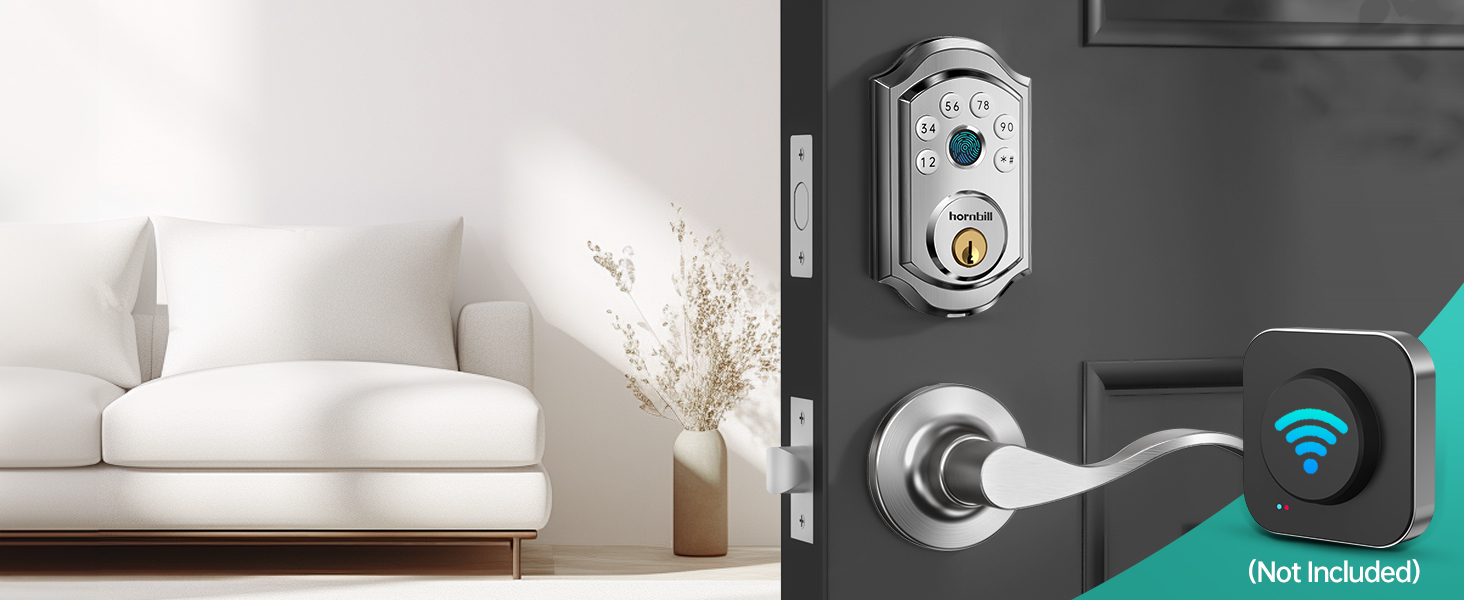
Image: The USB-C port provides a convenient backup power option if the batteries run out, ensuring you're never locked out.
5. Troubleshooting
If you encounter issues with your hornbill A5 Smart Lock, refer to the following common troubleshooting steps:
| Problem | Possible Cause | Solution |
|---|---|---|
| Fingerprint not recognized / App connection issues | Incorrect fingerprint registration, sensor dirty, app glitch, Bluetooth/Wi-Fi interference. |
|
| Lock does not respond | Low batteries, mechanical obstruction, internal error. |
|
| Wrong password/fingerprint lockout | Too many incorrect attempts. |
|
6. Specifications
Detailed technical specifications for the hornbill A5 Smart Lock.
| Feature | Description |
|---|---|
| Brand | hornbill |
| Model Name | A5 Smart Lock |
| Lock Type | Biometric, Deadbolt, Keypad |
| Material | Aluminum |
| Color | Silver |
| Dimensions (L x W x H) | 2.45 x 0.8 x 3.9 inches |
| Item Weight | 3.21 pounds |
| Special Features | Anti-Peeping Password, Auto-Lock, Fingerprint, One-Touch Lock, Passcode Unlock |
| Connectivity Protocol | Bluetooth (Wi-Fi with Tuya Gateway) |
| Control Method | App, Remote, Touch, Voice (Alexa, Google Assistant) |
| Recommended Uses | Front Door, Airbnb Remote Management, Garage, Back Door, Office |
| Batteries Required | Yes (Batteries not included) |

Image: The hornbill A5 Smart Lock is constructed from durable aluminum alloy, designed for stability and resilience in various environments.
7. Warranty and Support
hornbill is committed to providing excellent customer service and product support.
- Warranty: hornbill provides a 12-month warranty and replacement service.
- Technical Support: Lifetime technical support is available.
- Contact Information:
Toll Free: 1-(888)-988-6020
Email: service01@hornbilllock.com
Online Phone Calls Service: MON-SUN, 12 pm-8 pm, 9 pm-6 am (EDT)
If any parts are damaged during or after the warranty period, hornbill will provide a replacement.


