
Introduction
This manual provides detailed instructions for the assembly, operation, and maintenance of your Bestier Gaming Desk (Model D513S). Please read all instructions carefully before beginning assembly and retain this manual for future reference.
Product Overview
The Bestier Gaming Desk is designed for versatility and functionality, featuring integrated LED lighting and ample storage solutions. Its robust construction ensures durability for various uses, from gaming to office work.
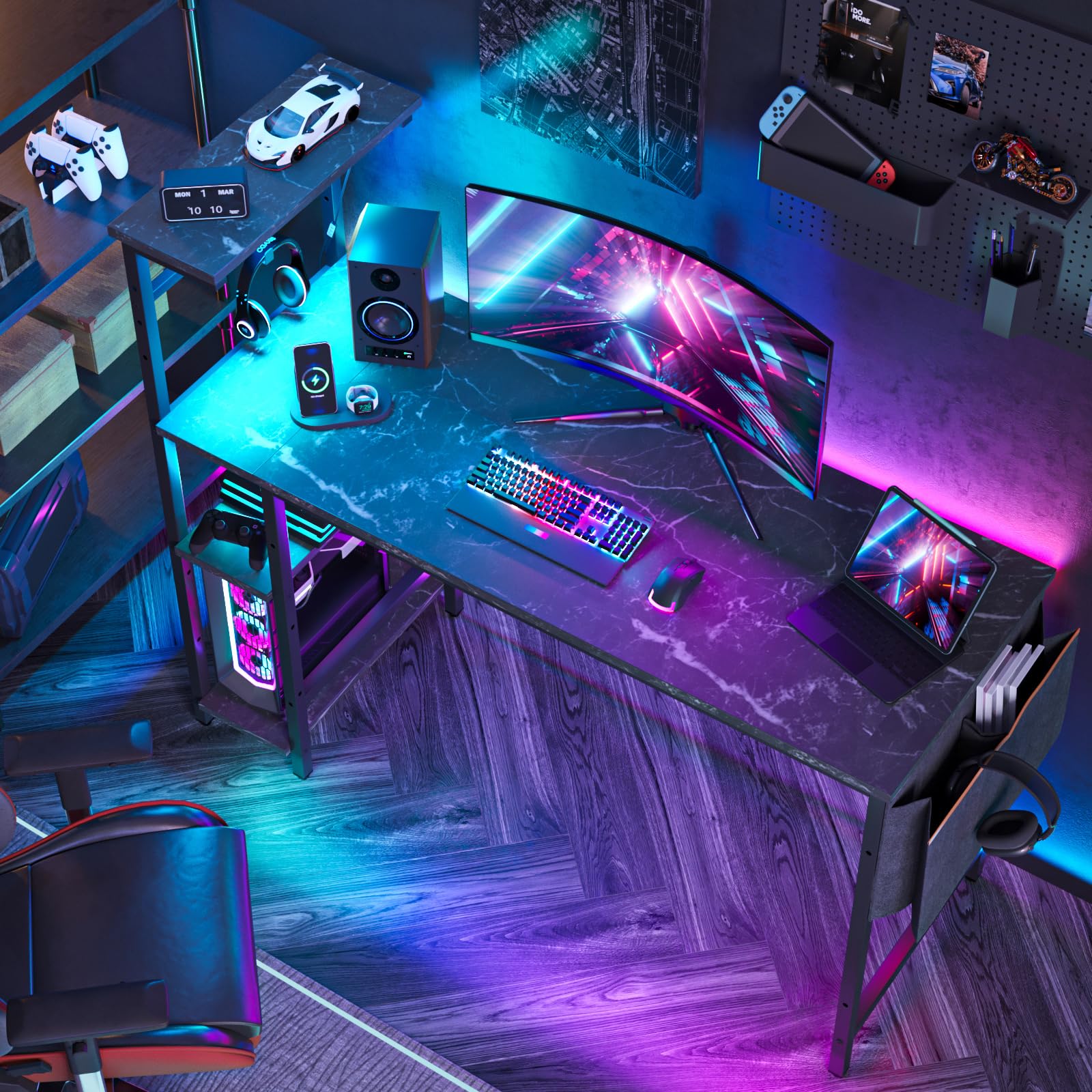
Image: The Bestier Gaming Desk, showcasing its black marble finish and overall structure.
Key Features:
- LED Lighting: Features 7 color selections and 20 dynamic modes to enhance your environment.
- Storage Shelves: Includes 4 tiers of reversible shelves, suitable for left or right-handed setup.
- Side Storage Bag: Equipped with a convenient side storage bag for documents, folders, or accessories.
- Headphone Hooks: Integrated hooks for organizing headphones or other peripherals.
- Height-Adjustable Shelf: The second shelf can be adjusted to 3 different heights or removed to accommodate a PC tower.
- Durable Construction: Made from CARB P2 Class Board and durable steel with an X-crossbar for stability.

Image: A detailed view highlighting the LED lights, headphone hooks, and the side storage bag, demonstrating their practical integration into the desk design.

Image: An illustration demonstrating the adjustable shelf, which can be configured to different heights or removed to create space for a computer tower.

Image: Two desks arranged to show how the shelves can be installed on either the left or right side, offering flexible setup options.
Setup and Assembly
Assembly of the Bestier Gaming Desk is required. Detailed instructions are provided with the product. It is recommended for one person to assemble the desk, and all necessary tools are included.
Assembly Tips:
- Review all parts and hardware against the packing list before starting.
- Do not fully tighten screws until all components are loosely assembled to allow for adjustments.
- Follow the step-by-step diagrams in the included instruction booklet.
- For optimal stability, ensure all screws are securely tightened once the desk is fully assembled.
Assembly Video:
Video: An official Bestier video demonstrating the assembly process for the 51-inch computer desk with LED lights. This video provides a visual guide to help with construction.
Video: An official Bestier video showcasing the computer desk with LED lights, focusing on various features and configurations. This video provides an image display of the product.
Operating Instructions
LED Lights:
The integrated LED lights offer 7 main color selections and 20 dynamic modes. Connect the LED light strip to a USB power source. Use the inline controller to cycle through colors, modes, and adjust brightness to create your desired ambiance.
Adjustable Shelf:
The second shelf on the side storage unit is designed to be height-adjustable. This allows you to customize the space to fit various items, including a computer tower. Refer to the assembly instructions for specific steps on how to adjust or remove this shelf.
Maintenance
To maintain the appearance and longevity of your Bestier Gaming Desk, follow these simple care instructions:
- Wipe surfaces with a damp cloth to remove dust and spills.
- Immediately follow with a dry cloth to prevent moisture damage.
- Avoid using harsh chemicals or abrasive cleaners, as these can damage the finish.
- Do not exceed the maximum weight recommendation of 95 pounds on the desktop.
Troubleshooting
If you encounter any issues with your Bestier Gaming Desk, consider the following general troubleshooting steps:
- Stability Issues: Ensure all screws and fasteners are tightened. Check that the desk is on a level surface.
- LED Lights Not Working: Verify the USB connection to the power source. Check the inline controller for proper function.
- Missing Parts: Refer to the package contents list in your assembly manual. Contact customer support if parts are missing.
For further assistance, please contact Bestier customer support.
Specifications
| Feature | Detail |
|---|---|
| Brand | Bestier |
| Model Number | D513S |
| Product Dimensions (D x W x H) | 19.7"D x 51.3"W x 44.7"H |
| Color | Black Marble |
| Top Material Type | Engineered Wood (CARB P2 BOARD) |
| Base Material | Metal |
| Number Of Shelves | 4 |
| Maximum Weight Recommendation | 95 Pounds |
| Special Features | LED Lights, Storage Bag, Headphone Hook, Height Adjustable Shelf |
| Assembly Required | Yes |
| Recommended Number of People for Assembly | 1 |
Warranty and Support
Your Bestier Gaming Desk comes with a 1-year limited warranty. This warranty covers manufacturing defects under normal use. Please retain your proof of purchase for any warranty claims.
For product support, warranty inquiries, or to report missing/damaged parts, please visit the official Bestier website or contact their customer service department. Contact information can typically be found on the product packaging or the Bestier brand store on Amazon.


